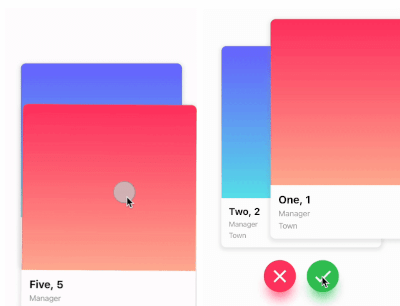
यह एक टिंडर-जैसा कार्ड स्वाइप पैकेज है। यह आपको बाएं, दाएं, ऊपर और नीचे स्वाइप करने की अनुमति देता है और प्रत्येक दिशा के लिए अपना व्यावसायिक तरीका निर्धारित करने की अनुमति देता है।
सार्वजनिक जानकारी से बना चयन मार्गदर्शन। केवल संदर्भ हेतु।
एक फ्लटर पैकेज जो बाएं, दाएं, ऊपर और नीचे के गति के समर्थन के साथ टिंडर-शैली कार्ड स्वाइप की अनुमति देता है। विकासकर्ता प्रत्येक स्वाइप दिशा के लिए कस्टम तर्क निर्धारित कर सकते हैं, जिससे यह डेटिंग ऐप्स, उत्पाद प्रदर्शन या सामग्री खोज इंटरफ़ेस के लिए आदर्श है। पैकेज क्रॉस-प्लेटफ़ॉर्म है, जो एंड्रॉइड, आईओएस, वेब, मैकओएस, विंडोज और लिनक्स पर बिना किसी समस्या के काम करता है। इसमें एनीमेशन और गति हैंडलिंग के साथ चिकनी और कस्टमाइज़ करने योग्य स्वाइप अनुभव प्रदान करता है।
उपयोग
डेटिंग ऐप इंटरफेस
उत्पाद या आइटम खोज
सामग्री सुझाव प्रणाली
इंटरैक्टिव स्टोरीटेलिंग
उपयोगकर्ता पसंद का संग्रह
मुख्य विशेषताएँ
Tinder जैसे स्वाइप गेस्चर
प्रत्येक दिशा के लिए कस्टमाइज़ करने योग्य स्वाइप तर्क
प्लेटफॉर्म के अनुकूलता
निर्मित एनीमेशन
हस्त अनुक्रमण
विस्तारयोग्य विजेट डिज़ाइन
इनके लिए उपयुक्त
स्वाइप-आधारित यूआई बना रहे डेवलपर्स
कार्ड स्वाइप के माध्यम से उपयोगकर्ता बातचीत की आवश्यकता वाले ऐप
सुगम नेविगेशन पैटर्न की आवश्यकता वाले प्रोजेक्ट
इंटरैक्टिव कार्ड अनुभवों के प्रोटोटाइपिंग
विचार योग्य बातें
स्वाइप स्थिति प्रबंधन का सावधानीपूर्वक उपयोग करने की आवश्यकता है
जटिल लेआउट के लिए अतिरिक्त स्टाइलिंग की आवश्यकता हो सकती है
बड़े डेटासेट का प्रदर्शन प्रभाव
केवल कार्ड-आधारित इंटरैक्शन तक सीमित
ऊर्ध्वाधर स्क्रॉलिंग सूचियों के लिए अनअनुकूलित
मूल README
संबंधित सोर्स रिपॉज़िटरी के मूल README का स्नैपशॉट। नवीनतम सामग्री के लिए रिपॉज़िटरी देखें।
flutter_card_swiper
This is a Flutter package for a Tinder-like card swiper. ✨
It allows you to swipe left, right, up, and down and define your own business logic for each direction.
Very smooth animations supporting Android, iOS, Web & Desktop.
Why?
We built this package because we wanted to:
Have a fully customizable slider
Swipe in any direction
Undo swipes as many times as you want
Choose your own settings such as duration, angle, padding and more
Trigger swipes in any direction with the controller
Add callbacks while swiping, on end, or when the swiper is disabled
Detect the direction (left, right, top, bottom) the card was swiped
Show Cases
Swipe in any direction
Trigger swipes
Unswipe the cards
Fully customizable
Installation
Add this to your package's pubspec.yaml file:
card_swiper:...
OR run
flutterpubaddflutter_card_swiper
in your project's root directory.
Usage
You can place your CardSwiper inside of a Scaffold like we did here. Optional parameters can be defined to enable different features. See the following example:
Index of the first card when the swiper is initialized
false
isDisabled
false
Set to true if swiping should be disabled, has no impact when triggered from the outside
false
isLoop
true
Set to true if the stack should loop
false
maxAngle
30
Maximum angle that the card can reach during swiping
false
allowedSwipeDirection
AllowedSwipeDirection.all
Sets the direction in which the card can be swiped. It can be set to any combination of left, right up or down.
false
numberOfCardsDisplayed
2
Number of cards displayed at the same time
false
onEnd
-
Callback when there are no more cards left to swipe
false
onSwipe
-
Callback when the user swipes a card. If the function returns false, the swipe action is canceled. If it returns true, the swipe action is performed as expected
false
onTapDisabled
-
Callback when a card is tapped and isDisabled is true
false
onUndo
-
Callback when the controller calls undo. If the function returns false, the undo action is canceled. If it returns true, the undo action is performed as expected
A callback containing the horizontal and vertical swipe direction
false
showBackCardOnUndo
-
If true, the previous card will be shown in the background when swiping, and the swipe action will trigger an undo
false
undoSwipeThreshold
50
The horizontal swipe distance threshold, in pixels, after which the back card switches to the previous card. Only active when showBackCardOnUndo is true
false
undoDirection
UndoDirection.left
The direction of the swipe to trigger an undo
false
Controller
The Controller is used to swipe the card from outside of the widget. You can create a controller called CardSwiperController and save the instance for further usage. Please have a closer look at our Example for the usage.