पैकेज, रिपॉज़िटरी और ऐप श्रेणियाँ खोजें

full_screen_menu कवर
पैकेज विवरणv3.1.1

full_screen_menu

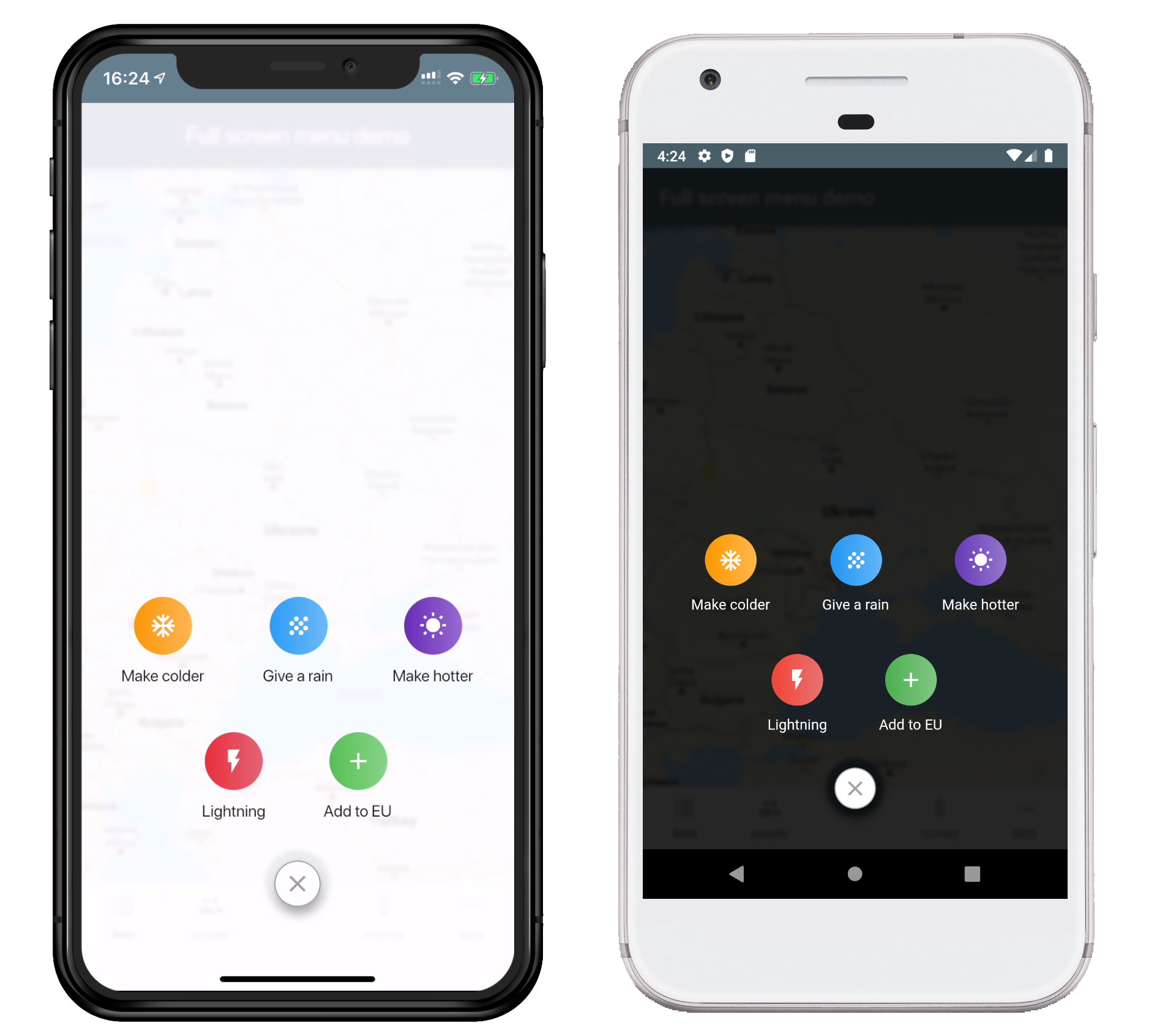
फ्लटर ऐप्स के लिए पूर्ण स्क्रीन मेनू, उपयोगकर्ता को सुंदर तरीके से विभिन्न विकल्प प्रदान करने के लिए

AndroidiOSWebmacOSWindowsLinux
30-दिन डाउनलोड
858
लाइक
90
Pub अंक
160

पैकेज इंस्टॉल करें

flutter pub add full_screen_menu

पैकेज अवलोकन

सार्वजनिक जानकारी से बना चयन मार्गदर्शन। केवल संदर्भ हेतु।

एक फ्लटर पैकेज जो मोबाइल और डेस्कटॉप एप्लिकेशन के लिए दृश्यात्मक रूप से आकर्षक और कस्टमाइज़ करने योग्य विकल्पों के साथ पूर्ण-स्क्रीन मेनू प्रदान करता है। यह डेवलपर्स को एंड्रॉइड, आईओएस, वेब, मैकओएस, विंडोज़ और लिनक्स प्लेटफॉर्म पर अवगत नेविगेशन अनुभव के लिए सक्षम बनाता है। मेनू में चिकनी एनीमेशन और प्रतिक्रियाशील लेआउट का समर्थन करता है, जिससे यह उत्तम, उपयोगकर्ता-अनुकूल नेविगेशन इंटरफेस की आवश्यकता वाले एप्लिकेशन के लिए आदर्श है। फ्लटर की लचीलेपन के साथ बनाया गया, इसे अधिकतम सेटअप के साथ मौजूदा प्रोजेक्ट में बिना किसी दिक्कत के एकीकृत किया जा सकता है।

उपयोग

  • अंगीकृत ऐप नेविगेशन
  • कस्टमाइज़ करने योग्य साइड मेनू
  • प्रतिक्रियाशील उपयोगकर्ता इंटरफेस डिज़ाइन
  • सुधारित उपयोगकर्ता ओनबोर्डिंग
  • आधुनिक डैशबोर्ड इंटरफेस
  • क्रॉस-प्लेटफॉर्म मेनू कार्यान्वयन

मुख्य विशेषताएँ

  • पूर्ण-स्क्रीन लेआउट समर्थन
  • कई दृश्य प्रारूप
  • चिकनी एनीमेशन
  • प्लेटफॉर्म के अनुकूलता
  • आसान एकीकरण
  • कस्टमाइज़ेबल स्टाइलिंग

इनके लिए उपयुक्त

  • मोबाइल और डेस्कटॉप ऐप विकासकर्ता
  • डिज़ाइन-केंद्रित एप्लिकेशन
  • समृद्ध नेविगेशन की आवश्यकता वाले ऐप्स
  • Flutter का उपयोग करने वाले UI/UX डिज़ाइनर
  • जटिल नेविगेशन की आवश्यकता वाले प्रोजेक्ट

विचार योग्य बातें

  • कम-स्तर के उपकरणों पर प्रदर्शन अनुकूलन की आवश्यकता हो सकती है
  • मूल उपयोग के अतिरिक्त सीमित दस्तावेज़न
  • अन्य नेविगेशन पैकेज के साथ संभावित ओवरलैप
  • विज़ुअल आकर्षण को न्यूनतमता की तुलना में प्राथमिकता देने वाले एप्लिकेशन के लिए सबसे उपयुक्त

मूल README

संबंधित सोर्स रिपॉज़िटरी के मूल README का स्नैपशॉट। नवीनतम सामग्री के लिए रिपॉज़िटरी देखें।

Full Screen Menu for Flutter

Pub Version

Installing:

  1. Add the dependency in your pubspec.yaml file.
dependencies:
  full_screen_menu: ^2.0.0
  1. Import the settings_ui package.
import 'package:full_screen_menu/full_screen_menu.dart';

Basic Usage:

    FullScreenMenu.show(
      context,
      items: [
        Image.asset('assets/image.png'),
        FSMenuItem(
          icon: Icon(Icons.ac_unit, color: Colors.white),
          text: Text('Make colder'),
          gradient: orangeGradient,
          onTap: () => print('The weather is colder now');
        ),
        FSMenuItem(
          icon: Icon(Icons.wb_sunny, color: Colors.white),
          text: Text('Make hotter'),
          gradient: blueGradient,
          onTap: () => print('The weather is hotter now');
        ),
      ],
    );


Full Screen Menu Base Widget

The Full Screen Menu Base Widget is the block of your menu items located in your screen

Parameters
Parameter Description Required
Color backgroundColor Set a background color of your FullScreenMenu +
VoidCallback onHide Set a function which is called by pressing FAB -
List items Set a menu items which you want to display -
BuildContext context Set the context of your parent widget -
Function(AnimationController) animationController Setup your animation when open full screen menu +


FSMenuItem

The Full Screen Menu Base Widget is the block of your menu items located in your screen

Parameters
Parameter Description Required
Text text Set the text that will be displayed on the item -
Icon icon Set the icon that will be displayed on the item -
Function onTap Set The function that will be called when you click on item +
Gradient gradient Set a gradient that will fill the background of your icon +


License

This project is licensed under the Apache License 2.0 - see the LICENSE file for details

श्रेणियाँ

निर्भरताएँ

निर्भरता सूची 1 आइटम

सोर्स रिपॉज़िटरी

इस पैकेज का उपयोग करने वाले प्रोजेक्ट

अभी कोई डेटा उपलब्ध नहीं है।