सार्वजनिक जानकारी से बना चयन मार्गदर्शन। केवल संदर्भ हेतु।
GetStorage एक हल्का, सिंक्रोनस की-वैल्यू स्टोरेज समाधान है जो पूरी तरह से डार्ट में बनाया गया है, जिसका उद्देश्य विभिन्न प्लेटफॉर्मों पर तेज़ और कुशल डेटा स्थायित्व के लिए है। यह स्ट्रिंग्स, नंबर्स, बूलियन्स और लिस्ट्स जैसे मूल डेटा प्रकारों को स्टोर और पुनर्प्राप्त करने के लिए एक सरल API प्रदान करता है, जिसमें असिंक्रोनस ऑपरेशन की आवश्यकता नहीं होती है। छोटे पैमाने पर ऐप स्टेट मैनेजमेंट या कैशिंग के लिए उपयुक्त, यह Android, iOS, Web, macOS, Windows और Linux पर बिना किसी दिक्कत के चलता है। इसका न्यूनतम फुटप्रिंट और उपयोग में आसानी इसे अधिक जटिल डेटाबेस के बजाय एक सरल विकल्प के रूप में विकासकर्ताओं के लिए उपयुक्त बनाती है।
उपयोग
उपयोगकर्ता पसंदीदा संग्रहित करना
छोटे डेटासेट को कैश करना
एप्लिकेशन सेटिंग्स को स्थायी बनाएं
सत्र डेटा को प्रबंधित करना
सरल स्थानीय अवस्था प्रबंधन
मुख्य विशेषताएँ
सिंक्रोनस ऑपरेशन
हल्का और तेज़
कई प्लेटफॉर्म का समर्थन करता है
उपयोग में आसान API
बाहरी निर्भरता नहीं है
इनके लिए उपयुक्त
छोटे से मध्यम एप्लिकेशन
त्वरित प्रोटोटाइपिंग
सरल डेटा स्थायित्व की आवश्यकता
क्रॉस-प्लेटफॉर्म विकास
जटिल डेटाबेस सेटअप से बचने वाले ऐप्स
विचार योग्य बातें
बड़े डेटासेट के लिए उपयुक्त नहीं
सीमित प्रश्न क्षमता
कोई निर्मित एन्क्रिप्शन नहीं
सामान्य पाठ में संग्रहित डेटा
केवल सरल कुंजी-मान युग्म के लिए सबसे अच्छा
मूल README
संबंधित सोर्स रिपॉज़िटरी के मूल README का स्नैपशॉट। नवीनतम सामग्री के लिए रिपॉज़िटरी देखें।
get_storage
A fast, extra light and synchronous key-value in memory, which backs up data to disk at each operation.
It is written entirely in Dart and easily integrates with Get framework of Flutter.
Supports Android, iOS, Web, Mac, Linux, and fuchsia and Windows**.
Can store String, int, double, Map and List
If you subscribe to events, be sure to dispose them when using:
disposeListen?.call();
To listen changes on key you can use listenKey:
box.listenKey('key', (value){
  print('new key is $value');
});
To erase your container:
box.erase();
If you want to create different containers, simply give it a name. You can listen to specific containers, and also delete them.
GetStorage g = GetStorage('MyStorage');
To initialize specific container:
awaitGetStorage.init('MyStorage');
SharedPreferences Implementation
classMyPref{
staticfinal _otherBox = () => GetStorage('MyPref');
final username = ''.val('username');
final age = 0.val('age');
final price = 1000.val('price', getBox: _otherBox);
// orfinal username2 = ReadWriteValue('username', '');
final age2 = ReadWriteValue('age', 0);
final price2 = ReadWriteValue('price', '', _otherBox);
}
...
voidupdateAge() {
final age = 0.val('age');
// or final age = ReadWriteValue('age', 0, () => box);
// or final age = Get.find<MyPref>().age;
age.val = 1; // will save to boxfinal realAge = age.val; // will read from box
}
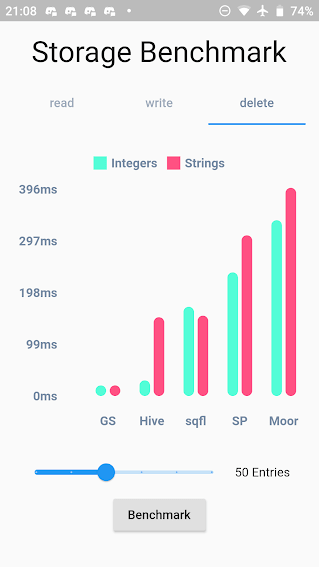
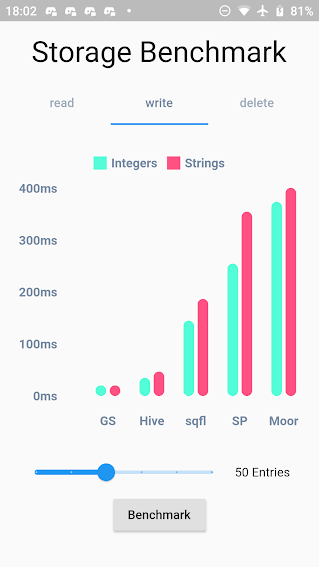
Benchmark Result:
GetStorage is not fast, it is absurdly fast for being memory-based. All of his operations are instantaneous. A backup of each operation is placed in a Container on the disk. Each container has its own file.
What GetStorage is:
Persistent key/value storage for Android, iOS, Web, Linux, Mac and Fuchsia and Windows, that combines fast memory access with persistent storage.
What GetStorage is NOT:
A database. Get is super compact to offer you a solution ultra-light, high-speed read/write storage to work synchronously. If you want to store data persistently on disk with immediate memory access, use it, if you want a database, with indexing and specific disk storage tools, there are incredible solutions that are already available, like Hive and Sqflite/Moor.
As soon as you declare "write" the file is immediately written in memory and can now be accessed immediately with box.read(). You can also wait for the callback that it was written to disk using await box.write().
When to use GetStorage:
simple Maps storage.
cache of http requests
storage of simple user information.
simple and persistent state storage
any situation you currently use sharedPreferences.
When not to use GetStorage:
you need indexes.
when you need to always check if the file was written to the storage disk before starting another operation (storage in memory is done instantly and can be read instantly with box.read(), and the backup to disk is done in the background. To make sure the backup is complete, you can use await, but if you need to call await all the time, it makes no sense you are using memory storage).
You can use this lib even as a modest persistent state manager using Getx SimpleBuilder