पैकेज, रिपॉज़िटरी और ऐप श्रेणियाँ खोजें

google_nav_bar कवर
पैकेज विवरणv5.0.7

google_nav_bar

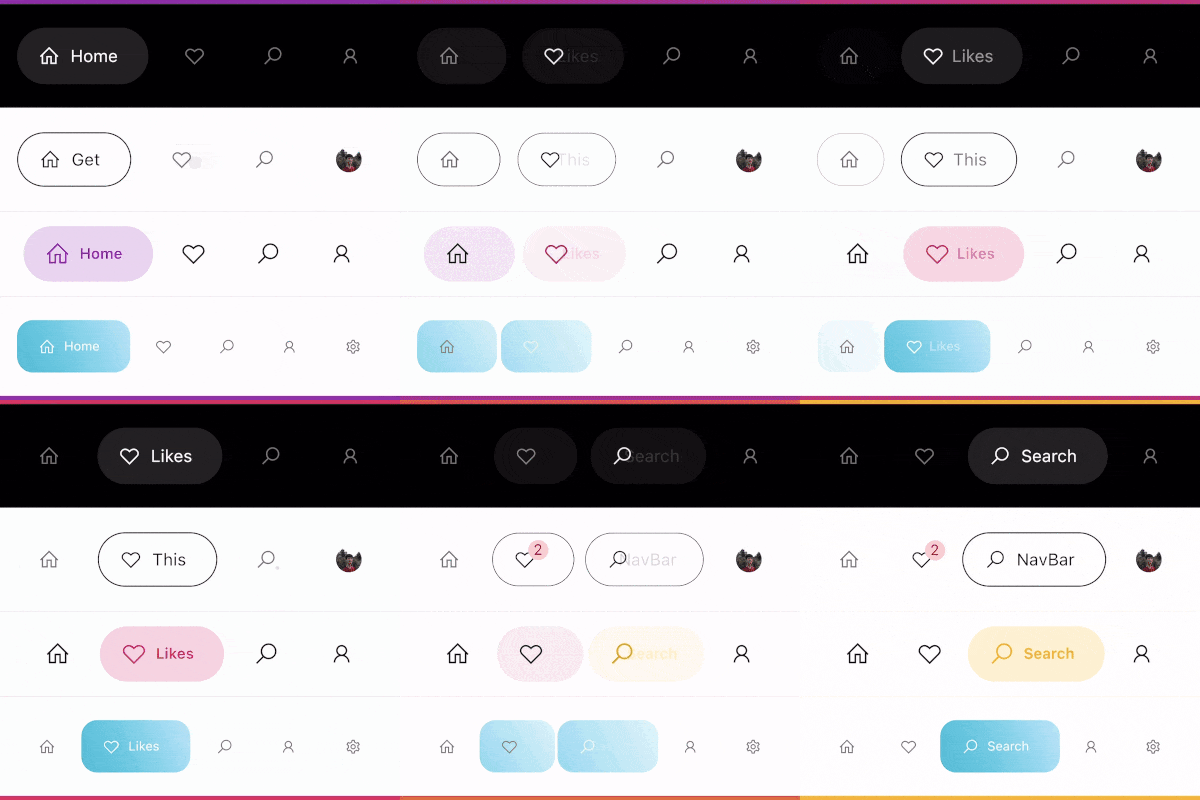
एक आधुनिक गूगल शैली का नेविगेशन बार जिसे नीचे के नेविगेशन बार या टैब बार के रूप में उपयोग किया जा सकता है, डिज़ाइन सख्ती से ड्रिबबल पर Cuberto के UI/UX का अनुसरण करता है।

AndroidiOSWebmacOSWindowsLinux
30-दिन डाउनलोड
33.9 हज़ार
लाइक
1.7 हज़ार
Pub अंक
140

पैकेज इंस्टॉल करें

flutter pub add google_nav_bar

पैकेज अवलोकन

सार्वजनिक जानकारी से बना चयन मार्गदर्शन। केवल संदर्भ हेतु।

एक आधुनिक, दृश्य रूप से आकर्षक नेविगेशन बार जो Google के डिज़ाइन भाषा और Dribbble पर Cuberto UI/UX अवधारणा से प्रेरित है। यह एक बॉटम नेविगेशन बार या टैब बार के रूप में काम करता है, जिसमें स्मूथ एनीमेशन, कस्टमाइज़ेबल रंग और रिस्पॉन्सिव लेआउट होते हैं। Flutter के लिए बनाया गया है, जो Android, iOS, Web, macOS, Windows और Linux जैसे कई प्लेटफॉर्म का समर्थन करता है। पैकेज साफ अस्तित्व और उपयोगकर्ता के अंतर्ज्ञान के लिए जोर देता है, जिससे यह एक पॉलिश्ड नेविगेशन अनुभव की आवश्यकता वाले ऐप्स के लिए आदर्श है।

उपयोग

  • मोबाइल ऐप बॉटम नेविगेशन
  • वेब एप्लिकेशन टैब्ड इंटरफेस
  • क्रॉस-प्लेटफॉर्म फ्लटर एप्स
  • आधुनिक UI डिज़ाइन कार्यान्वयन
  • कस्टमाइज़ेबल नेविगेशन बार

मुख्य विशेषताएँ

  • Google-प्रेरित डिज़ाइन
  • चिकनी एनीमेशन
  • बहु-प्लेटफॉर्म समर्थन
  • कस्टमाइज़ेबल रंग और आइकन
  • प्रतिक्रियाशील लेआउट
  • Flutter के साथ आसान एकीकरण

इनके लिए उपयुक्त

  • मैटीरियल डिज़ाइन अस्तित्व की खोज कर रहे विकासकर्ता
  • एलीगेंट बॉटम नेविगेशन की आवश्यकता वाले ऐप्स
  • डिज़ाइन-केंद्रित Flutter परियोजनाएँ
  • UI/UX प्रेमी
  • त्वरित प्रोटोटाइपिंग

विचार योग्य बातें

  • नेविगेशन उपयोग केस के लिए सीमित
  • हाथ से आइकन प्रबंधन की आवश्यकता है
  • जटिल लेआउट के लिए अतिरिक्त स्टाइलिंग की आवश्यकता हो सकती है
  • शीर्ष स्तर के नेविगेशन बार के लिए उपयुक्त नहीं
  • बाहरी डिज़ाइन सुसंगतता पर निर्भर करता है

मूल README

संबंधित सोर्स रिपॉज़िटरी के मूल README का स्नैपशॉट। नवीनतम सामग्री के लिए रिपॉज़िटरी देखें।

google_nav_bar


A modern google style nav bar for flutter.

google_nav_bar

GoogleNavBar is a Flutter widget designed by Aurelien Salomon and developed by sooxt98.

Getting Started

Add this to your package's pubspec.yaml file:

...
dependencies:
  google_nav_bar: ^5.0.7
  

Now in your Dart code, you can use:

import 'package:google_nav_bar/google_nav_bar.dart';

Usage

Style your tab globally with GNav's attribute, if you wish to style tab separately, use GButton's attribute

GNav(
  rippleColor: Colors.grey[800], // tab button ripple color when pressed
  hoverColor: Colors.grey[700], // tab button hover color
  haptic: true, // haptic feedback
  tabBorderRadius: 15, 
  tabActiveBorder: Border.all(color: Colors.black, width: 1), // tab button border
  tabBorder: Border.all(color: Colors.grey, width: 1), // tab button border
  tabShadow: [BoxShadow(color: Colors.grey.withOpacity(0.5), blurRadius: 8)], // tab button shadow
  curve: Curves.easeOutExpo, // tab animation curves
  duration: Duration(milliseconds: 900), // tab animation duration
  gap: 8, // the tab button gap between icon and text 
  color: Colors.grey[800], // unselected icon color
  activeColor: Colors.purple, // selected icon and text color
  iconSize: 24, // tab button icon size
  tabBackgroundColor: Colors.purple.withOpacity(0.1), // selected tab background color
  padding: EdgeInsets.symmetric(horizontal: 20, vertical: 5), // navigation bar padding
  tabs: [
    GButton(
      icon: LineIcons.home,
      text: 'Home',
    ),
    GButton(
      icon: LineIcons.heart_o,
      text: 'Likes',
    ),
    GButton(
      icon: LineIcons.search,
      text: 'Search',
    ),
    GButton(
      icon: LineIcons.user,
      text: 'Profile',
    )
  ]
)

View the example folder

There are 4 different use case included in the /example directory, go try it out!

श्रेणियाँ

सोर्स रिपॉज़िटरी

इस पैकेज का उपयोग करने वाले प्रोजेक्ट