पैकेज, रिपॉज़िटरी और ऐप श्रेणियाँ खोजें

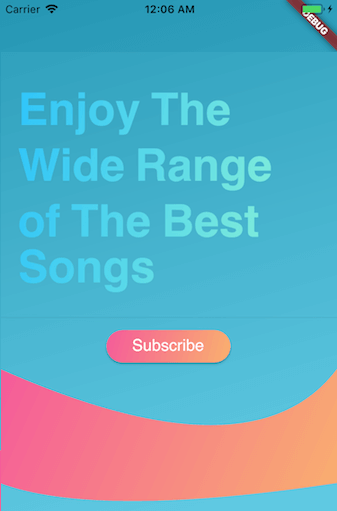
gradient_widgets कवर
पैकेज विवरणv0.6.0

gradient_widgets

सुंदर ग्रेडिएंट के साथ लगाए गए फ्लटर विजेट्स का न्यूनतम सेट।

30-दिन डाउनलोड
617
लाइक
89
Pub अंक
60

पैकेज इंस्टॉल करें

flutter pub add gradient_widgets

पैकेज अवलोकन

सार्वजनिक जानकारी से बना चयन मार्गदर्शन। केवल संदर्भ हेतु।

GradientWidgets एक हल्का Flutter पैकेज है जो सुंदर घटाव के साथ सुधारित न्यूनतम सेट विजेट प्रदान करता है। यह विकासकर्ताओं को पृष्ठभूमि, पाठ और अन्य UI तत्वों पर घटाव प्रभाव लगाने में आसानी से सक्षम बनाता है, सरल और स्पष्ट API के साथ। जटिल सेटअप के बिना ऐप में दृश्य चमक जोड़ने के लिए उपयुक्त है, यह चिकने घटाव संक्रमण का समर्थन करता है और मौजूदा Flutter प्रोजेक्ट में बिना किसी दिक्कत के एकीकृत होता है। पैकेज सरलता और प्रदर्शन पर ध्यान केंद्रित करता है, जिससे यह आधुनिक, दृश्य आकर्षक इंटरफेस के लिए आदर्श है।

उपयोग

  • कंटेनर में ग्रेडिएंट बैकग्राउंड जोड़ना
  • घुंघरूले रंगों के साथ पाठ में सुधार करना
  • एनिमेटेड ग्रेडिएंट प्रभाव बनाना
  • आधुनिक ऐप यूआई का डिज़ाइन करना
  • न्यूनतम कोड के साथ दृश्य आकर्षण में सुधार
  • बटन और कार्ड के दिखावट को कस्टमाइज़ करें

मुख्य विशेषताएँ

  • सरल ग्रेडिएंट विजेट API
  • पृष्ठभूमि और पाठ धुंधलाहट का समर्थन
  • न्यूनतम प्रदर्शन अतिरिक्त लागत
  • Flutter के साथ आसान एकीकरण
  • साफ़, पढ़ने में आसान कोडबेस
  • कोई बाहरी निर्भरता नहीं

इनके लिए उपयुक्त

  • दृश्य सुंदरता की तलाश में UI डिजाइनर
  • आधुनिक मोबाइल ऐप्स बनाने वाले डेवलपर्स
  • हल्के घनत्व प्रभाव की आवश्यकता वाले परियोजनाएँ
  • दृश्य धनी इंटरफेस का प्रोटोटाइपिंग
  • स्थायी डिज़ाइन पर केंद्रित ऐप्स

विचार योग्य बातें

  • मूल धुंधला कार्यक्षमता तक सीमित
  • कोई बिल्ट-इन एनीमेशन कंट्रोल नहीं
  • जटिल शेडर प्रभावों के लिए उपयुक्त नहीं
  • प्रतिक्रिया के लिए धीरे-धीरे दिशा और रंग का हस्तक्षेप करने की आवश्यकता होती है
  • स्थिर या सरल गतिशील धुंधले के लिए सबसे अच्छा

मूल README

संबंधित सोर्स रिपॉज़िटरी के मूल README का स्नैपशॉट। नवीनतम सामग्री के लिए रिपॉज़िटरी देखें।

Pub

Gradient Widgets

Gradient Widgets

As of ^0.5.0, shadowColor is available for gradient buttons and cards

A minimal set of Flutter widgets encased with beautiful gradients.

You can use them when your UI needs user attention/focus, , e.g., login or send actions, or important shopping item title (see Gradient Screens to get the idea 😉)

☑️ GradientText

☑️ GradientCard

☑️ GradientButton

☑️ CircularGradientButton + Shadow Color

☑️ GradientProgressIndicator

☑️ CircularGradientProgressIndicator

◻️ GradientAppBar

Installation

In your pubspec.yaml root add:

dependencies:
  gradient_widgets: ^0.6.0

then,

import 'package:gradient_widgets/gradient_widgets.dart';

Usage

Card + Gradient
GradientCard(
    gradient: Gradients.tameer,
    shadowColor: Gradients.tameer.colors.last.withOpacity(0.25),
    elevation: 8,
);

most parameters are the same as the Card.

Progress Indicator + Gradient
Gradient Widgets

must be gradient.colors.length = 2

indeterminate

GradientProgressIndicator(gradient: Gradients.rainbowBlue,);

determinate

GradientProgressIndicator(
  gradient: Gradients.rainbowBlue,
  value: 0.65,
);
Circular Progress Indicator + Gradient
Circular Gradient Progress Widgets

must be gradient.colors.length = 2

indeterminate

GradientCircularProgressIndicator(
  gradient: Gradients.aliHussien,
);

determinate

GradientCircularProgressIndicator(
  gradient: Gradients.aliHussien,
  radius: 100,
);
Normal Button + Gradient
GradientButton(
  child: Text('Gradient'),
  callback: () {},
  gradient: Gradients.backToFuture,
  shadowColor: Gradients.backToFuture.colors.last.withOpacity(0.25),
),

most parameters are the same as any *Button.

Circular Button + Gradient
CircularGradientButton(
  child: Icon(Icons.gradient),
  callback: (){},
  gradient: Gradients.rainbowBlue,
  shadowColor: Gradients.rainbowBlue.colors.last.withOpacity(0.5),
),

most parameters are the same as FloatingActionButton.

Text + Gradient
GradientText(
  'Hello',
  shaderRect: Rect.fromLTWH(0.0, 0.0, 50.0, 50.0),
  gradient: Gradients.hotLinear,
  style: TextStyle(fontSize: 40.0,),
),

all parameters are the same as the Text.


Getting Started

For help getting started with Flutter, view our online documentation.

For help on editing package code, view the documentation.

श्रेणियाँ

सोर्स रिपॉज़िटरी

इस पैकेज का उपयोग करने वाले प्रोजेक्ट