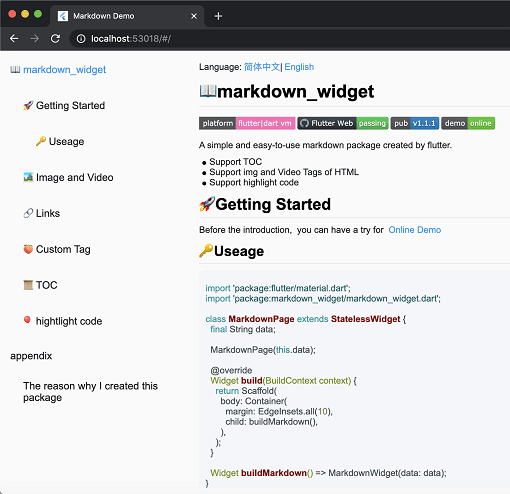
सार्वजनिक जानकारी से बना चयन मार्गदर्शन। केवल संदर्भ हेतु।
Flutter के लिए एक क्रॉस-प्लेटफॉर्म मार्कडाउन रेंडरिंग पैकेज जो सामग्री सूची उत्पन्न करने, कोड ब्लॉक के लिए सिंटैक्स हाइलाइटिंग, और एंड्रॉइड, आईओएस, वेब, मैकओएस, विंडोज और लिनक्स पर निरंतर एकीकरण का समर्थन करता है। सरलता और प्रदर्शन के लिए बनाया गया, यह डेवलपर्स को न्यूनतम कॉन्फ़िगरेशन के साथ धन्यवाद अमूल्य मार्कडाउन सामग्री प्रदर्शित करने की अनुमति देता है। पैकेज सक्रिय रूप से बनाए रखा जाता है और डायनामिक टेक्स्ट रेंडरिंग के लिए मार्कडाउन स्रोतों की आवश्यकता वाले एप्लिकेशन के लिए डिज़ाइन किया गया है।
उपयोग
एप्प्स में दस्तावेज़ों का रेंडरिंग
उपयोगकर्ता द्वारा उत्पन्न सामग्री प्रदर्शित कर रहा है
सहायता या एफ़एक्यू खंड बनाना
डायनामिक ब्लॉग पोस्ट जनरेट करना
ज्ञान आधार इंटरफेस बनाना
मुख्य विशेषताएँ
सामग्री सूची समर्थन
व्याकरण उच्चारण
क्रॉस-प्लेटफॉर्म संगतता
हल्का और तेज़ रेंडरिंग
कस्टमाइज़ किए गए स्टाइल
सभी प्रमुख प्लेटफॉर्म का समर्थन करता है
इनके लिए उपयुक्त
दस्तावेज़ एप्लिकेशन
शैक्षिक उपकरण
सामग्री-भारी एप्लिकेशन
डेवलपर टूल्स
वेब और डेस्कटॉप फ्लटर ऐप्स
विचार योग्य बातें
मार्कडाउन स्रोत प्रारूपण की आवश्यकता है
मूल एचटीएमएल प्रदर्शन के सीमित
कस्टम थीम समायोजन की आवश्यकता हो सकती है
जटिल लेआउट के लिए उपयुक्त नहीं
प्रदर्शन सामग्री के आकार पर निर्भर करता है
कोई निर्मित छवि लोडिंग समर्थन नहीं है
मूल README
संबंधित सोर्स रिपॉज़िटरी के मूल README का स्नैपशॉट। नवीनतम सामग्री के लिए रिपॉज़िटरी देखें।
Cross-platform support for Select All and Copy function.
🌐Html tag
As the current package only implements the conversion of Markdown tags, it does not support the conversion of HTML tags by default. However, this functionality can be supported through extension. You can refer to the usage in html_support.dart for more details.
The example includes support for Mermaid diagrams, which can render flowcharts, sequence diagrams, state diagrams, and more. Refer to the implementation in mermaid.dart
Features:
Multiple diagram types (flowchart, sequence diagram, state diagram, ER diagram, etc.)
Theme support (auto light/dark mode)
Interactive display modes (code only, diagram only, or both)
Fullscreen viewer with pan & zoom support
Independent horizontal scrolling for wide diagrams
Smart caching and debouncing for optimal performance
By passing a SpanNodeGeneratorWithTag to MarkdownGeneratorConfig, you can add new tags and the corresponding SpanNodes for those tags. You can also use existing tags to override the corresponding SpanNodes.
You can also customize the parsing rules for Markdown strings using InlineSyntax and BlockSyntax, and generate new tags.
You can refer to this issue to learn how to implement a custom tag.
If you have any good ideas or suggestions, or have any issues using this package, please feel free to open a pull request or issue.
🧾Appendix
Here are the other libraries used in markdown_widget