सार्वजनिक जानकारी से बना चयन मार्गदर्शन। केवल संदर्भ हेतु।
OCR Scan Text एक फ्लटर पैकेज है जो गूगल ML किट टेक्स्ट रिकग्निशन लाइब्रेरी को लपेटता है, जिससे डेवलपर्स कैमरा या डिवाइस की गैलरी से चयनित छवियों से पाठ निकाल सकते हैं। यह बहुभाषी और हैंडराइटिंग पहचान के समर्थन के साथ उच्च और त्वरित पाठ निर्धारण प्रदान करता है। इस पैकेज के माध्यम से उन्नत ओसीआर क्षमताओं को मोबाइल ऐप में समाहित करना सरल हो जाता है, जिसमें नीचे के मशीन लर्निंग फ्रेमवर्क के बारे में गहन ज्ञान की आवश्यकता नहीं होती है। एंड्रॉइड और आईओएस के लिए बनाया गया, यह पाठ स्कैनिंग कार्यक्षमता में क्रॉस-प्लेटफॉर्म सुसंगतता सुनिश्चित करता है।
उपयोग
दस्तावेज़ों से पाठ निकालें
व्यवसाय कार्ड स्कैन करें
हस्तलिखित नोट्स पढ़ें
स्क्रीनशॉट से पाठ कैप्चर करें
डेटा एंट्री को स्वचालित करें
मुख्य विशेषताएँ
रियल-टाइम टेक्स्ट रिकग्निशन
बहुभाषी समर्थन
हस्तलिपि निर्धारण
कैमरा एकीकरण
ऑफलाइन संचालन
इनके लिए उपयुक्त
दस्तावेज़ स्कैनिंग ऐप्स
नोट लेने के उपकरण
डेटा एंट्री स्वचालन
प्रवेश्यता विशेषताएँ
मोबाइल इन्वेंटरी सिस्टम
विचार योग्य बातें
कैमरा की अनुमति की आवश्यकता है
प्रदर्शन उपकरण द्वारा भिन्न होता है
स्पष्ट छवियों के साथ सबसे अच्छे परिणाम
केवल पाठ की पहचान तक सीमित
कम गुणवत्ता वाले इनपुट के लिए छवि प्रसंस्करण की आवश्यकता हो सकती है
मूल README
संबंधित सोर्स रिपॉज़िटरी के मूल README का स्नैपशॉट। नवीनतम सामग्री के लिए रिपॉज़िटरी देखें।
Flutter OCR Scan Text
OCR Flutter
v1.3.1
Flutter OCR Scan Text is a wrapper around the "Google ML kit Text Recognition" library.
It helps to facilitate accurate text search and display of results from the camera. It also allows to manage text searches from an image or a pdf.
Features
Allows you to easily scan text from the camera, extract accurate results and display them to the user.
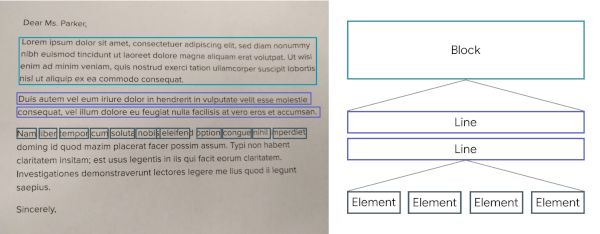
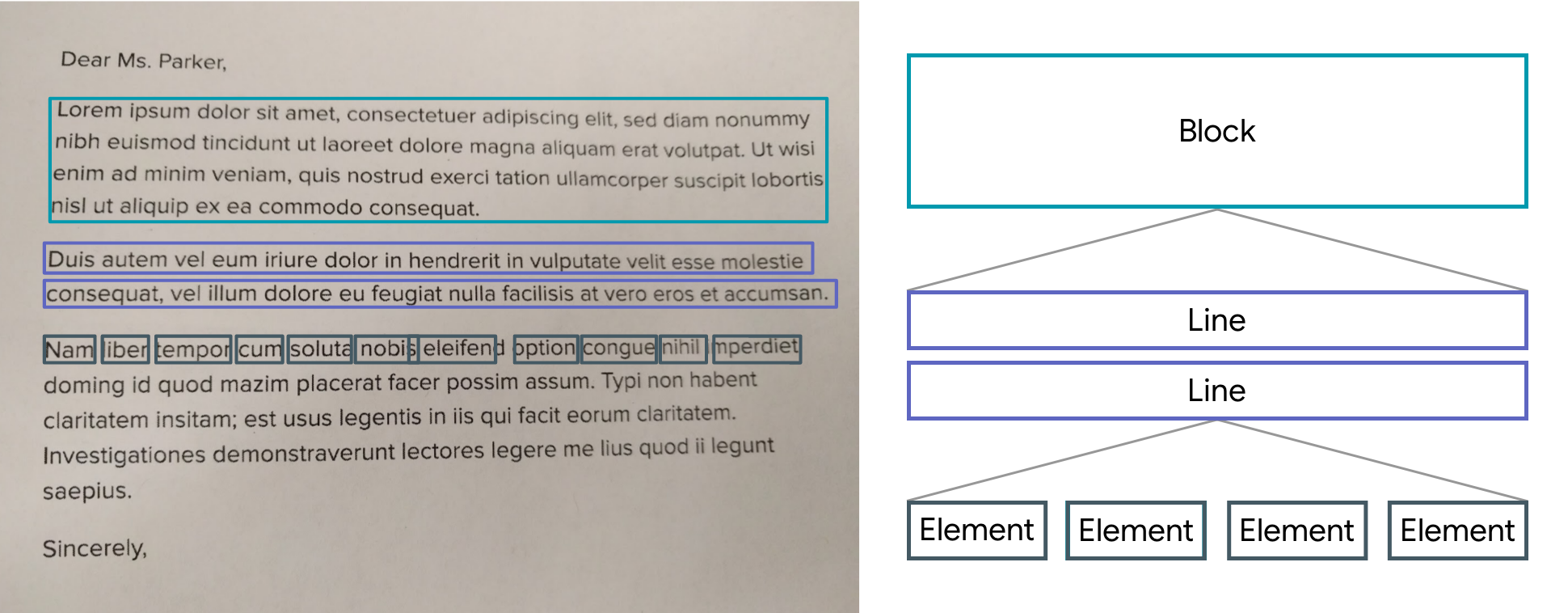
The results are returned by list of Block.
A Block contains: the global text of the block, a list of Lines and the position.
A Line contains: the global text of the line, a list of Elements and the position.
An Element contains: a word and the position.
Note: The library uses the Camera package, be sure to ask for permission.
A LiveScanWidget needs a module list to start detection.
Validated results will be returned to the "matchedResult" method.
Create a scan module :
In this example (see the /example folder), we consider all Elements to be results.
Create a scan module :
classScanAllModuleextendsScanModule
The constructor of a module:
label: A label (optional) that will be displayed to the user during rendering
color: A color (optional) that will be used for rendering
validateCountCorrelation: The number of times the same result must be found in the same place for it to be valid. (As the camera moves certain numbers / letters may be misinterpreted over several frames).
The purpose of a module is to search among the Blocks for a list of results (ScanResult) and to return it using the "matchedResult" method.
@overrideFuture<List<ScanResult>> matchedResult(List<TextBlock> textBlock, String text) async {
List<ScanResult> list = [];
for (var block in textBlock) {
for (var line in block.lines) {
for (var element in line.elements) {
list.add(ScanResult(cleanedText: element.text, scannedElementList: [element]));
}
}
}
return list;
}
Start a module :
module.start();
Stop a module :
module.stop();
Scan file with Widget (Supported extension : png, jpg and pdf )
You can use TextBlockHelper methods to help find results.
TextBlockHelper.extractTextElementsWithRegex :
Find the list of elements that match with the regex
TextBlockHelper.nextTextElement :
Find the next TextElement a right or left of TextElement
TextBlockHelper.combineRecreateTextLine :
When texts are on the same line but distant, MLKit can create two different TextBlock. The "combineRecreateTextLine" method will create a TextLine, from a starting TextElement, taking into account the Elements of each TextBlock
TextBlockHelper.combineLeftTextElement :
Return a List of TextElement with all TextElement to the left of startElement including startElement.
TextBlockHelper.combineRightTextElement :
Return a List of TextElement with all TextElement to the right of startElement including startElement.
TextBlockHelper.combineBetweenTextElement :
Return a List of TextElement between startElement and endElement