पैकेज, रिपॉज़िटरी और ऐप श्रेणियाँ खोजें

reorderable_grid_view कवर
पैकेज विवरणv2.2.8

reorderable_grid_view

पुनर्व्यवस्थित ग्रिड दृश्य

AndroidiOSWebmacOSWindowsLinux
30-दिन डाउनलोड
58.5 हज़ार
लाइक
164
Pub अंक
120

पैकेज इंस्टॉल करें

flutter pub add reorderable_grid_view

पैकेज अवलोकन

सार्वजनिक जानकारी से बना चयन मार्गदर्शन। केवल संदर्भ हेतु।

एक फ्लटर पैकेज जो ग्रिड लेआउट में आइटम के ड्रैग-एंड-ड्रॉप पुनर्व्यवस्था की अनुमति देता है। यह GridView की कार्यक्षमता को बढ़ाता है और उपयोगकर्ताओं को हथेली से टाइल्स को बदलने की अनुमति देता है। कस्टमाइज़ेबल डैशबोर्ड, टास्क बोर्ड या किसी भी ऐसे UI के लिए आदर्श जिसमें डायनामिक आइटम स्थिति की आवश्यकता हो। पैकेज सभी प्रमुख प्लेटफॉर्म जैसे मोबाइल, वेब और डेस्कटॉप को सपोर्ट करता है, जिससे उपकरणों के बीच संगत व्यवहार सुनिश्चित होता है। प्रदर्शन और एकीकरण की आसानी के लिए बनाया गया, यह म существिंग फ्लटर एप्लिकेशन में बिना किसी दिक्कत के काम करता है।

उपयोग

  • कस्टमाइज़ेबल डैशबोर्ड लेआउट
  • कार्य प्रबंधन इंटरफेस
  • फोटो गैलरी को पुनर्व्यवस्थित करें
  • उपयोगकर्ता पसंदीदा आधारित आइटम क्रम
  • इंटरैक्टिव ग्रिड-आधारित सेटिंग्स

मुख्य विशेषताएँ

  • ड्रैग-एंड-ड्रॉप पुनर्व्यवस्था
  • क्रॉस-प्लेटफ़ॉर्म संगतता
  • मौजूदा GridView के साथ सरल एकीकरण
  • कस्टम ड्रैग हैंडल का समर्थन करता है
  • चिकनी संक्रमण के लिए एम्बेडेड एनीमेशन

इनके लिए उपयुक्त

  • इंटरैक्टिव ग्रिड UI बनाने वाले डेवलपर्स
  • उपयोगकर्ता-चालित सामग्री व्यवस्था की आवश्यकता वाले ऐप्स
  • गतिशील लेआउट की आवश्यकता वाले प्रोजेक्ट

विचार योग्य बातें

  • राज्य प्रबंधन का सावधानीपूर्वक निर्देशन करने की आवश्यकता होती है
  • बहुत बड़े डेटासेट के साथ प्रदर्शन पर प्रभाव पड़ सकता है
  • ड्रैग फीडबैक के लिए सीमित कस्टमाइजेशन
  • अत्यधिक उच्च आवृत्ति के अपडेट के लिए अनुकूलित नहीं है

मूल README

संबंधित सोर्स रिपॉज़िटरी के मूल README का स्नैपशॉट। नवीनतम सामग्री के लिए रिपॉज़िटरी देखें।

ReorderableGridView

Idea from official ReorderableListView

Usage:

dependencies:
  reorderable_grid_view: ^2.2.9-alpha.4

Example

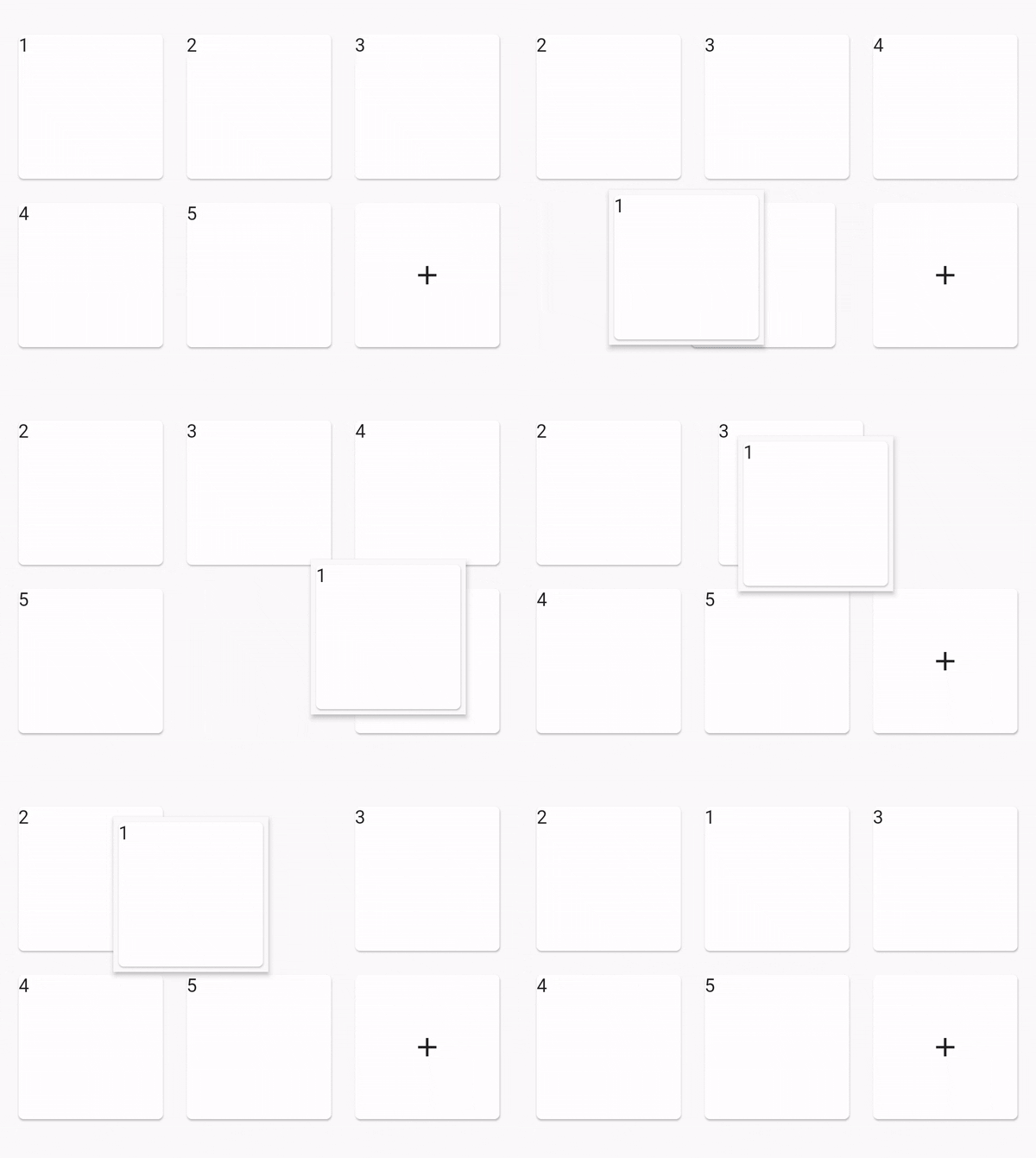
Sceenshot
class _MyHomePageState extends State<MyHomePage> {
  final data = [1, 2, 3, 4, 5];

  @override
  Widget build(BuildContext context) {
    Widget buildItem(String text) {
      return Card(
        key: ValueKey(text),
        child: Text(text),
      );
    }

    return Scaffold(
      appBar: AppBar(
        title: Text(widget.title),
      ),

      body: Center(
        // use ReorderableGridView.count() when version >= 2.0.0
        // else use ReorderableGridView()
        child: ReorderableGridView.count(
          crossAxisSpacing: 10,
          mainAxisSpacing: 10,
          crossAxisCount: 3,
          children: this.data.map((e) => buildItem("$e")).toList(),
          onReorder: (oldIndex, newIndex) {
            setState(() {
              final element = data.removeAt(oldIndex);
              data.insert(newIndex, element);
            });
          },
          footer: [
            Card(
              child: Center(
                child: Icon(Icons.add),
              ),
            ),
          ],
        ),
      ),
    );
  }
}

Options

option desc
dragWidgetBuilderV2 the drag widget builder
restrictDragScope restrict drag scope to ReorderableGridView, not drag over the scree, default is false
dragStartDelay the longPress time
scrollDirection the scroll direction, default is Axis.vertical, supports Axis.horizontal
scrollSpeedController control how speed when scroll down when drag out of viewport
OnDropIndexChange the drop position changed, void (index, oldIndex), oldIndex = nil if is drag start.

dragWidgetBuilderV2

Normaly you can do like this:

dragWidgetBuilderV2: DragWidgetBuilderV2(
	isScreenshotDragWidget: false,
	builder: (index, child, screenshot) {
		return child;
	}
)
  • child is you dragging widget.

And if you dragging widget has some state, the callback's child can't access the state. So you can do a screenshot like this.

dragWidgetBuilderV2: DragWidgetBuilderV2(
	isScreenshotDragWidget: true,
	builder: (index, child, screenshot) {
		return Image(screenshot);
	}
)

Constructors

  • ReorderableGridView.builder
  • ReorderableGridView.count
  • ReorderableSliverGridView.count

custom reorderable

You can use ReorderableWrapperWidget to custom your reorderable. Use ReorderableWrapperWidget as root. and it's descendants is ReorderableItemView[] list

  • ReorderableWrapperWidget(child: SomeCollection(children: ReorderableItemView))

Important

  • the placeholderBuilder is not right when the list is very long, is not fixable for now. please see issue 47
  • can drag out of scope in ReorderableSliverGridView, please see issue 52

TODO

fix placeholderBuilder is not right when the list is very long

Other link project

If this project is not fit your meet, you can try those other projects

श्रेणियाँ

सोर्स रिपॉज़िटरी

इस पैकेज का उपयोग करने वाले प्रोजेक्ट