패키지, 저장소 및 앱 카테고리 검색

reorderables 표지
패키지 상세v0.6.0

reorderables

재정렬 가능한 테이블, 행, 열, 래핑, 자식 요소를 드래그 앤 드롭할 수 있는 슬리버 목록

AndroidiOSWebmacOSWindowsLinux
30일 다운로드
10.5만
좋아요
1천
Pub 점수
150

패키지 설치

flutter pub add reorderables

패키지 개요

공개 정보를 바탕으로 생성한 선택 가이드입니다.

리스트, 테이블, 행, 열, 래핑, 슬리버 리스트 내의 자식 요소를 드래그 앤 드롭으로 재정렬할 수 있게 해주는 플러터 패키지입니다. 데이터 중심 애플리케이션에서 사용자 경험을 향상시키기 위해 동적으로 항목을 재정렬할 수 있는 직관적이고 상호작용 가능한 UI 컴포넌트를 제공합니다. 성능과 크로스플랫폼 호환성을 고려하여 제작되었으며, 안드로이드, iOS, 웹, 맥OS, 윈도우, 리눅스 등 모든 주요 플랫폼을 지원합니다. 작업 관리자, 할 일 목록 또는 유연한 항목 순서가 필요한 앱에 적합합니다.

사용 사례

  • 작업 관리 앱
  • 할 일 목록 인터페이스
  • 대시보드 위젯 재정렬
  • 사용자 정의 가능한 그리드 레이아웃
  • 정렬 가능한 데이터 테이블
  • 인터랙티브 콘텐츠 편집기

주요 기능

  • 드래그 앤 드롭 재정렬
  • 여러 컨테이너 유형을 지원합니다
  • 크로스 플랫폼 호환성
  • 부드러운 애니메이션
  • 사용자 정의 가능한 드래그 핸들
  • 드래그 중 내장 피드백

적합한 대상

  • 인터랙티브 리스트를 구축하는 개발자
  • 동적 항목 정렬이 필요한 앱
  • 드래그 가능한 컴포넌트를 가진 UI
  • 크로스 플랫폼 애플리케이션
  • 직관적인 사용자 상호작용을 원하는 디자이너

고려 사항

  • 대규모 데이터 세트에서 성능에 영향을 미칠 수 있습니다
  • 상태 업데이트를 주의 깊게 다뤄야 합니다
  • 복잡한 드래그 동작에 대한 사용자 정의 제한
  • 매우 긴 목록에 최적화되지 않음
  • 중첩 구조에서는 적절한 제스처 처리가 필요합니다
  • 다른 제스처 감지기와의 잠재적 충돌

원본 README

연결된 소스 저장소의 README 원문 스냅샷입니다. 최신 내용은 저장소에서 확인하세요.

** Kindly submit PR if you encounter issues and please make sure you're using stable channel releases.
** Maintaining open source software ain't easy. If you've commercially used this software, please consider support.

reorderables

pub package Awesome Flutter Buy Me A Coffee

Various reorderable, a.k.a. drag and drop, Flutter widgets, including reorderable table, row, column, wrap, and sliver list, that make their children draggable and reorder them within the widget. Parent widget only need to provide an onReorder function that is invoked with the old and new indexes of child being reordered.

Usage

To use this package, add reorderables as a dependency in your pubspec.yaml file.

dependencies:
  reorderables:

And import the package in your code.

import 'package:reorderables/reorderables.dart';

Examples

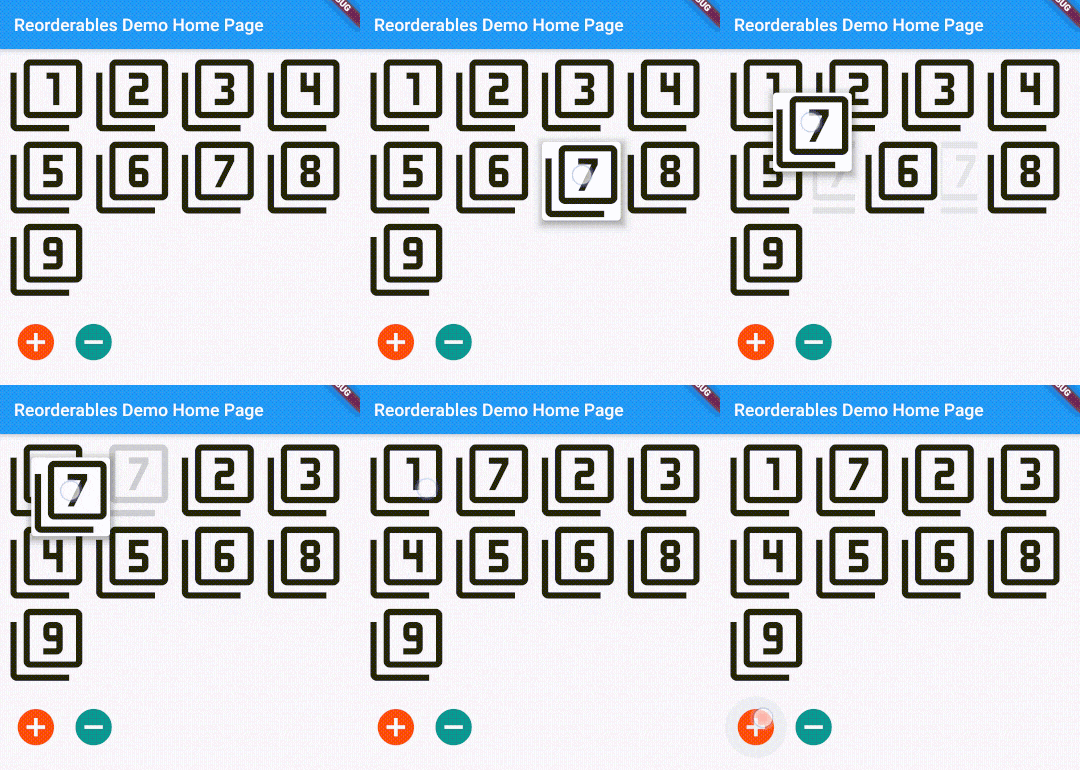
This package includes ReorderableSliverList, ReorderableTable, ReorderableWrap, ReorderableRow, and ReorderableColumn, which are reorderable versions of Flutter's SliverList, Table, Wrap, Row, and Column respectively.

ReorderableSliverList ReorderableTable ReorderableWrap Nested ReorderableWrap ReorderableColumn #1 ReorderableColumn #2 ReorderableRow

ReorderableSliverList

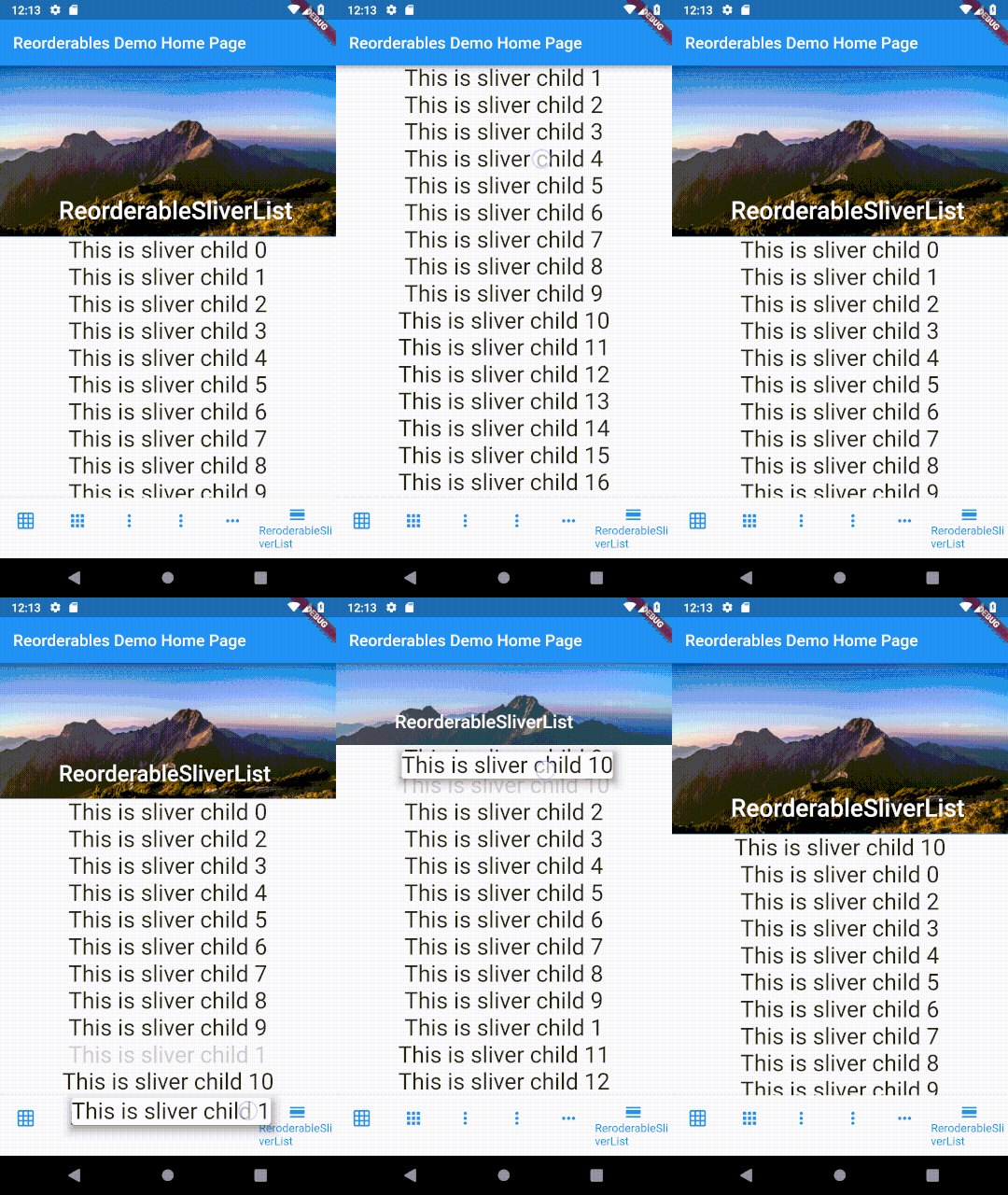
ReorderableSliverList behaves exactly like SliverList, but its children are draggable.

To make a SliverList reorderable, replace it with ReorderableSliverList and replace SliverChildListDelegate/SliverChildBuilderDelegate with ReorderableSliverChildListDelegate/ReorderableSliverChildBuilderDelegate. Do make sure that there's a ScrollController attached to the ScrollView that contains ReorderableSliverList, otherwise an error will be thrown when dragging list items.

class _SliverExampleState extends State<SliverExample> {
  List<Widget> _rows;

  @override
  void initState() {
    super.initState();
    _rows = List<Widget>.generate(50,
        (int index) => Text('This is sliver child $index', textScaleFactor: 2)
    );
  }

  @override
  Widget build(BuildContext context) {
    void _onReorder(int oldIndex, int newIndex) {
      setState(() {
        Widget row = _rows.removeAt(oldIndex);
        _rows.insert(newIndex, row);
      });
    }
    // Make sure there is a scroll controller attached to the scroll view that contains ReorderableSliverList.
    // Otherwise an error will be thrown.
    ScrollController _scrollController = PrimaryScrollController.of(context) ?? ScrollController();

    return CustomScrollView(
      // A ScrollController must be included in CustomScrollView, otherwise
      // ReorderableSliverList wouldn't work
      controller: _scrollController,
      slivers: <Widget>[
        SliverAppBar(
          expandedHeight: 210.0,
          flexibleSpace: FlexibleSpaceBar(
            title: Text('ReorderableSliverList'),
            background: Image.network(
              'https://upload.wikimedia.org/wikipedia/commons/thumb/6/68/Yushan'
                '_main_east_peak%2BHuang_Chung_Yu%E9%BB%83%E4%B8%AD%E4%BD%91%2B'
                '9030.png/640px-Yushan_main_east_peak%2BHuang_Chung_Yu%E9%BB%83'
                '%E4%B8%AD%E4%BD%91%2B9030.png'),
          ),
        ),
        ReorderableSliverList(
          delegate: ReorderableSliverChildListDelegate(_rows),
          // or use ReorderableSliverChildBuilderDelegate if needed
//          delegate: ReorderableSliverChildBuilderDelegate(
//            (BuildContext context, int index) => _rows[index],
//            childCount: _rows.length
//          ),
          onReorder: _onReorder,
        )
      ],
    );
  }
}
ReorderableSliverList Demo
ReorderableSliverList
ReorderableTable

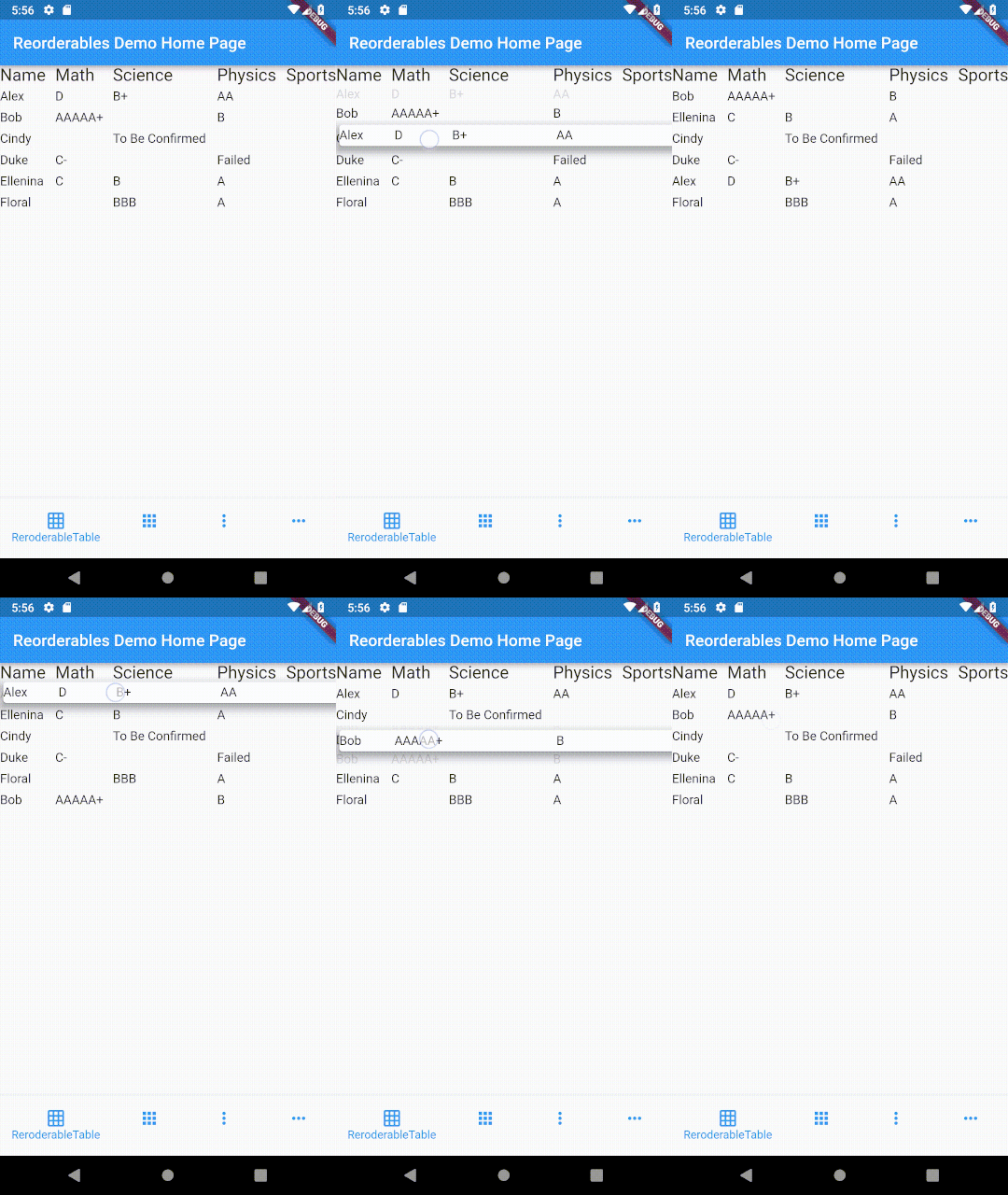
The difference between table and list is that cells in a table are horizontally aligned, whereas in a list, each item can have children but they are not aligned with children in another item.

Making a row draggable requires cells to be contained in a single widget. This isn't achievable with Table or GridView widget since their children are laid out as cells of widget instead of rows of widget.

class _TableExampleState extends State<TableExample> {
  List<ReorderableTableRow> _itemRows;

  @override
  void initState() {
    super.initState();
    var data = [
      ['Alex', 'D', 'B+', 'AA', ''],
      ['Bob', 'AAAAA+', '', 'B', ''],
      ['Cindy', '', 'To Be Confirmed', '', ''],
      ['Duke', 'C-', '', 'Failed', ''],
      ['Ellenina', 'C', 'B', 'A', 'A'],
      ['Floral', '', 'BBB', 'A', 'A'],
    ];

    Widget _textWithPadding(String text) {
      return Padding(
        padding: EdgeInsets.symmetric(vertical: 4),
        child: Text(text, textScaleFactor: 1.1),
      );
    }

    _itemRows = data.map((row) {
      return ReorderableTableRow(
        //a key must be specified for each row
        key: ObjectKey(row),
        mainAxisSize: MainAxisSize.max,
        mainAxisAlignment: MainAxisAlignment.spaceBetween,
        children: <Widget>[
          _textWithPadding('${row[0]}'),
          _textWithPadding('${row[1]}'),
          _textWithPadding('${row[2]}'),
          _textWithPadding('${row[3]}'),
//          Text('${row[4]}'),
        ],
      );
    }).toList();
  }

  @override
  Widget build(BuildContext context) {
    var headerRow = ReorderableTableRow(
      mainAxisSize: MainAxisSize.max,
      mainAxisAlignment: MainAxisAlignment.spaceBetween,
      children: [
        Text('Name', textScaleFactor: 1.5),
        Text('Math', textScaleFactor: 1.5),
        Text('Science', textScaleFactor: 1.5),
        Text('Physics', textScaleFactor: 1.5),
        Text('Sports', textScaleFactor: 1.5)
      ]
    );

    void _onReorder(int oldIndex, int newIndex) {
      setState(() {
        ReorderableTableRow row = _itemRows.removeAt(oldIndex);
        _itemRows.insert(newIndex, row);
      });
    }

    return ReorderableTable(
      header: headerRow,
      children: _itemRows,
      onReorder: _onReorder,
    );
  }
}

In a table, cells in each row are aligned on column basis with cells in other rows, whereas cells in a row of a list view don't align with other rows.

ReorderableTable Demo
ReorderableTable
ReorderableWrap

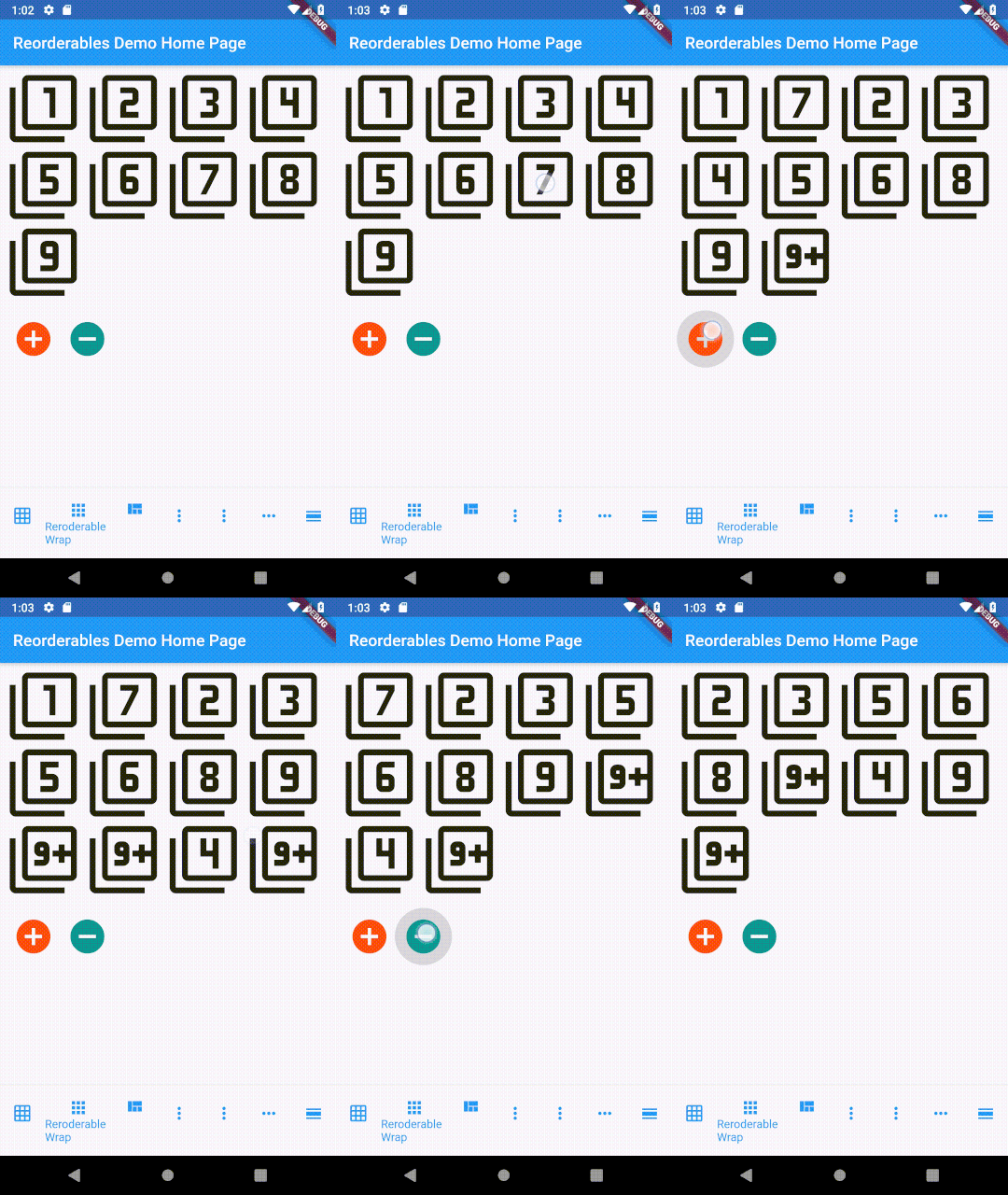
This widget can also limit the minimum and maximum amount of children in each run, on top of the size-based policy in Wrap's algorithm. See API references for more details. *Since v0.2.5, children of ReorderableWrap don't need to have a key explicitly specified.

class _WrapExampleState extends State<WrapExample> {
  final double _iconSize = 90;
  List<Widget> _tiles;

  @override
  void initState() {
    super.initState();
    _tiles = <Widget>[
      Icon(Icons.filter_1, size: _iconSize),
      Icon(Icons.filter_2, size: _iconSize),
      Icon(Icons.filter_3, size: _iconSize),
      Icon(Icons.filter_4, size: _iconSize),
      Icon(Icons.filter_5, size: _iconSize),
      Icon(Icons.filter_6, size: _iconSize),
      Icon(Icons.filter_7, size: _iconSize),
      Icon(Icons.filter_8, size: _iconSize),
      Icon(Icons.filter_9, size: _iconSize),
    ];
  }

  @override
  Widget build(BuildContext context) {
    void _onReorder(int oldIndex, int newIndex) {
      setState(() {
        Widget row = _tiles.removeAt(oldIndex);
        _tiles.insert(newIndex, row);
      });
    }

    var wrap = ReorderableWrap(
      spacing: 8.0,
      runSpacing: 4.0,
      padding: const EdgeInsets.all(8),
      children: _tiles,
      onReorder: _onReorder,
       onNoReorder: (int index) {
        //this callback is optional
        debugPrint('${DateTime.now().toString().substring(5, 22)} reorder cancelled. index:$index');
      },
      onReorderStarted: (int index) {
        //this callback is optional
        debugPrint('${DateTime.now().toString().substring(5, 22)} reorder started: index:$index');
      }
    );

    var column = Column(
      crossAxisAlignment: CrossAxisAlignment.start,
      children: <Widget>[
        wrap,
        ButtonBar(
          alignment: MainAxisAlignment.start,
          children: <Widget>[
            IconButton(
              iconSize: 50,
              icon: Icon(Icons.add_circle),
              color: Colors.deepOrange,
              padding: const EdgeInsets.all(0.0),
              onPressed: () {
                var newTile = Icon(Icons.filter_9_plus, size: _iconSize);
                setState(() {
                  _tiles.add(newTile);
                });
              },
            ),
            IconButton(
              iconSize: 50,
              icon: Icon(Icons.remove_circle),
              color: Colors.teal,
              padding: const EdgeInsets.all(0.0),
              onPressed: () {
                setState(() {
                  _tiles.removeAt(0);
                });
              },
            ),
          ],
        ),
      ],
    );

    return SingleChildScrollView(
      child: column,
    );

  }
}
ReorderableWrap Demo
ReorderableWrap
Nested ReorderableWrap

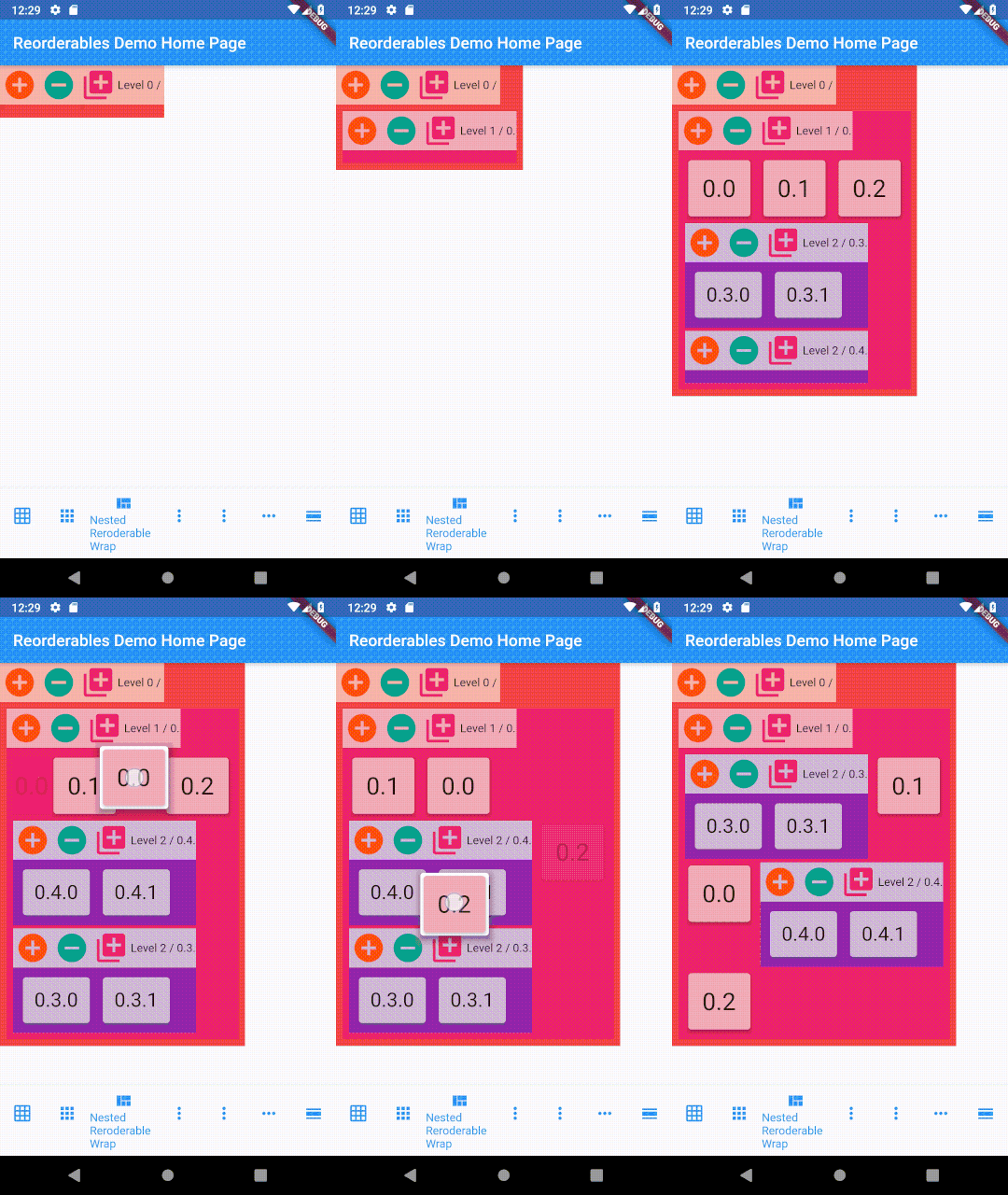
It is also possible to nest multiple levels of ReorderableWrap. See example/lib/nested_wrap_example.dart for complete example code.

class _NestedWrapExampleState extends State<NestedWrapExample> {
//  List<Widget> _tiles;
  Color _color;
  Color _colorBrighter;

  @override
  void initState() {
    super.initState();
    _color = widget.color ?? Colors.primaries[widget.depth % Colors.primaries.length];
    _colorBrighter = Color.lerp(_color, Colors.white, 0.6);
  }

  @override
  Widget build(BuildContext context) {
    void _onReorder(int oldIndex, int newIndex) {
      setState(() {
        widget._tiles.insert(newIndex, widget._tiles.removeAt(oldIndex));
      });
    }

    var wrap = ReorderableWrap(
      spacing: 8.0,
      runSpacing: 4.0,
      padding: const EdgeInsets.all(8),
      children: widget._tiles,
      onReorder: _onReorder
    );

    var buttonBar = Container(
      color: _colorBrighter,
      child: Row(
        mainAxisSize: MainAxisSize.min,
        mainAxisAlignment: MainAxisAlignment.start,
        children: <Widget>[
          IconButton(
            iconSize: 42,
            icon: Icon(Icons.add_circle),
            color: Colors.deepOrange,
            padding: const EdgeInsets.all(0.0),
            onPressed: () {
              setState(() {
                widget._tiles.add(
                  Card(
                    child: Container(
                      child: Text('${widget.valuePrefix}${widget._tiles.length}', textScaleFactor: 3 / math.sqrt(widget.depth + 1)),
                      padding: EdgeInsets.all((24.0 / math.sqrt(widget.depth + 1)).roundToDouble()),
                    ),
                    color: _colorBrighter,
                    elevation: 3,
                  )
                );
              });
            },
          ),
          IconButton(
            iconSize: 42,
            icon: Icon(Icons.remove_circle),
            color: Colors.teal,
            padding: const EdgeInsets.all(0.0),
            onPressed: () {
              setState(() {
                widget._tiles.removeAt(0);
              });
            },
          ),
          IconButton(
            iconSize: 42,
            icon: Icon(Icons.add_to_photos),
            color: Colors.pink,
            padding: const EdgeInsets.all(0.0),
            onPressed: () {
              setState(() {
                widget._tiles.add(NestedWrapExample(depth: widget.depth + 1, valuePrefix: '${widget.valuePrefix}${widget._tiles.length}.',));
              });
            },
          ),
          Text('Level ${widget.depth} / ${widget.valuePrefix}'),
        ],
      )
    );

    var column = Column(
      crossAxisAlignment: CrossAxisAlignment.start,
      children: [
        buttonBar,
        wrap,
      ]
    );

    return SingleChildScrollView(
      child: Container(child: column, color: _color,),
    );
  }
}
Nested ReorderableWrap Demo
Nested ReorderableWrap
ReorderableColumn example #1
class _ColumnExample1State extends State<ColumnExample1> {
  List<Widget> _rows;

  @override
  void initState() {
    super.initState();
    _rows = List<Widget>.generate(50,
        (int index) => Text('This is row $index', key: ValueKey(index), textScaleFactor: 1.5)
    );
  }

  @override
  Widget build(BuildContext context) {
    void _onReorder(int oldIndex, int newIndex) {
      setState(() {
        Widget row = _rows.removeAt(oldIndex);
        _rows.insert(newIndex, row);
      });
    }

    return ReorderableColumn(
      header: Text('THIS IS THE HEADER ROW'),
      footer: Text('THIS IS THE FOOTER ROW'),
      crossAxisAlignment: CrossAxisAlignment.start,
      children: _rows,
      onReorder: _onReorder,
    );
  }
}
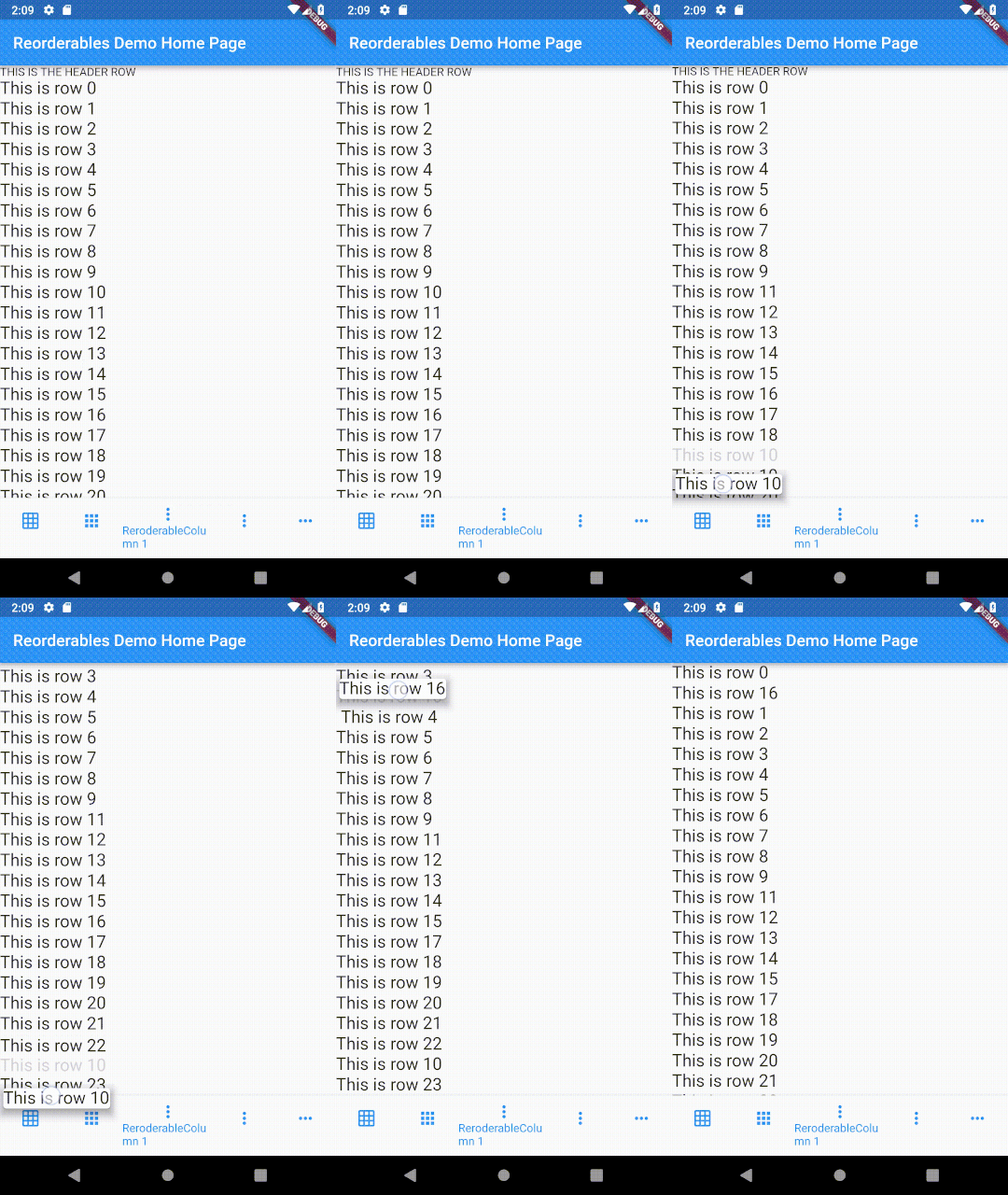
ReorderableColumn example #1 Demo
ReorderableColumn #1
ReorderableColumn example #2
class _ColumnExample2State extends State<ColumnExample2> {
  List<Widget> _rows;

  @override
  void initState() {
    super.initState();
    _rows = List<Widget>.generate(10,
        (int index) => Text('This is row $index', key: ValueKey(index), textScaleFactor: 1.5)
    );
  }

  @override
  Widget build(BuildContext context) {
    void _onReorder(int oldIndex, int newIndex) {
      setState(() {
        Widget row = _rows.removeAt(oldIndex);
        _rows.insert(newIndex, row);
      });
    }

    Widget reorderableColumn = IntrinsicWidth(
      child: ReorderableColumn(
        header: Text('List-like view but supports IntrinsicWidth'),
//        crossAxisAlignment: CrossAxisAlignment.start,
        children: _rows,
        onReorder: _onReorder,
      )
    );

    return Transform(
      transform: Matrix4.rotationZ(0),
      alignment: FractionalOffset.topLeft,
      child: Material(
        child: Card(child: reorderableColumn),
        elevation: 6.0,
        color: Colors.transparent,
        borderRadius: BorderRadius.zero,
      ),
    );
  }
}
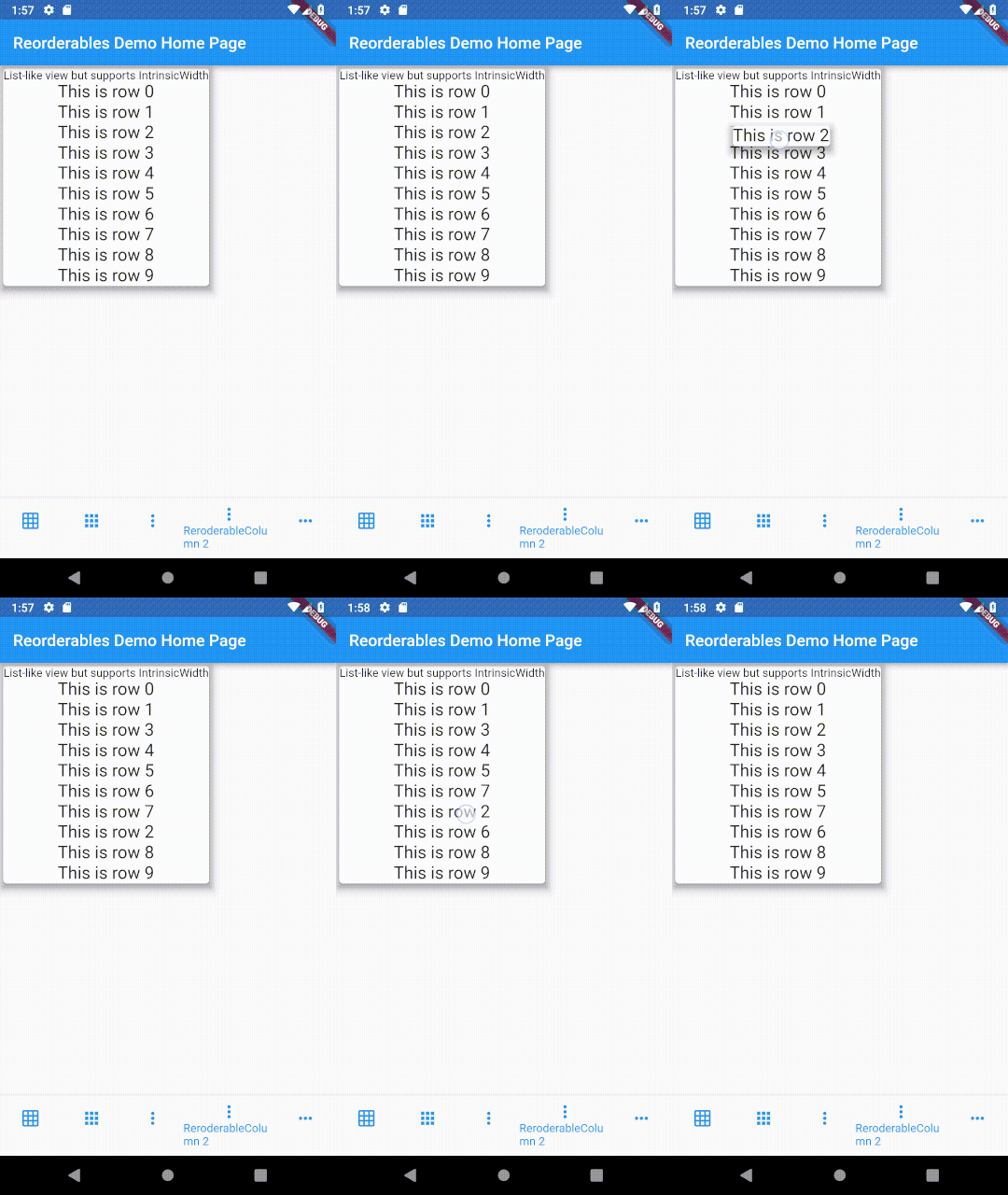
ReorderableColumn example #2 Demo
ReorderableColumn #2
ReorderableRow

See exmaple/lib/row_example.dart

ReorderableRow Demo
ReorderableRow

Issues

I've switched to Flutter channel stable from beta in order avoid compatibility issues. Supporting master or dev channels is not intended as they change frequently. Kindly make sure that you are using stable channel when submitting issues.

Support

If you need commercial support, please reach out to me by sending me message on LinkedIn Hansheng

Otherwise, you can also support me by buying me a coffee or donate me via PayPal. Your support is very much appreciated. :)

Buy Me A Coffee or Donate or Say Thanks!

카테고리

소스 저장소

이 패키지를 사용하는 프로젝트