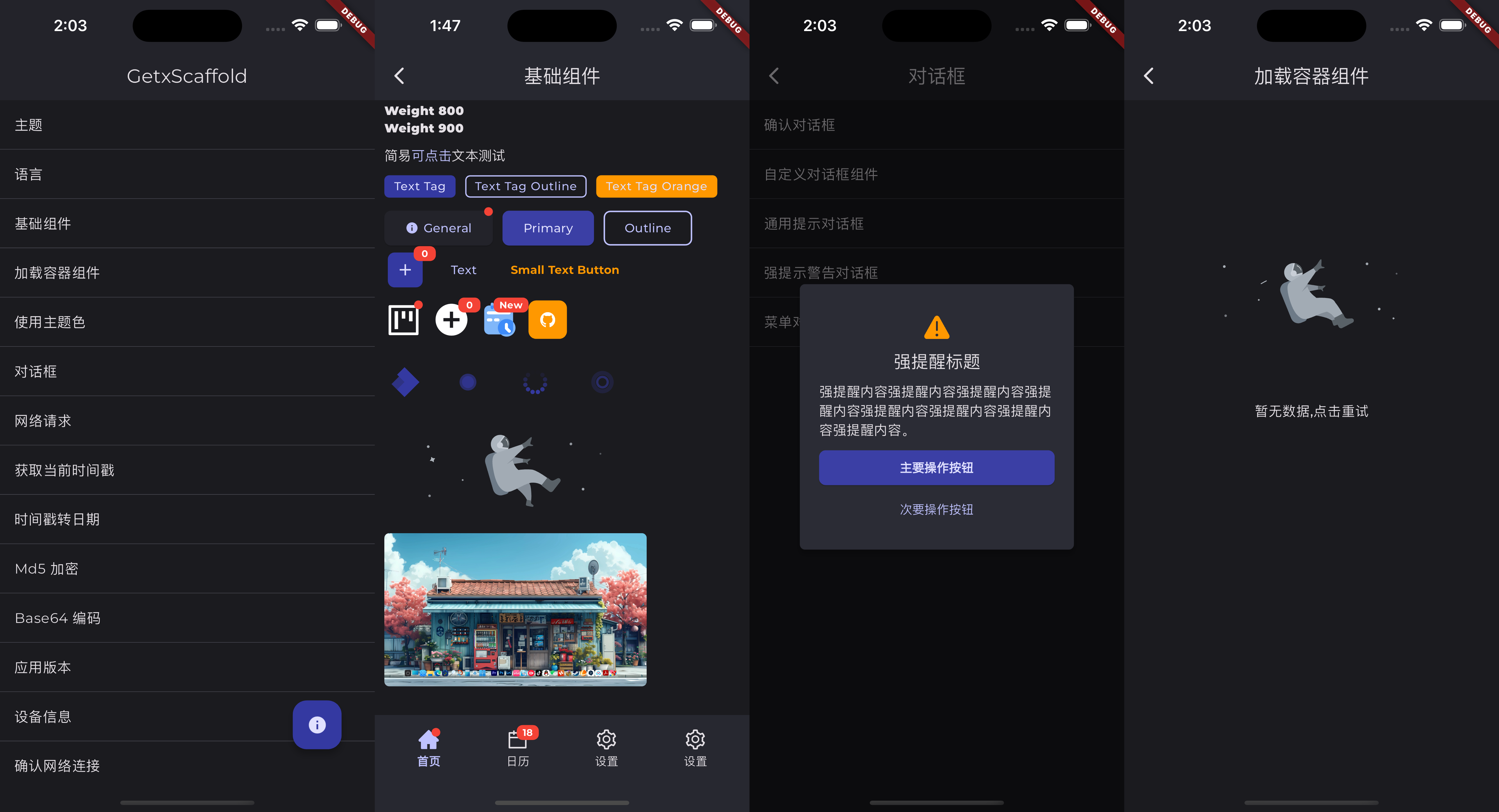
Originaler README-Schnappschuss aus dem verknüpften Quell-Repository. Aktuelle Inhalte finden Sie im Repository.
GetX Scaffold
关于 GetX Scaffold
GetXScaffold 快速开发脚手架在 GetX 框架和一些常用插件的基础上,构建了一套完整的快速开发模板。其中包括新增了部分常用功能的全局方法、常用的扩展方法和各种工具类、部分常用组件的封装、简单易用的对话框、二次封装的 Dio 网络请求工具、二次封装的 GetxController、二次封装的应用主题和国际化实现等。GetXScaffold 是对以上这些内容的过度封装,包括一些组件的扩展方法会违背 Flutter 本身的开发规范,改变你的开发习惯。所以本脚手架单纯为了提高开发效率,减少重复代码,减少开发成本。如果您是刚接触 Flutter 开发并还处在学习过程中的话,并不推荐您使用该脚手架。以下只是部分功能的使用示例,建议您通过示例项目或者源码了解全部使用方法。
适配 Flutter 版本
Version
Flutter 版本
0.0.3
3.19.5
0.0.4
3.22.2
0.1.2
3.24.1
0.2.0
3.24.1
更新日志
0.2.0
最近新项目的使用中,发现这 Material3 实在没法用,各种配色问题莫名其妙。从 0.2.0 开始推荐使用 Material2 重新适配,具体主题设置参考 Example。
适配 Flutter SDK 版本到 3.24.1
修复 ButtonX.icon iconSize 参数不生效的问题
新增滑动验证码 Dialog
HttpService 新增错误拦截和请求拦截
EncryptUtil ExString 新增 sha1 sha256 sha512 散列算法
新增随机数生成和 Nonce 生成的全局方法
refreshAppui 延时 300ms 刷新,处理主题更新后显示不正常的问题
Android 端修改主题自动修改底部导航栏颜色
运行示例项目
cd example
flutter pub get
flutter run
# 如果提示 Error : Type 'UnmodifiableUint8ListView' not found.请更新win32库
flutter pub upgrade win32
快速开始
1. 添加依赖
Flutter 工程中 pubspec.yaml 文件里加入以下依赖:
dependencies:
getx_scaffold: ^0.0 .1
# 如果您的项目中需要使用国际化,请添加以下依赖
flutter_localizations:
sdk: flutter
2. 初始化脚手架
在 main.dart 中初始化 GetXScaffold:
import 'package:getx_scaffold/getx_scaffold.dart' ;
void main () async {
WidgetsBinding widgetsBinding = await init (
isDebug: kDebugMode,
logTag: 'GetxScaffold' ,
supportedLocales: TranslationLibrary .supportedLocales,
);
runApp (
GetxApp (
designSize: const Size (390 , 844 ),
enableLog: kDebugMode,
defaultTransition: Transition .rightToLeft,
themeMode: GlobalService .to.themeMode,
theme: AppTheme .light,
darkTheme: AppTheme .dark,
locale: GlobalService .to.locale,
translations: TranslationLibrary (),
fallbackLocale: TranslationLibrary .fallbackLocale,
supportedLocales: TranslationLibrary .supportedLocales,
localizationsDelegates: TranslationLibrary .localizationsDelegates,
title: 'GetxScaffold' ,
home: const HomePage (),
builder: (context, widget) {
return widget!;
},
),
);
}
GetxApp 是 GetMaterialApp 嵌套了 ScreenUtilInit 对全局进行屏幕适配,通过 GlobalService 可以方便的实现多主题和多语言的切换。
3. 定义主题
最近新项目的使用中,发现这 Material3 实在没法用,各种配色问题莫名其妙。从 0.2.0 开始推荐使用 Material2 重新适配,具体主题设置参考 Example。
import 'package:flutter/material.dart' ;
class AppTheme static const String fontMontserrat = 'Montserrat' ;
static const Color themeColor = Color .fromARGB (255 , 11 , 107 , 47 );
static const Color darkThemeColor = Color .fromARGB (255 , 12 , 16 , 121 );
static ThemeData light = ThemeData (
useMaterial3: false ,
fontFamily: fontMontserrat,
colorScheme: ColorScheme .fromSeed (
seedColor: themeColor,
brightness: Brightness .light,
),
appBarTheme: const AppBarTheme (
backgroundColor: Colors .white,
foregroundColor: Color .fromARGB (200 , 0 , 0 , 0 ),
centerTitle: true ,
titleTextStyle: TextStyle (
fontSize: 18 ,
fontWeight: FontWeight .bold,
color: Color .fromARGB (200 , 0 , 0 , 0 ),
),
),
);
static ThemeData dark = ThemeData (
useMaterial3: false ,
fontFamily: fontMontserrat,
colorScheme: ColorScheme .fromSeed (
seedColor: darkThemeColor,
brightness: Brightness .dark,
),
appBarTheme: const AppBarTheme (
centerTitle: true ,
titleTextStyle: TextStyle (
fontSize: 18 ,
fontWeight: FontWeight .bold,
),
),
bottomAppBarTheme: const BottomAppBarTheme (
color: Color .fromARGB (255 , 34 , 34 , 34 ),
),
);
}
以上是主题示例,GetXScaffold 的所有内置组件均遵循 Material3 设计规范。如果你使用 colorScheme 定义了主题颜色,那么你可以通过以下方法使用所有的主题颜色:
ThemeColor .onPrimary
ThemeColor .onSecondary
ThemeColor .onSurface
......
4. 国际化
GetXScaffold 再次简化的国际化实现,您需要创建 TranslationLibrary 并实现以下方法:
import 'package:flutter_localizations/flutter_localizations.dart' ;
import 'package:getx_scaffold/getx_scaffold.dart' ;
import 'locales/locale_en.dart' ;
import 'locales/locale_es.dart' ;
import 'locales/locale_zh.dart' ;
class TranslationLibrary extends Translations static const fallbackLocale = Locale ('zh' , 'CN' );
static const supportedLocales = [
Locale ('zh' , 'CN' ),
Locale ('en' , 'US' ),
Locale ('es' , 'ES' ),
];
@override
Map <String , Map <String , String >> get keys => {
'zh' : zh,
'en' : en,
'es' : es,
};
static const localizationsDelegates = [
GlobalMaterialLocalizations .delegate,
GlobalWidgetsLocalizations .delegate,
GlobalCupertinoLocalizations .delegate,
];
}
在 main.dart GetxApp 中加入以下代码:
locale: GlobalService .to.locale,
translations: TranslationLibrary (),
fallbackLocale: TranslationLibrary .fallbackLocale,
supportedLocales: TranslationLibrary .supportedLocales,
localizationsDelegates: TranslationLibrary .localizationsDelegates,
5. 添加页面
GetXScaffold 的所有页面使用 GetView 加 GetxController 视图与逻辑分离的开发方式。这里注意,所有 GetxController 必须混入 BaseControllerMixin,以相应全局刷新。
HomePage.dart
import 'package:flutter/material.dart' ;
import 'package:example/common/langs/index.dart' ;
import 'package:getx_scaffold/getx_scaffold.dart' ;
import 'index.dart' ;
class HomePage extends GetView <HomeController > const HomePage ({super .key});
Widget _buildView () {
return <Widget >[
ListTile (
title: Text (TextKey .zhuTi.tr),
onTap: () {
Get .to (() => const ThemePage ());
},
),
ListTile (
title: Text (TextKey .yuYan.tr),
onTap: () {
Get .to (() => const LanguagePage ());
},
),
]
.toListView (
separator: const DividerX (),
)
.scrollbar ()
.safeArea ();
}
Widget _buildFloatingActionButton () {
return FloatingActionButton (
onPressed: () {},
child: const Icon (Icons .info),
).padding (all: 20 .w);
}
@override
Widget build (BuildContext context) {
return GetBuilder <HomeController >(
init: HomeController (),
id: 'home' ,
builder: (_) {
return DoublePressBackWidget (
child: Scaffold (
appBar: AppBar (
title: const Text ("GetxScaffold" ),
centerTitle: true ,
elevation: 1 ,
),
floatingActionButton: _buildFloatingActionButton (),
body: _buildView (),
),
);
},
);
}
}
HomeController.dart
import 'package:getx_scaffold/getx_scaffold.dart' ;
class HomeController extends GetxController with BaseControllerMixin @override
String get builderId => 'home' ;
HomeController ();
@override
void onInit () {
super .onInit ();
updateUi ();
back ();
delayedBack ();
}
@override
bool get listenLifecycleEvent => true ;
@override
void onDetached () {
log ('onDetached' );
}
@override
void onHidden () {
log ('onHidden' );
}
@override
void onInactive () {
log ('onInactive' );
}
@override
void onPaused () {
log ('onPaused' );
}
@override
void onResumed () {
log ('onResumed' );
}
}
全局方法
int getTimeStamp ({bool isSecond = false })
int getTimeStampSecond ()
String getNowDateString ()
String getNowDateTimeString ()
String getNowTimeString ()
Future <bool > isNetworkAvailable ()
Future <bool > isConnectedToMobile ()
Future <bool > isConnectedToWiFi ()
void showToast (String msg)
void showSuccessToast (String msg)
void showInfoToast (String msg)
void showWarningToast (String msg)
void showErrorToast (String msg)
void showLoading ([String ? msg])
void showError ([String ? msg])
void showInfo (String msg)
void dismissLoading ()
void delayed (int milliseconds, Function () callback)
StreamSubscription <T> eventListen<T>(
void Function (T)? onData, {
Function ? onError,
void Function ()? onDone,
bool? cancelOnError,
})
sendEvent<T>(T event)
void refreshAppui ()
void log (String log, [String ? tag])
void changeThemeMode (ThemeMode themeMode)
void changeLanguage (Locale locale)
void openWebPage (String url, {LaunchMode mode = LaunchMode .platformDefault})
void callPhone (String phoneNumber)
Future <PackageInfo > getPackageInfo ()
Future <String > getAppName ()
Future <String > getPackageName ()
Future <String > getVersion ()
Future <String > getBuildNumber ()
Future <BaseDeviceInfo > getDeviceInfo ()
Future <String ?> getDeviceName ()
Future <String ?> getDeviceSystemVersion ()
void hideKeyboard ()
Future <void > setStatusBarColor ()
void setDarkStatusBar ()
void setLightStatusBar ()
Future <void > showStatusBar ()
void enterFullScreen ()
void exitFullScreen ()
Future <void > hideStatusBar ()
void setOrientationPortrait ()
void setOrientationLandscape ()
Future <bool > setValue (String key, dynamic value, {bool print = true })
List <String > getMatchingSharedPrefKeys (String key)
List <String >? getStringListAsync (String key)
bool getBoolAsync (String key, {bool defaultValue = false })
double getDoubleAsync (String key, {double defaultValue = 0.0 })
int getIntAsync (String key, {int defaultValue = 0 })
String getStringAsync (String key, {String defaultValue = '' })
Map <String , dynamic > getJSONAsync (String key,{Map <String , dynamic >? defaultValue})
Future <bool > removeKey (String key)
Future <bool > clearSharedPref ()
Future <bool > requestPermission ({
required Permission permission,
String ? title,
String ? confirmText,
required String message,
required String error,
})
Future <bool > requestCameraPermission ()
Future <bool > requestPhotosPermission ()
Future <bool > requestBluetoothPermission ()
扩展方法
String?扩展:
bool get isEmptyOrNull => _isEmptyOrNull ();
bool get isNotEmptyOrNull => !_isEmptyOrNull ();
String ? dateFormat (String pattern)
String ? toDateString ()
String ? toDateTimeString ()
String ? toTimeString ()
DateTime ? getDateTime ({bool? isUtc})
String ? md5 ()
String ? encodeBase64 ()
String ? decodeBase64 ()
String ? toPrice (
int amount, {
MoneyFormats format = MoneyFormats .NORMAL,
MoneyUnit unit = MoneyUnit .NORMAL,
})
int? toInt ({int defValue = 0 })
double? toDouble ({double defValue = 0 })
num? toNumber ({num defValue = 0 })
bool isMobileSimple ()
bool isMobileExact ()
bool isTel ()
bool isIDCard18 ()
bool isAdult ()
bool isEmail ()
bool isURL ()
bool isIP ()
num?扩展:
String ? dateFormat (String pattern, {bool isSecond = false })
String ? toDateString ({bool isSecond = false })
String ? toDateTimeString ({bool isSecond = false })
String ? toTimeString ({bool isSecond = false })
String ? toFileSize ({int decimals = 0 })
String ? getTimeDifference ({bool isShowDay = true , bool isSecond = false })
String ? getTimeDifferenceDescription ({bool isSecond = false })
String ? toPrice (
int amount, {
MoneyFormats format = MoneyFormats .NORMAL,
MoneyUnit unit = MoneyUnit .NORMAL,
})
double? add (num value)
double? subtract (num value)
double? multiply (num value)
double? divide (num value)
Widget spacing ()
List扩展
Widget toWrap ();
Widget toColumn ();
Widget toRow ();
Widget toListView ()
Widget toStack ();
Widget _buildView () {
return <Widget >[
ListTile (
title: Text (TextKey .genSuiXiTong.tr),
trailing: GlobalService .to.themeMode == ThemeMode .system
? const Icon (Icons .check)
: null ,
onTap: () {
changeThemeMode (ThemeMode .system);
},
),
ListTile (
title: Text (TextKey .liangSeZhuTi.tr),
trailing: GlobalService .to.themeMode == ThemeMode .light
? const Icon (Icons .check)
: null ,
onTap: () {
changeThemeMode (ThemeMode .light);
},
),
ListTile (
title: Text (TextKey .anSeZhuTi.tr),
trailing: GlobalService .to.themeMode == ThemeMode .dark
? const Icon (Icons .check)
: null ,
onTap: () {
changeThemeMode (ThemeMode .dark);
},
),
].toListView (
separator: const DividerX (),
);
}
Widget 扩展:
Widget visibility ();
Widget aspectRatio ();
Widget card ();
Widget center ();
Widget clipOval ();
Widget clipRect ();
Widget clipRRect ();
Widget elevation ();
Widget expand ();
Widget fittedBox ();
Widget flexible ();
Widget fractionallySizedBox ();
Widget limitedBox ();
Widget offstage ();
Widget opacity ();
Widget overflow ();
Widget positioned ();
Widget inkWell ();
Widget ripple ();
Widget scale ();
Widget scrollable ();
Widget scrollbar ();
Widget transform ();
Widget translate ();
Widget constrained ();
Widget tight ();
Widget width ();
Widget height ();
Widget unConstrained ();
Widget safeArea ();
Widget align ();
Widget alignTopLeft ();
Widget alignTopCenter ();
Widget alignTopRight ();
Widget alignCenterLeft ();
Widget alignCenter ();
Widget alignCenterRight ();
Widget alignBottomLeft ();
Widget alignBottomCenter ();
Widget alignBottomRight ();
Widget decorated ();
Widget backgroundColor ();
Widget border ();
Widget boxShadow ();
Widget gestures ();
Widget onTap ();
Widget padding ();
Widget sliverPadding ();
Widget sliverPaddingVertical (double val);
Widget sliverPaddingHorizontal (double val);
Widget sliverPaddingTop (double val);
Widget sliverPaddingBottom (double val);
Widget sliverPaddingLeft (double val);
Widget sliverPaddingRight (double val);
Widget sliver ();
Widgets
GetXScaffold 并不是一个 UI 组件库,里面仅封装了最常用的一些组件并优化了使用方法。如有其他需求请按需引入其他组件库。
import 'package:example/common/langs/index.dart' ;
import 'package:flutter/material.dart' ;
import 'package:getx_scaffold/common/index.dart' ;
import 'package:getx_scaffold/getx_scaffold.dart' ;
import 'index.dart' ;
class BaseWidgetsPage extends GetView <BaseWidgetsController > const BaseWidgetsPage ({super .key});
Widget _buildView () {
return <Widget >[
TextX .displayLarge ('DisplayLarge' ),
TextX .displayMedium ('DisplayMedium' ),
TextX .displaySmall ('DisplaySmall' ),
TextX .headlineLarge ('HeadlineLarge' ),
TextX .headlineMedium ('HeadlineMedium' ),
TextX .headlineSmall ('HeadlineSmall' ),
TextX .titleLarge ('TitleLarge' ),
TextX .titleMedium ('TitleMedium' ),
TextX .titleSmall ('TitleSmall' ),
TextX .bodyLarge ('BodyLarge' ),
TextX .bodyMedium ('BodyMedium' ),
TextX .bodySmall ('BodySmall' ),
TextX .labelLarge ('LabelLarge' ),
TextX .labelMedium ('LabelMedium' ),
TextX .labelSmall ('LabelSmall' ),
const TextX ('Weight 100' , weight: FontWeight .w100),
const TextX ('Weight 200' , weight: FontWeight .w200),
const TextX ('Weight 300' , weight: FontWeight .w300),
const TextX ('Weight 400' , weight: FontWeight .w400),
const TextX ('Weight 500' , weight: FontWeight .w500),
const TextX ('Weight 600' , weight: FontWeight .w600),
const TextX ('Weight 700' , weight: FontWeight .w700),
const TextX ('Weight 800' , weight: FontWeight .w800),
const TextX ('Weight 900' , weight: FontWeight .w900),
RichTextX (children: [
TextSpanItem (
'简易' ,
),
TextSpanItem ('可点击' , onTap: () {
showInfoToast ('onClick!' );
}),
TextSpanItem (
'文本测试' ,
),
]).padding (top: 10 .w),
<Widget >[
const TextTag ('Text Tag' ),
const TextTag (
'Text Tag Outline' ,
outline: true ,
),
const TextTag (
'Text Tag Orange' ,
color: Colors .orange,
),
].toWrap (spacing: 10 .w).padding (top: 10 .w),
<Widget >[
ButtonX (
'General' ,
dot: true ,
icon: Icons .info,
onPressed: () {},
),
ButtonX .primary (
'Primary' ,
onPressed: () {},
),
ButtonX .outline (
'Outline' ,
onPressed: () {},
),
ButtonX .icon (
Icons .add,
badge: controller.number.toString (),
onPressed: () {
controller.increment ();
},
),
ButtonX .text (
'Text' ,
onPressed: () {},
),
ButtonX .text (
'Small Text Button' ,
textColor: Colors .orange,
textSize: 12 .sp,
textWeight: FontWeight .bold,
minSize: Size .zero,
innerPadding: EdgeInsets .symmetric (horizontal: 10 .w, vertical: 5 .h),
borderRadius: 3 .r,
onPressed: () {},
),
].toWrap (spacing: 10 .w).padding (top: 10 .w),
<Widget >[
IconX .icon (
AntdIcon .project,
size: 40 .sp,
dot: controller.showDot,
).onTap (() {
controller.updateDot ();
}),
IconX .icon (
Icons .add_circle_sharp,
size: 40 .sp,
badge: controller.number.toString (),
).onTap (() {
controller.increment ();
}),
IconX .svg (
'assets/svgs/icon1.svg' ,
size: 40 .sp,
badge: 'New' ,
),
IconX .image (
'assets/icons/ic_launcher_adaptive_dark.png' ,
size: 40 .sp,
).backgroundColor (Colors .orange).clipRRect (all: 8 .r),
].toWrap (spacing: 10 .w).padding (top: 10 .w),
<Widget >[
SpinKitFoldingCube (
color: ThemeColor .primaryContainer,
size: 22 .sp,
).padding (all: 10 .w),
20 .w.spacing (),
SpinKitDoubleBounce (
color: ThemeColor .primaryContainer,
size: 30 .sp,
).padding (all: 10 .w),
20 .w.spacing (),
SpinKitFadingCircle (
color: ThemeColor .primaryContainer,
size: 30 .sp,
).padding (all: 10 .w),
20 .w.spacing (),
SpinKitRipple (
color: ThemeColor .primaryContainer,
size: 30 .sp,
).padding (all: 10 .w),
].toRow ().padding (top: 20 .w),
Lottie .asset (
'assets/lottie/error.json' ,
package: pluginPackageName,
width: 0.7 .sw,
).padding (top: 10 .w),
ImageX .url (
'https://i0.hdslb.com/bfs/archive/ac72ae36271a6970f92b1de485e6ae6c9e4c1ebb.jpg' ,
width: 0.7 .sw,
radius: 5 .r,
).padding (top: 10 .w),
]
.toColumn (crossAxisAlignment: CrossAxisAlignment .start)
.padding (all: 10 .w, bottom: 50 .w)
.scrollable ()
.scrollbar ()
.width (1 .sw);
}
Widget _buildNavigationBar () {
return NavigationX (
currentIndex: controller.pageIndex,
onTap: (index) {
controller.pageIndex = index;
controller.updateUi ();
},
items: [
NavigationItemModel (
label: '首页' ,
icon: AntdIcon .home,
selectedIcon: AntdIcon .home_fill,
dot: true ,
),
NavigationItemModel (
label: '日历' ,
icon: AntdIcon .calendar,
selectedIcon: AntdIcon .calendar_fill,
badge: '18' ,
),
NavigationItemModel (
label: '设置' ,
icon: AntdIcon .setting,
selectedIcon: AntdIcon .setting_fill,
),
NavigationItemModel (
label: '设置' ,
icon: AntdIcon .setting,
selectedIcon: AntdIcon .setting_fill,
),
],
);
}
@override
Widget build (BuildContext context) {
return GetBuilder <BaseWidgetsController >(
init: BaseWidgetsController (),
id: 'baseWidgets' ,
builder: (_) {
return Scaffold (
extendBody: false ,
resizeToAvoidBottomInset: false ,
appBar: AppBar (title: Text (TextKey .jiChuZuJian.tr), elevation: 1 ),
bottomNavigationBar: _buildNavigationBar (),
body: SafeArea (
child: _buildView (),
),
);
},
);
}
}
.....
LoadContainer
内置了加载中,网络错误,空数据三种状态,通过控制器进行切换。每种状态的 Widget 可以自定义。
import 'package:example/common/langs/index.dart' ;
import 'package:flutter/material.dart' ;
import 'package:getx_scaffold/getx_scaffold.dart' ;
import 'index.dart' ;
class LoadContainerPage extends GetView <LoadContainerController > const LoadContainerPage ({super .key});
Widget _buildView () {
return <Widget >[
TextX .titleLarge ('Page contents' ),
ButtonX (
'Show Load Error' ,
onPressed: () => controller.onError (),
).width (double .infinity).padding (top: 30 .h, horizontal: 50 .w),
ButtonX (
'Show Load Empty' ,
onPressed: () => controller.onEmpty (),
).width (double .infinity).padding (top: 10 .h, horizontal: 50 .w),
].toColumn (mainAxisSize: MainAxisSize .min).center ();
}
@override
Widget build (BuildContext context) {
return GetBuilder <LoadContainerController >(
init: LoadContainerController (),
id: 'loadContainer' ,
builder: (_) {
return Scaffold (
appBar: AppBar (title: Text (TextKey .zhuTi.tr), elevation: 1 ),
body: SafeArea (
child: LoadContainer (
controller: controller.loadController!,
onReLoad: controller.onLoad,
child: _buildView (),
),
),
);
},
);
}
}
import 'package:getx_scaffold/getx_scaffold.dart' ;
class LoadContainerController extends GetxController with BaseControllerMixin @override
String get builderId => 'loadContainer' ;
LoadController ? loadController = LoadController ();
@override
void onInit () {
super .onInit ();
onLoad ();
}
@override
void onClose () {
super .onClose ();
loadController?.dispose ();
loadController = null ;
}
void onLoad () {
loadController?.loading ();
delayed (3000 , () => loadController?.complete ());
}
void onEmpty () {
loadController?.loading ();
delayed (3000 , () => loadController?.empty ());
}
void onError () {
loadController?.loading ();
delayed (3000 , () => loadController?.error ());
}
}
AntdIcon
脚手架中引入了 AntDesign 图标库,可以直接通过 AntdIcon.xxx 使用。查看全部图标
AntdIcon .home
AntdIcon .home_fill
......
Dialog
DialogX .to.showConfirmDialog ();
DialogX .to.showNoticeDialog ();
DialogX .to.showPromptDialog ();
DialogX .to.showMenuDialog ();
Utils
整合了 common_utils 库和 nb_utils 库中的常用工具类,并补全了 RSAUtils 等工具类。
DateUtil : 日期转换格式化输出。
EncryptUtil : 异或对称加/解密,md5 加密,Base64 加/解密。
JsonUtil : 简单封装 json 字符串转对象。
JwtDecoder : jwt 解析。
LogUtil : 全局 log 控制。
MoneyUtil : 精确转换,元转分,分转元,支持格式输出。
NumUtil : 保留 x 位小数, 精确加、减、乘、除, 防止精度丢失。
ObjectUtil : 判断对象是否为空(String List Map),判断两个 List 是否相等。
RegexUtil : 正则验证手机号,身份证,邮箱等等。
RSAUtils : RSA 加密解密验签。
TextUtil : 银行卡号每隔 4 位加空格,每隔 3 三位加逗号,隐藏手机号等等。
TimelineUtil : 时间轴。
TimerUtil : 倒计时,定时任务。
网络请求
GetXScaffold 对 Dio 进行了二次封装,提供了更简洁的调用方式和完整的请求日志。通过 HttpService 进行调用。
HttpService .to.setBaseUrl ('https://api.vvhan.com' );
HttpService .to.setAuthorization ('1234567890' );
HttpService .to.clearAuthorization ();
HttpService .to.setOnResponseHandler (
(response) async {
try {
var result = BaseModel .fromJson (response.data);
if (result.success == true ) {
return null ;
} else {
return '服务器异常' ;
}
} on Exception catch (e) {
e.printInfo ();
return '服务器异常' ;
}
},
);
HttpService .to.setOnResponseHandler (null );
showLoading ();
var response = await HttpService .to.get (
'/api/wallpaper/acg?type=json' ,
);
if (response != null ) {
dismissLoading ();
var result = BaseModel .fromJson (response.data);
showToast (result.url ?? '' );
}
HttpService .to.cancel ();
权限
国内 Android 应用市场大部分都要求在申请权限前,要弹窗提示用户申请权限的原因。GetXScaffold 封装了这部分的逻辑,可以通过全局方法直接调用。并且将相册权限这种在不同 SDK 版本有差异的权限封装成了一个方法,简化申请权限流程。在使用前请在对应平台的配置文件设置对应权限。
参考:permission_handler
import 'package:example/common/langs/index.dart' ;
import 'package:flutter/material.dart' ;
import 'package:getx_scaffold/getx_scaffold.dart' ;
import 'index.dart' ;
class PermissionPage extends GetView <PermissionController > const PermissionPage ({super .key});
Widget _buildView () {
return <Widget >[
ListTile (
title: const Text ('申请相机权限' ),
onTap: () async {
if (await requestCameraPermission ()) {
showSuccessToast ('已获取相机权限' );
}
},
),
ListTile (
title: const Text ('申请相册权限' ),
onTap: () async {
if (await requestPhotosPermission ()) {
showSuccessToast ('已获取相册权限' );
}
},
),
ListTile (
title: const Text ('申请麦克风权限' ),
onTap: () async {
var result = await requestPermission (
permission: Permission .microphone,
message: '我们申请使用您设备的麦克风权限,用于拍摄录音' ,
error: '请授权麦克风权限' ,
);
if (result) {
showSuccessToast ('已获取麦克风权限' );
}
},
),
].toListView (
separator: const DividerX (),
);
}
@override
Widget build (BuildContext context) {
return GetBuilder <PermissionController >(
init: PermissionController (),
id: 'permission' ,
builder: (_) {
return Scaffold (
appBar:
AppBar (title: Text (TextKey .shenQingQuanXian.tr), elevation: 1 ),
body: SafeArea (
child: _buildView (),
),
);
},
);
}
}