Pakete, Repositories und App-Kategorien suchen

Cover von tutorial_coach_mark
Paketdetailsv1.3.4

tutorial_coach_mark

Ein Leitfaden, der Ihnen hilft, Ihre App und ihre Funktionen auf schöne, einfache und anpassbare Weise vorzustellen. Tutorial | Leitfaden | Coach.

AndroidiOSWebmacOSWindowsLinux
30-Tage-Downloads
222.000
Likes
1600
Pub-Punkte
150

Paket installieren

flutter pub add tutorial_coach_mark

Paketübersicht

Aus öffentlichen Paketdaten erstellte Orientierung.

TutorialCoachMark ist ein Flutter-Paket, das entwickelt wurde, um elegante und anpassbare Onboarding-Anleitungen und Funktionsanleitungen für Apps zu erstellen. Es hebt spezifische Benutzeroberflächenelemente mit sanften Animationen und Tooltips hervor und hilft den Nutzern auf ansprechende Weise, wichtige Funktionen kennenzulernen. Ideal zum Einführen neuer Funktionen oder zur Anleitung erster Nutzer durch App-Workflows. Das Paket unterstützt mehrere Plattformen wie Android, iOS, Web, macOS, Windows und Linux und sorgt so für eine konsistente Benutzererfahrung über verschiedene Geräte hinweg.

Anwendungsfälle

  • Neue Benutzer onboarden
  • App-Funktionen hervorheben
  • Anleitung erster Interaktionen
  • Benutzer über neue Aktualisierungen aufklären
  • Verbesserung der Benutzerengagement

Hauptmerkmale

  • Anpassbare Hervorhebungsformen
  • Glatte Animationsübergänge
  • Unterstützung für mehrere Plattformen
  • Flexible Tooltip-Positionierung
  • Konfigurierbare Overlay-Farben
  • Einfache Integration mit bestehenden Widgets

Geeignet für

  • App-Onboarding-Flows
  • Feature-Entdeckungstools
  • Benutzerbildungs-Schnittstellen
  • Mobile und Web-Anwendungen
  • Designer, die interaktive Tutorials suchen

Hinweise

  • Kann eine sorgfältige Layoutplanung erfordern
  • Leistungsbeeinträchtigung bei vielen Markierungen
  • Begrenzte integrierte Themen
  • Benötigt manuelle Behandlung der Navigation
  • Nicht ideal für komplexe Workflows mit mehreren Schritten

Original-README

Originaler README-Schnappschuss aus dem verknüpften Quell-Repository. Aktuelle Inhalte finden Sie im Repository.

pub package buymeacoffee

TutorialCoachMark

Create a beautiful and easy tutorial for your application.

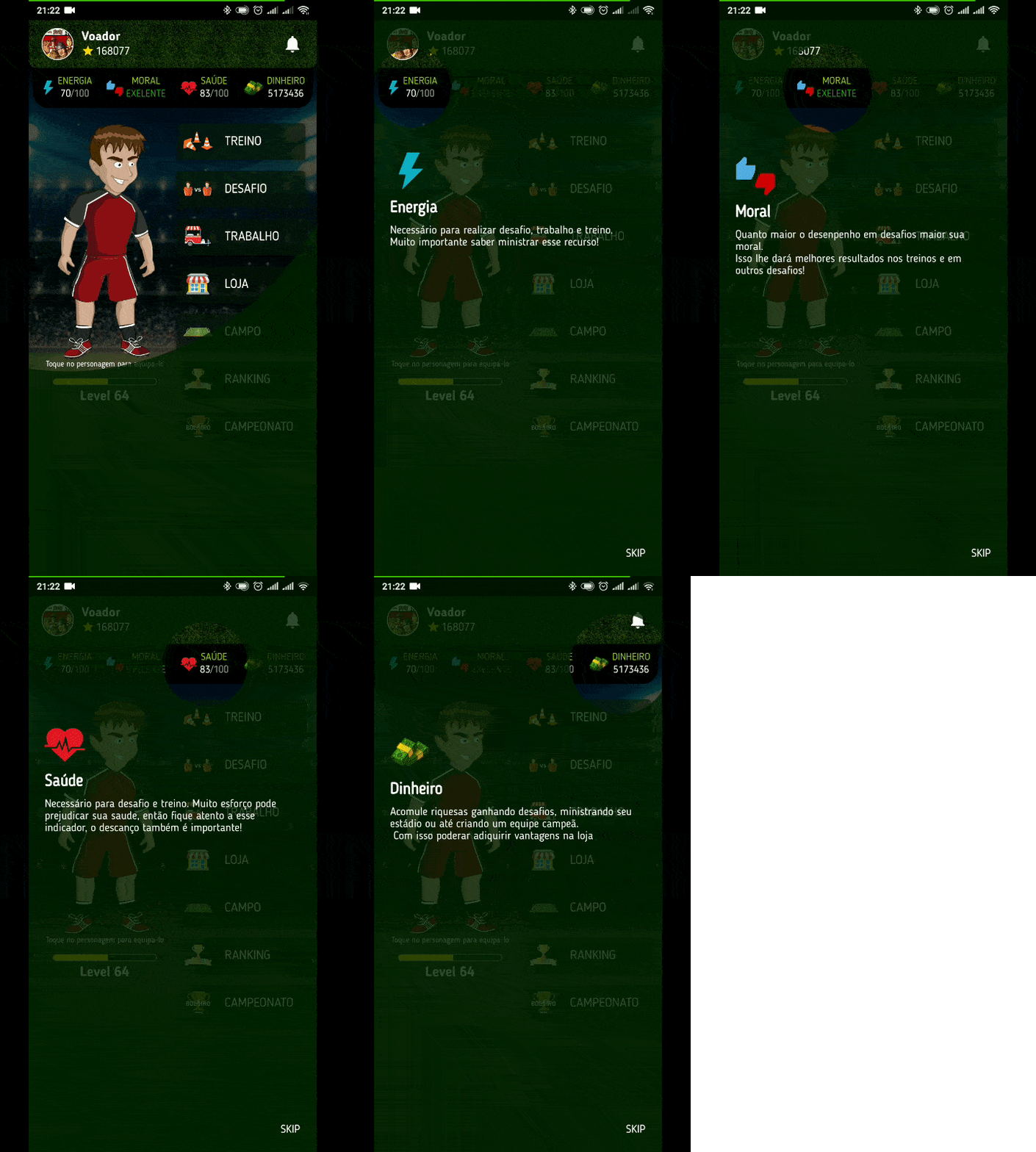
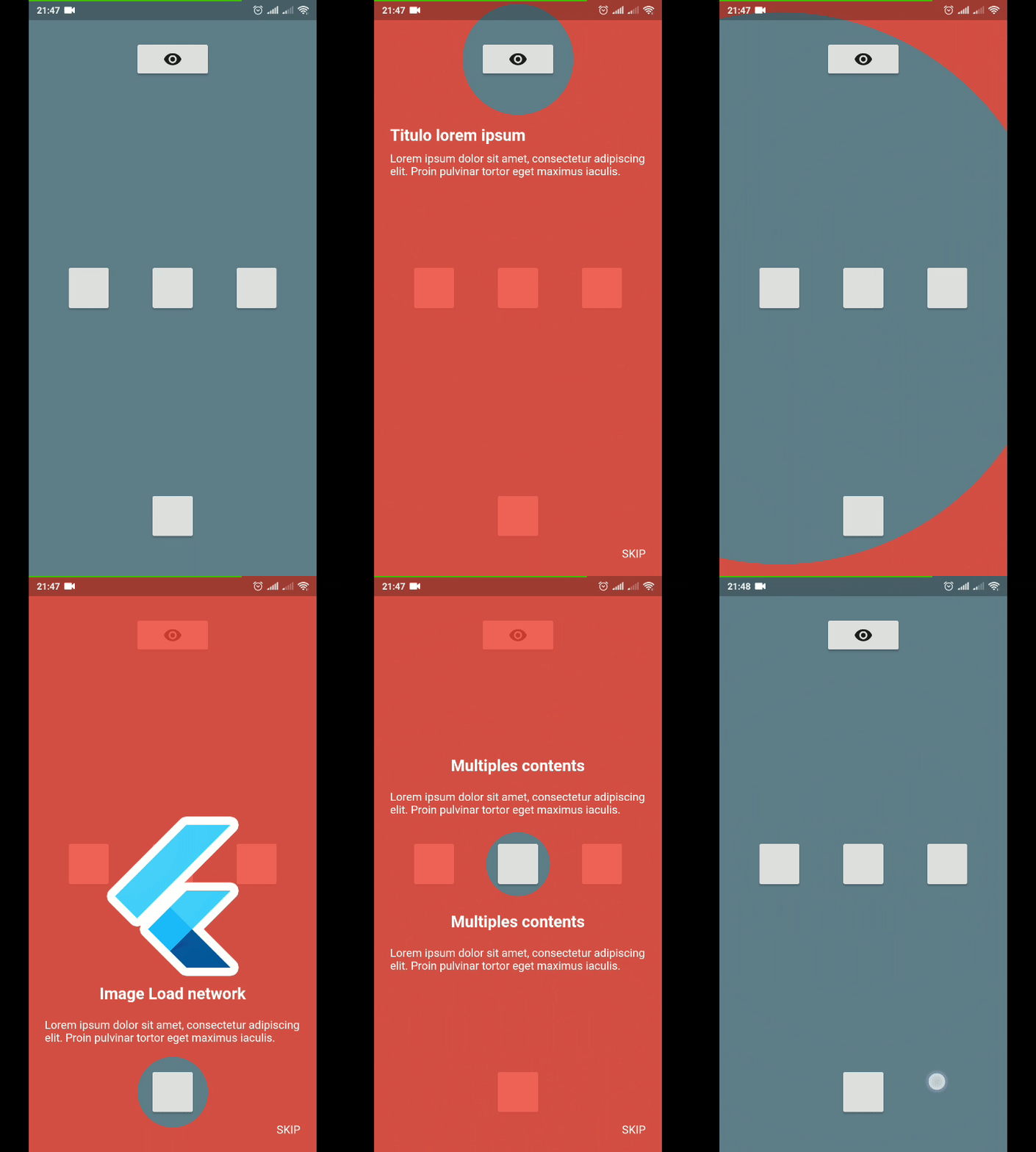
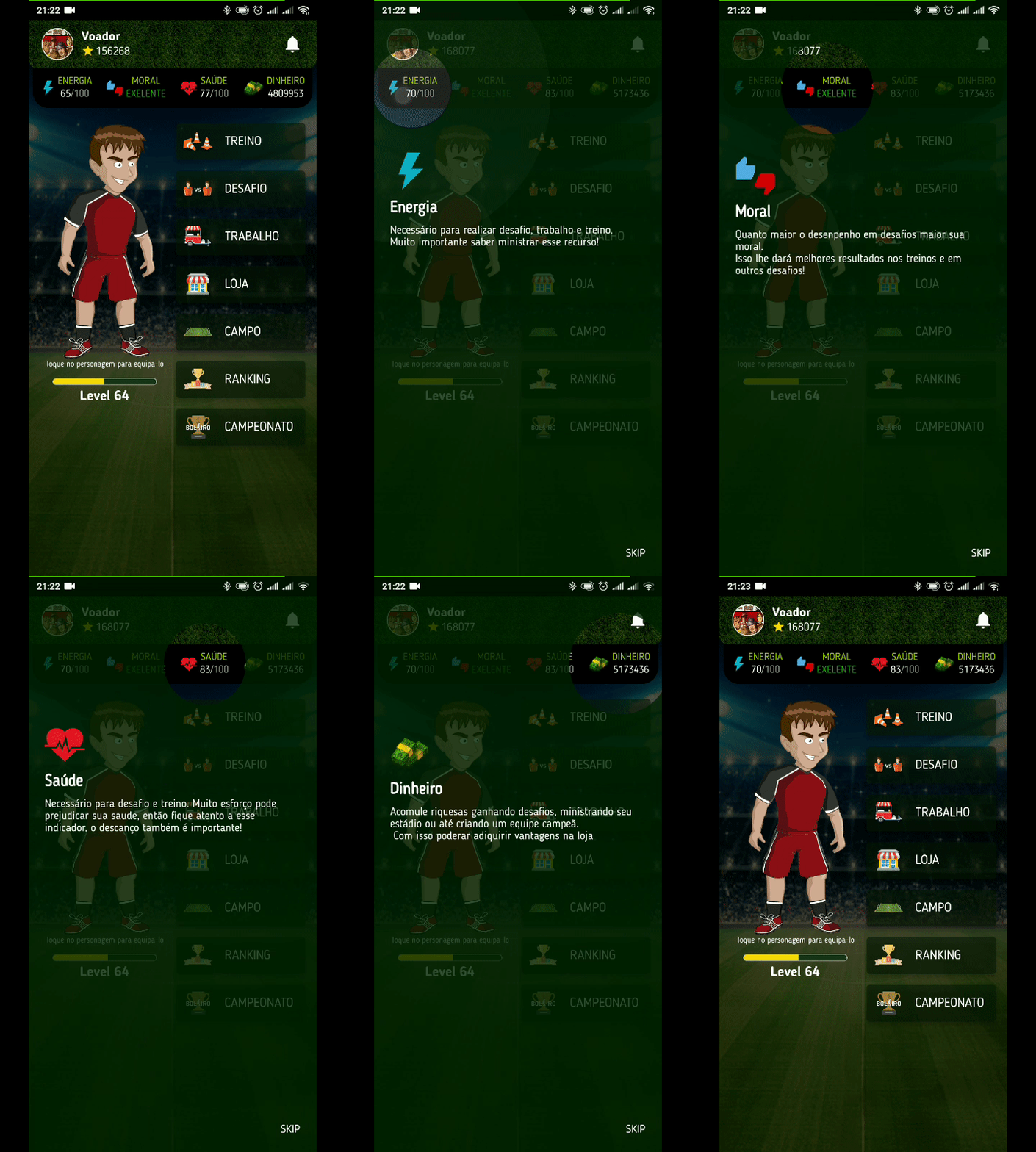
Example 1 Example 2

Usage

To use this plugin, add tutorial_coach_mark as a dependency in your pubspec.yaml file.

Example
import 'package:flutter/material.dart';
import 'package:tutorial_coach_mark/tutorial_coach_mark.dart';

void showTutorial() {
    TutorialCoachMark tutorial = TutorialCoachMark(
      targets: targets, // List<TargetFocus>
      colorShadow: Colors.red, // DEFAULT Colors.black
       // opacityShadow = 0.8,
       // alignSkip: Alignment.bottomRight,
       // textSkip: "SKIP",
       // textStyleSkip: const TextStyle(color: Colors.white),
       // skipWidget: MyWidget(),
       // hideSkip: false
       // showSkipInLastTarget: true,
       // paddingFocus: 10,
       // focusAnimationDuration: Duration(milliseconds: 500),
       // unFocusAnimationDuration: Duration(milliseconds: 500),
       // pulseAnimationDuration: Duration(milliseconds: 500),
       // pulseVariation: Tween(begin: 1.0, end: 0.99),
       // pulseEnable: true,
       // imageFilter: ImageFilter.blur(sigmaX: 8, sigmaY: 8),
       // initialFocus: 0,
       // useSafeArea: true,
       // finish: (){},
       // clickTarget: (TargetFocus) {},
       // onClickTargetWithTapPosition: (TargetFocus, TapDownDetails) {},
       // clickOverlay: (TargetFocus) {},
       // disableBackButton: false // If true disable native back button. 
      onFinish: (){
        print("finish");
      },
      onClickTargetWithTapPosition: (target, tapDetails) {
        print("target: $target");
        print("clicked at position local: ${tapDetails.localPosition} - global: ${tapDetails.globalPosition}");
      },
      onClickTarget: (target){
        print(target);
      },
      onSkip: (){
        print("skip");
        return true;
      }
    )..show(context:context);

    // tutorial.skip();
    // tutorial.finish();
    // tutorial.next(); // call next target programmatically
    // tutorial.previous(); // call previous target programmatically
    // tutorial.goTo(3); // call target programmatically by index
  }
Creating targets (TargetFocus)

TargetFocus is the class that represents the widget that will be focused and configure what will be displayed after you focus it.

Attributes:

Attribute Type Description
identify dynamic free for identification use
keyTarget GlobalKey GlobalKey widget that wants to be focused
targetPosition TargetPosition If you do not want to use GlobalKey, you can create a TargetPosition to determine where to focus
contents ContentTarget[] Content list you want to display after focusing widget
shape ShapeLightFocus ShapeLightFocus.Circle or ShapeLightFocus.RRect
radius double Use when shape = ShapeLightFocus.RRect
borderSide BorderSide
color Color Custom color to target
enableOverlayTab bool enable click in all screen to call next step
enableTargetTab bool enable click in target to call next step
alignSkip Alignment use to align the skip in the target
paddingFocus Alignment settings padding of the focus in target
focusAnimationDuration Duration override the widget's global focus animation duration
unFocusAnimationDuration Duration override the widget's global unfocus animation duration
pulseVariation Tween override interval pulse animation
Creating contents (ContentTarget)

ContentTarget is the class responsible for determining what should be displayed and how it will appear after focusing on the widget.

Attributes:

Attribute Type Description
align AlignContent With this attribute you determine in which region to display the content in relation to the focused widget (top,bottom,left,right)
padding EdgeInsets Padding of the content
child Widget Content you want to be displayed
builder Widget Content you want to be displayed
customPosition CustomTargetContentPosition Add custom position when align is AlignContent.custom
Example Complete
import 'package:flutter/material.dart';
import 'package:tutorial_coach_mark/tutorial_coach_mark.dart';

List<TargetFocus> targets = List();

 @override
 void initState() {
    targets.add(
        TargetFocus(
            identify: "Target 1",
            keyTarget: keyButton,
            contents: [
              TargetContent(
                  align: ContentAlign.bottom,
                  child: Container(
                    child:Column(
                      mainAxisSize: MainAxisSize.min,
                      crossAxisAlignment: CrossAxisAlignment.start,
                      children: <Widget>[
                        Text(
                          "Titulo lorem ipsum",
                          style: TextStyle(
                            fontWeight: FontWeight.bold,
                            color: Colors.white,
                            fontSize: 20.0
                          ),
                        ),
                        Padding(
                          padding: const EdgeInsets.only(top: 10.0),
                          child: Text("Lorem ipsum dolor sit amet, consectetur adipiscing elit. Proin pulvinar tortor eget maximus iaculis.",
                            style: TextStyle(
                                color: Colors.white
                            ),),
                        )
                      ],
                    ),
                  )
              )
            ]
        )
    );

    targets.add(
        TargetFocus(
            identify: "Target 2",
            keyTarget: keyButton4,
            contents: [
              TargetContent(
                  align: ContentAlign.left,
                  child: Container(
                    child: Column(
                      mainAxisSize: MainAxisSize.min,
                      crossAxisAlignment: CrossAxisAlignment.start,
                      children: <Widget>[
                        Text(
                          "Multiples content",
                          style: TextStyle(
                              fontWeight: FontWeight.bold,
                              color: Colors.white,
                              fontSize: 20.0
                          ),
                        ),
                        Padding(
                          padding: const EdgeInsets.only(top: 10.0),
                          child: Text("Lorem ipsum dolor sit amet, consectetur adipiscing elit. Proin pulvinar tortor eget maximus iaculis.",
                            style: TextStyle(
                                color: Colors.white
                            ),),
                        )
                      ],
                    ),
                  )
              ),
              TargetContent(
                  align: ContentAlign.top,
                  child: Container(
                    child: Column(
                      mainAxisSize: MainAxisSize.min,
                      crossAxisAlignment: CrossAxisAlignment.start,
                      children: <Widget>[
                        Text(
                          "Multiples content",
                          style: TextStyle(
                              fontWeight: FontWeight.bold,
                              color: Colors.white,
                              fontSize: 20.0
                          ),
                        ),
                        Padding(
                          padding: const EdgeInsets.only(top: 10.0),
                          child: Text("Lorem ipsum dolor sit amet, consectetur adipiscing elit. Proin pulvinar tortor eget maximus iaculis.",
                            style: TextStyle(
                                color: Colors.white
                            ),),
                        )
                      ],
                    ),
                  )
              )
            ]
        )
    );

    targets.add(
        TargetFocus(
            identify: "Target 3",
            keyTarget: keyButton5,
            contents: [
              TargetContent(
                  align: ContentAlign.right,
                  child: Container(
                    child: Column(
                      mainAxisSize: MainAxisSize.min,
                      crossAxisAlignment: CrossAxisAlignment.start,
                      children: <Widget>[
                        Text(
                          "Title lorem ipsum",
                          style: TextStyle(
                              fontWeight: FontWeight.bold,
                              color: Colors.white,
                              fontSize: 20.0
                          ),
                        ),
                        Padding(
                          padding: const EdgeInsets.only(top: 10.0),
                          child: Text("Lorem ipsum dolor sit amet, consectetur adipiscing elit. Proin pulvinar tortor eget maximus iaculis.",
                            style: TextStyle(
                                color: Colors.white
                            ),),
                        )
                      ],
                    ),
                  )
              )
            ]
        )
    );
}

void showTutorial() {
    TutorialCoachMark(
      targets: targets, // List<TargetFocus>
      colorShadow: Colors.red, // DEFAULT Colors.black
       // alignSkip: Alignment.bottomRight,
       // textSkip: "SKIP",
       // paddingFocus: 10,
       // opacityShadow: 0.8,
      onClickTarget: (target){
        print(target);
      },
      onClickTargetWithTapPosition: (target, tapDetails) {
        print("target: $target");
        print("clicked at position local: ${tapDetails.localPosition} - global: ${tapDetails.globalPosition}");
      },
      onClickOverlay: (target){
        print(target);
      },
      onSkip: (){
        print("skip");
        return true;
      },
      onFinish: (){
        print("finish");
      },
    )..show(context:context);
  }

Contribution

If you find any errors or want to add improvements, you can open a issue or develop the fix and open a pull request. Thank you for your cooperation!

Kategorien

Quell-Repository

Projekte, die dieses Paket verwenden