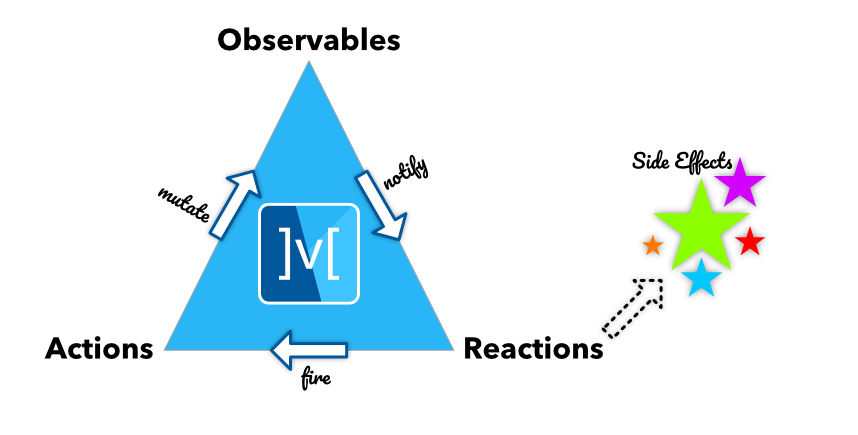
MobX के लिए Flutter इंटीग्रेशन। यह ट्रैक किए गए ओब्जर्वेबल्स में परिवर्तन होने पर स्वचालित रूप से पुनर्निर्माण करने वाले Observer विजेट्स का सेट प्रदान करता है।
सार्वजनिक जानकारी से बना चयन मार्गदर्शन। केवल संदर्भ हेतु।
Flutter MobX एक राज्य प्रबंधन समाधान है जो MobX को Flutter के साथ एकीकृत करता है, जिससे Observer विजेट्स के माध्यम से प्रतिक्रियाशील UI अपडेट होते हैं। जब नीचे के निरीक्षण करने योग्य बदलाव होते हैं, तो यह स्वचालित रूप से विजेट्स को पुनः निर्मित करता है, जिससे बॉयलरप्लेट कम होता है और विकास गति बढ़ती है। इस पैकेज में बारीक अभिक्रियाशीलता का समर्थन है, जो घटनाक्रमिक अनुप्रयोगों के लिए उपयुक्त है जिनमें घटकों के बीच वास्तविक समय में डेटा समन्वय की आवश्यकता होती है। यह Dart की शक्तिशाली प्रकार प्रणाली का उपयोग करता है और Flutter फ्रेमवर्क के साथ बिना किसी दिक्कत के एकीकृत होता है।
उपयोग
रियल-टाइम डेटा प्रदर्शन
फॉर्म राज्य प्रबंधन
डायनामिक यूआई अपडेट्स
क्रॉस-विजेट राज्य साझाकरण
जटिल ऐप स्थिति का हेरफेर
मुख्य विशेषताएँ
स्वचालित विजेट पुनर्निर्माण
सूक्ष्म-कोष्ठ अनुक्रियता
न्यूनतम बॉयलरप्लेट
प्रेक्षण ट्रैकिंग
Flutter विजेट्स के साथ एकीकरण
इनके लिए उपयुक्त
प्रतिक्रियाशील अवस्था प्रबंधन की तलाश में विकासकर्ता
लगातार UI अपडेट वाले ऐप्स
अन्य Dart प्रोजेक्ट में MobX का उपयोग करने वाली टीमें
विकासक उत्पादकता पर ध्यान केंद्रित परियोजनाएं
विचार योग्य बातें
MobX अवधारणाओं की समझ की आवश्यकता है
अन्य राज्य प्रबंधकों की तुलना में सीमित डिबगिंग उपकरण
यदि प्रेक्षणीय वस्तुओं को सही रूप से सीमित नहीं किया गया है, तो संभावित अतिक्रिया हो सकती है
मूल README
संबंधित सोर्स रिपॉज़िटरी के मूल README का स्नैपशॉट। नवीनतम सामग्री के लिए रिपॉज़िटरी देखें।
MobX is a state-management library that makes it simple to connect the
reactive data of your application with the UI. This wiring is completely automatic
and feels very natural. As the application-developer, you focus purely on what reactive-data
needs to be consumed in the UI (and elsewhere) without worrying about keeping the two
in sync.
It's not really magic but it does have some smarts around what is being consumed (observables)
and where (reactions), and automatically tracks it for you. When the observables
change, all reactions are re-run. What's interesting is that these reactions can be anything from a simple
console log, a network call to re-rendering the UI.
MobX has been a very effective library for the JavaScript
apps and this port to the Dart language aims to bring the same levels of productivity.
Sponsors
We are very thankful to our sponsors to make us part of their Open Source Software (OSS) program. [Become a sponsor]
For a deeper coverage of MobX, do check out MobX Quick Start Guide. Although the book uses the JavaScript version of MobX, the concepts are 100% applicable to Dart and Flutter.
Core Concepts
At the heart of MobX are three important concepts: Observables, Actions and Reactions.
Observables
Observables represent the reactive-state of your application. They can be simple scalars to complex object trees. By
defining the state of the application as a tree of observables, you can expose a reactive-state-tree that the UI
(or other observers in the app) consume.
A simple reactive-counter is represented by the following observable:
import'package:mobx/mobx.dart';
final counter = Observable(0);
More complex observables, such as classes, can be created as well.
On first sight, this does look like some boilerplate code which can quickly go out of hand!
This is why we added mobx_codegen to the mix that allows you to replace the above code with the following:
Note the use of annotations to mark the observable properties of the class. Yes, there is some header boilerplate here
but its fixed for any class. As you build more complex classes this boilerplate
will fade away and you will mostly focus on the code within the braces.
Note: Annotations are available via the mobx_codegen package.
Readonly
If you want to reduce your code you may want to swap @observable for @readonly.
For every private variable it generates a public getter such that the client of your store
can't change its value. Read more about it here
Computed Observables
What can be derived, should be derived. Automatically.
The state of your application consists of core-state and derived-state. The core-state is state inherent to the domain you are dealing with. For example, if you have a Contact entity, the firstName and lastName form the core-state of Contact. However, fullName is derived-state, obtained by combining firstName and lastName.
Such derived state, that depends on core-state or other derived-state is called a Computed Observable. It is automatically kept in sync when its underlying observables change.
In the example above fullName is automatically kept in sync if either firstName and/or lastName changes.
Actions
Actions are how you mutate the observables. Rather than mutating them directly, actions
add a semantic meaning to the mutations. For example, instead of just doing value++,
firing an increment() action carries more meaning. Besides, actions also batch up
all the notifications and ensure the changes are notified only after they complete.
Thus the observers are notified only upon the atomic completion of the action.
Note that actions can also be nested, in which case the notifications go out
when the top-most action has completed.
final counter = Observable(0);

final increment = Action((){
  counter.value++;
});
When creating actions inside a class, you can take advantage of annotations!
Reactions complete the MobX triad of observables, actions and reactions. They are
the observers of the reactive-system and get notified whenever an observable they
track is changed. Reactions come in few flavors as listed below. All of them
return a ReactionDisposer, a function that can be called to dispose the reaction.
One striking feature of reactions is that they automatically track all the observables without any explicit wiring. The act of reading an observable within a reaction is enough to track it!
The code you write with MobX appears to be literally ceremony-free!
ReactionDisposer autorun(Function(Reaction) fn)
Runs the reaction immediately and also on any change in the observables used inside
fn.
import'package:mobx/mobx.dart';
final greeting = Observable('Hello World');
final dispose = autorun((_){
print(greeting.value);
});
greeting.value = 'Hello MobX';
// Done with the autorun()dispose();
// Prints:// Hello World// Hello MobX
Monitors the observables used inside the predicate() function and runs the effect() when
the predicate returns a different value. Only the observables inside predicate() are tracked.
import'package:mobx/mobx.dart';
final greeting = Observable('Hello World');
final dispose = reaction((_) => greeting.value, (msg) => print(msg));
greeting.value = 'Hello MobX'; // Cause a change// Done with the reaction()dispose();
// Prints:// Hello MobX
Monitors the observables used inside predicate() and runs the effect()when it returns true. After the effect() is run, when automatically disposes itself. So you can think of when as a one-timereaction. You can also dispose when() pre-maturely.
import'package:mobx/mobx.dart';
final greeting = Observable('Hello World');
final dispose = when((_) => greeting.value == 'Hello MobX', () => print('Someone greeted MobX'));
greeting.value = 'Hello MobX'; // Causes a change, runs effect and disposes// Prints:// Someone greeted MobX
Similar to when but returns a Future, which is fulfilled when the predicate() returns true. This is a convenient way of waiting for the predicate() to turn true.
One of the most visual reactions in the app is the UI. The Observer widget (which is part of the flutter_mobx package), provides a granular observer of the observables used in its builder function. Whenever these observables change, Observer rebuilds and renders.