Pakete, Repositories und App-Kategorien suchen

Cover von flutter_slidable
Paketdetailsv5.2.0

flutter_slidable

Eine Flutter-Implementierung eines verschiebbaren Listenartikels mit richtungsabhängigen Verschiebeaktionen, die abgeschlossen werden können.

AndroidiOSWebmacOSWindowsLinux
30-Tage-Downloads
807.000
Likes
6150
Pub-Punkte
150

Paket installieren

flutter pub add flutter_slidable

Paketübersicht

Aus öffentlichen Paketdaten erstellte Orientierung.

flutter_slidable ist ein Flutter-Paket, das interaktive Listenelemente mit swipebaren Aktionen ermöglicht, sodass Benutzer durch Wischen nach links oder rechts Aktionsschaltflächen anzeigen können. Es unterstützt sowohl gerichtete Schiebe- als auch Ablehnungsgesten und ist ideal für Funktionen wie Löschen, Archivieren oder Markieren als gelesen in Listen. Das Paket integriert sich nahtlos mit ListView und anderen scrollbaren Widgets und bietet anpassbare Animationen und Layouts. Es funktioniert auf allen wichtigen Plattformen, einschließlich Android, iOS, Web, macOS, Windows und Linux.

Anwendungsfälle

  • Swipe-to-Delete in Aufgabenlisten implementieren
  • Zusätzliche Kontextaktionen zu Kontakten oder Nachrichten hinzufügen
  • Erstellen interaktiver Aufgaben-Elemente
  • Schnellaktionen in einem Feed oder Posteingang aktivieren
  • Unterstützung von ablebbaren Benachrichtigungen
  • Aufbau von reaktiven Listenartikel-Interaktionen

Hauptmerkmale

  • Nach links/rechts wischen, um Aktionen anzuzeigen
  • Eingebaute Unterstützung für Entfernungsgesten
  • Anpassbare Aktionsschaltflächen
  • Glatte Animationen beim Schieben
  • Plattformübergreifende Kompatibilität
  • Flexible Layout-Konfiguration

Geeignet für

  • Entwickler, die interaktive Listen erstellen
  • Apps, die swipebasierte Benutzeraktionen erfordern
  • Projekte mit dynamischen Listenartikeln
  • Teams, die eine konsistente Benutzererfahrung über Plattformen hinweg priorisieren
  • Benutzer, die leichtgewichtige, gut gepflegte Pakete suchen

Hinweise

  • Kann eine sorgfältige Behandlung von Touch-Ereignissen in verschachtelten Scrollansichten erfordern
  • Die Positionierung der Aktionsschaltfläche sollte auf verschiedenen Bildschirmgrößen getestet werden
  • Leistungseinbußen bei großen Listen ohne Optimierung
  • Begrenzte integrierte Themenoptionen außer grundlegenden Stilen
  • Nicht für komplexe Drag-and-Drop-Interaktionen konzipiert

Original-README

Originaler README-Schnappschuss aus dem verknüpften Quell-Repository. Aktuelle Inhalte finden Sie im Repository.

Pub BuyMeACoffee

Slidable is a Flutter Favorite package!

flutter_slidable

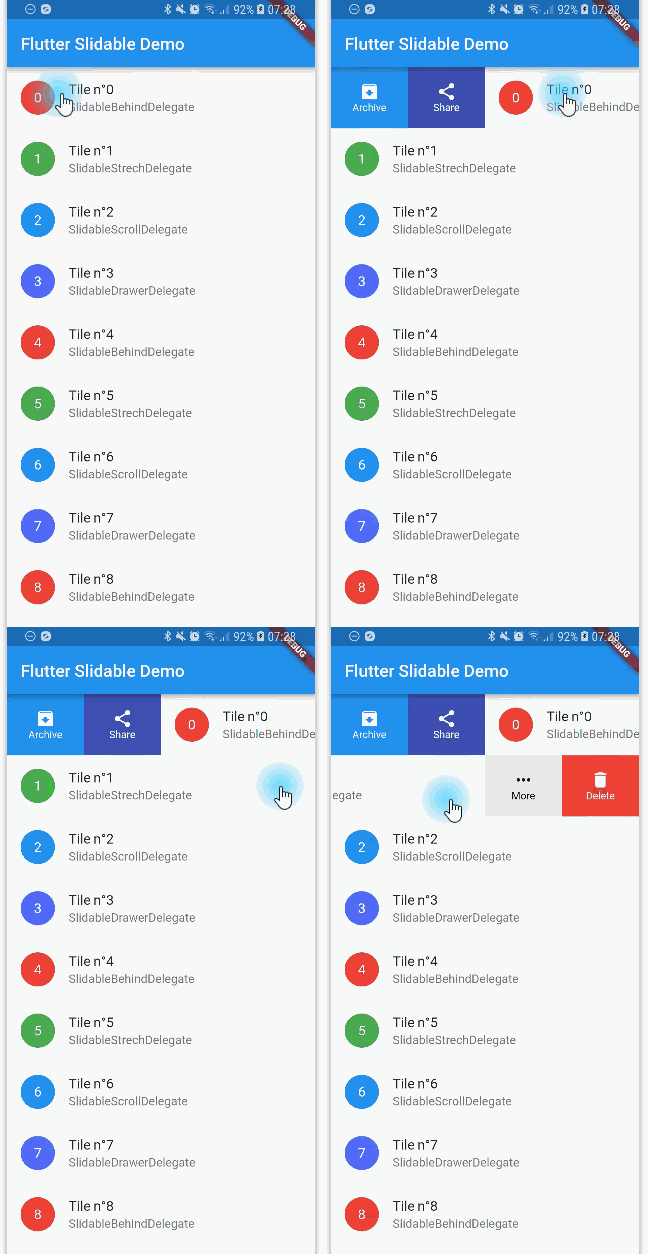
A Flutter implementation of slidable list item with directional slide actions that can be dismissed.

Sponsors

Our top sponsors are shown below! [Become a Sponsor]


Try the Flutter Chat Tutorial  💬

Your complete platform for sending notifications

Migration from 0.6.0

You can read this small guide to migrate from the 0.6 to the 1.0 version: https://github.com/letsar/flutter_slidable/wiki/Migration-from-version-0.6.0-to-version-1.0.0

Features

  • Accepts start (left/top) and end (right/bottom) action panes.
  • Can be dismissed.
  • 4 built-in action panes.
  • 2 built-in slide action widgets.
  • 1 built-in dismiss animation.
  • You can easily create custom layouts and animations.
  • You can use a builder to create your slide actions if you want special effects during animation.
  • Closes when a slide action has been tapped (overridable).
  • Closes when the nearest Scrollable starts to scroll (overridable).
  • Option to disable the slide effect easily.

Install

In the pubspec.yaml of your flutter project, add the following dependency:

dependencies:
  flutter_slidable: <latest_version>

In your library add the following import:

import 'package:flutter_slidable/flutter_slidable.dart';

Getting started

Example:

Slidable(
  // Specify a key if the Slidable is dismissible.
  key: const ValueKey(0),

  // The start action pane is the one at the left or the top side.
  startActionPane: ActionPane(
    // A motion is a widget used to control how the pane animates.
    motion: const ScrollMotion(),

    // A pane can dismiss the Slidable.
    dismissible: DismissiblePane(onDismissed: () {}),

    // All actions are defined in the children parameter.
    children: const [
      // A SlidableAction can have an icon and/or a label.
      SlidableAction(
        onPressed: doNothing,
        backgroundColor: Color(0xFFFE4A49),
        foregroundColor: Colors.white,
        icon: Icons.delete,
        label: 'Delete',
      ),
      SlidableAction(
        onPressed: doNothing,
        backgroundColor: Color(0xFF21B7CA),
        foregroundColor: Colors.white,
        icon: Icons.share,
        label: 'Share',
      ),
    ],
  ),

  // The end action pane is the one at the right or the bottom side.
  endActionPane: const ActionPane(
    motion: ScrollMotion(),
    children: [
      SlidableAction(
        // An action can be bigger than the others.
        flex: 2,
        onPressed: doNothing,
        backgroundColor: Color(0xFF7BC043),
        foregroundColor: Colors.white,
        icon: Icons.archive,
        label: 'Archive',
      ),
      SlidableAction(
        onPressed: doNothing,
        backgroundColor: Color(0xFF0392CF),
        foregroundColor: Colors.white,
        icon: Icons.save,
        label: 'Save',
      ),
    ],
  ),

  // The child of the Slidable is what the user sees when the
  // component is not dragged.
  child: const ListTile(title: Text('Slide me')),
),

Motions

Any ActionPane has a motion parameter which allow you to define how the pane animates when the user drag the Slidable.

Behind Motion

The actions appear as if they where behind the Slidable:

Behind Motion

Drawer Motion

Animate the actions as if they were drawers, when the Slidable is moving:

Drawer Motion

Scroll Motion

The actions follow the Slidable while it's moving:

Scroll Motion

Stretch Motion

Animate the actions as if they were streched while the Slidable is moving:

Stretch Motion

Controller

You can use SlidableController to open or close the actions programmatically:

final controller = SlidableController();

// ...

Slidable(
  controller: controller,
  // ...
);

// ...

// Open the actions
void _handleOpen() {
  controller.openEndActionPane();
  // OR
  //controller.openStartActionPane();
}

void _handleOpen() {
  controller.close();
}

FAQ

You can read the FAQ here: https://github.com/letsar/flutter_slidable/wiki/FAQ

Sponsoring

I'm working on my packages on my free-time, but I don't have as much time as I would. If this package or any other package I created is helping you, please consider to sponsor me so that I can take time to read the issues, fix bugs, merge pull requests and add features to these packages.

Contributions

Feel free to contribute to this project.

If you find a bug or want a feature, but don't know how to fix/implement it, please fill an issue.
If you fixed a bug or implemented a feature, please send a pull request.

Kategorien

Abhängigkeiten

Abhängigkeiten 1 Einträge

Quell-Repository

Projekte, die dieses Paket verwenden

Ranglisten