패키지, 저장소 및 앱 카테고리 검색

flutter_staggered_grid_view 표지
패키지 상세v0.7.0

flutter_staggered_grid_view

Flutter 그리드 레이아웃(스태거드, 메이슨리, 큐일티드, 웨븐 등)의 컬렉션을 제공합니다.

AndroidiOSWebmacOSWindowsLinux
30일 다운로드
155만
좋아요
4.8천
Pub 점수
140

패키지 설치

flutter pub add flutter_staggered_grid_view

패키지 개요

공개 정보를 바탕으로 생성한 선택 가이드입니다.

다양한 사용자 정의 가능한 그리드 레이아웃(스태거드, 메이슨리, 퀼트, 웨븐 디자인 등)을 제공하는 플러터 패키지입니다. 표준 GridView 기능을 확장하여 비정형 아이템 크기와 동적 배열을 지원하며, 사진 갤러리나 제품 목록과 같은 시각적으로 매력적인 콘텐츠 표시에 이상적입니다. 이 패키지는 가볍고 잘 문서화되어 있으며 모든 주요 플랫폼과 호환됩니다.

사용 사례

  • 사진 갤러리 인터페이스
  • 제품 목록 레이아웃
  • 동적 콘텐츠 격자
  • 크리에이티브한 UI 디자인
  • 소셜 미디어 피드 레이아웃

주요 기능

  • 스테거드 및 메이슨리 레이아웃을 지원합니다
  • 사용자 정의 가능한 항목 치수
  • 스무스 스크롤 성능
  • 크로스 플랫폼 호환성
  • 유연한 그리드 구성
  • 내장 애니메이션 지원

적합한 대상

  • 시각적으로 부담이 큰 앱을 개발하는 개발자
  • 독특한 그리드 패턴을 찾는 디자이너
  • 반응형 콘텐츠 레이아웃을 요구하는 앱
  • 변동 크기의 항목을 가진 프로젝트
  • UI 마무리에 중점을 두는 팀

고려 사항

  • 작은 화면에서 정밀한 레이아웃 테스트가 필요할 수 있습니다
  • 매우 큰 데이터 세트에서는 성능이 저하될 수 있습니다
  • 제한된 내장 항목 간격 제어
  • 간단한 균일 격자에 적합하지 않습니다
  • 사용자 정의 레이아웃 원칙에 대한 이해가 필요합니다

원본 README

연결된 소스 저장소의 README 원문 스냅샷입니다. 최신 내용은 저장소에서 확인하세요.

Pub BuyMeACoffee

flutter_staggered_grid_view

Provides a collection of Flutter grids layouts.

Getting started

In the pubspec.yaml of your flutter project, add the following dependency:

dependencies:
  ...
  flutter_staggered_grid_view: <latest_version>

In your library add the following import:

import 'package:flutter_staggered_grid_view/flutter_staggered_grid_view.dart';

For help getting started with Flutter, view the online documentation.

Layouts

This package contains various grid layouts. In the following section, you'll discover each one of them. The explanation of the layout will always considered a top-to-bottom and left-to-right directions to simplify the description. However it is possible to change these directions in the code.

Staggered

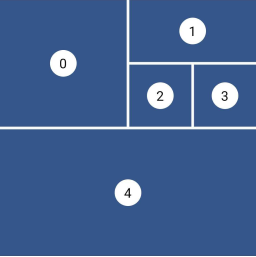
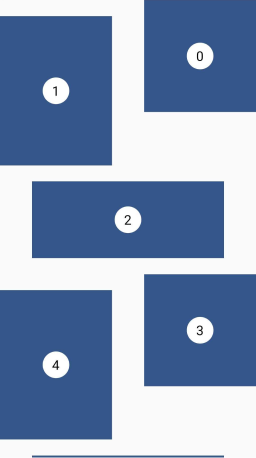
Staggered Grid Layout

This layout is intended for a small number of items. I didn't find, for the moment, a performant algorithm which would work in a Sliver context, that's why this is not a GridView and therefore there are no SliverStaggeredGrid.

Grid properties
  • Evenly divided in n columns
  • Small number of items
  • Not scrollable
Tile properties
  • Must occupy 1 to n columns
Placement algorithm
  • Top-most and then left-most
Example

Below you'll find the code to create this grid layout:

Staggered example

StaggeredGrid.count(
  crossAxisCount: 4,
  mainAxisSpacing: 4,
  crossAxisSpacing: 4,
  children: const [
    StaggeredGridTile.count(
      crossAxisCellCount: 2,
      mainAxisCellCount: 2,
      child: Tile(index: 0),
    ),
    StaggeredGridTile.count(
      crossAxisCellCount: 2,
      mainAxisCellCount: 1,
      child: Tile(index: 1),
    ),
    StaggeredGridTile.count(
      crossAxisCellCount: 1,
      mainAxisCellCount: 1,
      child: Tile(index: 2),
    ),
    StaggeredGridTile.count(
      crossAxisCellCount: 1,
      mainAxisCellCount: 1,
      child: Tile(index: 3),
    ),
    StaggeredGridTile.count(
      crossAxisCellCount: 4,
      mainAxisCellCount: 2,
      child: Tile(index: 4),
    ),
  ],
);
Masonry

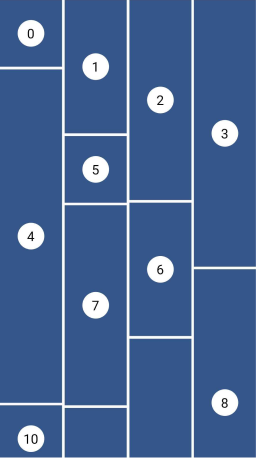
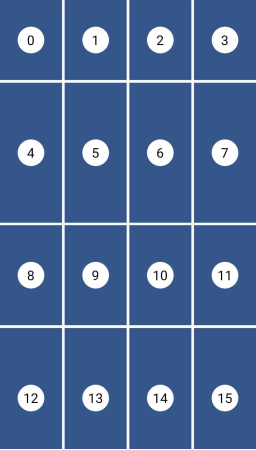
Masonry Grid Layout

This layout facilitates the browsing of uncropped peer content. Container heights are sized based on the widget size.

This is a complete separate grid and not a SliverGridDelegate for performance reasons. The SliverGrid is great but it needs to have a layout which does not depends on the size of its children. Otherwise we have to compute the size to all children before the end of the cache, which is really not performant for a masonry layout.

Grid properties
  • Evenly divided in n columns
Tile properties
  • Must occupy 1 column only
Placement algorithm
  • Top-most and then left-most
Example

Below you'll find the code to create this grid layout:

Masonry example

MasonryGridView.count(
  crossAxisCount: 4,
  mainAxisSpacing: 4,
  crossAxisSpacing: 4,
  itemBuilder: (context, index) {
    return Tile(
      index: index,
      extent: (index % 5 + 1) * 100,
    );
  },
);
Quilted

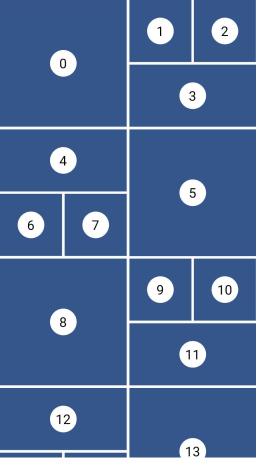
Quilted Grid Layout

This layout emphasizes certain items over others in a collection. It creates hierarchy using varied container sizes and ratios.

This is a specific delegate for the built-in GridView (or SliverGrid) widget. That's why the example below will create such a layout with a GridView.

Grid properties
  • Evenly divided in n columns
  • The height of each row is equal to the width of each column
  • A pattern defines the size of the tiles and different mode of repetition are possible
Tile properties
  • Must occupy 1 to n columns
  • Must occupy 1 or more entire rows
Placement algorithm
  • Top-most and then left-most
Example

Below you'll find the code to create this grid layout:

Quilted example

GridView.custom(
  gridDelegate: SliverQuiltedGridDelegate(
    crossAxisCount: 4,
    mainAxisSpacing: 4,
    crossAxisSpacing: 4,
    repeatPattern: QuiltedGridRepeatPattern.inverted,
    pattern: [
      QuiltedGridTile(2, 2),
      QuiltedGridTile(1, 1),
      QuiltedGridTile(1, 1),
      QuiltedGridTile(1, 2),
    ],
  ),
  childrenDelegate: SliverChildBuilderDelegate(
    (context, index) => Tile(index: index),
  ),
);
Woven

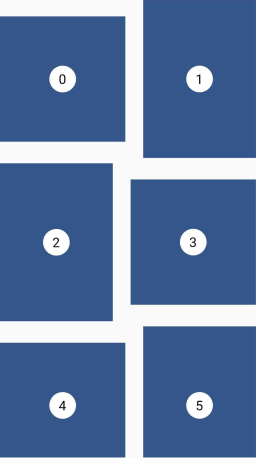
Woven Grid Layout

This layout facilitates the browsing of peer content. The items are displayed in containers of varying ratios to create a rhythmic layout.

This is a specific delegate for the built-in GridView (or SliverGrid) widget. That's why the example below will create such a layout with a GridView.

Grid properties
  • Evenly divided in n columns
  • The height the rows is the maximum height of the tiles
  • A pattern defines the size of the tiles
  • The size of the tiles follows the pattern in a 'z' sequence.
Tile properties
  • The height is defined by an aspectRatio (width/height)
  • The width is defined by a crossAxisRatio (width/column's width) between 0 (exclusive) and 1 (inclusive)
  • Each tile can define how it is aligned within the available space
Placement algorithm
  • Top-most and then left-most
Example

Below you'll find the code to create this grid layout:

Woven example

GridView.custom(
  gridDelegate: SliverWovenGridDelegate.count(
    crossAxisCount: 2,
    mainAxisSpacing: 8,
    crossAxisSpacing: 8,
    pattern: [
      WovenGridTile(1),
      WovenGridTile(
        5 / 7,
        crossAxisRatio: 0.9,
        alignment: AlignmentDirectional.centerEnd,
      ),
    ],
  ),
  childrenDelegate: SliverChildBuilderDelegate(
    (context, index) => Tile(index: index),
  ),
);
Staired

Staired Grid Layout

This layout uses alternating container sizes and ratios to create a rhythmic effect. It's another kind of woven grid layout.

This is a specific delegate for the built-in GridView (or SliverGrid) widget. That's why the example below will create such a layout with a GridView.

Grid properties
  • A pattern defines the size of the tiles
  • Each tile is shifted from the previous one by a margin in both axis
  • The placement follows a 'z' sequence
Tile properties
  • The height is defined by an aspectRatio (width/height)
  • The width is defined by a crossAxisRatio (width/available horizontal space) between 0 (exclusive) and 1 (inclusive)
Placement algorithm
  • In a 'z' sequence
Example

Below you'll find the code to create this grid layout:

Staired example

GridView.custom(
  gridDelegate: SliverStairedGridDelegate(
    crossAxisSpacing: 48,
    mainAxisSpacing: 24,
    startCrossAxisDirectionReversed: true,
    pattern: [
      StairedGridTile(0.5, 1),
      StairedGridTile(0.5, 3 / 4),
      StairedGridTile(1.0, 10 / 4),
    ],
  ),
  childrenDelegate: SliverChildBuilderDelegate(
    (context, index) => Tile(index: index),
  ),
);
Aligned

Aligned Grid Layout

This layout is also called CSS Grid. This is a common grid layout on the web, where each item within a track has the maximum cross axis extent of its siblings.

Grid properties
  • Evenly divided in n columns
  • The rows can have differents heights
Tile properties
  • Must occupy 1 column only
  • Each tile has the same height as the tallest one of the row.
Placement algorithm
  • Top-most and then left-most
Example

Below you'll find the code to create this grid layout:

Aligned example

AlignedGridView.count(
  crossAxisCount: 4,
  mainAxisSpacing: 4,
  crossAxisSpacing: 4,
  itemBuilder: (context, index) {
    return Tile(
      index: index,
      extent: (index % 7 + 1) * 30,
    );
  },
);

Sponsoring

I'm working on my packages on my free-time, but I don't have as much time as I would. If this package or any other package I created is helping you, please consider to sponsor me so that I can take time to read the issues, fix bugs, merge pull requests and add features to these packages.

Sponsors

I want to thank Tommy for sponsoring this package. Thanks to him, I took the time to investigate in the previous performance issues and refactor this library to make it how is it today.


Tom3652

Contributions

Feel free to contribute to this project.

If you find a bug or want a feature, but don't know how to fix/implement it, please fill an issue.
If you fixed a bug or implemented a feature, please send a pull request.

카테고리

소스 저장소

이 패키지를 사용하는 프로젝트