搜索插件、代码仓与 APP 分类

animated_toast_list 封面
插件详情v2.0.0

animated_toast_list

任何使用此包的人都会感到更加自由。因为这个包是通用的,您可以创建您想要的提示。

AndroidiOSWebmacOSWindowsLinux
近 30 天下载
940
喜欢数
30
Pub 分数
160

安装插件

flutter pub add animated_toast_list

插件介绍

基于插件公开信息、社区数据与项目使用情况整理的选型参考。

AnimatedToastList 是一个 Flutter 包,可让开发者轻松创建可自定义的动画弹出消息。该包设计为通用且灵活,允许用户定义自己的弹出消息外观和行为,非常适合需要独特通知样式的应用程序。该包支持 Android、iOS、Web、macOS、Windows 和 Linux 多个平台,确保在不同设备上提供一致的用户体验。通过流畅的动画和仅需一条命令即可完成的简单集成,它在不增加复杂性的情况下增强了应用反馈。

适合场景

  • 自定义应用内通知
  • 用户在操作后的反馈
  • 交互式用户界面元素
  • 跨平台通知显示
  • 实时状态更新

主要特点

  • 高度可定制的吐司设计
  • 流畅的动画效果
  • 多平台支持
  • 与 Flutter 的简单集成
  • 适用于任何吐司样式的通用模板

适合对象

  • 寻求独特吐司设计的开发者
  • 需要跨平台通知的应用
  • 强调用户体验的项目
  • UI密集型应用
  • 希望拥有可重用通知组件的团队

使用建议

  • 需要自定义样式知识
  • 可能需要对复杂动画进行性能调优
  • 有限的内置主题
  • 最适合频繁用户交互的应用程序
  • 依赖于动态通知的正确状态管理

原始 README

以下为关联源码仓库的 README 原文快照,最新内容请访问源码仓库。

Introduction

When using Flutter, did you ever want to show toast with the design you want? Also, did you want to list the toast and show it with the desired animation? Then you have found what you are looking for! This package is generic, so there will be no problem with your toast. This package supports all platforms.

Usage

To use this package, wrap any widget with ToastListOverlay, as in the example below. For more details, see the example.

Widget build(BuildContext context) {
    return ToastListOverlay<MyToastModel>(
      itemBuilder: (BuildContext context, MyToastModel item, int index,
          Animation<double> animation) {
        return ToastItem(
          animation: animation,
          item: item,
          onTap: () => context.hideToast(
              item,
              (context, animation) =>
                  _buildItem(context, item, index, animation)),
        );
      },
      child: MaterialApp(
        theme: ThemeData(
          primarySwatch: Colors.blue,
        ),
        home: const MainScreen(),
        debugShowCheckedModeBanner: false,
      ),
    );
  }
Property Default value Description
child Required Widget Wrapped widget
position Alignment.topCenter Specifies where toast to be displayed.
reverse false Reverse the Toast list.
limit 5 Specify how much toast to display.
itemBuilder Required ToastListItemBuilder The Toast widget is defined here.
width 375 Specifies the width of the toast.
timeoutDuration 5 seconds Specifies how long toast will be displayed.

Now you can call the context.showToast method to display your toast. You can see more details in the example.

  context.showToast(MyToastModel(ToastType.success.name, ToastType.success));

Note: MyToastModel is an example model.

To close the Toast, call the context.hideToast method.

context.hideToast(
  item,
  (context, animation) => ToastItem(
    animation: animation,
    item: item,
  ),
);

Live demo

Example

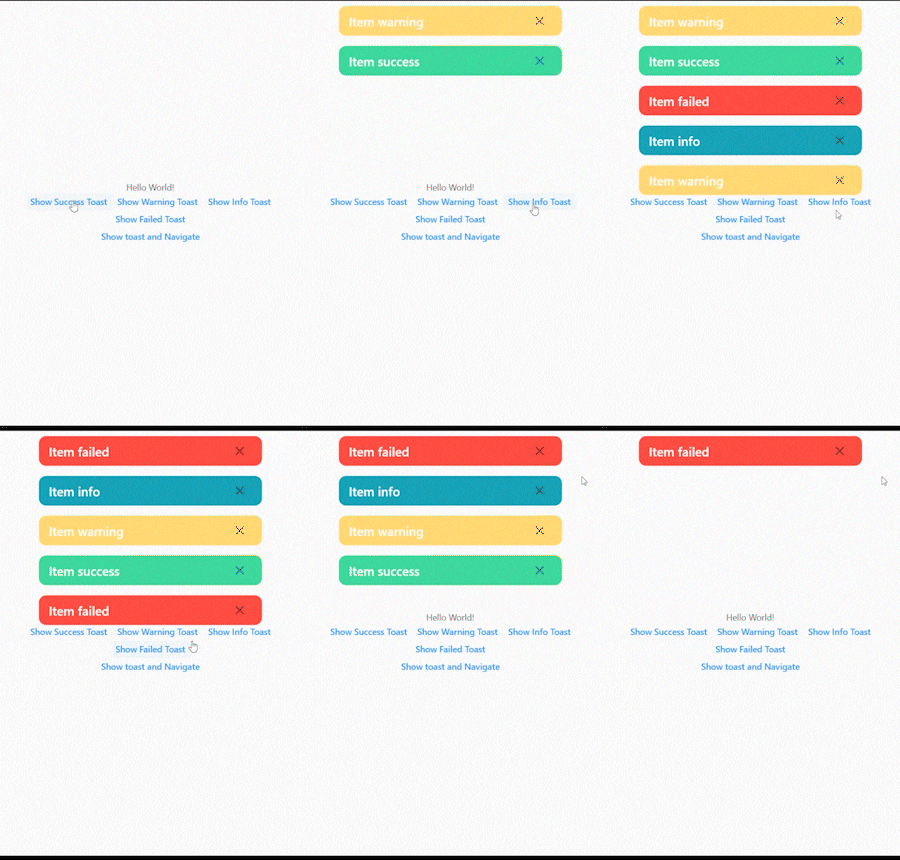
The figure below shows when the toast exceeds the limit.
2022-06-11_01-25-41_AdobeExpress

The figure below shows how to remove the toast by clicking the close button.
2022-06-11_01-25-41_AdobeExpress (1)

In the figure below, you can see the toast without any problems even if you navigate to another screen.
2022-06-11_01-25-41_AdobeExpress (2)

The figure below shows the toast list reversed.
2022-06-11_01-39-18_AdobeExpress

所属分类

源码仓库

使用此插件的项目

暂无相关数据。