搜索插件、代码仓与 APP 分类

插件详情v1.1.1

awesome_shake_widget

一个提供摇晃动画和可选震动效果的 Flutter 小部件,非常适合用于无效表单、提醒提示和用户交互反馈。

AndroidiOS
近 30 天下载
1050
喜欢数
21
Pub 分数
160

安装插件

flutter pub add awesome_shake_widget

插件介绍

基于插件公开信息、社区数据与项目使用情况整理的选型参考。

一个 Flutter 小部件,可为 UI 元素添加抖动动画和可选的振动反馈。非常适合吸引用户注意无效表单输入、提示用户操作或提供交互反馈。该小部件易于集成,并支持 Android 和 iOS 平台。通过最少的设置即可提供视觉和触觉响应,提升用户体验。专为常见交互场景中的简洁性和高效性而设计。

适合场景

  • 表单验证警告
  • 用户输入提示
  • 交互式按钮反馈
  • 错误状态通知
  • 引导式入门

主要特点

  • 摇晃动画效果
  • 可选的震动支持
  • 跨平台兼容性
  • 简单的 API 集成
  • 可自定义的动画持续时间
  • 响应式设计支持

适合对象

  • 开发交互式表单的开发者
  • UX 设计师提升反馈机制
  • 需要吸引注意力的提示的应用程序
  • 针对 Android 和 iOS 的移动应用
  • 专注于直观用户交互的项目

使用建议

  • 如果过度使用,可能会造成分心
  • 某些设备需要权限才能进行振动
  • 动画性能取决于设备功能
  • 不适合用于对可访问性要求较高的组件
  • 建议谨慎使用,以保持用户体验的清晰性

原始 README

以下为关联源码仓库的 README 原文快照,最新内容请访问源码仓库。

🚀 awesome_shake_widget

A customizable Flutter widget that adds shake animations with haptic and vibration feedback. Perfect for invalid forms, error indicators, or drawing attention to UI components.

Pub Version Platform License


✨ Features

  • Shake any widget on demand
  • Built-in presets: light, medium, heavy
  • Optional vibration (custom or haptic)
  • Fully customizable offset, pattern & intensities
  • Easy to trigger using a GlobalKey

📦 Installation

dependencies:
  awesome_shake_widget: ^1.0.1

Run:

flutter pub get

🧪 Usage

1️⃣ Standard (Shake + Vibration)

By using the built-in presets — light, medium, heavy and custom — you can quickly apply different vibration intensities and patterns, perfectly paired with UI shake animations for a dynamic and responsive user experience.

final shakeKey = GlobalKey<ShakeWidgetState>();

ShakeWidget(
  key: shakeKey,
  preset: ShakePreset.medium,
  child: Text("Tap Me"),
);

// Somewhere else, e.g., on button press:
shakeKey.currentState?.shake();

2️⃣ Shake Only (No Vibration)

If you only want the visual shake effect without vibration, you can set vibrationType to VibrationType.none using the ShakeConfig. To customize the intensity of the shake, adjust the offset value — higher values will produce a stronger visual effect.

ShakeWidget(
  key: shakeKey,
  customConfig: ShakeConfig(
    offset: 20,
    vibrationType: VibrationType.none,
  ),
  child: Icon(Icons.info),
);

3️⃣ Advanced Configuration: Full Control Over Visual and Vibration Effects

You can also create custom vibration patterns by setting vibrationType to VibrationType.custom, and providing your own pattern and intensities. This gives you full control over the vibration behavior.

ShakeWidget(
key: shakeKey,
customConfig: ShakeConfig(
offset: 32,
pattern: [0, 50, 100, 50],
intensities: [255, 0, 255, 0],
vibrationType: VibrationType.custom,
),
child: Text("Custom Shake!"),
);

Trigger it via:

shakeKey.currentState?.shake();

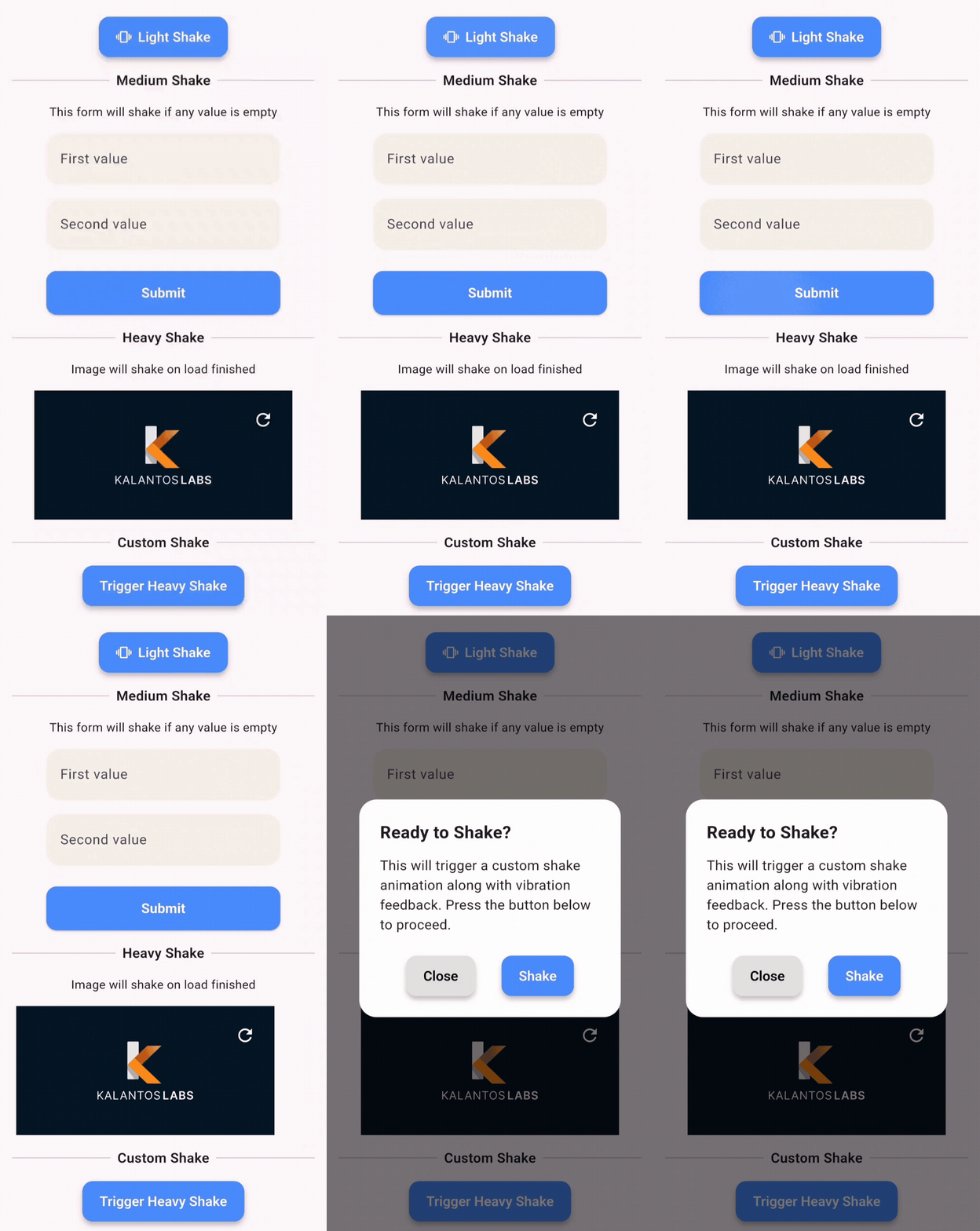
🎥 Demo

This demo shows how you can apply shake animations to:

  • ✅ Buttons
  • 💬 Dialogs
  • 🖼️ Images
  • ✏️ Text fields
  • 📦 Any widget

🧩 API Reference

Enum: ShakePreset
Value Offset Vibration
light 8 Haptic
medium 16 Haptic
heavy 24 Patterned Vibe
custom User-defined Custom

Enum: VibrationType
  • none – no vibration
  • haptic – system haptic feedback
  • custom – vibration with pattern/intensity (Android only)

ShakeConfig
ShakeConfig({
  required double offset,
  List<int>? pattern,
  List<int>? intensities,
  VibrationType vibrationType = VibrationType.haptic,
});

💡 Example App

Clone and run the example:

cd example
flutter run

Example main.dart:

import 'package:flutter/material.dart';
import 'package:awesome_shake_widget/shake_widget.dart';

void main() => runApp(const MyApp());

class MyApp extends StatelessWidget {
  const MyApp({super.key});

  @override
  Widget build(BuildContext context) {
    return MaterialApp(
      home: ShakeDemo(),
    );
  }
}

class ShakeDemo extends StatelessWidget {
  final shakeKey = GlobalKey<ShakeWidgetState>();

  @override
  Widget build(BuildContext context) {
    return Scaffold(
      appBar: AppBar(title: const Text('Shake Demo')),
      body: Center(
        child: Column(
          mainAxisAlignment: MainAxisAlignment.center,
          children: [
            ShakeWidget(
              key: shakeKey,
              preset: ShakePreset.heavy,
              child: const Icon(Icons.warning, size: 64),
            ),
            const SizedBox(height: 32),
            ElevatedButton(
              onPressed: () => shakeKey.currentState?.shake(),
              child: const Text("Shake it!"),
            ),
          ],
        ),
      ),
    );
  }
}

📄 License

MIT © Juanma Del Boca

所属分类

依赖

依赖清单 1 项

源码仓库

使用此插件的项目

暂无相关数据。