Flip_box_bar_plus
Forked from Flip_box_bar,
added support for vertical position
Installation Guide
A 3D BottomNavigationBar inspired by Dribbble design by Dannniel.
Demo
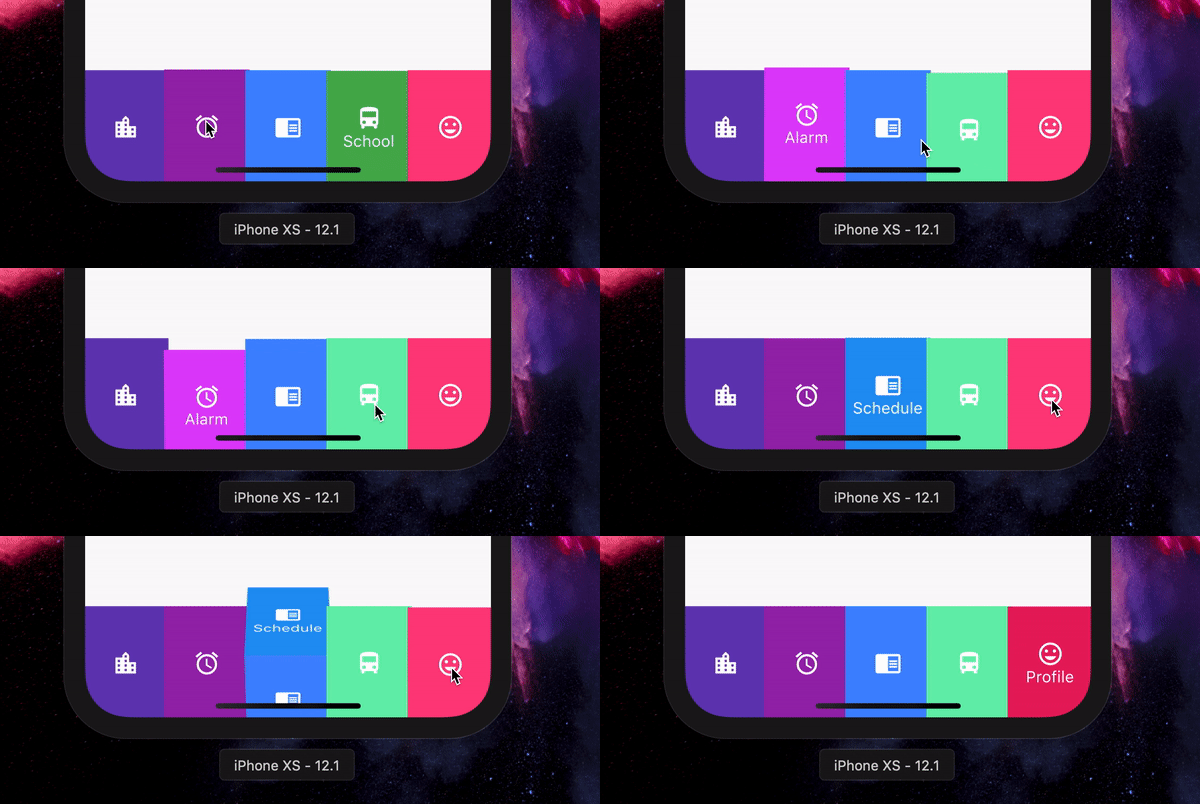
Example Use
int selectedIndex = 0;
FlipBoxBarPlus(
selectedIndex: index,
items: [
FlipBarItem(icon: Icon(Icons.map), text: Text("Map"), frontColor: Colors.blue, backColor: Colors.blueAccent),
FlipBarItem(icon: Icon(Icons.add), text: Text("Add"), frontColor: Colors.cyan, backColor: Colors.cyanAccent),
FlipBarItem(icon: Icon(Icons.chrome_reader_mode), text: Text("Read"), frontColor: Colors.orange, backColor: Colors.orangeAccent),
FlipBarItem(icon: Icon(Icons.print), text: Text("Print"), frontColor: Colors.purple, backColor: Colors.purpleAccent),
FlipBarItem(icon: Icon(Icons.print), text: Text("Print"), frontColor: Colors.pink, backColor: Colors.pinkAccent),
],
onIndexChanged: (newIndex) {
setState() {
selectedIndex = newIndex;
}
},
),
For vertical position set isVerticalBar = true
Properties
List<FlipBarItem> items;
The items to be displayed in the NavBar.
Duration animationDuration;
The duration of the animation of the box flip.
ValueChanged<int> onIndexChanged;
Callback for getting value of item selection.
int initialIndex;
The initial selected index of the NavBar.
double navBarHeight;
The height of the NavBar when it is in bottom nav position.
bool isVerticalBar;
Set the navigation bar as vertical.
double navBarWidth;
The width of the NavBar when it is in vertical position.

