Advanced Table Widget for Flutter 🚀📊


Tired of boring, basic tables in your Flutter apps? Want something that sparkles ✨, sizzles 🔥, and makes your data sing 🎤? Well, buckle up, buttercup, because the Advanced Table Widget is here to revolutionize your data presentation!
This isn't your grandma's table (unless your grandma is a seriously cool Flutter developer 😎). This widget gives you superpowers over your tabular data, letting you customize everything from headers to rows to actions with the finesse of a master chef crafting a gourmet meal.
Features
- Headers that POP! 💥: Define custom header widgets with a builder. No more dull, default text headers. Go wild! Use icons! Use colors! Use... anything! (Within reason, of course. We don't want to break Flutter.)
- Rows that ROCK! 🎸: Build row elements dynamically with a builder. Each row is a blank canvas for your creativity.
- Actions, Actions, Actions! 🎬: Add action buttons to each row. Think "Edit", "Delete", "Send Pigeon" (okay, maybe not that last one, but you get the idea).
- Loading States? We Got You Covered. ⏳: Built-in loading indicators for both the entire table and individual "load more" scenarios. No more awkward blank spaces while your data fetches from the digital ether.
- Empty State? No Problem! 🤷♀️: Display a custom widget when there's no data to show. Tell your users "Hey, there's nothing here... yet!" in style.
- Decoration Extravaganza! 🎨: Customize the look and feel of your table with decorations for headers, rows, and even individual cells. Rounded corners? Gradients? Shadows? You got it!
- Padding Paradise! 🏝️: Control the padding everywhere. Inner, outer, header, row... you're the padding master.
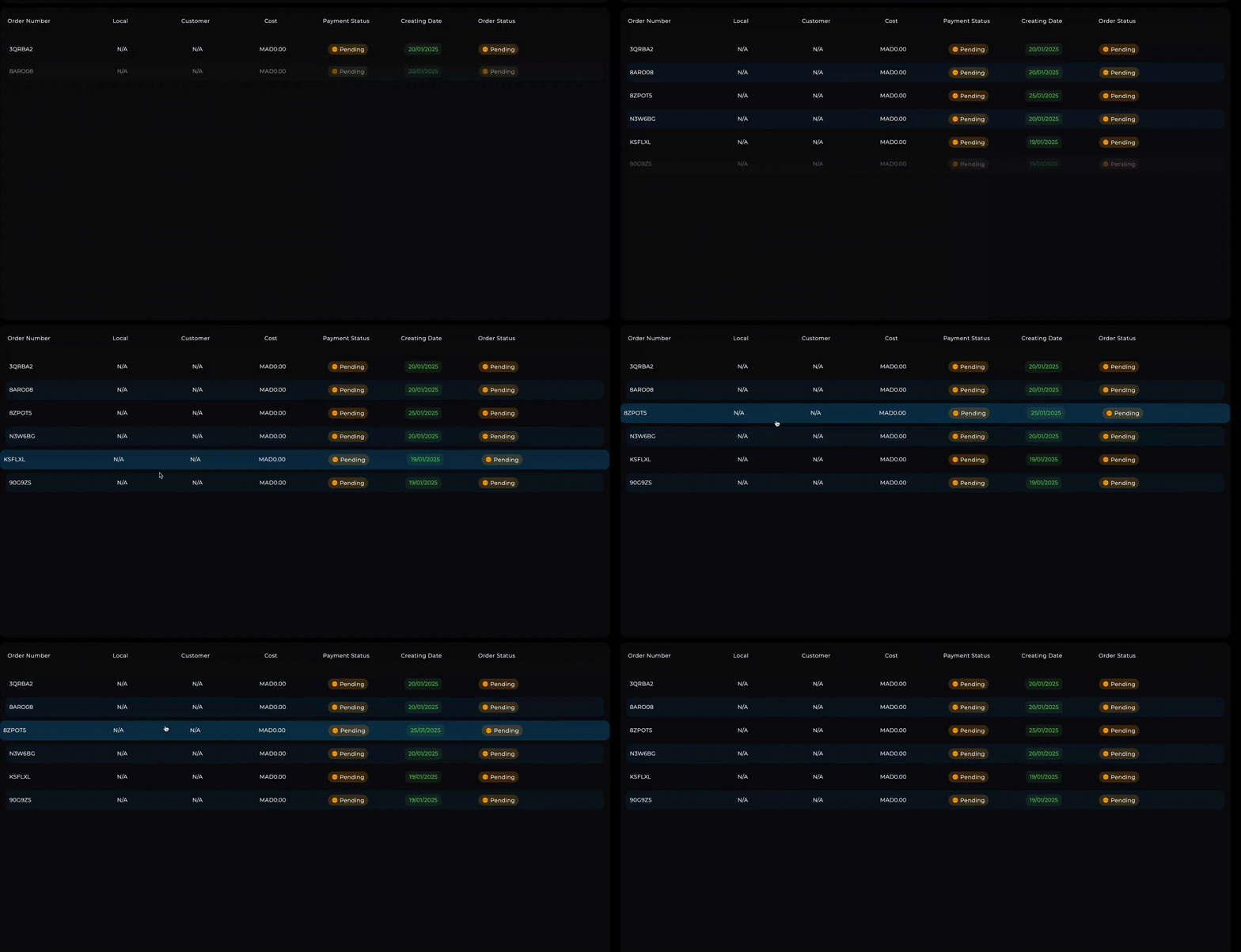
- Hover Effects? Oh Yeah! ✨: Make your rows react to user interaction with hover effects. It's like magic, but it's just Flutter.
- Row Taps? We Listen. 👂: Handle row taps with a callback. Take your users on a journey when they click!
- Lazy Loading? Of course! 🦥: Implement lazy loading for large datasets, like a coding ninja.
- Animations?! YES!!! 💫: Use the
rowBuilder to add any animation you want.
- Fully Customizable: we added builders everywhere, if you want to change something you can 🛠️
- Sliver Support 📜: Seamlessly integrate with scrollable layouts using sliver support for better performance and flexibility!!
Getting Started
-
Add it to your pubspec.yaml:
flutter pub add flutter_advanced_table
-
Import it:
import 'package:advanced_table_widget/advanced_table_widget.dart';
- Start building awesome tables!
Usage
Constructor Arguments
Here's a detailed explanation of all the constructor arguments for AdvancedTableWidget:
headerBuilder: (required) Function to build custom header widgets for each columnrowElementsBuilder: (required) Function to build the cells within each rowitems: (required) Your data list - each item becomes a rowisLoadingAll: (required) ValueNotifier to control full table loading stateheaderItems: (required) List of items to be displayed in the headerfullLoadingPlaceHolder: (required) Widget shown during full table loading
Optional arguments:
actions: List of actions for each row (used for width calculations)actionBuilder: Function to build action buttons for each rowisLoadingMore: ValueNotifier for pagination loading stateonEmptyState: Widget to show when table has no dataheaderDecoration: BoxDecoration for the header rowinnerHeaderPadding: Padding inside header cellselementsPadding: Padding around table contentloadingMorePlaceHolder: Widget shown during pagination loadingrowElementsDecoration: BoxDecoration for data rowsinnerRowElementsPadding: Padding inside row cellsheaderTextStyle: TextStyle for header textoutterRowsPadding: Padding around all rowsrowDecorationBuilder: Function to build dynamic row decorationsoutterHeaderPadding: Padding around header rowaddSpacerToActions: Add space before action buttons (default: true)onRowTap: Callback function when row is tappedrowBuilder: Custom row builder for animations/effects
Full Example
Here's a taste of what you can do:
import 'package:flutter/material.dart';
import 'package:flutter_animate/flutter_animate.dart';
class OrdersTableExample extends StatefulWidget {
const OrdersTableExample({super.key});
@override
State<OrdersTableExample> createState() => _OrdersTableExampleState();
}
class _OrdersTableExampleState extends State<OrdersTableExample> {
final ValueNotifier<bool> _isLoadingAll = ValueNotifier(false);
final ValueNotifier<bool> _isLoadingMore = ValueNotifier(false);
late List<Order> _orders;
final int _initialLoad = 10;
final int _loadMoreCount = 5;
@override
void initState() {
super.initState();
_orders = _generateFakeOrders(_initialLoad);
}
Future<void> _loadMore(int index) async {
if (index < _orders.length - 2) return;
if (_isLoadingMore.value) return;
_isLoadingMore.value = true;
await Future.delayed(const Duration(seconds: 1));
final newOrders = _generateFakeOrders(_loadMoreCount);
setState(() {
_orders.addAll(newOrders);
});
_isLoadingMore.value = false;
}
Widget rowBuilder(
BuildContext context, int rowIndex, Widget row, bool isHover, int length) {
_loadMore(rowIndex);
return AnimatedScale(
duration: const Duration(milliseconds: 300),
scale: isHover ? 1.02 : 1,
child: row.animate(
delay: length < 10 ? (rowIndex.milliseconds * 300) : null,
effects: [
SlideEffect(
duration: 500.milliseconds,
curve: Curves.easeInOut,
begin: const Offset(0, -0.1),
),
FadeEffect()
]),
);
}
BoxDecoration rowDecorationBuilder(
BuildContext context, int index, bool isHover) {
final isOdd = index % 2 == 0;
return BoxDecoration(
borderRadius: const BorderRadius.all(Radius.circular(7.0)),
color: isHover
? Theme.of(context).primaryColor.withAlpha(100)
: isOdd
? Colors.transparent
: Theme.of(context).primaryColor.withOpacity(0.1),
);
}
@override
Widget build(BuildContext context) {
return Scaffold(
appBar: AppBar(
title: const Text('Advanced Table Example'),
),
body: AdvancedTableWidget(
isLoadingAll: _isLoadingAll,
isLoadingMore: _isLoadingMore,
items: _orders,
headerItems: const ['Order #', 'Local', 'Customer', 'Price', 'Payment', 'Date', 'Status'],
onEmptyState: const Center(child: Text('No orders yet! 😢')),
fullLoadingPlaceHolder:
const Center(child: CircularProgressIndicator()),
loadingMorePlaceHolder: const LinearProgressIndicator(),
headerBuilder: (context, header) => Container(
width: header.defualtWidth,
padding: const EdgeInsets.all(8.0),
alignment: header.index == 0 ? Alignment.centerLeft : Alignment.center,
child: Text(
header.value.toString(),
style: const TextStyle(fontWeight: FontWeight.bold),
),
),
rowElementsBuilder: (context, rowParams) {
final order = _orders[rowParams.index];
return [
SizedBox(
width: rowParams.defualtWidth,
child: Text(order.orderNumber)),
SizedBox(
width: rowParams.defualtWidth,
child: Center(child: Text(order.localName))),
SizedBox(
width: rowParams.defualtWidth,
child: Center(child:Text(order.userFullName))),
SizedBox(
width: rowParams.defualtWidth,
child: Center(child:Text('\$${order.toBePaidPrice.toStringAsFixed(2)}'))),
SizedBox(
width: rowParams.defualtWidth,
child: Center(child: Text(order.paymentStatus))),
SizedBox(
width: rowParams.defualtWidth,
child: Center(
child: Text(order.createdDate.toIso8601String().substring(0, 10)),
),),
SizedBox(
width: rowParams.defualtWidth,
child:Center(child: Text(order.orderStatus))),
];
},
actionBuilder: (context, actionParams) {
return IconButton(
icon: const Icon(Icons.more_vert),
onPressed: () {
print('Action on row ${actionParams.rowIndex}, item ${actionParams.index}');
},
);
},
actions: [
{"label": "view"}
],
rowDecorationBuilder: (index, isHovered) => rowDecorationBuilder(context, index, isHovered),
rowBuilder: (context, index, row, isHover) => rowBuilder(context, index, row, isHover,_orders.length),
onRowTap: (index) {
print('Row $index tapped!');
},
),
);
}
}
This example shows you how to:
- Define your data model (Order).
- Generate fake data (_generateFakeOrders).
- Use ValueNotifier for loading states.
- Configure:
- headerBuilder
- rowElementsBuilder
- actionBuilder
- rowDecorationBuilder
- Handle row taps with onRowTap.
- Display an empty state with onEmptyState.
- Add animation using rowBuilder
Additional Information
Where to find more information: Check out the /example folder for more comprehensive examples, including how to handle different data types, implement sorting, and more!
Contribute to the package: We welcome contributions! Fork the repo, make your changes, and submit a pull request. Bonus points for adding tests! 🧪
File issues: Found a bug? Have a feature request? File an issue on GitHub. We'll do our best to respond promptly (unless we're busy building more awesome widgets).
Package Authors: This package was lovingly crafted by [NIMR SAWAFTA] with the help of many cups of coffee ☕ and late-night coding sessions.
License: MIT - do what you want! (But attribution is appreciated 😉)
So, what are you waiting for? Go forth and create amazing tables! 🎉

