搜索插件、代码仓与 APP 分类

flutter_gradient_animation_text 封面
插件详情v1.0.2

flutter_gradient_animation_text

通过输入文本、颜色和动画持续时间,非常轻松地创建动态渐变文字。

AndroidiOSWebmacOSWindowsLinux
近 30 天下载
1050
喜欢数
42
Pub 分数
140

安装插件

flutter pub add flutter_gradient_animation_text

插件介绍

基于插件公开信息、社区数据与项目使用情况整理的选型参考。

一个 Flutter 包,使开发者能够通过指定文本内容、渐变颜色和动画持续时间,轻松创建动画渐变文本。它简化了在多个平台上为应用添加视觉上吸引人、动态的文本效果的过程。该包轻量级,可无缝集成到现有的 Flutter 项目中,设置简单。非常适合通过引人入胜的排版增强 UI,而无需复杂的自定义动画。

适合场景

  • 添加动画渐变标题
  • 创建引人注目的应用标题
  • 增强启动画面
  • 设计交互式 UI 元素
  • 在引导流程中动画化文本

主要特点

  • 简单的 API,带有文本和颜色输入
  • 可自定义的动画持续时间
  • 跨平台支持
  • 平滑的渐变过渡
  • 最小化样板代码

适合对象

  • 寻求视觉魅力的UI设计师
  • 开发现代应用程序界面的开发者
  • 需要动画字形的项目
  • 初学者学习Flutter动画
  • 具有动态或交互式文本元素的应用程序

使用建议

  • 大量动画文本带来的性能影响
  • 除了渐变和持续时间外,自定义选项有限
  • 可能需要针对低端设备进行优化
  • 动画行为在不同平台之间可能存在细微差异
  • 不适合静态文本设计

原始 README

以下为关联源码仓库的 README 原文快照,最新内容请访问源码仓库。

Static Badge Static Badge Static Badge Static Badge

This package lets you make animated gradient texts without any hassle. Just pass the text, colors, the duration of the animation and you're done! Using the transform and reverse, you can achieve amazing effects. For More info read the docs below.

Getting started

Install the package using the following command:

flutter pub add flutter_gradient_animation_text

Import the package in your dart file using the following code:

import 'package:flutter_gradient_animation_text/flutter_gradient_animation_text.dart';

And you are good to go!

Usage

Create your animated gradient text. The 3 required arguments are:

  1. text(Text): The text.
  2. colors(List<Colors>): List of colors you want in your gradient.
  3. duration(Duration): Duration for which a single gradient animation runs.
// rainbow text
GradientAnimationText(
    text: Text(
        'Rainbow Text 1',
        style: TextStyle(
            fontSize: 50,
        ),
    ),
    colors: [
        Color(0xff8f00ff),  // violet
        Colors.indigo,
        Colors.blue,
        Colors.green,
        Colors.yellow,
        Colors.orange,
        Colors.red,
    ],
    duration: Duration(seconds: 5),
),

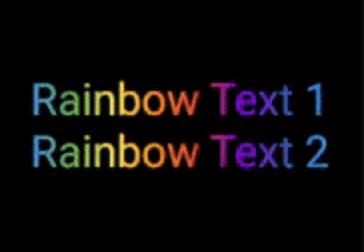
Rainbow Text 1

Reverse the animation. This plays the animation backwards when a single iteration of the forward animation is completed. You set reverse to true to enable this.

// rainbow text with reverse
GradientAnimationText(
    text: Text(
        'Rainbow Text 1',
        style: TextStyle(
            fontSize: 50,
        ),
    ),
    colors: [
        Color(0xff8f00ff),  // violet
        Colors.indigo,
        Colors.blue,
        Colors.green,
        Colors.yellow,
        Colors.orange,
        Colors.red,
    ],
    duration: Duration(seconds: 5),
    reverse: true,  // reverse
),

Rainbow Text 2

Play with colors. It is possible to use the same color more than once to increase the area it covers. Gold Text Example: The following 2 Gold Text animations have different number of Colors.amber color.

// gold text 1
GradientAnimationText(
    text: Text(
        'Gold Text 1',
        style: TextStyle(
            fontSize: 50,
            fontWeight: FontWeight.bold,
        ),
    ),
    colors: [
        Colors.amber,   // 1
        Colors.white,
    ],
    duration: Duration(seconds: 5),
    reverse: true,
),
// gold text 2
GradientAnimationText(
    text: Text(
        'Gold Text 2',
        style: TextStyle(
            fontSize: 50,
            fontWeight: FontWeight.bold,
        ),
    ),
    colors: [
        Colors.amber,   // 1
        Colors.amber,   // 2
        Colors.amber,   // 3
        Colors.white,
    ],
    duration: Duration(seconds: 5),
    reverse: true,
),

Gold Text

Transform your gradient. You can transform your gradient using transform property. Use GradientTranform classes such as SweepGradient, and GradientRotation to tranform.

// Tranform Text
GradientAnimationText(
    text: Text(
    'Tranform Text',
        style: TextStyle(
            fontSize: 90,
            fontWeight: FontWeight.bold,
        ),
    ),
    colors: [
        Color(0xFF061A9C),
        Color(0xff92effd),
    ],
    duration: Duration(seconds: 5),
    transform: GradientRotation(math.pi / 4),   // tranform
),

Tranform Text

Available Properties

Property Type Description
text Text The text to be used in the animation.
colors List Colors of the animation.
duration Duration Duration for which a single gradient animation runs.
reverse bool? If you want to reverse the animation.
transform GradientTransform? You can transform your gradient.

Author

This package is developed by Sahil Shah.

所属分类

源码仓库

使用此插件的项目

暂无相关数据。