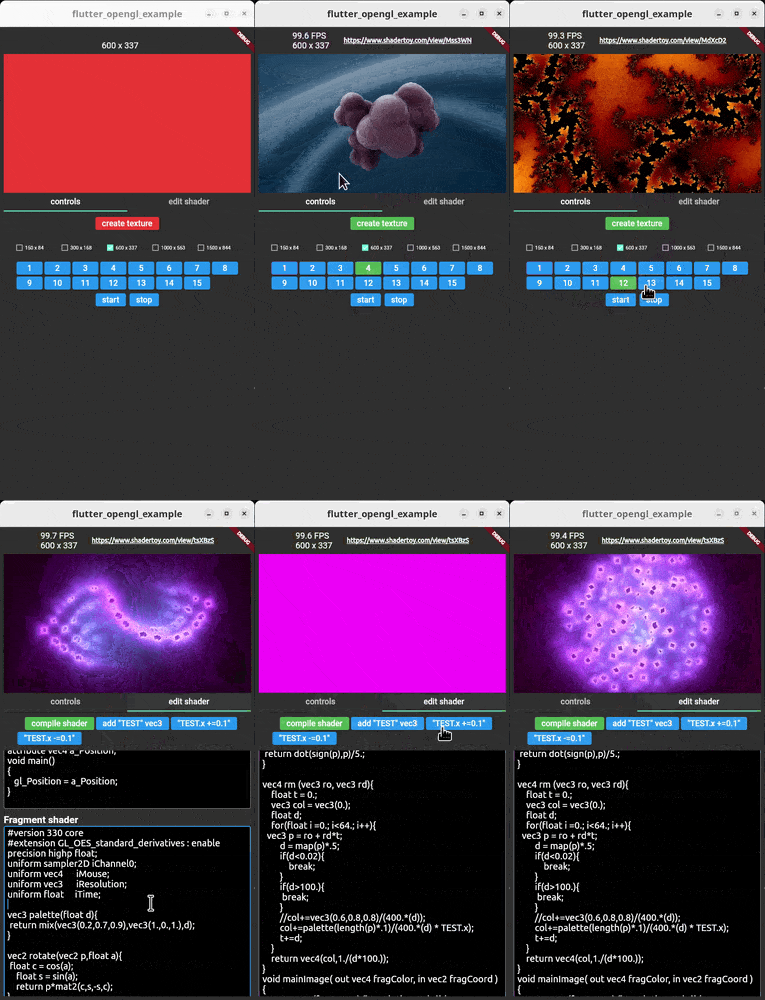
flutter_opengl 是一个 Flutter 插件,可将 OpenGL ES 上下文与 Flutter 的 Texture 小部件集成,从而实现自定义着色器的实时渲染。它支持 ShaderToy 着色器的使用,非常适合创建动态背景效果、动画渐变和视觉丰富的用户界面元素。该插件可在 Android、iOS、macOS、Windows 和 Linux 等多个平台上运行,提供一致的性能和视觉保真度。开发者可以利用 GPU 加速,在其应用中实现流畅且高质量的图形。
适合场景
创建动画背景
实现基于着色器的UI效果
渲染复杂的可视化效果
集成 ShaderToy 着色器
构建交互式艺术界面
主要特点
实时 OpenGL ES 渲染
对 ShaderToy 着色器的支持
跨平台兼容性
GPU 加速性能
与 Texture 小部件的无缝集成
适合对象
使用着色器的视觉艺术家
寻求高级图形的App开发者
设计师创建沉浸式用户界面
交互式媒体应用
原型设计实验性视觉效果
使用建议
需要了解 OpenGL ES 和 GLSL
性能因设备而异
着色器的调试工具有限
不适合用于简单的UI组件
由于原生依赖项,可能导致应用体积增大
原始 README
以下为关联源码仓库的 README 原文快照,最新内容请访问源码仓库。
flutter_opengl
A Flutter OpenGL ES plugin using a Texture() widget. Supports Android, Linux and Windows. Many shaders from ShaderToy.com can be copy/pasted
Getting Started
Android
Windows
Linux
iOS
MacOS
Web
✅
✅
✅
x
x
x
The main workflow of the plugin is:
ask to native code with a MethodChannel for a texture ID
use the texture ID in a Texture() widget
set a vertex and a fragment sources
start the renderer
change shader sources on the fly
All functionalities, but the first call to the first method channel, use FFI calls.
The starting idea developing this plugin, was not just to use GLSL, but also take advantage of the wonderful ShaderToy web site.
For now it's possible to copy/paste shaders from ShaderToy, but only those which have only one layer.
Be aware that on a real device, many shaders could be very slow because they are hungry of power and some others needs ES 3 and for now is not supported on Android (ie latest 3 shaders in the lib/main_in_deep.dart example).
iResolution, iTime, iMouse, iChannel[0-3] are supported, other uniforms can be added at run-time.
iResolution is a vec3 uniform which represents the texture size
iTime is a float which represents the time since the shader was created
iMouse is a vec4 which the x and y values represent the coordinates where the mouse or the touch is grabbed hover the Texture() widget
iChannel[0-3] Sampler2D uniform textures
Simple example
SizedBox(
width: 400,
height: 300,
child: FutureBuilder(
/// The surface size identifies the real texture size and/// it is not related to the above SizedBox size
future: OpenGLController().openglPlugin.createSurface(300, 200),
builder: (_, snapshot) {
if (snapshot.hasError || !snapshot.hasData) {
returnconstSizedBox.shrink();
}
/// When the texture id is retrieved, it will be possible/// to start the renderer, set a shader and display it./// Start renderer threadOpenGLController().openglFFI.startThread();
/// Set the fragment shaderOpenGLController().openglFFI.setShaderToy(fShader);
/// build the texture widgetreturnOpenGLTexture(id: snapshot.data!);
},
),
)
Look at example/lib/main_in_deep.dart for a full fledged example.
Once the renderer is started all the below methods can be used via OpenGLController().openglFFI:
method
description
bool rendererStatus()
Returns true if the texture has been created successfully via OpenGLController().openglPlugin.createSurface()
Size getTextureSize()
Get the size of the current texture. If not set it returns Size(-1, -1)
startThread()
Starts the drawing thread loop.
stopThread()
Delete shader, delete texture and stops the drawing thread loop.
isContinuous not used yet. vertexShader String of the vertex shader source. fragmentShader String of the fragment shader source
returns the compiling shader error string or an empty string if no errors.
String setShaderToy(String fragmentShader)
Set the shader to be used in the current texture. These are only fragment shaders taken from ShaderToy.com Many of the shaders can be copy/pasted, but they must have only the "image" layer (ie no buffer). Also many of them could be heavy for mobile devices (few FPS).
The uniforms actually available and automatically registered are: float iTime vec4 iMouse vec3 iResolution Sampler2D iChannel[0-3]
String getVertexShader()
Get current vertex shader text.
String getFragmentShader()
Get current fragment shader text.
addShaderToyUniforms()
add these uniforms: vec4 iMouse vec3 iResolution float iTime Sampler2D iChannel[0-3] These uniforms are automatically set when using setShaderToy()
Set the iMouse uniform. How to use the mouse input (only left button supported): mouse.xy = mouse position during last button down abs(mouse.zw) = mouse position during last button click sign(mouze.z) = button is down sign(mouze.w) = button is clicked
This is automatically processed by OpenGLTexture widget
For reference: https://www.shadertoy.com/view/llySRh https://www.shadertoy.com/view/Mss3zH
Replace a texture with another image with the same size. Be sure the val length is the same as the previously stored image with the uniform named name.
extract the zip and rename its main directory to "glew"
run "SCRIPTS\setupOpenCV-windows.bat" or manually download OpenCV and extract it into SCRIPT dir:
https://github.com/opencv/opencv/releases/download/4.7.0/opencv-4.7.0-windows.exe
Android
Run the script SCRIPT/setupOpenCV-android.sh or manually download OpenCV from here https://github.com/opencv/opencv/releases/download/4.7.0/opencv-4.7.0-android-sdk.zip locate libs and include folders and copy them into android/src/opencv.
TODO
better docomentation
the c/c++ code is not "state of the art" written! PRs are welcomed