搜索插件、代码仓与 APP 分类

插件详情v0.0.6

flutter_paginator

一个可自定义的 Flutter 分页包。此包可用于按页从 API 获取并显示数据。

近 30 天下载
52
喜欢数
27
Pub 分数
40

安装插件

flutter pub add flutter_paginator

插件介绍

基于插件公开信息、社区数据与项目使用情况整理的选型参考。

一个可自定义的分页包,适用于 Flutter,可实现从 API 以逐页方式高效加载和显示数据。它支持下拉刷新和无限滚动交互,非常适合处理大型数据集的列表型应用。该包设计灵活,允许开发者自定义 UI、加载指示器和错误状态。它与异步数据获取无缝集成,并能处理空结果和网络故障等边缘情况。

适合场景

  • 在列表中加载大型数据集
  • 实现无限滚动
  • 从 REST API 获取数据
  • 显示分页搜索结果
  • 构建新闻或社交媒体动态

主要特点

  • 可自定义的 UI 组件
  • 下拉刷新支持
  • 无限滚动集成
  • 错误和空状态处理
  • 可配置的加载指示器

适合对象

  • 包含大量数据列表的应用程序
  • 基于API的内容展示
  • 需要延迟加载的用户界面
  • 寻求可重用分页逻辑的开发人员
  • 需要响应式分页用户体验的项目

使用建议

  • 需要手动处理 API 请求
  • 有限的内置缓存
  • 未针对极高频率的更新进行优化
  • 依赖外部状态管理
  • 复杂布局可能需要额外的样式

原始 README

以下为关联源码仓库的 README 原文快照,最新内容请访问源码仓库。

Flutter Paginator

pub package

A customizable pagination package for Flutter. This package can be used to fetch and display data from an API page by page.

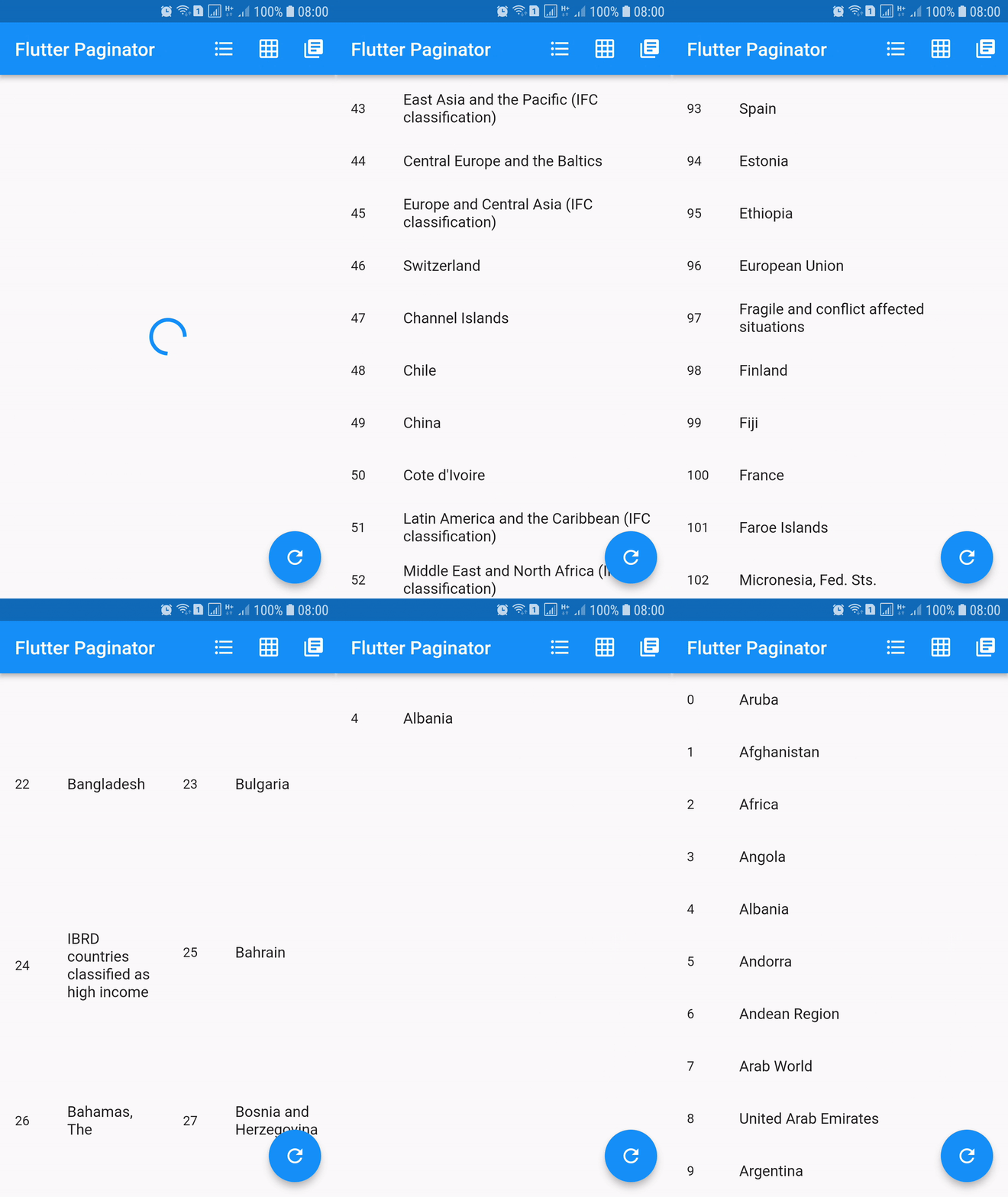
Screenshots

Installing

dependencies:
  flutter_paginator: ^0.0.6

Description

Paginator extends StatefulWidget has 3 constructors namely Paginator.listView, Paginator.gridView and Paginator.pageView. Paginator.listView, Paginator.gridView and Paginator.pageView are descendants of ListView, GridView and PageView. Paginator.listView, Paginator.gridView and Paginator.pageView got all the features of their ancestors and they are need to provide additional functions that are essential in doing their task.

PageLoadFuture
  • Loads the page asynchronously when the page number is given.
  • This should return an instance of a Future.
  • Called when the next page is needed to be loaded.
PageItemsGetter
  • This function should return list of page item data when page data is given.
  • This is called after successful completion of PageLoadFuture.
  • The page items returned by this method is added to the list of all the page items.
ListItemBuilder
  • Builds list item when item data and item index are given.
  • This should return an instance of a Widget.
LoadingWidgetBuilder
  • Builds loading widget.
  • This should return an instance of a Widget.
ErrorWidgetBuilder
  • Builds error widget when page data and error callback are given.
  • This should return an instance of a Widget.
EmptyListWidgetBuilder
  • Builds empty list widget.
  • This is displayed when the total number of list items is zero.
  • This should return an instance of a Widget.
TotalItemsGetter
  • This should return total number of list items when page data is given.
PageErrorChecker
  • This should return true if page has error else false, when page data is given.

Using

import 'dart:async';
import 'dart:convert';
import 'dart:io';

import 'package:flutter/material.dart';
import 'package:http/http.dart' as http;

import 'package:flutter_paginator/flutter_paginator.dart';
import 'package:flutter_paginator/enums.dart';

void main() => runApp(MyApp());

class MyApp extends StatelessWidget {
  @override
  Widget build(BuildContext context) {
    return MaterialApp(
      title: 'Flutter Paginator',
      home: HomePage(),
    );
  }
}

class HomePage extends StatefulWidget {
  @override
  State<StatefulWidget> createState() {
    return HomeState();
  }
}

class HomeState extends State<HomePage> {
  GlobalKey<PaginatorState> paginatorGlobalKey = GlobalKey();

  @override
  Widget build(BuildContext context) {
    return Scaffold(
      appBar: AppBar(
        title: Text('Flutter Paginator'),
        actions: <Widget>[
          IconButton(
            icon: Icon(Icons.format_list_bulleted),
            onPressed: () {
              paginatorGlobalKey.currentState
                  .changeState(listType: ListType.LIST_VIEW);
            },
          ),
          IconButton(
            icon: Icon(Icons.grid_on),
            onPressed: () {
              paginatorGlobalKey.currentState.changeState(
                listType: ListType.GRID_VIEW,
                gridDelegate: SliverGridDelegateWithFixedCrossAxisCount(
                    crossAxisCount: 2),
              );
            },
          ),
          IconButton(
            icon: Icon(Icons.library_books),
            onPressed: () {
              paginatorGlobalKey.currentState
                  .changeState(listType: ListType.PAGE_VIEW);
            },
          ),
        ],
      ),
      body: Paginator.listView(
        key: paginatorGlobalKey,
        pageLoadFuture: sendCountriesDataRequest,
        pageItemsGetter: listItemsGetter,
        listItemBuilder: listItemBuilder,
        loadingWidgetBuilder: loadingWidgetMaker,
        errorWidgetBuilder: errorWidgetMaker,
        emptyListWidgetBuilder: emptyListWidgetMaker,
        totalItemsGetter: totalPagesGetter,
        pageErrorChecker: pageErrorChecker,
        scrollPhysics: BouncingScrollPhysics(),
      ),
      floatingActionButton: FloatingActionButton(
        onPressed: () {
          paginatorGlobalKey.currentState.changeState(
              pageLoadFuture: sendCountriesDataRequest, resetState: true);
        },
        child: Icon(Icons.refresh),
      ),
    );
  }

  Future<CountriesData> sendCountriesDataRequest(int page) async {
    try {
      String url = Uri.encodeFull(
          'http://api.worldbank.org/v2/country?page=$page&format=json');
      http.Response response = await http.get(url);
      return CountriesData.fromResponse(response);
    } catch (e) {
      if (e is IOException) {
        return CountriesData.withError(
            'Please check your internet connection.');
      } else {
        print(e.toString());
        return CountriesData.withError('Something went wrong.');
      }
    }
  }

  List<dynamic> listItemsGetter(CountriesData countriesData) {
    List<String> list = [];
    countriesData.countries.forEach((value) {
      list.add(value['name']);
    });
    return list;
  }

  Widget listItemBuilder(value, int index) {
    return ListTile(
      leading: Text(index.toString()),
      title: Text(value),
    );
  }

  Widget loadingWidgetMaker() {
    return Container(
      alignment: Alignment.center,
      height: 160.0,
      child: CircularProgressIndicator(),
    );
  }

  Widget errorWidgetMaker(CountriesData countriesData, retryListener) {
    return Column(
      mainAxisAlignment: MainAxisAlignment.center,
      children: <Widget>[
        Padding(
          padding: const EdgeInsets.all(16.0),
          child: Text(countriesData.errorMessage),
        ),
        FlatButton(
          onPressed: retryListener,
          child: Text('Retry'),
        )
      ],
    );
  }

  Widget emptyListWidgetMaker(CountriesData countriesData) {
    return Center(
      child: Text('No countries in the list'),
    );
  }

  int totalPagesGetter(CountriesData countriesData) {
    return countriesData.total;
  }

  bool pageErrorChecker(CountriesData countriesData) {
    return countriesData.statusCode != 200;
  }
}

class CountriesData {
  List<dynamic> countries;
  int statusCode;
  String errorMessage;
  int total;
  int nItems;

  CountriesData.fromResponse(http.Response response) {
    this.statusCode = response.statusCode;
    List jsonData = json.decode(response.body);
    countries = jsonData[1];
    total = jsonData[0]['total'];
    nItems = countries.length;
  }

  CountriesData.withError(String errorMessage) {
    this.errorMessage = errorMessage;
  }
}

所属分类

源码仓库

使用此插件的项目

暂无相关数据。