搜索插件、代码仓与 APP 分类

google_map_custom_windows 封面
插件详情v1.1.0

google_map_custom_windows

一个可自定义的 Google 地图标记信息窗口。您可以在 Google 地图视图中显示多个信息窗口。

AndroidiOS
近 30 天下载
1460
喜欢数
2
Pub 分数
160

安装插件

flutter pub add google_map_custom_windows

插件介绍

基于插件公开信息、社区数据与项目使用情况整理的选型参考。

一个可自定义的 Google 地图标记信息窗口包,可实现在 Google 地图视图上显示多个信息窗口。它通过允许开发者为每个标记创建和管理自定义、交互式弹出窗口,扩展了标准标记功能。适用于需要在地图标记中显示丰富动态内容的应用程序,例如详细的位置数据、图片或按钮。该包支持 Android 和 iOS 平台,并与 Flutter 的 Google Maps 插件无缝集成。

适合场景

  • 在地图上显示多个自定义信息窗口
  • 在标记中显示图像和按钮等丰富内容
  • 创建交互式位置详细信息面板
  • 通过自定义标记弹出窗口提升用户体验
  • 构建基于位置的应用程序并提供详细的标记信息

主要特点

  • 支持同时多个信息窗口
  • 信息窗口的高度可定制UI
  • 兼容 Android 和 iOS
  • 与 Google 地图插件轻松集成
  • 允许在信息窗口内使用交互式元素

适合对象

  • 开发复杂地图界面的开发者
  • 需要丰富标记内容的应用程序
  • 基于位置的服务,包含详细信息
  • 使用 Google 地图的 Flutter 项目
  • 希望灵活自定义标记的团队

使用建议

  • 需要使用 Google 地图 API 密钥进行正确设置
  • 可能会影响性能,因为存在大量重叠的信息窗口
  • 自定义样式需要熟悉 Flutter 小部件
  • 除了基本用法外,文档有限
  • 依赖外部GitHub仓库的稳定性

原始 README

以下为关联源码仓库的 README 原文快照,最新内容请访问源码仓库。

google map custom info window

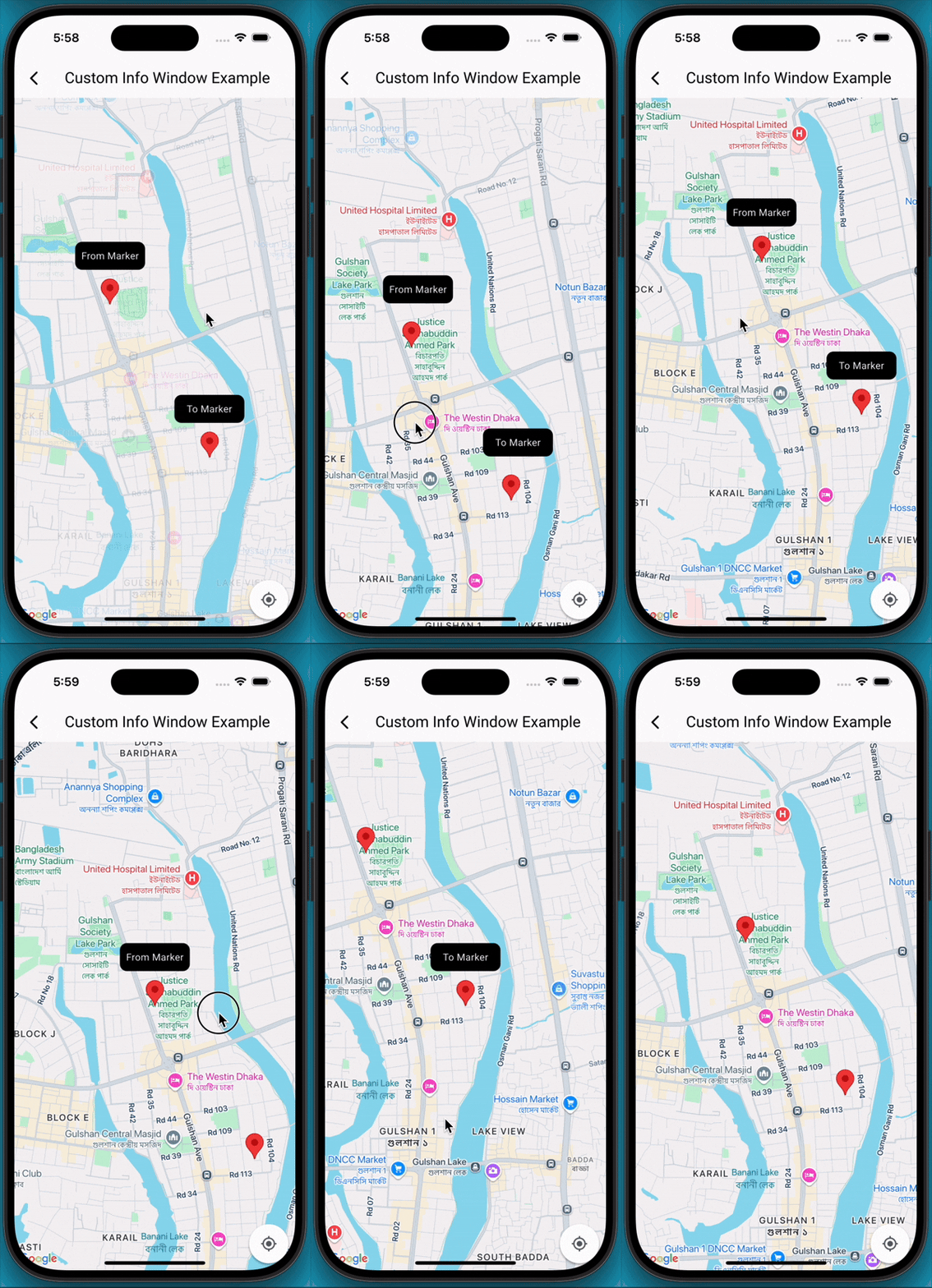
A Flutter package that extends the capabilities of google_maps_flutter by allowing developers to display fully customizable info windows for markers, including the ability to show multiple info windows simultaneously on the map.

✨Features

  • Customizable Info Windows: Design your info window using any Flutter widget.
  • Multiple Info Windows: Display several info windows at once, ideal for showing details of nearby locations or clustered markers.
  • Highly Flexible: Control the content, styling, and behavior of each info window independently.
  • Easy Integration: Seamlessly integrates with your existing Maps_flutter implementation.

📸 Demo screen recording

🚀 Getting Started

  1. Add Dependencies First, ensure you have google_maps_flutter integrated into your project. Then, add google_map_custom_windows to your pubspec.yaml:

     dependencies:
       google_map_custom_windows: ^1.0.1
    

    Run flutter pub get to fetch the new dependencies.

  2. Import

     import 'package:google_map_custom_windows/google_map_custom_windows.dart';
    
  3. Usage To use the custom info windows, you'll primarily interact with the GoogleMapCustomWindowController and the CustomMapInfoWindow widget.

  • Initialize GoogleMapCustomWindowController, Create an instance of GoogleMapCustomWindowController in your StatefulWidget's initState.
    late GoogleMapCustomWindowController _googleMapCustomWindowController;
    
    @override
    void initState() {
     super.initState();
     _googleMapCustomWindowController = GoogleMapCustomWindowController();
    }
    
  • Need to create your custom info window widget for view. You can create multiple window as your requirement.
    class MyCustomInfoWidget extends StatelessWidget {
    final String title;
    const MyCustomInfoWidget({super.key, required this.title});
    
    @override
    Widget build(BuildContext context) {
     return Container(
       decoration: BoxDecoration(
         borderRadius: BorderRadius.circular(10),
         color: Colors.black,
       ),
       alignment: Alignment.center,
       child: Text(
         title,
         style: TextStyle(color: Colors.white, fontSize: 14),
       ),
     );
    }
    }
    
  • Declare list of info window and same size of list LatLng.
    List<Widget> infoWidgets = [
    MyCustomInfoWidget(title: 'From Marker'),
    MyCustomInfoWidget(title: 'To Marker'),
    ];
    
    List<LatLng> infoPositions = [
    LatLng(23.798054, 90.413459),
    LatLng(23.789451, 90.419584),
    ];
    
  • Use Stack widget for using custom info window.
    @Stack(
         children: [
           GoogleMap(
             mapType: MapType.normal,
             markers: markers,
             initialCameraPosition: CameraPosition(target: initPosition, zoom: 15),
             onMapCreated: (GoogleMapController controller) {
               _setFromToMarker();
               _googleMapCustomWindowController.googleMapController = controller;
               _googleMapCustomWindowController.addInfoWindow!(infoWidgets, infoPositions);
             },
             onTap: (position) {
               _googleMapCustomWindowController.hideInfoWindow!();
             },
             onCameraMove: (CameraPosition cameraPosition) {
               _googleMapCustomWindowController.onCameraMove!();
             },
           ),
    
           CustomMapInfoWindow(
             controller: _googleMapCustomWindowController,
             offset: const Offset(0, 50),
             height: 40,
             width: 100,
           ),
         ],
       )
    
  1. Don't forget to dispose _googleMapCustomWindowController
    @override
      void dispose() {
        _googleMapCustomWindowController.dispose();
        super.dispose();
      }
    

🤝 Contributing

Contributions are welcome! If you find a bug or have a feature request, please open an issue on GitHub. If you'd like to contribute code, please fork the repository and submit a pull request.

所属分类

依赖

依赖清单 1 项

源码仓库

使用此插件的项目

暂无相关数据。