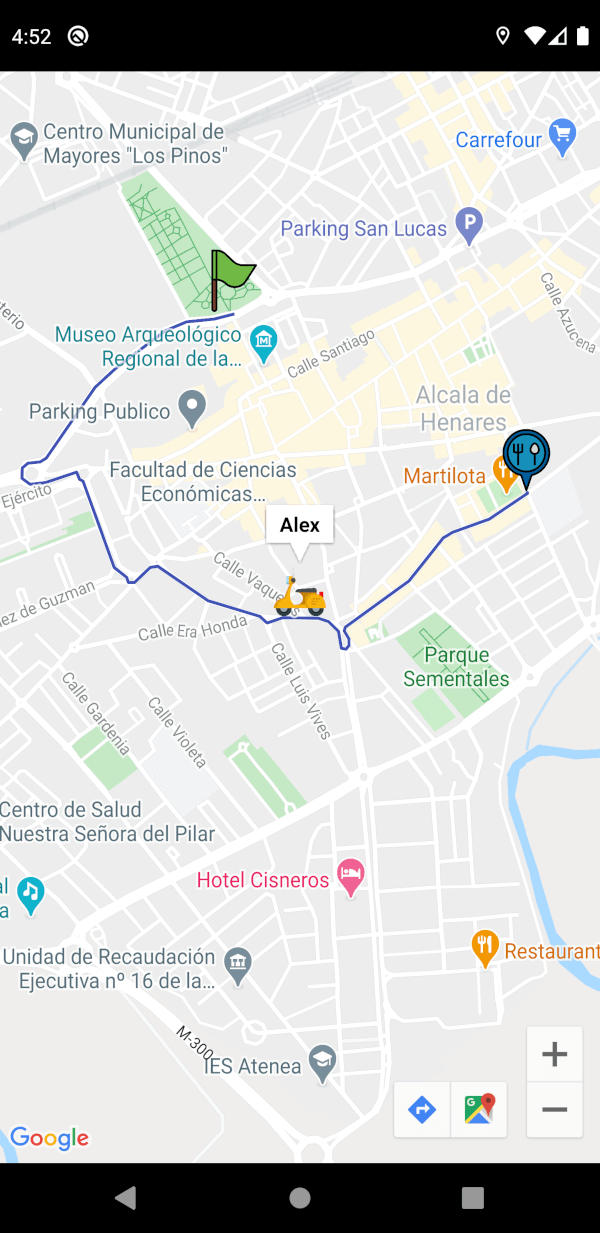
一个用于将 Google 地图与实时路线可视化及司机位置跟踪集成的 Flutter 包。它可从起点到终点创建折线,并支持在地图上实时更新司机的位置。专为跨平台使用而设计,可在 Android、iOS 和 Web 上无缝运行。该包通过提供简单直接的 API 来渲染路线和管理动态位置数据,简化了地图交互。
A widget for flutter developers to easily integrate google maps in their apps. It can be used to make polylines from a source to a destination, and also handle a driver's realtime location (if any) on the map.
Route Creation: Draw polylines (routes) between two locations by providing their latitude and longitude, using the Google Routes API.
Customizable Route Appearance: Customize the route’s color and width.
Real-time Location Tracking: Offers real-time location tracking for drivers, with an automatically updating marker on the map as the driver's location changes.
Marker Customization: Fully customizable markers.
User Interaction Handling: onTap callbacks for all markers and info windows to handle user interactions easily.
Full Google Maps Parameter Support: Supports passing nearly all parameters from google_maps_flutter for the GoogleMap widget as arguments to the plugin.
Step 2: Enable Google Maps SDK for Each Platform and the Routes API
Go to Google Developers Console, select your project, and open the Google Maps section from the navigation menu. Under APIs, enable Maps SDK for Android, Maps SDK for iOS, and Maps JavaScript API for web under the "Additional APIs" section.
To enable the Routes API, select "Routes API" in the "Additional APIs" section, then select "ENABLE". This is the service that builds the route. The older Directions API is in Legacy status and cannot be enabled on new Google Cloud projects, so it is not used.
[!NOTE]
Make sure the APIs you enabled are under the "Enabled APIs" section.
[!NOTE]
Refer to the platform specific setup for google maps here
Modify web/index.html
Get an API Key for Google Maps JavaScript API. Get started here.
Modify the <head> tag of your web/index.html to load the Google Maps JavaScript API, like so:
<head><!-- // Other stuff --><scriptsrc="https://maps.googleapis.com/maps/api/js?key=PASTE_GOOGLE_MAPS_API_KEY_HERE"></script></head>
🔑 Supplying the API key
The key is needed in up to three places, because the map tiles and the route
come from different Google services:
Where
What it is for
apiKey: on GoogleMapsWidget
The Routes API call that builds the route
android/app/src/main/AndroidManifest.xml
Rendering the map on Android
ios/Runner/AppDelegate.swift
Rendering the map on iOS
Enable Maps SDK for Android, Maps SDK for iOS and the Routes API on
the key, and enable billing on the project. A key that renders the map but has
no Routes API produces a map with markers and no route.
[!WARNING]
An application restricted key (Android package name plus SHA-1, or iOS bundle
id) will not work for the route. Those restrictions are enforced by the
native Maps SDK, which attaches the app identity; the Routes API call is a
plain HTTPS request from Dart and carries none. Google rejects it with:
PERMISSION_DENIED: Requests from thisAndroid client application <empty> are blocked.
Map tiles keep working, so only the route disappears. Use two keys: one
application restricted for the SDKs, and one restricted by API only
(Routes API) for apiKey:. Cap its quota and set a billing alert, since a key
without an application restriction is extractable from the app. For
production, proxy the call through your own backend so the key never ships.
The example app keeps the key out of the repository. Put it in a gitignored
example/.env:
GOOGLE_MAPS_API_KEY=your_key_here
and let Flutter read it:
flutter run --dart-define-from-file=.env
iOS uses the same flag. Because --dart-define values arrive base64 encoded in
DART_DEFINES, which xcconfig cannot decode, the example adds an Inject Google
Maps API key build phase that decodes them into the built Info.plist. See
example/ios/Runner/AppDelegate.swift.
Without either, all three fall back to the literal
PASTE_GOOGLE_MAPS_API_KEY_HERE, which you can replace in place if you prefer.
You can now add a GoogleMapsWidget widget to your widget tree and pass all the required parameters to get started. This widget will create a route between the source and the destination LatLng's provided.
One can create a controller and interact with the google maps controller, or update the source and destination LatLng's.
// can create a controller, and call methods to update source loc,// destination loc, interact with the google maps controller to// show/hide markers programmatically etc.final mapsWidgetController = GlobalKey<GoogleMapsWidgetState>();
// Pass this controller to the "key" param in "GoogleMapsWidget" widget, and then// call like this to update source or destination, this will also rebuild the route.
mapsWidgetController.currentState!.setSourceLatLng(
LatLng(
40.484000837597925 * (Random().nextDouble()),
-3.369978368282318,
),
);
// or, can interact with the google maps controller directly to focus on a marker etc..final googleMapsCon = await mapsWidgetController.currentState!.getGoogleMapsController();
googleMapsCon.showMarkerInfoWindow(MarkerIconInfo.sourceMarkerId);
The source and destination can also be updated declaratively, without a controller. Pass new values and rebuild, and the markers and the route follow.
GoogleMapsWidget(
  apiKey: "PASTE_GOOGLE_MAPS_API_KEY_HERE",
  // changing either of these and rebuilding recalculates the route
  sourceLatLng: _sourceLatLng,
  destinationLatLng: _destinationLatLng,
),
Pass a Google Maps style JSON to style to theme the map, for example to give it a dark mode. Generate one at mapstyle.withgoogle.com.
Use onError to find out why a route failed to load. A key without the Routes API enabled, or a project without billing, otherwise just looks like a map with no route on it.
GoogleMapsWidget(
apiKey: "PASTE_GOOGLE_MAPS_API_KEY_HERE",
sourceLatLng: ...,
destinationLatLng: ...,
onError: (error, stackTrace) {
// error is a RoutesApiException carrying the API's own messagedebugPrint('Could not load route: $error');
},
),
🚚 Migrating
Upgrading from 1.0.x? See the migration guide. The short version: 2.0.0 needs Flutter 3.38.0 or newer, and sourceLatLng/destinationLatLng now update when you rebuild.
🎯 Sample Usage
See the example app for a complete app. Learn how to setup the example app for testing here.
Check out the full API reference of the widget here.
import'dart:math';
import'package:flutter/material.dart';
import'package:google_maps_widget/google_maps_widget.dart';
voidmain() {
runApp(constMyApp());
}
/// The Google Maps API key.////// Pass it with `--dart-define-from-file=.env`, or replace the fallback below./// See README.md.const _googleMapsApiKey = String.fromEnvironment(
'GOOGLE_MAPS_API_KEY',
defaultValue: 'PASTE_GOOGLE_MAPS_API_KEY_HERE',
);
/// A trimmed down dark map style. Generate your own at/// https://mapstyle.withgoogle.com and paste the JSON here.const _darkMapStyle = '''
[
{"elementType": "geometry", "stylers": [{"color": "#242f3e"}]},
{"elementType": "labels.text.fill", "stylers": [{"color": "#746855"}]},
{"elementType": "labels.text.stroke", "stylers": [{"color": "#242f3e"}]},
{"featureType": "road", "elementType": "geometry", "stylers": [{"color": "#38414e"}]},
{"featureType": "road", "elementType": "geometry.stroke", "stylers": [{"color": "#212a37"}]},
{"featureType": "water", "elementType": "geometry", "stylers": [{"color": "#17263c"}]}
]
''';
classMyAppextendsStatefulWidget{
constMyApp({super.key});
@overrideState<MyApp> createState() => _MyAppState();
}
class_MyAppStateextendsState<MyApp> {
ThemeMode _themeMode = ThemeMode.light;
void_toggleTheme(bool isDark) {
setState(() => _themeMode = isDark ? ThemeMode.dark : ThemeMode.light);
}
@overrideWidgetbuild(BuildContext context) {
returnMaterialApp(
theme: ThemeData.light(),
darkTheme: ThemeData.dark(),
themeMode: _themeMode,
home: MapDemo(
isDark: _themeMode == ThemeMode.dark,
onThemeChanged: _toggleTheme,
),
);
}
}
classMapDemoextendsStatefulWidget{
constMapDemo({super.key, requiredthis.isDark, requiredthis.onThemeChanged});
finalbool isDark;
finalValueChanged<bool> onThemeChanged;
@overrideState<MapDemo> createState() => _MapDemoState();
}
class_MapDemoStateextendsState<MapDemo> {
// Can create a controller, and call methods to update source loc,// destination loc, interact with the google maps controller to// show/hide markers programmatically etc.final mapsWidgetController = GlobalKey<GoogleMapsWidgetState>();
// Source is held in state so it can also be changed declaratively, by// rebuilding with a new value, instead of going through the controller.LatLng _sourceLatLng = constLatLng(40.484000837597925, -3.369978368282318);
// mock streamfinalStream<LatLng> _driverCoordinates = Stream<LatLng>.periodic(
constDuration(milliseconds: 500),
(i) => LatLng(
40.47747872288886 + i / 10000,
-3.368043154478073 - i / 10000,
),
).asBroadcastStream();
finalValueNotifier<String?> _error = ValueNotifier<String?>(null);
finalValueNotifier<Duration?> _duration = ValueNotifier<Duration?>(null);
finalValueNotifier<int?> _distanceMetres = ValueNotifier<int?>(null);
@overridevoiddispose() {
_error.dispose();
_duration.dispose();
_distanceMetres.dispose();
super.dispose();
}
@overrideWidgetbuild(BuildContext context) {
returnSafeArea(
child: Scaffold(
body: Column(
children: [
ValueListenableBuilder<String?>(
valueListenable: _error,
builder: (context, error, _) {
if (error == null) returnconstSizedBox.shrink();
returnContainer(
width: double.infinity,
color: Theme.of(context).colorScheme.errorContainer,
padding: constEdgeInsets.all(12),
child: Text(
error,
style: TextStyle(
color: Theme.of(context).colorScheme.onErrorContainer,
),
),
);
},
),
Expanded(
child: GoogleMapsWidget(
apiKey: _googleMapsApiKey,
key: mapsWidgetController,
sourceLatLng: _sourceLatLng,
destinationLatLng: constLatLng(
40.48017307700204,
-3.3618026599287987,
),
///////////////////////////////////////////////////////////////////// OPTIONAL PARAMETERS /////////////////////////////////////////////////////////////////////// Surfaces why a route failed to load. An API key without// the Routes API enabled is the usual cause, and it// otherwise looks like the map is simply broken.
onError: (error, _) => _error.value = error.toString(),
// The app decides which style to show. Anything can drive it:// the theme, a user preference, time of day. Passing a new// value restyles the live map.
style: widget.isDark ? _darkMapStyle : null,
routeWidth: 2,
sourceMarkerIconInfo: constMarkerIconInfo(
infoWindowTitle: "This is source name",
assetPath: "assets/images/house-marker-icon.png",
assetMarkerSize: Size.square(50),
),
destinationMarkerIconInfo: constMarkerIconInfo(
assetPath: "assets/images/restaurant-marker-icon.png",
assetMarkerSize: Size.square(50),
),
driverMarkerIconInfo: MarkerIconInfo(
infoWindowTitle: "Alex",
assetPath: "assets/images/driver-marker-icon.png",
onTapMarker: (currentLocation) {
debugPrint("Driver is currently at $currentLocation");
},
assetMarkerSize: constSize.square(50),
rotation: 90,
),
onPolylineUpdate: (p) {
debugPrint("Polyline updated: ${p.points}");
},
updatePolylinesOnDriverLocUpdate: true,
driverCoordinatesStream: _driverCoordinates,
totalTimeCallback: (duration) => _duration.value = duration,
totalDistanceCallback: (metres) => _distanceMetres.value = metres,
),
),
ListenableBuilder(
listenable: Listenable.merge([_duration, _distanceMetres]),
builder: (context, _) => _RouteSummary(
duration: _duration.value,
distanceMetres: _distanceMetres.value,
),
),
Padding(
padding: constEdgeInsets.all(10),
child: Column(
spacing: 10,
children: [
Row(
spacing: 10,
children: [
// Declarative update: rebuild with a new sourceLatLng// and the marker and route follow.Expanded(
child: ElevatedButton(
onPressed: () {
setState(() {
_sourceLatLng = LatLng(
40.47747872288886 + Random().nextInt(1000) / 10000,
-3.369978368282318,
);
});
},
child: constText('Update source'),
),
),
// Imperative update through the state, for cases where// you do not want to rebuild.Expanded(
child: ElevatedButton(
onPressed: () async {
finalGoogleMapsWidgetState? state = mapsWidgetController.currentState;
if (state == null) return;
finalGoogleMapController googleMapsCon = await state.getGoogleMapsController();
await googleMapsCon.showMarkerInfoWindow(
MarkerIconInfo.sourceMarkerId,
);
},
child: constText('Show source info'),
),
),
],
),
SwitchListTile(
contentPadding: EdgeInsets.zero,
title: constText('Dark theme'),
value: widget.isDark,
onChanged: widget.onThemeChanged,
),
],
),
),
],
),
),
);
}
}
/// Shows the total distance and time for the current route.////// The package hands these over as an [int] of metres and a [Duration], so/// turning them into text is the app's job. Use `intl` in a real app; the/// formatting below is deliberately minimal.class_RouteSummaryextendsStatelessWidget{
const_RouteSummary({requiredthis.duration, requiredthis.distanceMetres});
finalDuration? duration;
finalint? distanceMetres;
staticString_formatDistance(int metres) {
if (metres < 1000) return'$metres m';
return'${(metres / 1000).toStringAsFixed(1)} km';
}
staticString_formatDuration(Duration duration) {
finalint hours = duration.inHours;
finalint minutes = duration.inMinutes.remainder(60);
if (hours > 0) return'$hours h $minutes min';
if (duration.inMinutes > 0) return'$minutes min';
return'${duration.inSeconds} s';
}
@overrideWidgetbuild(BuildContext context) {
finalDuration? duration = this.duration;
finalint? distanceMetres = this.distanceMetres;
finalThemeData theme = Theme.of(context);
// Nothing to show until the first route comes back.if (duration == null && distanceMetres == null) {
returnconstSizedBox.shrink();
}
returnContainer(
width: double.infinity,
color: theme.colorScheme.surfaceContainerHighest,
padding: constEdgeInsets.symmetric(horizontal: 16, vertical: 10),
child: Row(
mainAxisAlignment: MainAxisAlignment.spaceEvenly,
children: [
if (distanceMetres != null)
_Metric(
icon: Icons.straighten,
label: 'Distance',
value: _formatDistance(distanceMetres),
),
if (duration != null)
_Metric(
icon: Icons.schedule,
label: 'Time',
value: _formatDuration(duration),
),
],
),
);
}
}
class_MetricextendsStatelessWidget{
const_Metric({
requiredthis.icon,
requiredthis.label,
requiredthis.value,
});
finalIconData icon;
finalString label;
finalString value;
@overrideWidgetbuild(BuildContext context) {
finalThemeData theme = Theme.of(context);
returnRow(
mainAxisSize: MainAxisSize.min,
spacing: 8,
children: [
Icon(icon, size: 20, color: theme.colorScheme.onSurfaceVariant),
Column(
crossAxisAlignment: CrossAxisAlignment.start,
mainAxisSize: MainAxisSize.min,
children: [
Text(label, style: theme.textTheme.labelSmall),
Text(
value,
style: theme.textTheme.titleMedium?.copyWith(
fontWeight: FontWeight.w600,
),
),
],
),
],
);
}
}
👤 Author
Built and maintained by Rithik Bhandari, a mobile developer building cross-platform apps with Flutter.