搜索插件、代码仓与 APP 分类

插件详情v1.8.0

highlight_text

使用此包,您可以高亮显示单词并创建特定样式和操作。

AndroidiOSWebmacOSWindowsLinux
近 30 天下载
1.1万
喜欢数
133
Pub 分数
150

安装插件

flutter pub add highlight_text

插件介绍

基于插件公开信息、社区数据与项目使用情况整理的选型参考。

highlight_text 包使开发者能够突出显示文本中的特定单词,并应用自定义样式和交互操作。它非常适合需要对某些关键词进行视觉强调或功能处理的富文本显示场景,例如可点击的术语。该包支持 Android、iOS、Web、macOS、Windows 和 Linux 多个平台,适用于跨平台应用程序。通过 Flutter pub add 简单集成,它通过动态文本交互提升用户参与度。

适合场景

  • 在文章中突出关键词
  • 创建交互式文本元素
  • 增强搜索结果预览
  • 显示样式化的提及或标签
  • 构建富文本编辑器
  • 实现可点击的单词操作

主要特点

  • 可自定义的高亮样式
  • 支持对高亮词语的点击手势
  • 跨平台兼容性
  • 与 Flutter 的轻松集成
  • 灵活的文本渲染
  • 可配置的高亮颜色和效果

适合对象

  • 内容密集型应用
  • 教育类应用
  • 交互式文档
  • 社交媒体功能
  • 搜索和筛选接口
  • 用户生成内容平台

使用建议

  • 大段文本带来的性能影响
  • 内置的样式选项有限,仅支持基本自定义
  • 需要仔细处理嵌套的 widget
  • 可能需要额外的逻辑来处理复杂交互
  • 不适用于实时协作编辑
  • 最适合中等文本复杂度

原始 README

以下为关联源码仓库的 README 原文快照,最新内容请访问源码仓库。

Highlight Text Plugin

A flutter package to highlight words from a text.

Usage

To use this package, add highlight_text as a dependency in your pubspec.yaml file.

Getting Started

With this package you can highlight words and create specific actions for each highlighted word, you can customize the style of each word separately or create a unique style for all of them, you can also customize the style of the rest of the text.

Example

Import the highlight library

import 'package:highlight_text/highlight_text.dart';

You should use the HighlightedWord class to specify the dictionary words in a Map object

Map<String, HighlightedWord> words = {
    "Flutter": HighlightedWord(
        onTap: () {
            print("Flutter");
        },
        textStyle: textStyle,
    ),
    "open-source": HighlightedWord(
        onTap: () {
            print("open-source");
        },
        textStyle: textStyle,
    ),
    "Android": HighlightedWord(
        onTap: () {
            print("Android");
        },
        textStyle: textStyle,
    ),
};

Now you can call the TextHighlight widget

TextHighlight(
    text: text, // You need to pass the string you want the highlights
    words: words, // Your dictionary words
    textStyle: TextStyle( // You can set the general style, like a Text()
        fontSize: 20.0,
        color: Colors.black,
    ),
    textAlign: TextAlign.justify, // You can use any attribute of the RichText widget
),

Package example image

1.1.0 Update

Now you can customize better the words you highlight, just like a Container. It was added decoration and padding fields to HighlightedWord object, so you can do whatever you want to customize it.

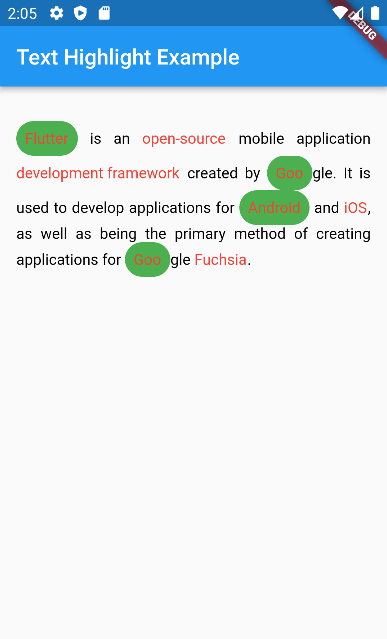
HighlightedWord(
    onTap: () {},
    textStyle: textStyle,
    decoration: BoxDecoration(
        color: Colors.green,
        borderRadius: BorderRadius.circular(50),
    ),
    padding: EdgeInsets.all(8.0),
),

1.2.0 Breaking changes

enableCaseSensitive renamed to matchCase to be clearer about what it does

TextHighlight(
    text: text,
    words: words,
    matchCase: true // will highlight only exactly the same string
),

所属分类

源码仓库

使用此插件的项目