搜索插件、代码仓与 APP 分类

icon_picker 封面
插件详情v2.1.0

icon_picker

一个 Flutter 小部件,用于显示包含图标集合的对话框,供选择一个图标并返回 jason iconData。

近 30 天下载
61
喜欢数
18
Pub 分数
60

安装插件

flutter pub add icon_picker

插件介绍

基于插件公开信息、社区数据与项目使用情况整理的选型参考。

Icon Picker 是一个 Flutter 包,提供了一个对话框小部件,用于轻松显示图标集合以供选择。它允许用户选择一个图标,并以 JSON 格式返回所选图标的数据显示。设计简洁且易于集成,支持自定义图标集,非常适合需要在表单或设置中进行图标选择的应用程序。该包轻量且专注于可用性,使 UI 工作流程中的实现变得简单直接。

适合场景

  • 在应用设置中选择图标
  • 向用户生成的内容添加图标
  • 使用图标自定义UI元素
  • 配置主题选项
  • 使用图标输入构建表单生成器
  • 将图标选择集成到仪表板中

主要特点

  • 显示可滚动的图标集合
  • 以 JSON 数据形式返回所选图标
  • 简单的基于对话框的界面
  • 支持自定义图标集
  • 轻量且易于集成
  • 所需设置最少

适合对象

  • 开发UI密集型应用的开发者
  • 需要自定义图标的应用
  • 带有视觉元素的表单构建器
  • 设计师集成图标选择
  • 依赖最少的项目
  • 原型图标选择功能

使用建议

  • 需要手动处理图标数据解析
  • 仅限预定义图标集合,除非进行自定义
  • 无内置搜索或筛选
  • 未针对非常大的图标集进行优化
  • 依赖外部图标集定义
  • 可能需要额外的样式以保持外观一致

原始 README

以下为关联源码仓库的 README 原文快照,最新内容请访问源码仓库。

icon_picker

pub package

Buy Me A Beer

A Flutter widget to show an icon collection to pick.
This widget extend TextField and has a similar behavior as TextFormField

Usage

In the pubspec.yaml of your flutter project, add the following dependency:

dependencies:
  ...
  icon_picker: "^2.1.0"

In your library add the following import:

import 'package:icon_picker/icon_picker.dart';

For help getting started with Flutter, view the online documentation.

Example

IconPicker use an internal MaterialIcon collection by default, but you can set your own icon collection.
You just need to pass in iconCollection param a Map<String, IconData>.

final Map<String, IconData> myIconCollection = {
  'favorite': Icons.favorite,
  'home': Icons.home,
  'android': Icons.android,
  'album': Icons.album,
  'ac_unit': Icons.ac_unit,
  ...
}
IconPicker(
  initialValue: 'favorite',
  icon: Icon(Icons.apps),
  labelText: "Icon",
  title: "Select an icon",
  cancelBtn: "CANCEL",
  enableSearch: true,
  searchHint: 'Search icon',
  iconCollection: myIconCollection,
  onChanged: (val) => print(val),
  onSaved: (val) => print(val),
);

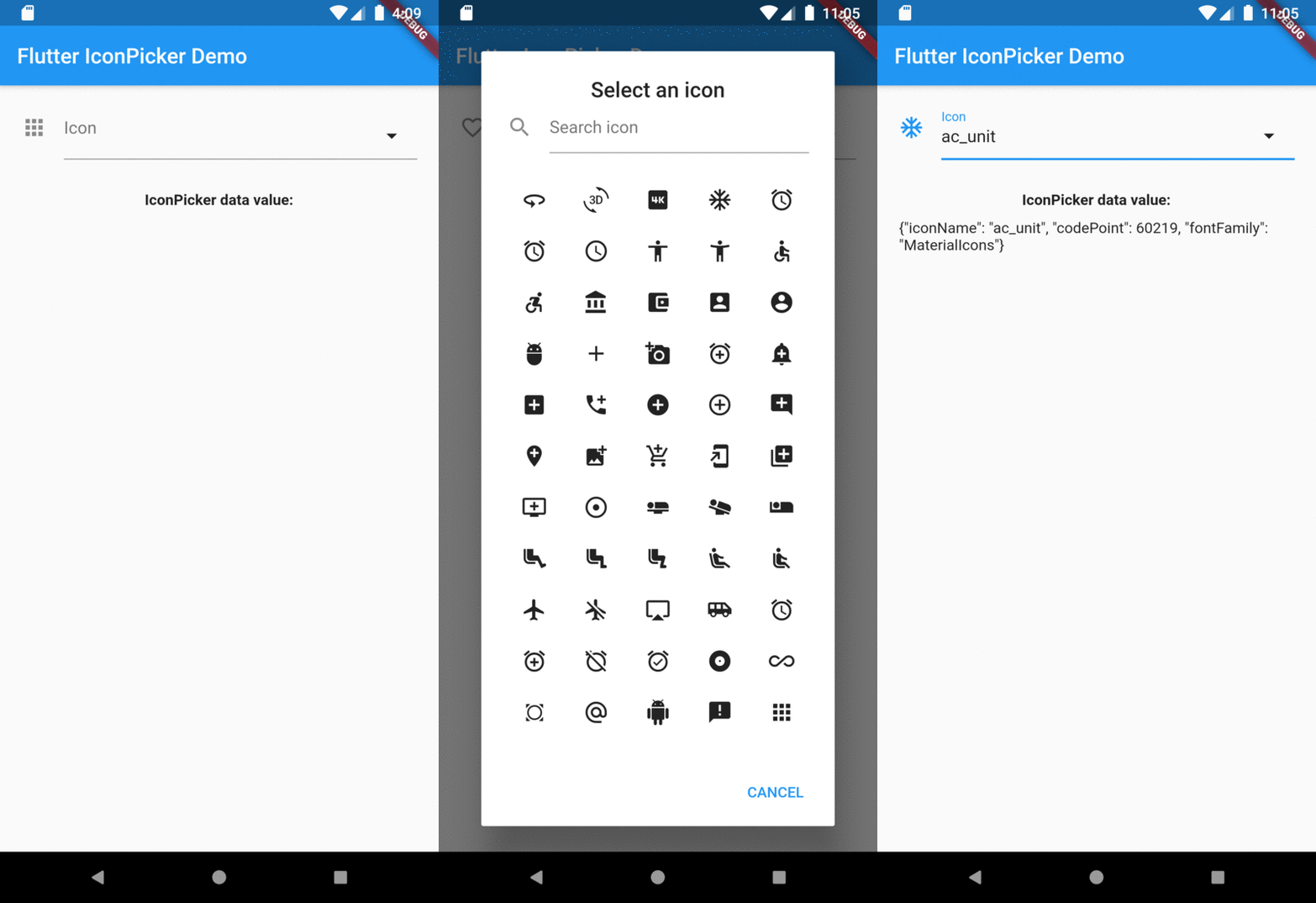
The result of val in onChanged, validator and onSaved will be a json String.
So, if you tap the icon ac_unit in the dialog window, the result value will be:

'{"iconName": "ac_unit", "codePoint": 60219, "fontFamily": "MaterialIcons"}'

Transforming the String result of IconPicker in an IconData:

String value = '{"iconName": "ac_unit", "codePoint": 60219, "fontFamily": "MaterialIcons"}'
var iconDataJson = jsonDecode(value);
IconData icon = IconData(iconDataJson['codePoint'], fontFamily: iconDataJson['fontFamily']);
Icon(icon);

Preview

Overview

所属分类

源码仓库

使用此插件的项目

暂无相关数据。