搜索插件、代码仓与 APP 分类

插件详情v2.0.0+5

mu_state

使用 Flutter 内置原语的最小化 Cubit 风格状态管理。无外部依赖。

AndroidiOSWebmacOSWindowsLinux
近 30 天下载
29
喜欢数
2
Pub 分数
160

安装插件

flutter pub add mu_state

插件介绍

基于插件公开信息、社区数据与项目使用情况整理的选型参考。

mu_state 是一个轻量级、无依赖的状态管理解决方案,专为 Flutter 设计,灵感来自 Cubit。它利用 Flutter 内置的 Stream 和 ValueNotifier 等原语,提供一种无需外部依赖的最小化且高效的方式来管理应用状态。设计简洁且性能出色,提供了清晰的 API 来发出状态变更并响应这些变更。非常适合中小型应用,当使用功能完整的状态管理库可能过于复杂时。

适合场景

  • 小型应用中的简单状态管理
  • 替换复杂的状态解决方案
  • Bloc/Cubit 的轻量级替代方案
  • 实时 UI 更新,开销最小
  • 模块化或微服务架构中的状态处理

主要特点

  • 无外部依赖
  • 基于 Flutter 的原生基础组件构建
  • 最小化样板代码
  • Cubit 启发的 API
  • 轻松集成到现有的 Flutter 代码中
  • 基于流的状态发射

适合对象

  • 寻求轻量级状态管理的开发者
  • 项目避免使用第三方库
  • 需要快速状态更新的应用
  • 学习状态管理概念
  • 注重简单性和可维护性的团队

使用建议

  • 不适合大规模应用
  • 有限的内置错误处理
  • 无内置持久化或序列化
  • 需要手动状态转换逻辑
  • 比完整的框架(如Bloc)更少主观

原始 README

以下为关联源码仓库的 README 原文快照,最新内容请访问源码仓库。

mu_state

Minimal Cubit-inspired state management using Flutter's built-in primitives. No external dependencies.

See my article From ValueNotifier to Cubit-inspired state management for more info

Overview

mu_state provides a lightweight alternative to Bloc/Cubit using Flutter's built-in ValueNotifier, ValueListenableBuilder and InheritedWidget. It follows the same patterns you know from Bloc but with zero dependencies and minimal boilerplate.

Key concepts:

  • MuLogic<S> - Your business logic (like Cubit)
  • MuBuilder<S> - Rebuilds UI on state changes (like BlocBuilder)
  • MuListener<S> - Performs side effects (like BlocListener)
  • MuConsumer<S> - Combines builder and listener (like BlocConsumer)
  • MuProvider<T> - Provides values down the widget tree (like Provider or BlocProvider)

Additional widgets are available for handling multiple states or providers: MuMultiBuilder, MuMultiListener, and MuMultiProvider. The MuComparable mixin is also available for state equality comparison. See the Components section for details.

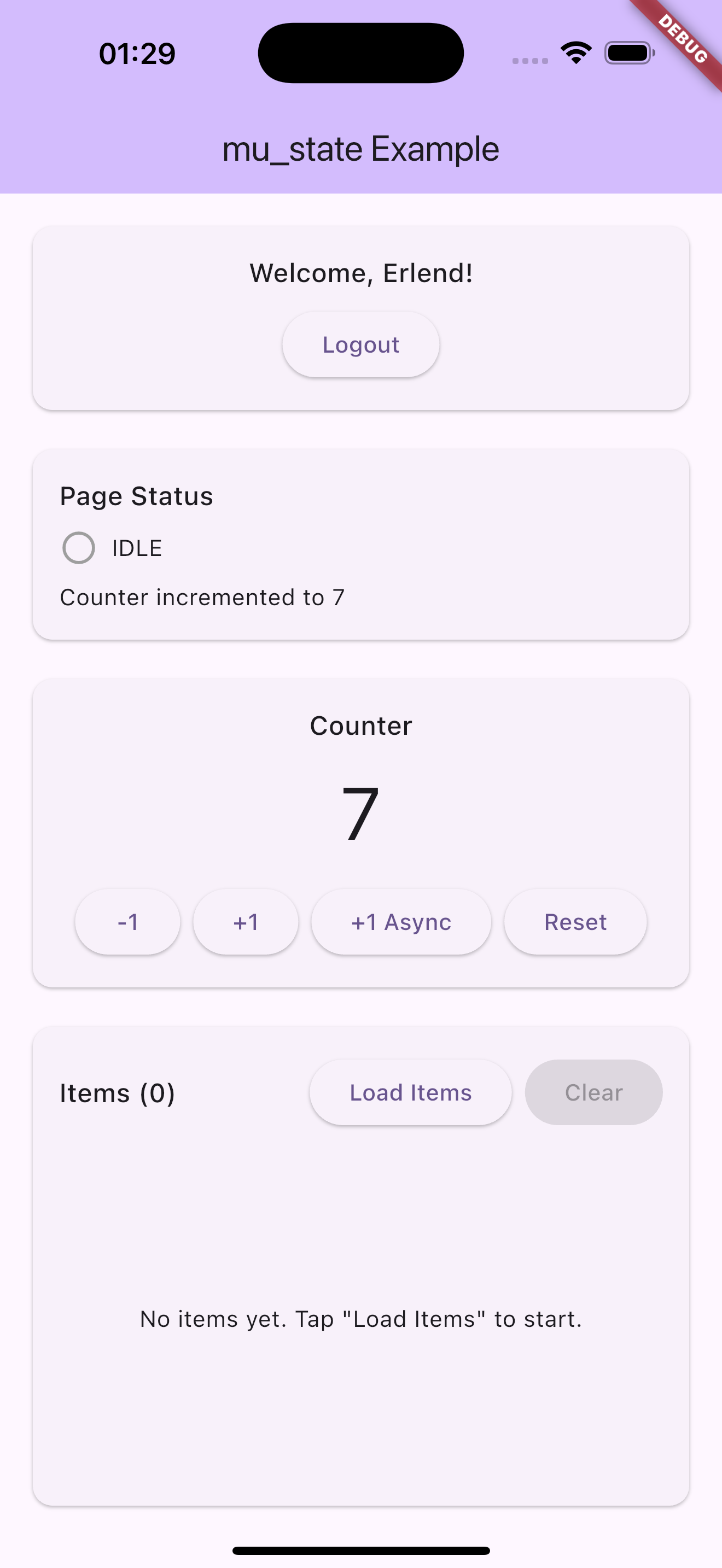
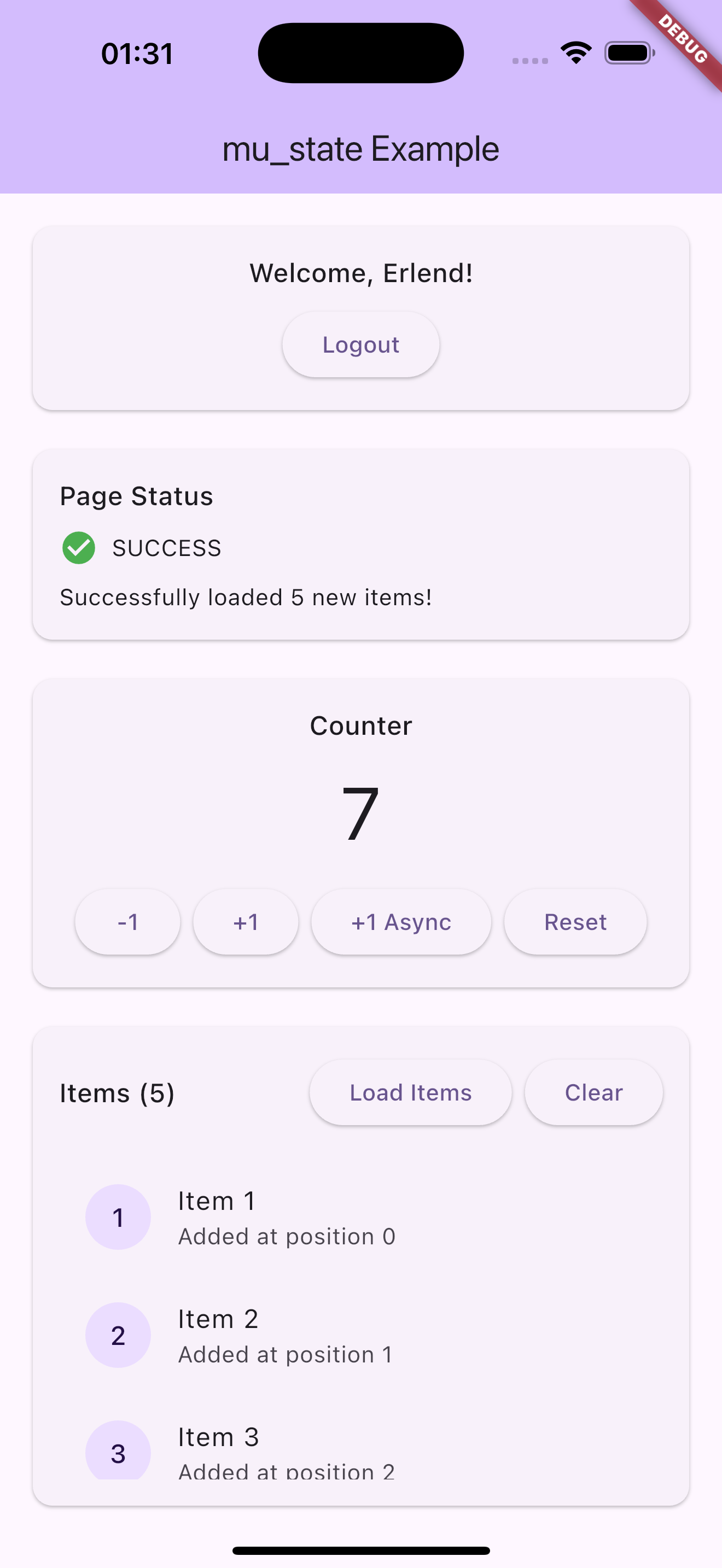
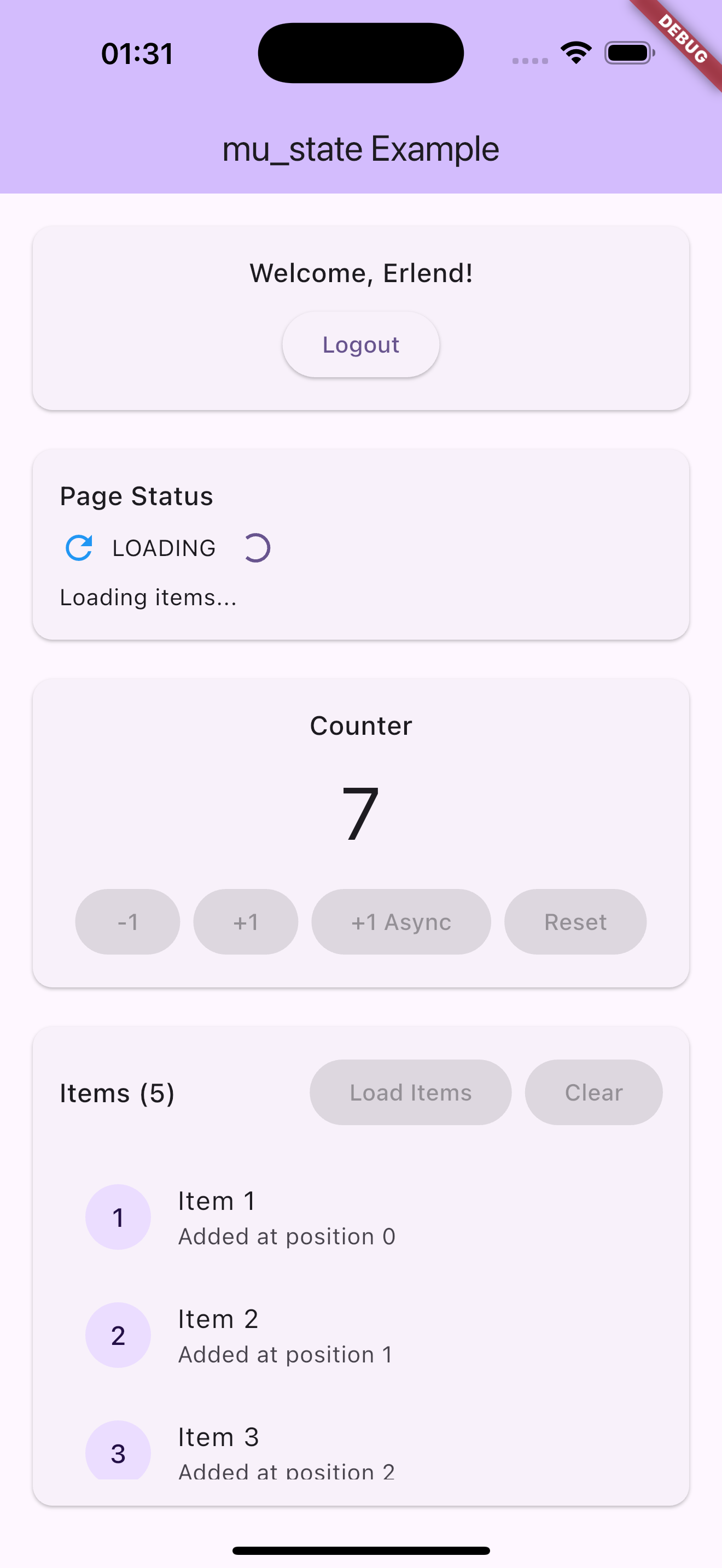
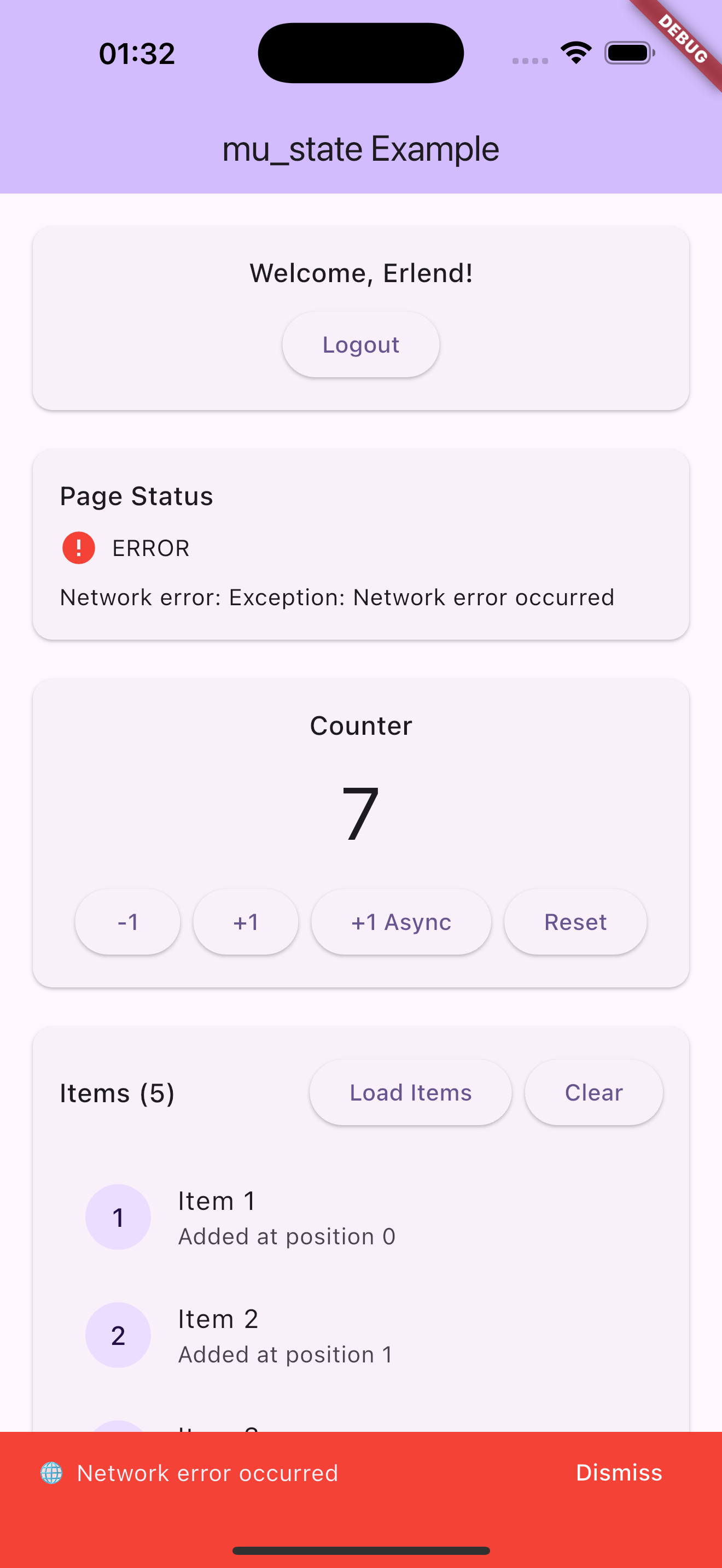
Screenshots

Usage

Let's create a simple counter to see how mu_state works:

counter_logic.dart
import 'package:mu_state/mu_state.dart';

class CounterState with MuComparable {
  final int counter;
  final bool isLoading;
  final String? error;

  const CounterState({required this.counter, required this.isLoading, this.error});

  CounterState copyWith({int? counter, bool? isLoading, String? error}) {
    return CounterState(
      counter: counter ?? this.counter,
      isLoading: isLoading ?? this.isLoading,
      error: error ?? this.error,
    );
  }

  @override
  List<Object?> get props => [counter, isLoading, error];
}

class CounterLogic extends MuLogic<CounterState> {
  CounterLogic() : super(const CounterState(counter: 0, isLoading: false));

  void increment() {
    value = value.copyWith(counter: value.counter + 1);
  }

  Future<void> incrementAsync() async {
    value = value.copyWith(isLoading: true, error: null);
    await Future.delayed(const Duration(seconds: 1));
    
    // Simulate random error
    if (DateTime.now().millisecondsSinceEpoch % 3 == 0) {
      value = value.copyWith(isLoading: false, error: 'Failed to increment');
    } else {
      value = value.copyWith(counter: value.counter + 1, isLoading: false);
    }
  }
}
main.dart
import 'package:flutter/material.dart';
import 'package:mu_state/mu_state.dart';
import 'counter_logic.dart';

void main() => runApp(CounterApp());

class CounterApp extends StatelessWidget {
  @override
  Widget build(BuildContext context) {
    return MaterialApp(
      home: MuProvider<CounterLogic>(
        value: CounterLogic(),
        child: CounterPage(),
      ),
    );
  }
}
counter_page.dart
class CounterPage extends StatelessWidget {
  @override
  Widget build(BuildContext context) {
    final logic = context.logic<CounterLogic>();
    
    return Scaffold(
      appBar: AppBar(title: Text('Counter')),
      body: MuListener<CounterState>(
        logic: logic,
        listener: (context, state) {
          if (state.error != null) {
            ScaffoldMessenger.of(context).showSnackBar(
              SnackBar(content: Text('⚠️ ${state.error}')),
            );
          }
        },
        listenWhen: (prev, curr) => prev.error != curr.error && curr.error != null,
        child: Center(
          child: Column(
            mainAxisAlignment: MainAxisAlignment.center,
            children: [
              MuBuilder<CounterState>(
                valueListenable: logic,
                builder: (context, state, child) {
                  return Column(
                    children: [
                      Text('Counter: ${state.counter}', style: Theme.of(context).textTheme.headlineMedium),
                      if (state.isLoading) CircularProgressIndicator(),
                    ],
                  );
                },
              ),
              SizedBox(height: 20),
              ElevatedButton(
                onPressed: () => logic.increment(),
                child: Text('Increment'),
              ),
              SizedBox(height: 8),
              ElevatedButton(
                onPressed: () => logic.incrementAsync(),
                child: Text('Async Increment'),
              ),
            ],
          ),
        ),
      ),
    );
  }
}

At this point we have successfully separated our presentational layer from our business logic layer. Notice that CounterPage knows nothing about what happens when a user taps the buttons. The widget simply notifies the CounterLogic that the user has pressed increment.

Alternative: You could also use MuConsumer to combine the listener and builder functionality in a single widget. See the MuConsumer section below for details.

Components

MuLogic

MuLogic<S> is a typedef for ValueNotifier<S> that serves as the foundation for your business logic. It manages state and notifies listeners when the state changes. MuLogic is essentially an alias that makes the code more semantic for state management purposes.

class CounterLogic extends MuLogic<CounterState> {
  CounterLogic() : super(const CounterState(counter: 0, isLoading: false));

  void increment() {
    value = value.copyWith(counter: value.counter + 1);
  }
}

Since MuLogic extends ValueNotifier, you get all the familiar methods like addListener, removeListener, and the value property for getting and setting state.

MuBuilder

MuBuilder<S> is a typedef for ValueListenableBuilder<S> that rebuilds the widget when the state changes. It's essentially an alias that makes the code more semantic for state management, but underneath it's just Flutter's built-in ValueListenableBuilder.

See MuListener if you want to "do" anything in response to state changes such as navigation, showing a dialog, etc...

MuBuilder<CounterState>(
  valueListenable: logic,
  builder: (context, state, child) {
    return Text('Counter: ${state.counter}');
  }
)
MuComparable

MuComparable is a mixin that provides equality comparison for state classes. It's a lightweight alternative to packages like Equatable and helps MuBuilder and other listeners determine when to rebuild.

class CounterState with MuComparable {
  final int counter;
  final String? error;

  const CounterState({required this.counter, this.error});

  @override
  List<Object?> get props => [counter, error];
}

The props list should include all properties that determine equality. When state changes, widgets will only rebuild if the new state is different from the previous state based on these properties.

Updating collections

Equality is shallow: entries in props are compared with Dart's default ==. For List, Map, and Set that means reference equality, not content equality. Always create a new collection when updating state — never mutate in place:

// ✅ Correct — new list reference, listeners fire.
emit(state.copyWith(items: [...state.items, newItem]));

// ❌ Wrong — same reference, listeners do NOT fire.
state.items.add(newItem);
emit(state.copyWith(items: state.items));

If you'd rather have deep collection equality out of the box, equatable is a drop-in alternative with the same props API.

MuListener

MuListener performs side effects in response to state changes - navigation, showing dialogs, etc. The listener is called once per state change and by default NOT on initial state (lazy: true). Set lazy: false to call the listener immediately with the current state.

MuListener<CounterState>(
  logic: logic,
  listener: (context, state) {
    if (state.error != null) {
      ScaffoldMessenger.of(context).showSnackBar(
        SnackBar(content: Text('Error: ${state.error}')),
      );
    }
  },
  listenWhen: (prev, curr) => prev.error != curr.error,
  child: Container(),
)
MuProvider

MuProvider is a Flutter widget which provides any value to its children via dependency injection. While originally designed for MuLogic instances, it's now fully generic and can provide any type - making it perfect for injecting repositories, services, or other dependencies throughout your widget tree.

You provide the instance to MuProvider via the value parameter. MuProvider will automatically handle disposing the value when the provider is disposed (if it implements ChangeNotifier, which MuLogic does).

MuProvider<CounterLogic>(
  value: CounterLogic(),
  child: CounterPage(),
);

Access from anywhere in the subtree:

// For MuLogic instances
final logic = context.logic<CounterLogic>();

// For any type
final repo = context.read<AuthRepository>();
MuMultiProvider

MuMultiProvider is a Flutter widget that merges multiple MuProvider widgets into one. MuMultiProvider improves the readability and eliminates the need to nest multiple MuProviders. By using MuMultiProvider we can go from:

MuProvider<LogicA>(
  value: LogicA(),
  child: MuProvider<LogicB>(
    value: LogicB(),
    child: MuProvider<LogicC>(
      value: LogicC(),
      child: ChildA(),
    )
  )
)

to:

MuMultiProvider([
  (child) => MuProvider<LogicA>(value: LogicA(), child: child),
  (child) => MuProvider<LogicB>(value: LogicB(), child: child),
  (child) => MuProvider<LogicC>(value: LogicC(), child: child),
], child: ChildA())
MuMultiBuilder

MuMultiBuilder is a Flutter widget which listens to multiple MuLogic instances and rebuilds when any of them change. This is useful when you need to build UI that depends on multiple state sources.

MuMultiBuilder(
  listenables: [logicA, logicB],
  builder: (context, values, child) {
    final stateA = values[0] as StateA;
    final stateB = values[1] as StateB;
    return Text('A: ${stateA.value}, B: ${stateB.value}');
  },
)
MuMultiListener

MuMultiListener is a Flutter widget that merges multiple MuListener widgets into one. MuMultiListener improves the readability and eliminates the need to nest multiple MuListeners. By using MuMultiListener we can go from:

MuListener<StateA>(
  logic: logicA,
  listener: (context, state) {
    // handle state A changes
  },
  child: MuListener<StateB>(
    logic: logicB,
    listener: (context, state) {
      // handle state B changes
    },
    child: ChildWidget(),
  ),
)

to:

MuMultiListener(
  listeners: [
    (child) => MuListener<StateA>(
      logic: logicA,
      listener: (context, state) {
        // handle state A changes
      },
      child: child,
    ),
    (child) => MuListener<StateB>(
      logic: logicB,
      listener: (context, state) {
        // handle state B changes
      },
      child: child,
    ),
  ],
  child: ChildWidget(),
)
MuConsumer

MuConsumer combines MuBuilder and MuListener functionality in a single widget.

MuConsumer<CounterState>(
  logic: logic,
  listener: (context, state) {
    if (state.error != null) {
      ScaffoldMessenger.of(context).showSnackBar(
        SnackBar(content: Text('Error: ${state.error}')),
      );
    }
  },
  builder: (context, state, child) {
    return Text('Counter: ${state.counter}');
  },
)

An optional listenWhen and buildWhen can be implemented for more granular control over when listener and builder are called. The listenWhen and buildWhen functions take the previous state and the current state and return a bool which determines whether or not the listener or builder function will be invoked.

MuConsumer<CounterState>(
  logic: logic,
  listenWhen: (previous, current) {
    // return true/false to determine whether or not
    // to invoke listener with state
    return previous.error != current.error;
  },
  listener: (context, state) {
    // do stuff here based on state
  },
  buildWhen: (previous, current) {
    // return true/false to determine whether or not
    // to rebuild the widget with state
    return previous.counter != current.counter;
  },
  builder: (context, state, child) {
    // return widget here based on state
    return Text('Counter: ${state.counter}');
  }
)

See the example project for a complete implementation with more features.

所属分类

源码仓库

使用此插件的项目

暂无相关数据。