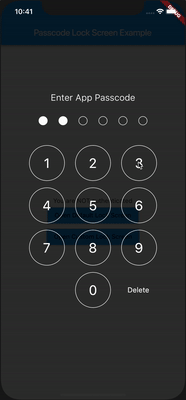
Flutter - Passcode Lock Screen
A Flutter package for iOS and Android for showing passcode input screen, similar to Native iOS.

Installation
First add passcode_screen as a dependency in your pubspec.yaml file.
Then use import
import 'package:passcode_screen/passcode_screen.dart';
What can it do for you?

- Create a beautiful passcode lock view simply.
PasscodeScreen(
  title: title,
  passwordEnteredCallback: _onPasscodeEntered,
  cancelButton: Text('Cancel'),
  deleteButton: Text('Delete'),
  shouldTriggerVerification: _verificationNotifier.stream,
);
- Passcode input completed callback.
_onPasscodeEntered(String enteredPasscode) {

}
- Notify passcode screen if passcode correct or not
final StreamController<bool> _verificationNotifier = StreamController<bool>.broadcast();

_onPasscodeEntered(String enteredPasscode) {
  bool isValid = '123456' == enteredPassword;
  _verificationNotifier.add(isValid);
}
Don't forget to close a stream
@override
void dispose() {
  _verificationNotifier.close();
  super.dispose();
}
- Customize UI.
Customize circles
class CircleUIConfig {
  final Color borderColor;
  final Color fillColor;
  final double borderWidth;
  final double circleSize;
  double extraSize;
}
Customize keyboard
class KeyboardUIConfig {
  final double digitSize;
  final TextStyle digitTextStyle;
  final TextStyle deleteButtonTextStyle;
  final Color primaryColor;
  final Color digitFillColor;
  final EdgeInsetsGeometry keyboardRowMargin;
  final EdgeInsetsGeometry deleteButtonMargin;
}

Landscape Support

iOS & Android
Plugin is totally platform agnostic. No configuration required - the plugin should work out of the box.
Contributions
Warmly welcome to submit a pull request!
Passcode Lock Screen
Passcode Lock Screen is owned and maintained by Redeyes Dev
Used in production
Passkeep - Passwords Keeper
Contributors
Vladimir Hudnitsky
BeDaut
mix1009
pixnbit
ssanderson
imejiasoft
Relase notes:
1.0.0+1:
Basic implementation of a widget.
- You could show a widget, enter passcode and validate it.
1.0.1
- Added
isValidCallback to help you handle success scenario. isValidCallback will be invoked after passcode screen will pop.
1.0.2
- Added configurable background and title color. (by @BeDaut)
- Added
cancelCallback to react when user cancelled widget (by @mix1009)
1.1.0
- Provide widget instead of string for title
- Fixed digits layout
- Added flexibility to configure 'Cancel' and 'Delete' buttons as widgets
- Added flexibility to provide digits as list of strings for better customisation
- Removed navigation as default action when cancel pressed
1.1.1
- Add landscape view for the passcode screen
1.2.0
- Add dynamic size for landscape view.
- Moved 'Cancel' button to the bottom of the screen to align with iOS Native Passcode Screen style.
1.2.1
- Example updated to target Android 11
- Fixed Issue#23
1.2.2
- Fixed an issue with example build
- Example updated to show how to implement 'Reset passcode' feature
2.0.0