搜索插件、代码仓与 APP 分类

插件详情v0.0.3

progress_indicator_button

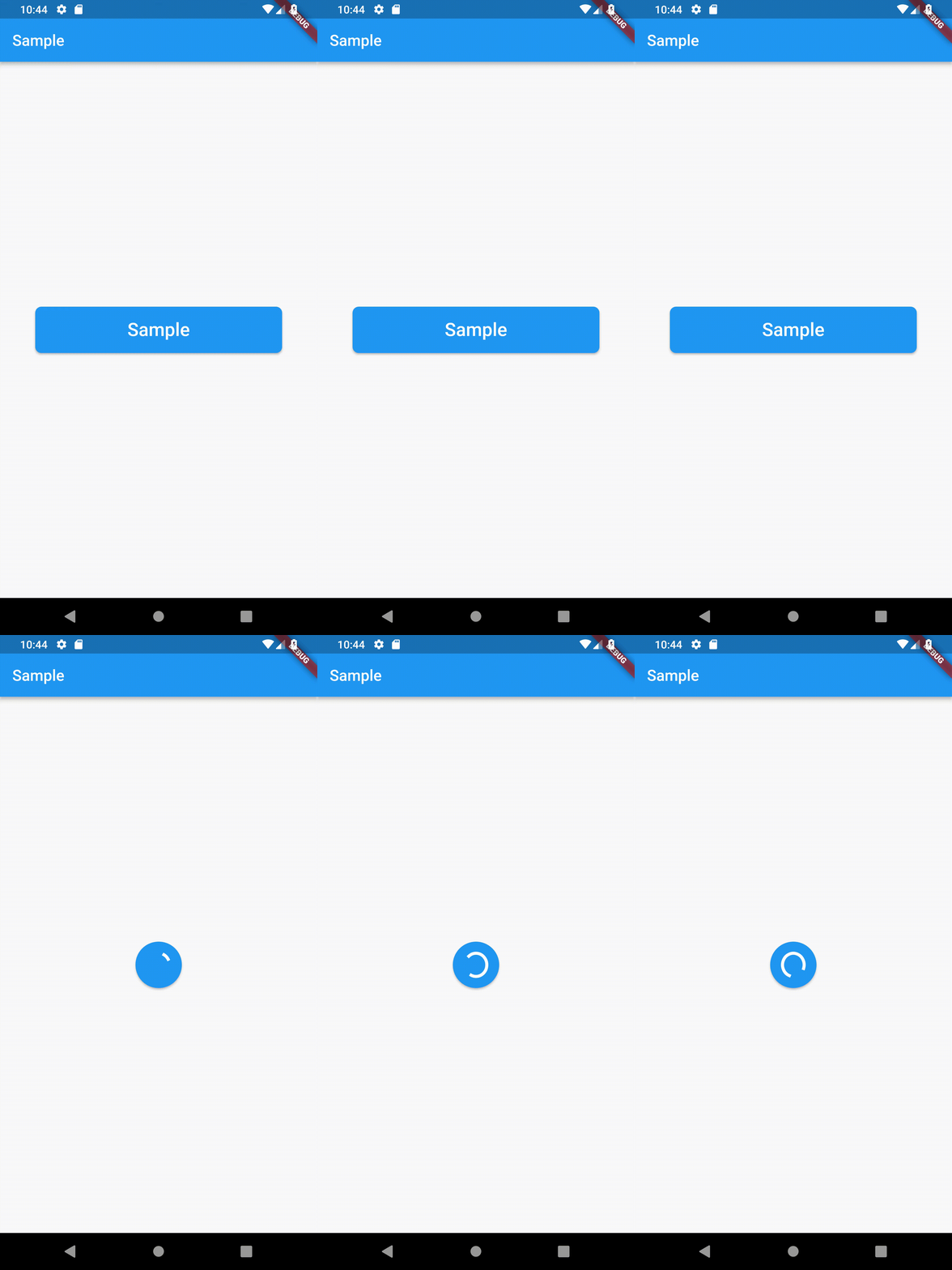
一个简单的按钮,可以转换并显示进度指示器。

近 30 天下载
33
喜欢数
20
Pub 分数
30

安装插件

flutter pub add progress_indicator_button

插件介绍

基于插件公开信息、社区数据与项目使用情况整理的选型参考。

一个 Flutter 包,提供一个可自定义的按钮,能够在表单提交或加载状态等操作期间转换为进度指示器。它通过视觉方式显示正在进行的过程,无需额外的控件来提升用户体验。该按钮会平滑地从标准状态动画过渡到加载旋转图标或自定义进度 UI,完成后返回原始形式。适用于表单、身份验证流程以及任何需要在异步操作中提供清晰反馈的场景。

适合场景

  • 表单提交
  • 认证流程
  • 加载状态指示器
  • 异步操作反馈
  • 用户操作确认

主要特点

  • 平滑过渡到进度指示器
  • 可定制的加载UI
  • 自动状态管理
  • 支持完成时的回调
  • 轻量且易于集成

适合对象

  • 简单加载按钮
  • 面向用户的表单
  • 移动应用交互
  • 快速用户界面优化
  • 寻求最小化设置的开发者

使用建议

  • 超出基础样式的有限自定义
  • 无内置的复杂动画支持
  • 依赖外部状态管理
  • 不适合高度动态的进度条
  • 需要手动处理异步逻辑

原始 README

以下为关联源码仓库的 README 原文快照,最新内容请访问源码仓库。

Progress Button

Pub Build Status Donate

A simple button that gives you the possibility to transform into a circular one and shows a progress indicator.

How to use

Container(
    width: 200,
    height: 60,
    child: ProgressButton(
        borderRadius: BorderRadius.all(Radius.circular(8)),
        strokeWidth: 2,
        child: Text(
            "Sample",
            style: TextStyle(
                color: Colors.white,
                fontSize: 24,
            ),
        ),
        onPressed: (AnimationController controller) {
            if (controller.isCompleted) {
                controller.reverse();
            } else {
                controller.forward();
            }
        },
    ),
),

Please check the sample folder for a simple implementation.

Changelog

Please see the Changelog page to know what's recently changed.

Contributions

Feel free to contribute to this project.

If you find a bug or want a feature, but don't know how to fix/implement it, please fill an issue.
If you fixed a bug or implemented a new feature, please send a pull request.

License

This project is licensed under the MIT License - see the LICENSE.md file for details

所属分类

源码仓库

使用此插件的项目

暂无相关数据。