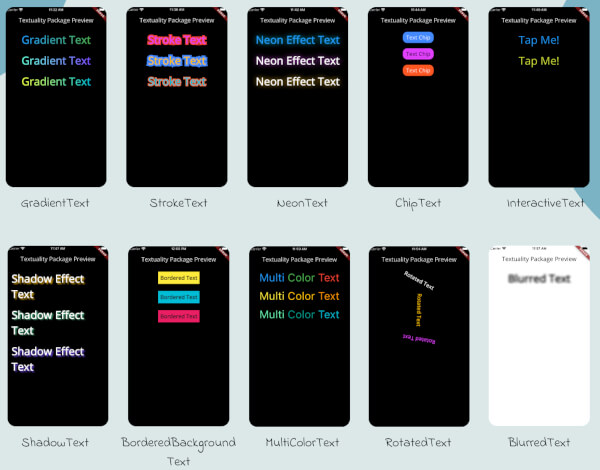
Textuality 是一个 Flutter 包,它通过高级视觉效果扩展了 Text 小部件的功能。它使开发者能够直接为文本应用渐变填充、描边轮廓、霓虹灯效果和阴影效果,从而在无需复杂自定义绘图的情况下提升 UI 美学。该包设计简洁易用,可无缝集成到现有的 Flutter 项目中。该包支持 Android、iOS、Web、macOS、Windows 和 Linux 多个平台,非常适合需要表现力强的排版的跨平台应用程序。
适合场景
创建引人注目的标题
在游戏中添加装饰性文本效果
增强应用入门屏幕
使用生动文字设计主题化UI
通过视觉对比度提升可访问性
主要特点
渐变文本样式
描边和轮廓效果
霓虹光效
阴影和深度增强
简单的 API 集成
适合对象
寻求视觉魅力的UI设计师
开发创意应用的开发者
跨平台移动和Web项目
具有动态或动画文本的应用程序
使用建议
使用复杂特效可能影响性能
超出提供样式的有限自定义
需要在跨平台环境下进行仔细测试
不适合高性能动画
原始 README
以下为关联源码仓库的 README 原文快照,最新内容请访问源码仓库。
Textuality Package
Textuality is a powerful Flutter package that enhances the appearance of text widgets with a variety of customizable text effects and styles. With this package, you can easily add gradient text, stroke text, neon effects, shadow effects, interactive text, and more to your Flutter app.
Features
GradientText: Add gradient colors to your text.
StrokeText: Apply an outline or stroke around your text.
NeonText: Create a glowing neon text effect.
ChipText: Display text inside stylish chip-like containers.
ShadowText: Add customizable shadows to your text.
InteractiveText: Make text interactive for clicks, taps, or custom gestures.
MultiColorText: Display text in multiple colors, even within the same string.
RotatedText: Rotate the text in any direction, including vertical.
BlurredText: Add a blurred effect to your text.
BorderedBackgroundText: Add a border around the background of your text.
Each widget accepts various optional parameters for customization, such as style, text alignment, maxLines, overflow, and more.
Installation
To use the textuality package in your Flutter project, follow these steps:
Add the package to your pubspec.yaml file:
dependencies:textuality:^0.0.1
Run the following command to install the package:
flutter pub get
💻Example
Below is an example of how to use the Textuality package in your Flutter app: