utils_rinch_text 包提供了一个实用方法,用于使用 TextSpan 格式化长文本,支持自定义标签以实现富文本渲染。它能够以嵌入式格式显示结构化文本,非常适合动态内容(如聊天消息或格式化描述)。该包在所有主要平台上均兼容,并简化了复杂文本布局的创建,无需手动管理 Span。它通过简洁的 API 高效解析和渲染带标签的文本。
适合场景
聊天消息格式化
动态内容渲染
UI 组件中的富文本
格式化描述
用户生成文本处理
主要特点
支持自定义文本标签
生成 TextSpan 列表
跨平台兼容性
简单的 API 集成
高效的文本解析
适合对象
需要丰富文本的应用程序
聊天或消息界面
内容密集型UI
文本格式化工具
寻求简洁的 Flutter 开发人员
使用建议
需要正确的标签语法
仅限文本格式化
无内置样式选项
依赖于正确的输入结构
不适合复杂的布局
原始 README
以下为关联源码仓库的 README 原文快照,最新内容请访问源码仓库。
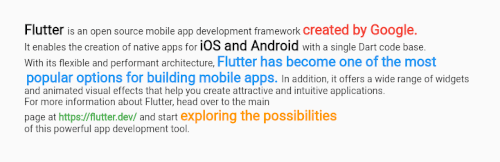
This method returns a list of TextSpan ideal for formatting long text
this implementation supports the following tags, see example.
<a>Link web<a>
<p> add paragraph
Add custom tags
Text de example:
 String textExample = """
  <i>Flutter<i> is an open source mobile app development framework <l>created by Google.<l>
  It enables the creation of native apps for <i>iOS and Android<i> with a single Dart code base.
  With its flexible and performant architecture, <o>Flutter has become one of the most
  popular options for building mobile apps.<o> In addition, it offers a wide range of widgets
  and animated visual effects that help you create attractive and intuitive applications. <p>
  For more information about Flutter, head over to the main
  page at <a>https://flutter.dev/<a> and start <b>exploring the possibilities<b>
  of this powerful app development tool.
  """;