搜索插件、代码仓与 APP 分类

window_focus 封面
插件详情v1.2.1

window_focus

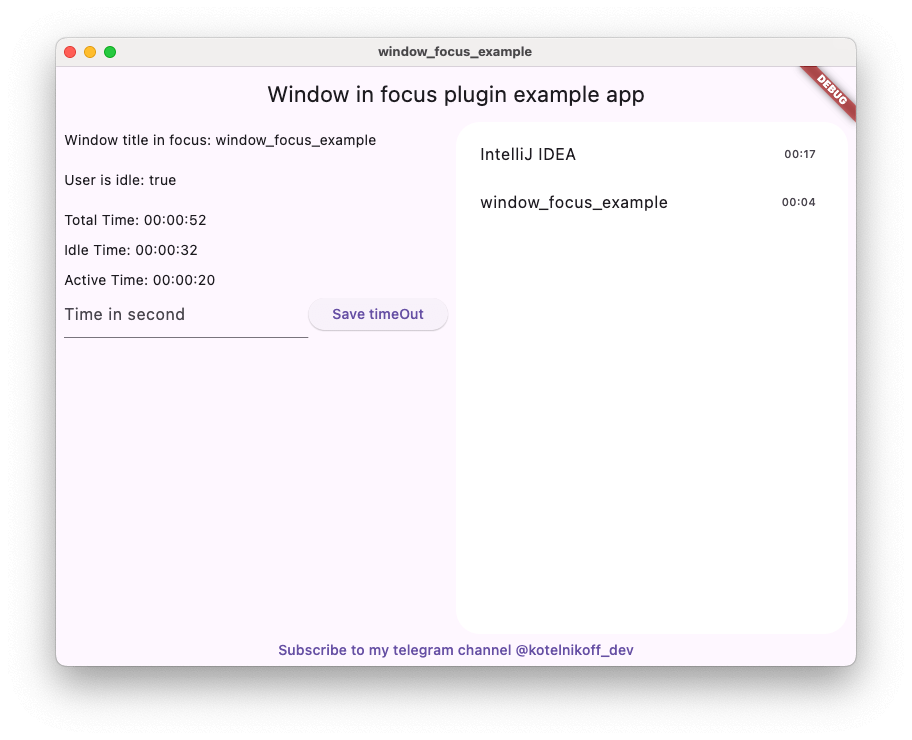
Window Focus 是一个方便的 Flutter 插件,可让您跟踪用户不活动状态,并获取 Mac OS 和 Windows 上活动窗口的标题信息。

macOSWindowsLinux
近 30 天下载
20
喜欢数
8
Pub 分数
140

安装插件

flutter pub add window_focus

插件介绍

基于插件公开信息、社区数据与项目使用情况整理的选型参考。

Window Focus 是一个 Flutter 插件,可实现对用户不活动状态的跟踪,并在 macOS 和 Windows 上获取当前活动窗口的标题。该插件通过监控当前处于焦点的应用程序或窗口,为开发者提供用户行为洞察。此插件特别适用于生产力工具、时间追踪应用以及需要跨桌面平台了解用户上下文的应用。它支持 macOS、Windows 和 Linux,适合跨平台桌面开发。该包可通过 pub 与 Flutter 生态系统无缝集成。

适合场景

  • 时间跟踪应用
  • 生产力和专注工具
  • 用户活动监控
  • 跨平台桌面应用
  • 上下文感知应用

主要特点

  • 跟踪活动窗口标题
  • 监控用户不活跃状态
  • 支持 macOS、Windows 和 Linux
  • 轻量且易于集成
  • 提供实时窗口状态更新

适合对象

  • 桌面应用程序开发者
  • 生产力工具创作者
  • 时间管理软件
  • 需要用户上下文感知的应用程序
  • 跨平台桌面项目

使用建议

  • 在某些系统上需要平台特定的权限
  • 仅限 macOS、Windows 和 Linux
  • 在 Linux 上可能需要额外的配置
  • 不适用于移动平台
  • 依赖原生系统 API 实现功能

原始 README

以下为关联源码仓库的 README 原文快照,最新内容请访问源码仓库。

Window focus plugin

Language Versions

Usage_example

Pub

Window Focus is a Flutter plugin that allows you to track user activity and focus on the active window for Windows and macOS platforms. The plugin provides features such as detecting user inactivity, identifying the active application, and enabling debug mode for enhanced logging.

Key Features:

User Inactivity Tracking:

The plugin enables you to detect periods of user inactivity within your Flutter application. You can customize the inactivity threshold and handle inactivity events according to your needs.

Active Window Title Retrieval:

Provides the ability to retrieve the title of the active window of the operating system.

  • Windows: Full window title support.
  • macOS: Improved detection using CGWindowList. Supports capturing titles for the active process. Requires Screen Recording permission for accurate window titles.
Debug Mode

Enable detailed logs for troubleshooting during development.

Set Custom Idle Threshold

Define the timeout period after which the user is considered inactive.

Screenshot Capture

Capture the entire screen or just the active window. This is useful for time tracking applications.

Plugin Installation

Windows

No action required.

Mac OS

Setup for window focus tracking

You need to add the following code to the Info.plist file for MacOS:

<key>NSApplicationSupportsSecureRestorableState</key>
<true/>
Setup for screen recording (screenshots)

To use the screenshot functionality on macOS 10.15+, you must request screen recording permission. You can check the permission status using checkScreenRecordingPermission() and request it using requestScreenRecordingPermission().

The user must manually enable this in: System Preferences > Security & Privacy > Privacy > Screen Recording

Setup for Global Keyboard Tracking (macOS)

To track keyboard activity globally (outside the app) on macOS, the application requires Accessibility permissions. Crucial: Without these permissions, the plugin will only detect mouse movements and clicks outside the app, but keyboard events will be ignored for security reasons.

The user must manually enable this in: System Preferences > Security & Privacy > Privacy > Accessibility (Or System Settings > Privacy & Security > Accessibility on macOS Ventura and newer).

Plugin Usage

Import the plugin:

import 'package:window_focus/window_focus.dart';

Example

  void main() {
  final windowFocus = WindowFocus(debug: true, duration: Duration(seconds: 10));

  // Add focus change listener
  windowFocus.addFocusChangeListener((appWindow) {
    print('Active window: ${appWindow.appName}, Title: ${appWindow.windowTitle}');
  });

  // Add user activity listener
  windowFocus.addUserActiveListener((isActive) {
    if (isActive) {
      print('User is active');
    } else {
      print('User is inactive');
    }
  });
}

API Reference

Constructor

WindowFocus({bool debug = false, Duration duration = const Duration(seconds: 1)})
  • debug (optional): Enables debug mode for detailed logs.
  • duration (optional): Sets the user inactivity timeout. Default is 1 second.

Methods

Future setIdleThreshold(Duration duration)

Sets the threshold for detecting user inactivity.

  • Parameters:
    • duration: The duration after which the user is considered inactive.
    await windowFocus.setIdleThreshold(Duration(seconds: 15));
    
Future getIdleThreshold()

Gets the current idle threshold.

  • Returns: Duration - The currently set idle threshold.
final threshold = await windowFocus.getIdleThreshold();
print('Idle threshold: ${threshold.inSeconds} seconds');
void addFocusChangeListener(Function(AppWindowDto) listener)

Adds a listener for changes in the focused window.

  • Parameters:
    • listener: A callback function that receives an AppWindowDto object containing:
      • appName: The name of the active application.
      • windowTitle: The title of the active window.

Platform-specific Details

  • Windows:
    • appName is the name of the executable file (e.g., chrome.exe).
    • windowTitle is the title of the active window (e.g., Flutter Documentation).
  • macOS:
    • appName is the name of the active application (e.g., Safari).
    • windowTitle is the title of the active window (if available, otherwise same as appName). May require Screen Recording permission.
windowFocus.addFocusChangeListener((appWindow) {
  print('Active application: ${appWindow.appName}, Window title: ${appWindow.windowTitle}');
});
void addUserActiveListener(Function(bool) listener)

Adds a listener for user activity changes.

  • Parameters:
    • listener: A callback function that receives a bool indicating user activity (true for active, false for inactive).
windowFocus.addUserActiveListener((isActive) {
  if (isActive) {
    print('User is active');
  } else {
    print('User is inactive');
  }
});
Future setDebug(bool value)

Enables or disables debug mode.

  • Parameters:
    • value: true to enable debug mode, false to disable it.
await windowFocus.setDebug(true);
Future<Uint8List?> takeScreenshot({bool activeWindowOnly = false})

Takes a screenshot of the entire screen or just the active window.

  • Parameters:
    • activeWindowOnly: If true, captures only the currently focused window.
  • Returns: Future<Uint8List?> - PNG image data.
Uint8List? screenshot = await windowFocus.takeScreenshot(activeWindowOnly: true);
Future checkScreenRecordingPermission()

Checks if screen recording permission is granted (macOS).

Future requestScreenRecordingPermission()

Requests screen recording permission (macOS).

DTO: AppWindowDto

Represents the active application and window information.

Properties

  • appName: String - The name of the active application.
  • windowTitle: String - The title of the active window.

Example

final appWindow = AppWindowDto(appName: "Chrome", windowTitle: "Flutter Documentation");
print(appWindow); // Output: Window title: Flutter Documentation. AppName: Chrome

About the author

My telegram channel - @kotelnikoff_dev Contributions

Contributions are welcome! Feel free to open issues or create pull requests on the GitHub repository.

所属分类

依赖

依赖清单 1 项

  • plugin_platform_interface^2.0.2

源码仓库

使用此插件的项目

暂无相关数据。