🎧 assets_audio_player 🔊





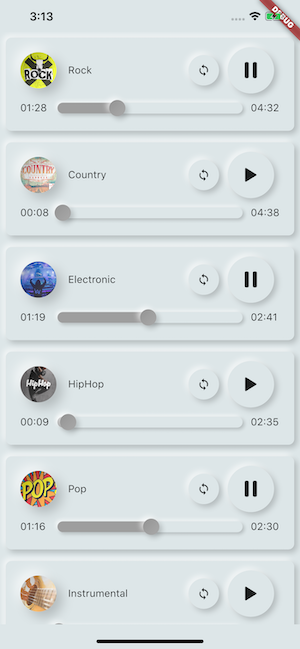
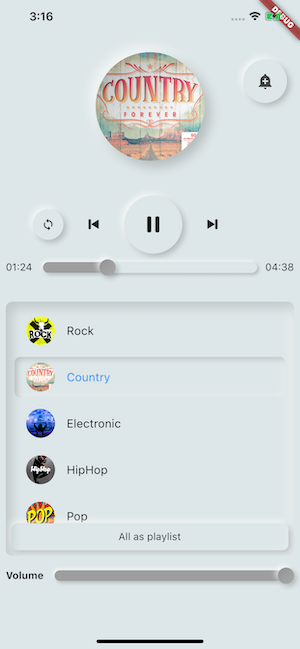
Play music/audio stored in assets files (simultaneously) directly from Flutter (android / ios / web / macos).
You can also use play audio files from network using their url, radios/livestream and local files
Notification can be displayed on Android & iOS, and bluetooth actions are handled
flutter:
  assets:
    - assets/audios/
AssetsAudioPlayer.newPlayer().open(
    Audio("assets/audios/song1.mp3"),
    autoStart: true,
    showNotification: true,
);
📥 Import
dependencies:
  assets_audio_player: ^3.0.8
Works with flutter: ">=3.3.0", be sure to upgrade your sdk
You like the package ? buy me a kofi :)

| Audio Source |
Android |
iOS |
Web |
MacOS |
| 🗄️ Asset file (asset path) |
✅ |
✅ |
✅ |
✅ |
| 🌐 Network file (url) |
✅ |
✅ |
✅ |
✅ |
| 📁 Local file (path) |
✅ |
✅ |
✅ |
✅ |
📻 Network LiveStream / radio (url)
(Default, HLS, Dash, SmoothStream) |
✅ |
✅ |
✅ |
✅ |
| Feature |
Android |
iOS |
Web |
MacOS |
| 🎶 Multiple players |
✅ |
✅ |
✅ |
✅ |
| 💽 Open Playlist |
✅ |
✅ |
✅ |
✅ |
| 💬System notification |
✅ |
✅ |
🚫 |
🚫 |
| 🎧 Bluetooth actions |
✅ |
✅ |
🚫 |
🚫 |
| 🔕 Respect System silent mode |
✅ |
✅ |
🚫 |
🚫 |
| 📞 Pause on phone call |
✅ |
✅ |
🚫 |
🚫 |
| Commands |
Android |
iOS |
Web |
MacOS |
| ▶ Play |
✅ |
✅ |
✅ |
✅ |
| ⏸ Pause |
✅ |
✅ |
✅ |
✅ |
| ⏹ Stop |
✅ |
✅ |
✅ |
✅ |
| ⏩ Seek(position) |
✅ |
✅ |
✅ |
✅ |
| ⏪⏩ SeekBy(position) |
✅ |
✅ |
✅ |
✅ |
| ⏩ Forward(speed) |
✅ |
✅ |
✅ |
✅ |
| ⏪ Rewind(speed) |
✅ |
✅ |
✅ |
✅ |
| ⏭ Next |
✅ |
✅ |
✅ |
✅ |
| ⏮ Prev |
✅ |
✅ |
✅ |
✅ |
| Widgets |
Android |
iOS |
Web |
MacOS |
| 🐦 Audio Widget |
✅ |
✅ |
✅ |
✅ |
| 🐦 Widget Builders |
✅ |
✅ |
✅ |
✅ |
| 🐦 AudioPlayer Builders Extension |
✅ |
✅ |
✅ |
✅ |
| Properties |
Android |
iOS |
Web |
MacOS |
| 🔁 Loop |
✅ |
✅ |
✅ |
✅ |
| 🔀 Shuffle |
✅ |
✅ |
✅ |
✅ |
| 🔊 get/set Volume |
✅ |
✅ |
✅ |
✅ |
| ⏩ get/set Play Speed |
✅ |
✅ |
✅ |
✅ |
| ⏩ get/set Pitch |
✅ |
🚫 |
🚫 |
🚫 |
| Listeners |
Android |
iOS |
Web |
MacOS |
| 🦻 Listener onReady(completeDuration) |
✅ |
✅ |
✅ |
✅ |
| 🦻 Listener currentPosition |
✅ |
✅ |
✅ |
✅ |
| 🦻 Listener finished |
✅ |
✅ |
✅ |
✅ |
| 🦻 Listener buffering |
✅ |
✅ |
✅ |
✅ |
| 🦻 Listener volume |
✅ |
✅ |
✅ |
✅ |
| 🦻Listener Play Speed |
✅ |
✅ |
✅ |
✅ |
| 🦻Listener Pitch |
✅ |
🚫 |
🚫 |
🚫 |
📁 Import assets files
No needed to copy songs to a media cache, with assets_audio_player you can open them directly from the assets.
- Create an audio directory in your assets (not necessary named "audios")
- Declare it inside your pubspec.yaml
flutter:
  assets:
    - assets/audios/
🛠️ Getting Started
final assetsAudioPlayer = AssetsAudioPlayer();

assetsAudioPlayer.open(
    Audio("assets/audios/song1.mp3"),
);
You can also play network songs from url
final assetsAudioPlayer = AssetsAudioPlayer();
try {
await assetsAudioPlayer.open(
Audio.network("http://www.mysite.com/myMp3file.mp3"),
);
} catch (t) {
}
LiveStream / Radio from url
The main difference with network, if you pause/play, on livestream it will resume to present duration
final assetsAudioPlayer = AssetsAudioPlayer();
try {
await assetsAudioPlayer.open(
Audio.liveStream(MY_LIVESTREAM_URL),
);
} catch (t) {
}
And play songs from file
final assetsAudioPlayer = AssetsAudioPlayer();
assetsAudioPlayer.open(
Audio.file(FILE_URI),
);
for file uri, please look at https://pub.dev/packages/path_provider
assetsAudioPlayer.playOrPause();
assetsAudioPlayer.play();
assetsAudioPlayer.pause();
assetsAudioPlayer.seek(Duration to);
assetsAudioPlayer.seekBy(Duration by);
assetsAudioPlayer.forwardRewind(double speed);
assetsAudioPlayer.stop();
Notifications
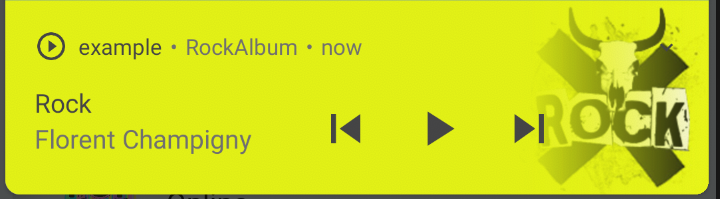
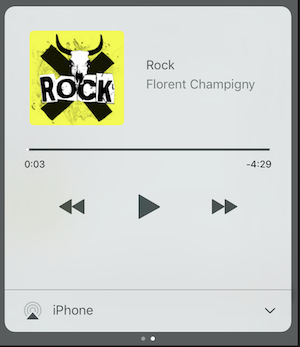
on iOS, it will use MPNowPlayingInfoCenter
- Add metas inside your audio
final audio = Audio.network("/assets/audio/country.mp3",
metas: Metas(
title: "Country",
artist: "Florent Champigny",
album: "CountryAlbum",
image: MetasImage.asset("assets/images/country.jpg"),
),
);
- open with
showNotification: true
_player.open(audio, showNotification: true)
Custom notification
Custom icon (android only)
By ResourceName
Make sure you added those icons inside your android/res/drawable !!! not on flutter assets !!!!
await _assetsAudioPlayer.open(
        myAudio,
        showNotification: true,
        notificationSettings: NotificationSettings(
            customStopIcon: AndroidResDrawable(name: "ic_stop_custom"),
            customPauseIcon: AndroidResDrawable(name:"ic_pause_custom"),
            customPlayIcon: AndroidResDrawable(name:"ic_play_custom"),
            customPrevIcon: AndroidResDrawable(name:"ic_prev_custom"),
            customNextIcon: AndroidResDrawable(name:"ic_next_custom"),
        )
And don't forget tell proguard to keep those resources for release mode
(part Keeping Resources)
https://sites.google.com/a/android.com/tools/tech-docs/new-build-system/resource-shrinking
<?xml version="1.0" encoding="utf-8"?>
<resources xmlns:tools="http://schemas.android.com/tools"
tools:keep="@drawable/ic_next_custom, @drawable/ic_prev_custom, @drawable/ic_pause_custom, @drawable/ic_play_custom, @drawable/ic_stop_custom"/>
By Manifest
-
Add your icon into your android's res folder (android/app/src/main/res)
-
Reference this icon into your AndroidManifest (android/app/src/main/AndroidManifest.xml)
<meta-data
     android:name="assets.audio.player.notification.icon"
     android:resource="@drawable/ic_music_custom"/>
You can also change actions icons
<meta-data
    android:name="assets.audio.player.notification.icon.play"
    android:resource="@drawable/ic_play_custom"/>
<meta-data
    android:name="assets.audio.player.notification.icon.pause"
    android:resource="@drawable/ic_pause_custom"/>
<meta-data
    android:name="assets.audio.player.notification.icon.stop"
    android:resource="@drawable/ic_stop_custom"/>
<meta-data
    android:name="assets.audio.player.notification.icon.next"
    android:resource="@drawable/ic_next_custom"/>
<meta-data
    android:name="assets.audio.player.notification.icon.prev"
    android:resource="@drawable/ic_prev_custom"/>
Handle notification click (android)
Add in main
AssetsAudioPlayer.setupNotificationsOpenAction((notification) {
return true;
});
Then if you want a custom action on widget
AssetsAudioPlayer.addNotificationOpenAction((notification) {
return false;
});
Custom actions
You can enable/disable a notification action
open(AUDIO,
showNotification: true,
notificationSettings: NotificationSettings(
prevEnabled: false,
customNextAction: (player) {
print("next");
}
)
)
Update audio's metas / notification content
After your audio creation, just call
audio.updateMetas(
player: _assetsAudioPlayer,
title: "My new title",
artist: "My new artist",
image: MetasImage.network(
),
);
Bluetooth Actions
You have to enable notification to make them work
Available remote commands :
- Play / Pause
- Next
- Prev
- Stop
HeadPhone Strategy
(Only for Android for now)
while opening a song/playlist, add a strategy
assetsAudioPlayer.open(
...
headPhoneStrategy: HeadPhoneStrategy.pauseOnUnplug,
)
If you want to make it work on bluetooth too, you'll have to add the BLUETOOTH permission inside your AndroidManifest.xml
<uses-permission android:name="android.permission.BLUETOOTH" />
⛓ Play in parallel / simultaneously
You can create new AssetsAudioPlayer using AssetsAudioPlayer.newPlayer(),
which will play songs in a different native Media Player
This will enable to play two songs simultaneously
You can have as many player as you want !
AssetsAudioPlayer.newPlayer().open(
Audio("assets/audios/song1.mp3")
);
AssetsAudioPlayer.newPlayer().open(
Audio("assets/audios/song2.mp3")
);
AssetsAudioPlayer.playAndForget(
Audio("assets/audios/song3.mp3")
);
Each player has an unique generated id, you can retrieve or create them manually using
final player = AssetsAudioPlayer.withId(id: "MY_UNIQUE_ID");
🗄️ Playlist
assetsAudioPlayer.open(
Playlist(
audios: [
Audio("assets/audios/song1.mp3"),
Audio("assets/audios/song2.mp3")
]
),
loopMode: LoopMode.playlist
);
assetsAudioPlayer.next();
assetsAudioPlayer.prev();
assetsAudioPlayer.playlistPlayAtIndex(1);
Audio Widget
If you want a more flutter way to play audio, try the AudioWidget !
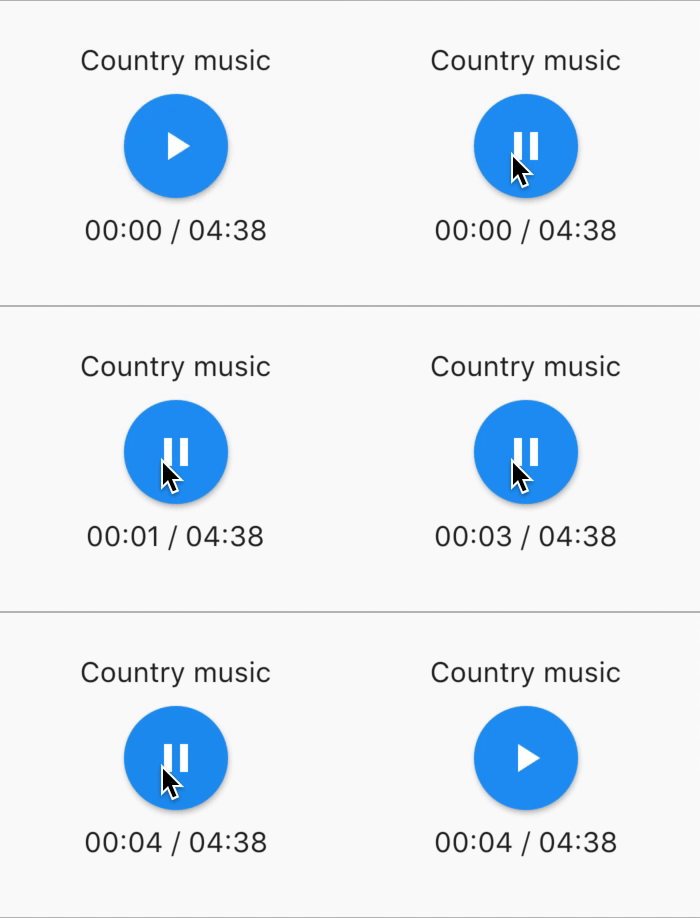
bool _play = false;
@override
Widget build(BuildContext context) {
return AudioWidget.assets(
path: "assets/audios/country.mp3",
play: _play,
child: RaisedButton(
child: Text(
_play ? "pause" : "play",
),
onPressed: () {
setState(() {
_play = !_play;
});
}
),
onReadyToPlay: (duration) {
},
onPositionChanged: (current, duration) {
},
);
}
How to 🛑 stop 🛑 the AudioWidget ?
Just remove the Audio from the tree !
Or simply keep play: false
🎧 Listeners
All listeners exposes Streams
Using RxDart, AssetsAudioPlayer exposes some listeners as ValueObservable (Observable that provides synchronous access to the last emitted item);
🎵 Current song
assetsAudioPlayer.current
final PlayingAudio playing = assetsAudioPlayer.current.value;
assetsAudioPlayer.current.listen((playingAudio){
final asset = playingAudio.assetAudio;
final songDuration = playingAudio.duration;
})
⌛ Current song duration
final duration = assetsAudioPlayer.current.value.duration;
⏳ Current position (in seconds)
assetsAudioPlayer.currentPosition
final Duration position = assetsAudioPlayer.currentPosition.value;
return StreamBuilder(
stream: assetsAudioPlayer.currentPosition,
builder: (context, asyncSnapshot) {
final Duration duration = asyncSnapshot.data;
return Text(duration.toString());
}),
or use a PlayerBuilder !
PlayerBuilder.currentPosition(
     player: _assetsAudioPlayer,
     builder: (context, duration) {
       return Text(duration.toString());
     }
)
or Player Builder Extension
_assetsAudioPlayer.builderCurrentPosition(
     builder: (context, duration) {
       return Text(duration.toString());
     }
)
▶ IsPlaying
boolean observable representing the current mediaplayer playing state
assetsAudioPlayer.isPlaying
final bool playing = assetsAudioPlayer.isPlaying.value;
return StreamBuilder(
stream: assetsAudioPlayer.isPlaying,
builder: (context, asyncSnapshot) {
final bool isPlaying = asyncSnapshot.data;
return Text(isPlaying ? "Pause" : "Play");
}),
or use a PlayerBuilder !
PlayerBuilder.isPlaying(
     player: _assetsAudioPlayer,
     builder: (context, isPlaying) {
       return Text(isPlaying ? "Pause" : "Play");
     }
)
or Player Builder Extension
_assetsAudioPlayer.builderIsPlaying(
     builder: (context, isPlaying) {
       return Text(isPlaying ? "Pause" : "Play");
     }
)
🔊 Volume
Change the volume (between 0.0 & 1.0)
assetsAudioPlayer.setVolume(0.5);
The media player can follow the system "volume mode" (vibrate, muted, normal)
Simply set the respectSilentMode optional parameter as true
_player.open(PLAYABLE, respectSilentMode: true);
https://developer.android.com/reference/android/media/AudioManager.html?hl=fr#getRingerMode()
https://developer.apple.com/documentation/avfoundation/avaudiosessioncategorysoloambient
Listen the volume
return StreamBuilder(
    stream: assetsAudioPlayer.volume,
    builder: (context, asyncSnapshot) {
        final double volume = asyncSnapshot.data;
        return Text("volume : $volume");
    }),
or use a PlayerBuilder !
PlayerBuilder.volume(
     player: _assetsAudioPlayer,
     builder: (context, volume) {
       return Text("volume : $volume");
     }
)
✋ Finished
Called when the current song has finished to play,
it gives the Playing audio that just finished
assetsAudioPlayer.playlistAudioFinished
assetsAudioPlayer.playlistAudioFinished.listen((Playing playing){
})
Called when the complete playlist has finished to play
assetsAudioPlayer.playlistFinished
assetsAudioPlayer.playlistFinished.listen((finished){
})
🔁 Looping
final LoopMode loopMode = assetsAudioPlayer.loop;
assetsAudioPlayer.setLoopMode(LoopMode.single);
assetsAudioPlayer.loopMode.listen((loopMode){
})
assetsAudioPlayer.toggleLoop();
🏃 Play Speed
assetsAudioPlayer.setPlaySpeed(1.5);
assetsAudioPlayer.playSpeed.listen((playSpeed){
})
Audio audio = Audio.network(
url,
playSpeed: 1.5
);
assetsAudioPlayer.open(audio);
🎙️ Pitch
assetsAudioPlayer.setPitch(1.2);
assetsAudioPlayer.pitch.listen((pitch){
})
Audio audio = Audio.network(
url,
pitch: 1.2
);
assetsAudioPlayer.open(audio);
Error Handling
By default, on playing error, it stop the audio
BUT you can add a custom behavior
_player.onErrorDo = (handler){
  handler.player.stop();
};
Open another audio
_player.onErrorDo = (handler){
  handler.player.open(ANOTHER_AUDIO);
};
Try to open again on same position
_player.onErrorDo = (handler){
  handler.player.open(
      handler.playlist.copyWith(
        startIndex: handler.playlistIndex
      ),
      seek: handler.currentPosition
  );
};
Network Policies (android/iOS/macOS)
Android only allow HTTPS calls, you will have an error if you're using HTTP,
don't forget to add INTERNET permission and seet usesCleartextTraffic="true" in your AndroidManifest.xml
<?xml version="1.0" encoding="utf-8"?>
<manifest ...>
    <uses-permission android:name="android.permission.INTERNET" />
    <application
        ...
        android:usesCleartextTraffic="true"
        ...>
        ...
    </application>
</manifest>
iOS only allow HTTPS calls, you will have an error if you're using HTTP,
don't forget to edit your info.plist and set NSAppTransportSecurity to NSAllowsArbitraryLoads
<key>NSAppTransportSecurity</key>
<dict>
    <key>NSAllowsArbitraryLoads</key>
    <true/>
</dict>
To enable http calls on macOs, you have to add input/output calls capabilities into info.plist
<key>NSAppTransportSecurity</key>
<dict>
    <key>NSAllowsArbitraryLoads</key>
    <true/>
</dict>
<key>UIBackgroundModes</key>
<array>
    <string>audio</string>
    <string>fetch</string>
</array>
<key>com.apple.security.network.client</key>
<true/>
and in your
Runner/DebugProfile.entitlements
add
<key>com.apple.security.network.client</key>
<true/>
Complete Runner/DebugProfile.entitlements
<?xml version="1.0" encoding="UTF-8"?>
<!DOCTYPE plist PUBLIC "-//Apple//DTD PLIST 1.0//EN" "http://www.apple.com/DTDs/PropertyList-1.0.dtd">
<plist version="1.0">
<dict>
	<key>com.apple.security.app-sandbox</key>
	<true/>
	<key>com.apple.security.cs.allow-jit</key>
	<true/>
	<key>com.apple.security.network.server</key>
	<true/>
	<key>com.apple.security.network.client</key>
	<true/>
</dict>
</plist>
🎶 Musics
All musics used in the samples came from https://www.freemusicarchive.org/

