搜索插件、代码仓与 APP 分类

插件详情v0.4.0

background_task

应用进入后台后,可以使用位置更新进行处理。

AndroidiOS
近 30 天下载
97
喜欢数
40
Pub 分数
160

安装插件

flutter pub add background_task

插件介绍

基于插件公开信息、社区数据与项目使用情况整理的选型参考。

background_task 包使 Flutter 应用能够在后台执行操作,特别是位置更新。该包专为 Android 和 iOS 设计,允许开发者持续保持功能,例如在不中断的情况下跟踪用户移动。该包与原生平台功能集成,以确保在后台状态下可靠执行。对于需要实时位置监控或定期数据收集的应用程序尤其有用。该解决方案具有最小开销,并通过专用的原生实现支持两个平台。

适合场景

  • 实时位置跟踪
  • 周期性数据同步
  • 背景地理围栏
  • 长时间运行的任务执行
  • 节能的后台处理

主要特点

  • 支持 Android 和 iOS
  • 处理后台的位置更新
  • 最小化电池影响
  • 原生平台集成
  • 任务调度的简单 API

适合对象

  • 健身和导航应用
  • 物流与配送跟踪
  • 现场服务管理
  • 需要持续后台活动的应用程序
  • 基于位置的服务

使用建议

  • 需要在两个平台上都有适当的权限
  • 可能受操作系统省电模式限制
  • 需要在实际设备上进行测试
  • 后台执行限制因操作系统版本而异
  • 用户必须授予位置访问权限

原始 README

以下为关联源码仓库的 README 原文快照,最新内容请访问源码仓库。

background_task

never-light-log

Developed with 💙 by Never inc.


Motivation

Enable developers to continue processing even when the application transitions to the background, we have created a package that allows processing to continue using location updates.This package was created with reference to background_location.

Can be used when you want to run the program periodically in the background.

  • Monitor and notify the distance walked and steps.
  • Notification of destination arrival.
  • Tracking location information (sending it to a server).

Usage

// Monitor notifications of background processes.
// However, Cannot be used while the app is in task kill.
BackgroundTask.instance.stream.listen((event) {
  // Implement the process you want to run in the background.
  // ex) Check health data.
});

// Start background processing with location updates.
await BackgroundTask.instance.start();

// Stop background processing and location updates.
await BackgroundTask.instance.stop();

This is an implementation for receiving updates even when the task is task-killed. In this package, iOS uses startMonitoringSignificantLocationChanges and Android uses ForegroundService.

// Define callback handler at the top level.
@pragma('vm:entry-point')
void backgroundHandler(Location data) {
  // Implement the process you want to run in the background.
  // ex) Check health data.
}

void main() {
  WidgetsFlutterBinding.ensureInitialized();
  BackgroundTask.instance.setBackgroundHandler(backgroundHandler); // 👈 Set callback handler.
  runApp(const MyApp());
}

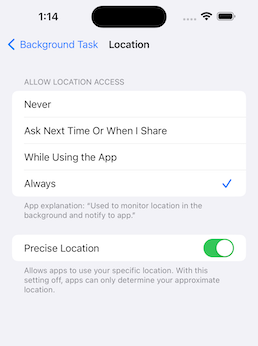
To get the latest location information in a task-killed status, set the app to Always.

ios android

This is an implementation for when you want to stop using the application when it is killed.

await BackgroundTask.instance.start(
  isEnabledEvenIfKilled: false,
);

Recommended to use with permission_handler.

final status = await Permission.location.request();
final statusAlways = await Permission.locationAlways.request();

if (status.isGranted && statusAlways.isGranted) {
  await BackgroundTask.instance.start();
}
Setup

pubspec.yaml

dependencies:
  background_task:

iOS: Info.plist

<key>NSLocationAlwaysAndWhenInUseUsageDescription</key>
<string>Used to monitor location in the background and notify to app.</string>
<key>NSLocationAlwaysUsageDescription</key>
<string>Used to monitor location in the background and notify to app.</string>
<key>NSLocationWhenInUseUsageDescription</key>
<string>Used to monitor location in the background and notify to app.</string>
<key>UIBackgroundModes</key>
<array>
    <string>fetch</string>
    <string>location</string>
</array>

To use an external package (shared_preference etc..) in callback handler, register DispatchEngine in AppDelegate.

iOS: AppDelegate.swift

import UIKit
import Flutter
import background_task // 👈 Add

@main
@objc class AppDelegate: FlutterAppDelegate, FlutterImplicitEngineDelegate {
  override func application(
    _ application: UIApplication,
    didFinishLaunchingWithOptions launchOptions: [UIApplication.LaunchOptionsKey: Any]?
  ) -> Bool {
      GeneratedPluginRegistrant.register(with: self)
      // 👇 Add
      BackgroundTaskPlugin.onRegisterDispatchEngine = {
          GeneratedPluginRegistrant.register(with: BackgroundTaskPlugin.dispatchEngine)
      }
      return super.application(application, didFinishLaunchingWithOptions: launchOptions)
  }

  func didInitializeImplicitFlutterEngine(_ engineBridge: FlutterImplicitEngineBridge) {
    GeneratedPluginRegistrant.register(with: engineBridge.pluginRegistry)
  }
}

Android: AndroidManifest.xml

<uses-permission android:name="android.permission.ACCESS_COARSE_LOCATION" />
<uses-permission android:name="android.permission.ACCESS_FINE_LOCATION" />
<uses-permission android:name="android.permission.ACCESS_BACKGROUND_LOCATION"/>
<uses-permission android:name="android.permission.POST_NOTIFICATIONS"/>

References

所属分类

源码仓库

使用此插件的项目

暂无相关数据。