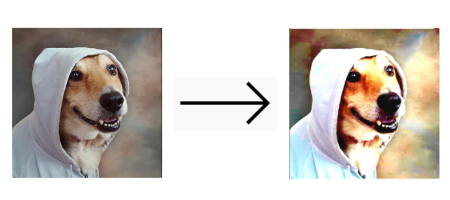
Flutter Bitmap

A minimalist Flutter package to perform fast bitmaps operations.
The focus here is to provide a cool bitmap manipulation interface.
The package standard format is RGBA32.
Bitmap uses the Dart FFI to perform operations such as contrast, brightness, saturation, and exposure.
For now, things like format encoding, EXIF and multi-frame images are not the concern of this package. If that is your need, check image.
Some of the algorithms here are heavily inspired by this awesome lib.
Why this exists?
I started to use dart image to create LetsPicture (cool app, check it out) but since the beginning, I've noticed that the performance was really bad.
Dart image has its own Image format, so between decoding, putting some transformations and then displaying the result on the app you had to convert the image two times (at least).
So this package is just this: We deal bitmaps (duh) and we focus only on Flutter use cases.
bitmap takes some advantages from Flutter:
- Every image is decoded to RGBA32 by the framework trough ImageStreamListener, so we can rely on Flutter to do the decoding job;
- Dart FFI: we are porting some of our functions to C (or C++) making it blazing fast.
- With this package, you can easily take advantage of stuff like compute (Isolates) on only the manipulations you want to free the UI thread of heavy computation.
Alternatives
Dart image
As mentioned previously, check on pub.
Flutter Built-in ColorFilter class
Flutter has a powerful ColorFilter class (that came from skia) which can be used to put some color corrections when painting stuff on canvas. You can use a matrix to correct color (Some matrix examples here).
Not every color transformation can be done through the matrix, though.
Basic usage
1. Image to Bitmap
Everything is around the Bitmap class. You can get an instance of that from any ImageProvider.
import 'package:bitmap/bitmap.dart';
Bitmap bitmap = await Bitmap.fromProvider(NetworkImage("http://pudim.com.br/pudim.jpg"));
You can create from a headed Uint8List:
import 'package:bitmap/bitmap.dart';
Bitmap bitmap = Bitmap.fromHeadful(imageWidth, imageHeight, theListOfInts);
Or a headless:
Bitmap bitmap = Bitmap.fromHeadless(imageWidth, imageHeight, theListOfInts);
This is useful when you are dealing with the Uint8List that ByteData generates.
You can even create a blank one
Bitmap bitmap = Bitmap.blank(imageWidth, imageHeight);
This creates a black, full transparent bitmap.
2. Applying some operations
Let's put some contrast
import 'package:bitmap/bitmap.dart';

Bitmap contrastedBitmap = bitmap.apply(BitmapContrast(0.2));;
It is possible to add several operations at once
import 'package:bitmap/bitmap.dart';
Bitmap brightBitmap = bitmap.applyBatch([
  BitmapBrightness(0.2),
  BitmapAdjustColor(
    saturation: 1.0
  ),
]);
3. Displaying/painting/saving the output
You can create two outputs from a Bitmap instance:
- A
Uint8List with no header, only the content of the file (.content property).
- A
Uint8List with a bitmap header, which Flutter can parse (.buildHeaded() method).
Displaying
To easiest way to display an image is to getting the bitmap with header and then passing it to the widget Image.memory:
Uint8List headedBitmap = bitmap.buildHeaded();
child: Image.memory(headedBitmap)
Painting
The Bitmap class has also a helper function buildImage that uses Flutter's decodeImageFromList to build a dart:ui Image.
With an Image, you can paint it in a canvas (in a CustomPainter, for example).
import 'dart:ui' as ui;
ui.Image outputImage = await bitmap.buildImage();
canvas.drawImage(outputImage, Offset.zero, ui.Paint());
Saving
You can also save the image as a .bmp file (get the file content with the .buildHeaded() method).
You can check also the image lib where you can save the image in several formats.
How to save files with Flutter?
Performance improvements and Dart FFI
Dart FFI
The capability of calling a c (or c++) function from dart can help us a lot in getter better performance times.
Isolates
Most of the manipulations on the bitmap take a long time to be completed. That's is because they have to iterate on every item of the bitmap.
A picture with a 400px width and height sizes will generate a list of 640000 integers. This is a heavy computation.
Those can be expensive. Sou you may use Isolates there to free the UI thread from all of this work.
Check the example app, where the transformations are applied through the compute function.
Important: it is noticed that the performance increases a lot when using release mode on your Flutter App
Apps using it (only one for now)
Supported operations
- Flip vertical
- Flip horizontal
- Rotation
- Resize (nearest interpolation)
- Contrast
- Brightness
- Saturation
- Exposure
- Crop
Todo
There is a lot of work to be done:
- [ ] Resize with other interpolations
- [ ] Set channel
- [ ] White balance
- [ ] Color blend
- [ ] Noise
- [ ] Tones
- [ ] ??? The sky is the limit

