搜索插件、代码仓与 APP 分类

插件详情v2.4.6

bluetooth_print_plus

bluetooth_print_plus 是一个用于蓝牙热敏打印机的 Flutter 插件,支持 Android 和 iOS,支持 TSPL/TSC、CPCL、ESC/POS。

AndroidiOSWebmacOSLinux
近 30 天下载
2210
喜欢数
65
Pub 分数
135

安装插件

flutter pub add bluetooth_print_plus

插件介绍

基于插件公开信息、社区数据与项目使用情况整理的选型参考。

bluetooth_print_plus 是一个 Flutter 插件,可在 Android 和 iOS 上实现与蓝牙热敏打印机的通信。它支持多种打印机语言,包括 TSPL/TSC、CPCL 和 ESC/POS,适用于打印收据、标签和票券。该包提供了一个简单的 API,用于发送打印命令和管理设备连接。它还具备跨平台兼容性,支持 Web、macOS 和 Linux,但在非移动平台上功能可能受限。非常适合需要可靠移动打印的零售、酒店和物流应用。

适合场景

  • 零售应用中的收据打印
  • 库存系统的标签打印
  • 活动管理中的票务生成
  • 移动POS集成
  • 随时随地文档打印

主要特点

  • 支持 TSPL/TSC、CPCL 和 ESC/POS 语言
  • 跨平台支持(Android、iOS、Web、macOS、Linux)
  • 用于发送打印命令的简单 API
  • 蓝牙设备发现和配对
  • 实时状态监控

适合对象

  • 零售和销售点应用程序
  • 物流与仓储管理
  • 事件票务系统
  • 移动打印解决方案
  • 开发跨平台打印功能的开发者

使用建议

  • 非 Android/iOS 平台上的功能有限
  • 需要蓝牙访问的正确权限
  • 打印机特定的命令语法可能需要测试
  • 并非所有打印机型号都完全支持所有语言
  • Web 支持可能具有受限的蓝牙功能

原始 README

以下为关联源码仓库的 README 原文快照,最新内容请访问源码仓库。

Bluetooth Print Plus

pub package GitHub stars GitHub forks qq_group tg_group

Introduction

Bluetooth Print Plus is a Bluetooth plugin used to print thermal printers in Flutter, a new mobile SDK to help developers build bluetooth thermal printer apps for iOS and Android.

Important, important, important. First, you need to run the demo to confirm the printer command type ! ! ! now support tspl/tsc、cpcl、esc pos. If this plugin is helpful to you, please give it a like, Thanks.

Buy Me A Coffee/请我喝杯咖啡

Plan

Version plan
1.1.x blue and tsc command, esc print image command
1.5.x support cpcl command
2.x.x improve esc command
3.x.x support zpl command

Features

Android iOS Description
scan :white_check_mark: :white_check_mark: Starts a scan for Bluetooth Low Energy devices.
connect :white_check_mark: :white_check_mark: Establishes a connection to the device.
disconnect :white_check_mark: :white_check_mark: Cancels an active or pending connection to the device.
state :white_check_mark: :white_check_mark: Stream of state changes for the Bluetooth Device.

Usage

Example

To use this plugin :
dependencies:
  flutter:
    sdk: flutter
  bluetooth_print_plus: ^2.4.5
Add permissions for Bluetooth

We need to add the permission to use Bluetooth and access location:

Android

In the android/app/src/main/AndroidManifest.xml let’s add:

<uses-permission android:name="android.permission.BLUETOOTH" />
<uses-permission android:name="android.permission.BLUETOOTH_SCAN" />
<uses-permission android:name="android.permission.BLUETOOTH_CONNECT" />
<uses-permission android:name="android.permission.BLUETOOTH_ADMIN" />
<uses-permission android:name="android.permission.ACCESS_FINE_LOCATION"/>
<uses-permission android:name="android.permission.ACCESS_COARSE_LOCATION"/>
IOS

In the ios/Runner/Info.plist let’s add:

<key>NSBluetoothAlwaysUsageDescription</key>
<string>Need BLE permission</string>
<key>NSBluetoothPeripheralUsageDescription</key>
<string>Need BLE permission</string>
import
import 'package:bluetooth_print_plus/bluetooth_print_plus.dart';
BluetoothPrintPlus useful property
BluetoothPrintPlus.isBlueOn;
BluetoothPrintPlus.isScanning;
BluetoothPrintPlus.isConnected;
listen

late StreamSubscription<bool> _isScanningSubscription;
late StreamSubscription<BlueState> _blueStateSubscription;
late StreamSubscription<ConnectState> _connectStateSubscription;
late StreamSubscription<Uint8List> _receivedDataSubscription;
late StreamSubscription<List<BluetoothDevice>> _scanResultsSubscription;
late List<BluetoothDevice> _scanResults;
  • scan results
/// listen scanResults
_scanResultsSubscription = BluetoothPrintPlus.scanResults.listen((event) {
  if (mounted) {
    setState(() {
      _scanResults = event;
    });
  }
});
  • state
/// listen isScanning
_isScanningSubscription = BluetoothPrintPlus.isScanning.listen((event) {
  print('********** isScanning: $event **********');
  if (mounted) {
    setState(() {});
  }
});

/// listen blue state
_blueStateSubscription = BluetoothPrintPlus.blueState.listen((event) {
  print('********** blueState change: $event **********');
  /// blue state changed, do something...
});

/// listen connect state
_blueStateSubscription = _BluetoothPrintPlus.connectState.listen((event) {
  print('********** connectState change: $event **********');
  /// connect state changed, do something...
});
  • received Data
_BluetoothPrintPlus.receivedData.listen((data) {
  print('********** received data: $data **********');
  /// received data, do something...
});
scan

// begin scan
await BluetoothPrintPlus.startScan(timeout: Duration(seconds: 10));

// get devices
_scanResultsSubscription = BluetoothPrintPlus.scanResults.listen((event) {
  if (mounted) {
    setState(() {
      _scanResults = event;
    });
  }
});
connect

await BluetoothPrintPlus.connect(_device);
disconnect

await BluetoothPrintPlus.disconnect();
print/write

final ByteData bytes = await rootBundle.load("assets/dithered-image.png");

/// write tsc command, for example:
final Uint8List image = bytes.buffer.asUint8List();
await tscCommand.cleanCommand();
await tscCommand.size(width: 76, height: 130);
await tscCommand.cls(); // most after size
await tscCommand.image(image: image, x: 50, y: 60);
await tscCommand.print(1);
final cmd = await tscCommand.getCommand();
if (cmd == null) return;
BluetoothPrintPlus.write(cmd);

/// write cpcl command, for example:
await cpclCommand.cleanCommand();
await cpclCommand.size(width: 76 * 8, height: 76 * 8);
await cpclCommand.image(image: image, x: 10, y: 10);
await cpclCommand.print();
final cmd = await cpclCommand.getCommand();
if (cmd == null) return;
BluetoothPrintPlus.write(cmd);

/// write esc command, for example:
await escCommand.cleanCommand();
await escCommand.print();
await escCommand.image(image: image);
await escCommand.print();
final cmd = await escCommand.getCommand();
if (cmd == null) return;
BluetoothPrintPlus.write(cmd);
Cancel Subscription
@override
void dispose() {
  super.dispose();
  _isScanningSubscription.cancel();
  _blueStateSubscription.cancel();
  _connectStateSubscription.cancel();
  _receivedDataSubscription.cancel();
  _scanResultsSubscription.cancel();
  _scanResults.clear();
  _device = null;
}

Troubleshooting

error:'State restoration of CBCentralManager is only allowed for applications that have specified the "bluetooth-central" background mode'

info.plist add:

<key>NSBluetoothAlwaysUsageDescription</key>
<string>Allow App use bluetooth?</string>
<key>NSBluetoothPeripheralUsageDescription</key>
<string>Allow App use bluetooth?</string>
<key>UIBackgroundModes</key>
<array>
    <string>bluetooth-central</string>
    <string>bluetooth-peripheral</string>
</array>

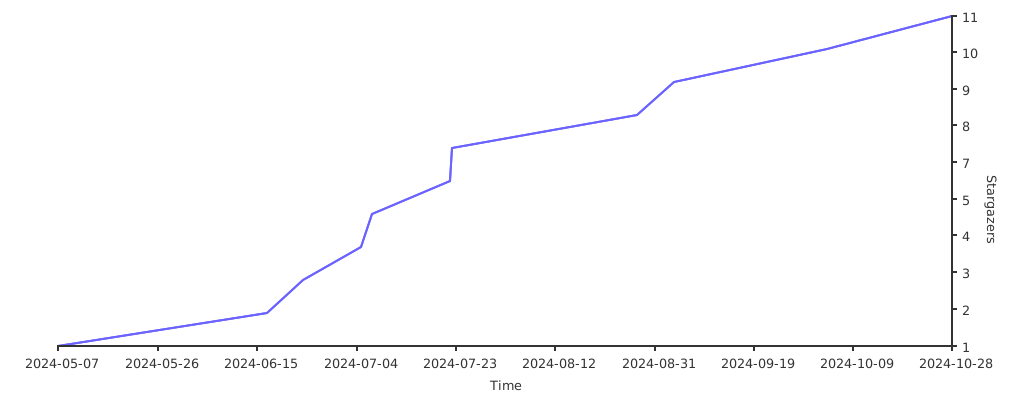
Stargazers over time

Stargazers over time

所属分类

依赖

依赖清单 1 项

源码仓库

使用此插件的项目

暂无相关数据。