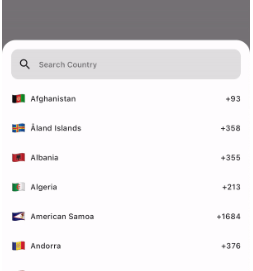
If you want to show the country list as a UI component, use the CountryCodeSelector widget:
CountryCodeSelector(
   onCountryCodeTap: (CountryCode code) {
      /// Specify country code tap event
   },
    //Note: Cannot provide both onCountryCodeTap and codeBuilder, as onCountryCodeTap will not work if you have provided codeBuilder.
)
How to get a country code from the country alpha-2:,
CountryCode code = CountryCode.getCountryCodeByAlpha2(
    countryAlpha2Code:"IN", // its case-insensitive you can use both IN or in
);
You can use await Alpha2CountryCode,getCurrentCountryCode() to obtain the current alpha-2 code:
Note: Using await Alpha2CountryCode.getCurrentCountryCode() will return the current country alpha-2 code based on the IP location from the 'http://ip-api.com/json/' API.
You can also get the current country alpha-2 code based on the user's device region, using PlatformDispatcher locale.
CountryCode code = CountryCode.getCountryCodeByAlpha2(
    countryAlpha2Code: WidgetsBinding.instance.platformDispatcher.locale.countryCode,
    /// if you have context, use View.of(context).platformDispatcher.locale.countryCode
);
Note: WidgetsBinding and View.of(context) are provided by the Flutter SDK.
How to get a country code from the country dial code,
For customizations, we are providing the CustomizationBuilders class to customize each section.
customizationBuilders: CustomizationBuilders(
codeBuilder: (CountryCode code) {
// Return something to change the country list item UI.// Note: onCountryCodeTap will be overridden by codeBuilder in customizationBuilders.// If want to do some customization in default country code view, you can usereturnDefaultCountryCodeListItemView(
onCountryCodeTap: () {},
code: code,
locale: 'US', // To show a localized country name,
);
},
codeSeparatorBuilder: (BuildContext context, int index) {
// Return something to add a separator between country codes.returnconstSizedBox(); // Default
},
countryListBuilder: (List<CountryCode> codes, ScrollController? controller) {
// Return something to customize the country list
},
textFieldBuilder: (voidFunction(String)? filter) {
// Return the search text field widget//// If you want to do some customization in the default text field, you can usereturnDefaultCountryCodeFilterTextField(
filter: filter,
);
// Use filter(searchText); to update the country code list.
},
),
Bugs and Feedback
For bugs, feedback, questions and discussions please use the Github Issues.
Credits
Canopas Country Picker is owned and maintained by the Canopas team.
You can follow us on Twitter at @canopassoftware for project updates and releases.
We regularly upload blogs on new topics, which you can read here.