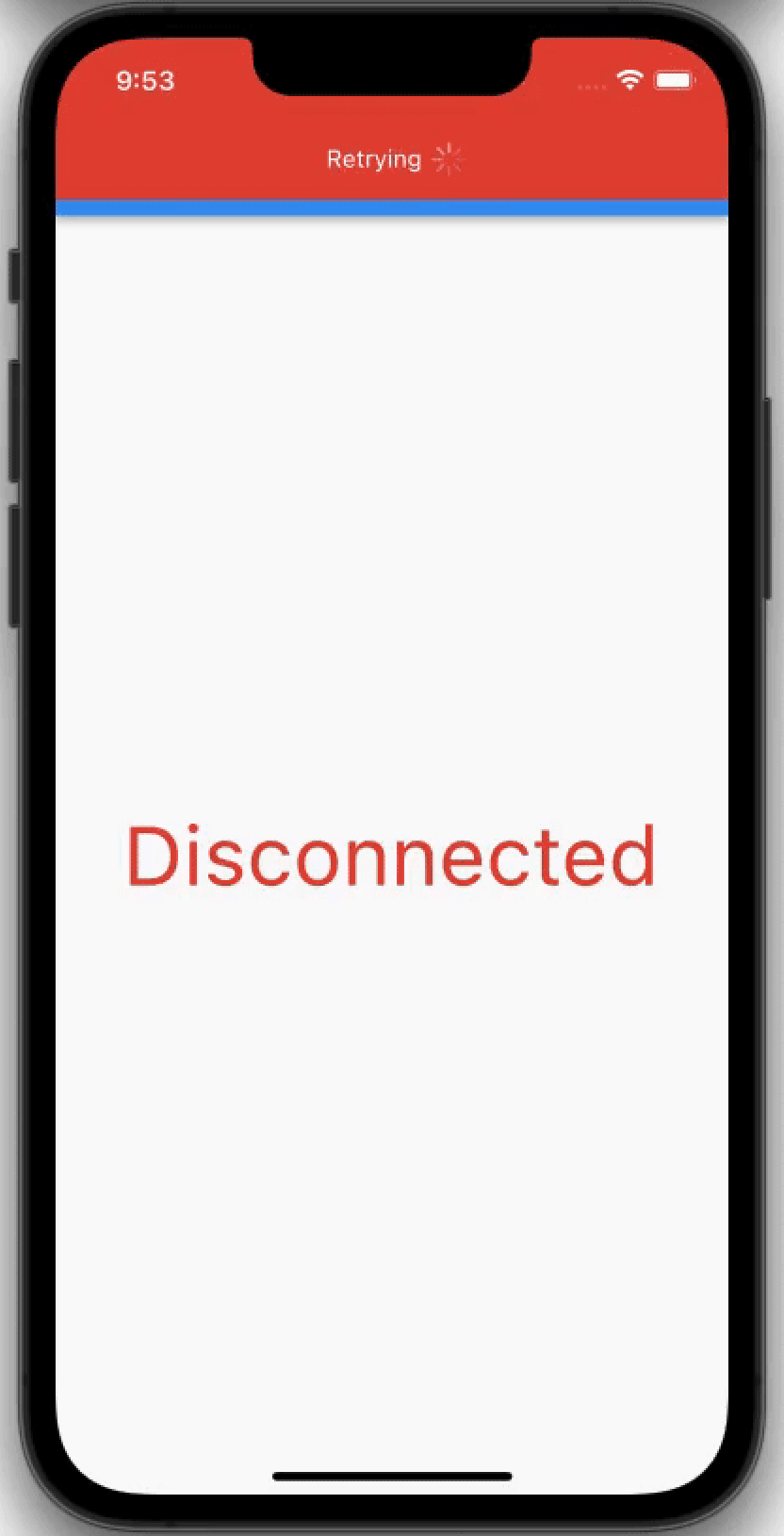
Connection Notifier
A simple way to notify your user about the connection status as well as providing simple tools that help tracking the internet connection status.
Version 4.0+ : Now with injectable connectivity handlers, full Navigator 2.0 support , Web support , and seamless support for modern routing solutions.
Version 4.1+ : Added async connectivity check via ConnectionNotifierTools.isConnectedAsync.
Gallery
Quick Start
Basic Usage (Without Localization)
If you don't need localization, simply wrap your MaterialApp:
import 'package:connection_notifier/connection_notifier.dart' ;
import 'package:flutter/material.dart' ;
void main () async {
WidgetsFlutterBinding .ensureInitialized ();
await ConnectionNotifierTools .initialize ();
runApp (const MyApp ());
}
class MyApp extends StatelessWidget const MyApp ({Key ? key}) : super (key: key);
@override
Widget build (BuildContext context) {
return GlobalConnectionNotifier (
connectionNotificationOptions: ConnectionNotificationOptions (
alignment: Alignment .topCenter,
),
child: MaterialApp (
title: 'My App' ,
home: const MyHomePage (),
),
);
}
}
Recommended Usage (With Localization)
This is the recommended approach if you're using any localization package (EasyLocalization, flutter_localizations, intl, etc.):
Call ConnectionNotifierTools.initialize(...) once in main() before
runApp(...), same as the basic usage example.
import 'package:connection_notifier/connection_notifier.dart' ;
import 'package:easy_localization/easy_localization.dart' ;
import 'package:flutter/material.dart' ;
class MyApp extends StatelessWidget const MyApp ({Key ? key}) : super (key: key);
@override
Widget build (BuildContext context) {
return MaterialApp (
locale: context.locale,
supportedLocales: context.supportedLocales,
localizationsDelegates: context.localizationDelegates,
builder: (context, child) => GlobalConnectionNotifier (
connectionNotificationOptions: ConnectionNotificationOptions (
alignment: Alignment .bottomCenter,
connectedText: 'connectionRestored' .tr (context: context),
disconnectedText: 'connectionLost' .tr (context: context),
),
child: child!,
),
home: const MyHomePage (),
);
}
}
Why use the builder approach?
✅ Full access to localization context
✅ Messages automatically update when language changes
✅ Works with EasyLocalization, flutter_localizations, intl, and all localization packages
✅ Clean and maintainable code
That's it! Connection notifications will work throughout your entire app with full localization support.
✅ Platform Support
Works everywhere:
✅ iOS
✅ Android
✅ Web
✅ macOS
✅ Windows
✅ Linux
✅ Navigation Support
Works with ALL navigation types:
✅ Classic Navigator (Navigator 1.0)
✅ Navigator 2.0 (GoRouter, AutoRoute, Beamer, and all modern routing solutions)
Example with GoRouter
import 'package:go_router/go_router.dart' ;
class MyApp extends StatelessWidget const MyApp ({Key ? key}) : super (key: key);
final _router = GoRouter (
routes: [
GoRoute (path: '/' , builder: (context, state) => const HomePage ()),
GoRoute (path: '/details' , builder: (context, state) => const DetailsPage ()),
],
);
@override
Widget build (BuildContext context) {
return GlobalConnectionNotifier (
connectionNotificationOptions: ConnectionNotificationOptions (
alignment: Alignment .topCenter,
),
child: MaterialApp .router (
title: 'My App' ,
routerConfig: _router,
),
);
}
}
Configuration
ConnectionNotificationOptions Parameters
Option
Description
Type
Default Value
Required
alignment
Alignment of the connection notification
AlignmentGeometry
AlignmentDirectional.topCenter
No
height
Height of the connection notification
double?
twice top padding
No
width
Width of the connection notification
double?
double.infinity
No
borderRadius
Border radius of the connection notification
BorderRadiusGeometry?
null
No
connectedBackgroundColor
Background color in connected state
Color?
Colors.green
No
disconnectedBackgroundColor
Background color in disconnected state
Color?
Colors.red
No
connectedDuration
Duration before auto-dismissing in connected state
Duration?
2 seconds
No
disconnectedDuration
Duration before auto-dismissing in disconnected state
Duration?
infinity
No
overlayAnimationType
Animation type of the notification
OverlayAnimationType
OverlayAnimationType.fadeAndSlide
No
animationCurve
Animation curve
Curve?
Curves.fastOutSlowIn
No
animationDuration
Animation duration
Duration?
300 milliseconds
No
connectedContent
Custom widget for connected state
Widget?
null
No
disconnectedContent
Custom widget for disconnected state
Widget?
null
No
shouldAlwaysPullContentDownOnTopAlignment
Pull content down on top alignment
bool
true
No
hasIndicationIcon
Show indication icon in default content
bool
true
No
textAndIconSeparationWidth
Distance between text and icon
double?
10
No
connectedText
Text for connected state
String?
'Back Online'
No
disconnectedText
Text for disconnected state
String?
'Retrying'
No
connectedTextStyle
Text style for connected state
TextStyle?
null
No
disconnectedTextStyle
Text style for disconnected state
TextStyle?
null
No
connectedIcon
Icon for connected state
Icon?
Icon(Icons.check)
No
disconnectedIcon
Icon for disconnected state
Icon?
CircularProgressIndicator
No
iconBoxSideLength
Size of the icon box
double?
10
No
connectedConnectionNotification
Custom notification widget for connected state
Widget?
null
No
disconnectedConnectionNotification
Custom notification widget for disconnected state
Widget?
null
No
Custom Notification Example
GlobalConnectionNotifier (
connectionNotificationOptions: ConnectionNotificationOptions (
alignment: Alignment .topCenter,
connectedConnectionNotification: Container (
padding: const EdgeInsets .all (16 ),
decoration: BoxDecoration (
color: Colors .green,
borderRadius: BorderRadius .circular (8 ),
),
child: Row (
mainAxisSize: MainAxisSize .min,
children: [
const Icon (Icons .wifi, color: Colors .white),
const SizedBox (width: 8 ),
const Text ('Connected' , style: TextStyle (color: Colors .white)),
],
),
),
disconnectedConnectionNotification: Container (
padding: const EdgeInsets .all (16 ),
decoration: BoxDecoration (
color: Colors .red,
borderRadius: BorderRadius .circular (8 ),
),
child: Row (
mainAxisSize: MainAxisSize .min,
children: [
const Icon (Icons .wifi_off, color: Colors .white),
const SizedBox (width: 8 ),
const Text ('No Connection' , style: TextStyle (color: Colors .white)),
],
),
),
),
child: MaterialApp (home: MyHomePage ()),
)
Localization
Recommended Approach: Use MaterialApp Builder (Best Practice)
The easiest and most powerful way to handle localization is using the MaterialApp builder pattern. This gives you full access to the localization context:
import 'package:connection_notifier/connection_notifier.dart' ;
import 'package:easy_localization/easy_localization.dart' ;
import 'package:flutter/material.dart' ;
class MyApp extends StatelessWidget @override
Widget build (BuildContext context) {
return MaterialApp (
locale: context.locale,
supportedLocales: context.supportedLocales,
localizationsDelegates: context.localizationDelegates,
builder: (context, child) => GlobalConnectionNotifier (
connectionNotificationOptions: ConnectionNotificationOptions (
alignment: Alignment .bottomCenter,
connectedText: 'connectionRestored' .tr (context: context),
disconnectedText: 'connectionLost' .tr (context: context),
),
child: child!,
),
home: const MyHomePage (),
);
}
}
Benefits:
✅ Works with any localization package (EasyLocalization, flutter_localizations, intl, etc.)
✅ Messages automatically update when language changes
✅ Full access to localization context
✅ Clean and maintainable
✅ No need for custom widgets or manual locale detection
Alternative: Custom Notification Widgets
If you need more control over the UI, create custom widgets:
GlobalConnectionNotifier (
connectionNotificationOptions: ConnectionNotificationOptions (
connectedConnectionNotification: MyLocalizedConnectedWidget (),
disconnectedConnectionNotification: MyLocalizedDisconnectedWidget (),
),
child: MaterialApp (...),
)
class MyLocalizedConnectedWidget extends StatelessWidget @override
Widget build (BuildContext context) {
final String message = 'connectionRestored' .tr (context: context);
return Container (
padding: EdgeInsets .all (16 ),
decoration: BoxDecoration (
color: Colors .green,
borderRadius: BorderRadius .circular (8 ),
),
child: Text (message, style: TextStyle (color: Colors .white)),
);
}
}
Additional Widgets
ConnectionNotifierToggler
Toggle between widgets based on connection state:
ConnectionNotifierToggler (
onConnectionStatusChanged: (connected) {
if (connected == null ) return ;
print (connected);
},
connected: Center (
key: UniqueKey (),
child: const Text (
'Connected' ,
style: TextStyle (color: Colors .green, fontSize: 48 ),
),
),
disconnected: Center (
key: UniqueKey (),
child: const Text (
'Disconnected' ,
style: TextStyle (color: Colors .red, fontSize: 48 ),
),
),
);
LocalConnectionNotifier
Show connection notification for a specific screen only:
class MyScreen extends StatelessWidget @override
Widget build (BuildContext context) {
return LocalConnectionNotifier (
connectionNotificationOptions: const ConnectionNotificationOptions (
alignment: Alignment .bottomCenter,
),
child: Scaffold (
appBar: AppBar (title: const Text ('My Screen' )),
body: Center (child: Text ('Content' )),
),
);
}
}
ConnectionNotifierTools
Check connection status programmatically anywhere in your app:
First, initialize:
void main () async {
WidgetsFlutterBinding .ensureInitialized ();
await ConnectionNotifierTools .initialize ();
runApp (const MyApp ());
}
Then use:
bool isConnected = ConnectionNotifierTools .isConnected;
bool isOnline = await ConnectionNotifierTools .isConnectedAsync;
ConnectionNotifierTools .onStatusChange.listen ((isConnected) {
print ('Connection status: $isConnected ' );
});
Custom Connection Handler (Inject Your Own Connectivity Source)
The package is agnostic to how connectivity is detected. By default it uses
ConnectionNotifierHandlerImpl (internet_connection_checker_plus). If you have
your own source (socket, native SDK, etc.), implement ConnectionHandler and
pass it to ConnectionNotifierTools.initialize(...).
import 'package:connection_notifier/connection_notifier.dart' ;
class MySocketConnectionHandler implements ConnectionHandler @override
Stream <ConnectionNotifierInternetConnectionStatus > get onStatusChange =>
mySocketStatusStream.map ((isOnline) {
return isOnline
? ConnectionNotifierInternetConnectionStatus .connected
: ConnectionNotifierInternetConnectionStatus .disconnected;
});
@override
Future <bool > get hasInternetAccess async => mySocketIsConnected;
}
void main () async {
WidgetsFlutterBinding .ensureInitialized ();
await ConnectionNotifierTools .initialize (
connectionHandler: MySocketConnectionHandler (),
);
runApp (const MyApp ());
}
The package UI reacts to the handler stream. No manual notification API calls
are required.
Migration Guide
From v3.x to v4.0
Version 4.0 introduces breaking changes. Please read below.
What's Changed:
Removed pauseConnectionListenerWhenAppInBackground — Background/foreground lifecycle is now managed internallyInjectable ConnectionHandler support — Bring your own connectivity sourceAutomatic, stable reconnect flow — App pauses in background, resumes with 3s delay in foreground
Migration Steps:
Step 1: Remove pauseConnectionListenerWhenAppInBackground
If you were using this option, simply remove it:
GlobalConnectionNotifier (
connectionNotificationOptions: ConnectionNotificationOptions (
alignment: Alignment .topCenter,
pauseConnectionListenerWhenAppInBackground: true ,
),
child: MaterialApp (...),
)
GlobalConnectionNotifier (
connectionNotificationOptions: ConnectionNotificationOptions (
alignment: Alignment .topCenter,
),
child: MaterialApp (...),
)
Step 2: (Optional) Use custom connectivity source
New in v4.0: bring your own connectivity handler:
class MyCustomHandler implements ConnectionHandler @override
Stream <ConnectionNotifierInternetConnectionStatus > get onStatusChange {
return myCustomConnectivityStream;
}
@override
Future <bool > get hasInternetAccess async {
return myCustomCheckInternet ();
}
}
void main () async {
WidgetsFlutterBinding .ensureInitialized ();
await ConnectionNotifierTools .initialize (
connectionHandler: MyCustomHandler (),
);
runApp (const MyApp ());
}
Behavior Changes:
Behavior
v3.0
v4.0
Background handling
Optional, manual via option
Always active, automatic
Resume delay
None
3 seconds (for OS to settle)
Status deduplication
No
Yes (same status ignored)
Custom connectivity
No
Yes, via ConnectionHandler injection
From v2.x to v3.0
See CHANGELOG.md for detailed migration instructions.
Quick Migration:
Before (v2.x):
ConnectionNotifier (
locale: const Locale ('en' , 'US' ),
supportedLocales: [Locale ('en' , 'US' )],
localizationsDelegates: [...],
connectionNotificationOptions: ConnectionNotificationOptions (...),
child: MaterialApp (
home: MyHomePage (),
),
)
After (v3.0):
GlobalConnectionNotifier (
connectionNotificationOptions: ConnectionNotificationOptions (...),
child: MaterialApp (
locale: const Locale ('en' , 'US' ),
supportedLocales: [Locale ('en' , 'US' )],
localizationsDelegates: [...],
home: MyHomePage (),
),
)
Migration Steps:
Replace ConnectionNotifier with GlobalConnectionNotifier
Move locale properties to MaterialApp: locale, supportedLocales, localizationsDelegates, etc.
Keep connectionNotificationOptions in GlobalConnectionNotifier
Handle localization using one of the methods described in the Localization section
Test your app!
Complete Example
import 'package:connection_notifier/connection_notifier.dart' ;
import 'package:flutter/material.dart' ;
void main () async {
WidgetsFlutterBinding .ensureInitialized ();
await ConnectionNotifierTools .initialize ();
runApp (const MyApp ());
}
class MyApp extends StatelessWidget const MyApp ({Key ? key}) : super (key: key);
@override
Widget build (BuildContext context) {
return GlobalConnectionNotifier (
connectionNotificationOptions: ConnectionNotificationOptions (
alignment: Alignment .topCenter,
height: 60 ,
connectedBackgroundColor: Colors .green,
disconnectedBackgroundColor: Colors .red,
connectedText: 'Back Online!' ,
disconnectedText: 'No Internet Connection' ,
connectedDuration: const Duration (seconds: 3 ),
),
child: MaterialApp (
title: 'Connection Notifier Demo' ,
theme: ThemeData (primarySwatch: Colors .blue),
home: const MyHomePage (),
),
);
}
}
class MyHomePage extends StatelessWidget const MyHomePage ({Key ? key}) : super (key: key);
@override
Widget build (BuildContext context) {
return Scaffold (
appBar: AppBar (title: const Text ('Connection Notifier Demo' )),
body: ConnectionNotifierToggler (
connected: Center (
child: const Text (
'Connected' ,
style: TextStyle (color: Colors .green, fontSize: 48 ),
),
),
disconnected: Center (
child: const Text (
'Disconnected' ,
style: TextStyle (color: Colors .red, fontSize: 48 ),
),
),
),
);
}
}
Attribution
This package depends on the following (Big Thanks):
More from the Developer
Check out my other open-source project:
workspace-bridge-mcp
License
MIT License