搜索插件、代码仓与 APP 分类

插件详情v0.4.0+1

crimson

快速、高效且易于使用的 Dart JSON 解析器和序列化器。

AndroidiOSWebmacOSWindowsLinux
近 30 天下载
72
喜欢数
128
Pub 分数
140

安装插件

flutter pub add crimson

插件介绍

基于插件公开信息、社区数据与项目使用情况整理的选型参考。

Crimson 是一个高性能的 Dart JSON 解析器和序列化工具,专为速度和简洁性而设计。它能够以最少的样板代码高效地在 JSON 数据和 Dart 对象之间进行转换。Crimson 以性能为核心构建,支持所有主要平台,包括 Android、iOS、Web、macOS、Windows 和 Linux。Crimson 提供了简洁直观的 API,使处理 JSON 变得简单直接,非常适合需要快速数据处理的应用程序。其轻量级特性确保了低开销,适用于小型项目和大型应用程序。

适合场景

  • 解析 API 的 JSON 响应
  • 将 Dart 对象序列化为 JSON
  • 高性能数据处理
  • 跨平台应用开发
  • 实时数据同步
  • 轻量级数据存储

主要特点

  • 超快速解析和序列化
  • 最小化样板代码
  • 支持所有主要平台
  • 简单直观的 API
  • 低内存占用
  • 内置类型安全

适合对象

  • 性能关键的应用程序
  • 移动和网页应用
  • API 客户端
  • 数据密集型服务
  • 寻求快速 JSON 处理的开发者
  • 注重效率的项目

使用建议

  • 需要显式定义模型
  • 有限的内置验证
  • 不适用于需要自定义的复杂嵌套结构
  • 高级用例可能需要额外的设置
  • 最适合结构良好的 JSON 数据

原始 README

以下为关联源码仓库的 README 原文快照,最新内容请访问源码仓库。

Fast, efficient and easy-to-use JSON parser and serializer for Dart.
Crimson does not verify your JSON!

Features

  • 🏎️ Fast: Like really fast. Crimson parses JSON in a single pass.
  • 🌻 Easy to use: Crimson is designed to be easy to learn and use.
  • 💃 Flexible: Crimson can partially parse and serialize JSON.
  • 🥶 Freezed support: Crimson supports freezed classes.
  • 🪶 Lightweight: Crimson is lightweight and has no third-party dependencies.

Usage

After adding Crimson to your pubspec.yaml, you can start annotating your classes with @json and optionally @JsonField():

import 'package:crimson/crimson.dart';

part 'tweet.g.dart';

@json
class Tweet {
  DateTime? createdAt;

  String? tweet;

  int? favoriteCount;
}

Now you just need to run pub run build_runner build to generate the necessary code.

import 'package:crimson/crimson.dart';

void main() {
  final jsonBytes = downloadTweets();

  final crimson = Crimson(jsonBytes);
  final tweets = crimson.readTweetList();

  final writer = CrimsonWriter();
  writer.writeTweetList(tweets);
  final bytes = writer.toBytes();
}

That's it! You can now parse and serialize JSON with ease.

Ignoring JSON fields

Annotate properties with @jsonIgnore to ignore them:

@json
class Tweet {
  DateTime? created_at;

  String? tweet;

  @jsonIgnore
  int? favoriteCount;
}

Renaming JSON fields

Use the @JsonName() annotation to rename individual fields:

@json
class Tweet {
  @JsonName('created_at')
  DateTime? createdAt;

  @JsonName('text', aliases: {'alias1', 'alias2'})
  String? tweet;
}

The same works for enum values:

@json
enum TweetType {
  tweet,

  @JsonName('re-tweet')
  retweet,
}

If you want to rename all fields or enum values, you can use @jsonKebabCase and @jsonSnakeCase:

@jsonKebabCase
class Tweet {
  DateTime? createdAt; // created-at

  String? tweet; // tweet

  int? favoriteCount; // favorite-count
}

@jsonSnakeCase
enum PlaceType {
  country, // country
  largeCity, // large_city
  smallCity, // small_city
}

fromJson and toJson methods

Crimson supports generating a fromJson() constructor and a toJson() extension method for your classes use Uint8List.

Just add the following line to your class. The .toJson() method is generated using an extension.

@json
class Tweet {
  // ...

  factory Tweet.fromJson(Uint8List json) => _$TweetFromJson(json);
}

Alternatively you can use fromBytes() and toBytes(). It's equivalent to fromJson() and toJson().

@json
class Tweet {
  // ...

  factory Tweet.fromBytes(Uint8List bytes) => _$TweetFromBytes(bytes);
}

JSON Pointers

Crimson supports RFC 6901 JSON pointers to access nested JSON fields:

{
  "user": {
    "name": "Simon Choi"
  },
  "tweets": [
    {
      "text": "Hello World!"
    },
    {
      "text": "Hello Crimson!"
    }
  ]
}

We can access the name field of the user object and the text field of the second tweet by providing a JSON pointer:

@json
class Tweet {
  @JsonName('/user/name')
  String? userName;

  @JsonName('/tweets/1/text')
  String? secondTweet;
}

JSON pointers are evaluated at compile time and optimized code is generated so there is no runtime overhead.

Fields using JSON pointers are ignored for serialization.

Important: You can only use a pointer prefix once in a class. For example, you can't use /user and /user/name in the same class.

Custom JSON converters

You can use custom JSON converters to convert between JSON and Dart types using the @JsonConvert() annotation:

@json
class Tweet {
  String? tweet;

  @JsonConvert(fromJson: jsonIntToBool, toJson: boolToJsonInt)
  bool? isFavorite;
}

bool jsonIntToBool(int json) => json >= 1;

int boolToJsonInt(bool value) => value ? 1 : 0;

Freezed Support

Crimson supports classes annotated with @freezed from the freezed package.

import 'package:crimson/crimson.dart';

part 'tweet.g.dart';
part 'tweet.freezed.dart';

@freezed
class Tweet with _$Tweet {
  @json
  const factory Tweet({
    DateTime? created_at,
    @JsonField(name: 'text') String? tweet,
    int? reply_count,
    int? retweet_count,
    int? favorite_count,
  }) = _Tweet;
}

JSON Benchmarks

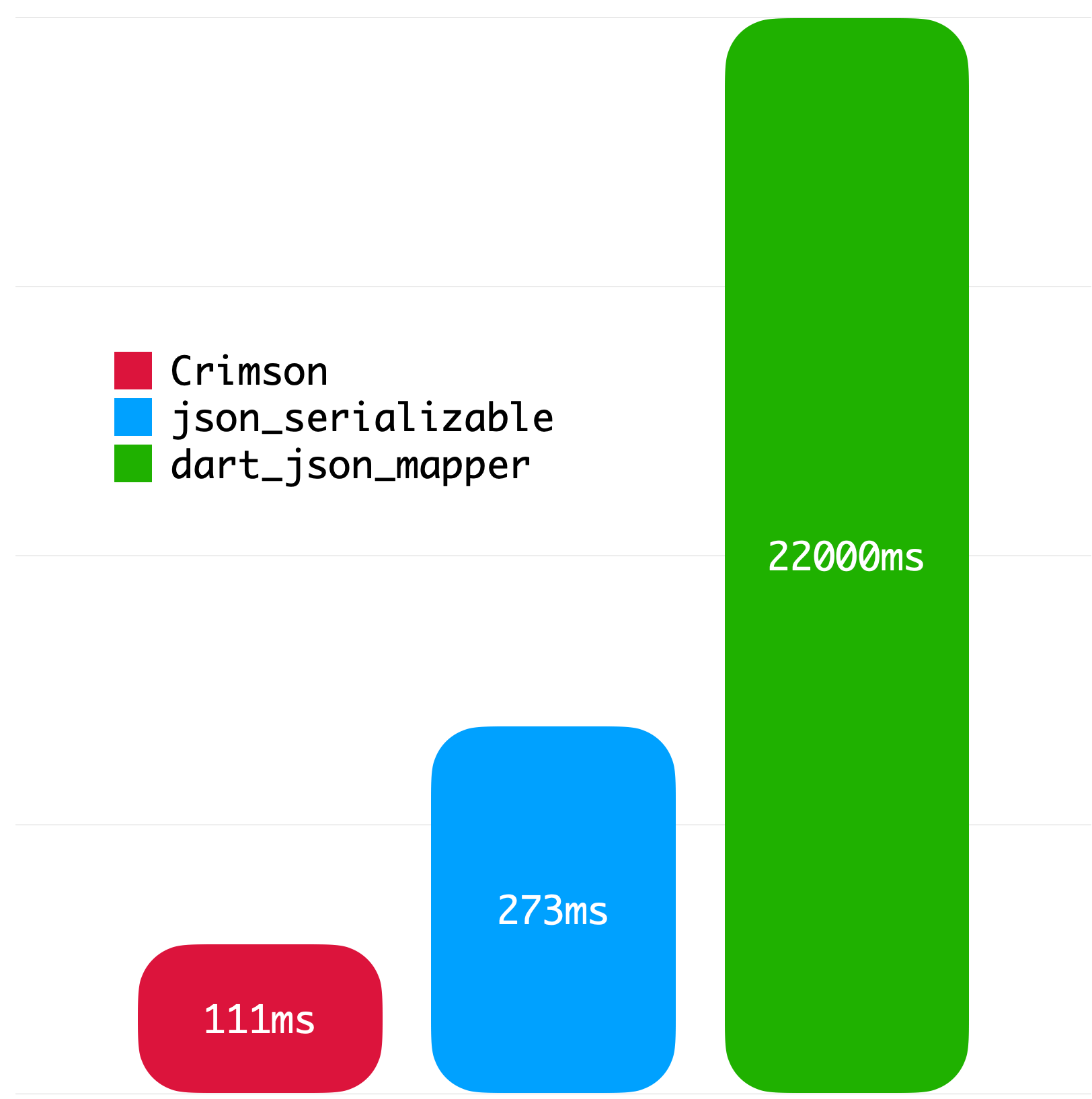
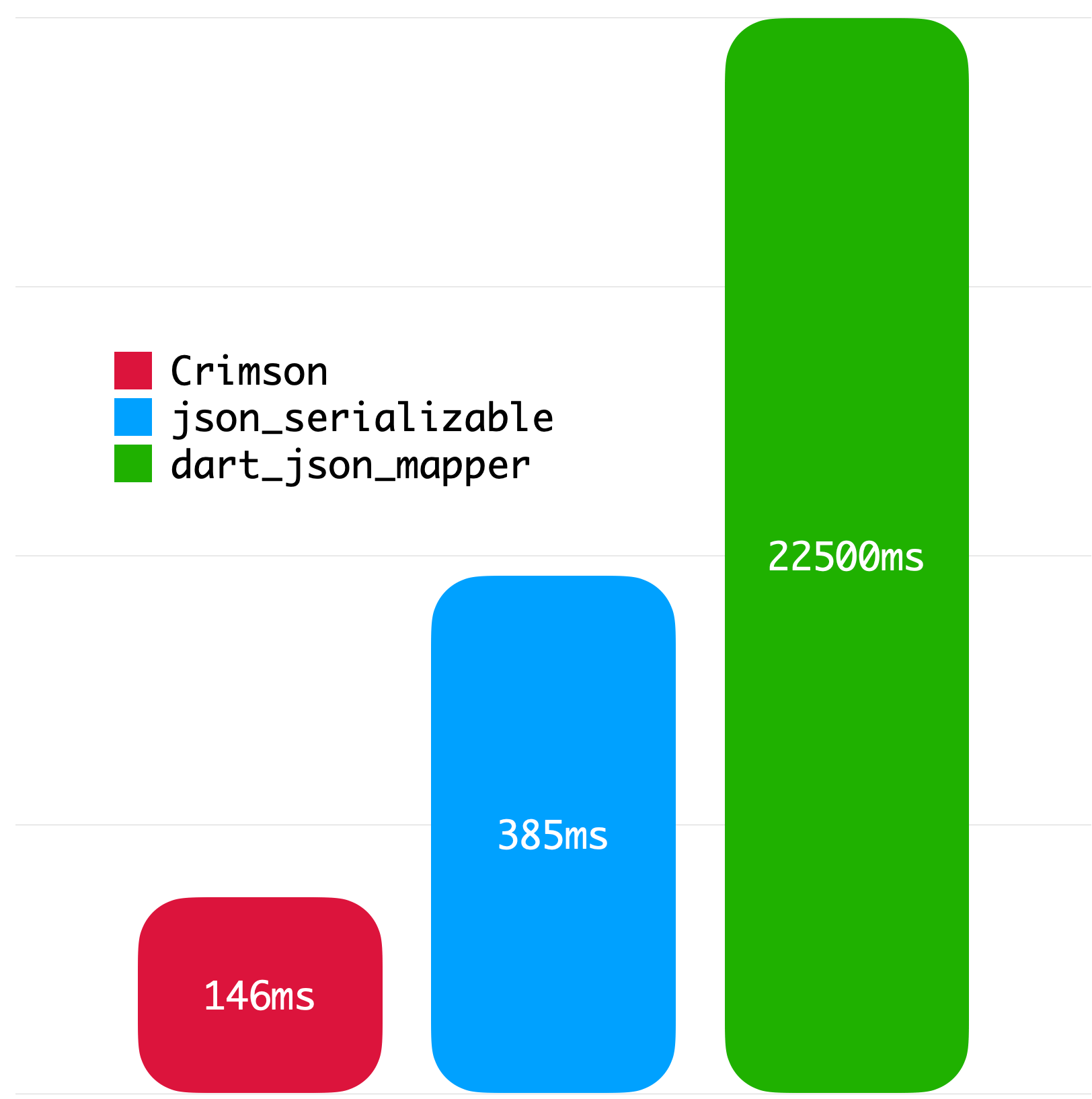
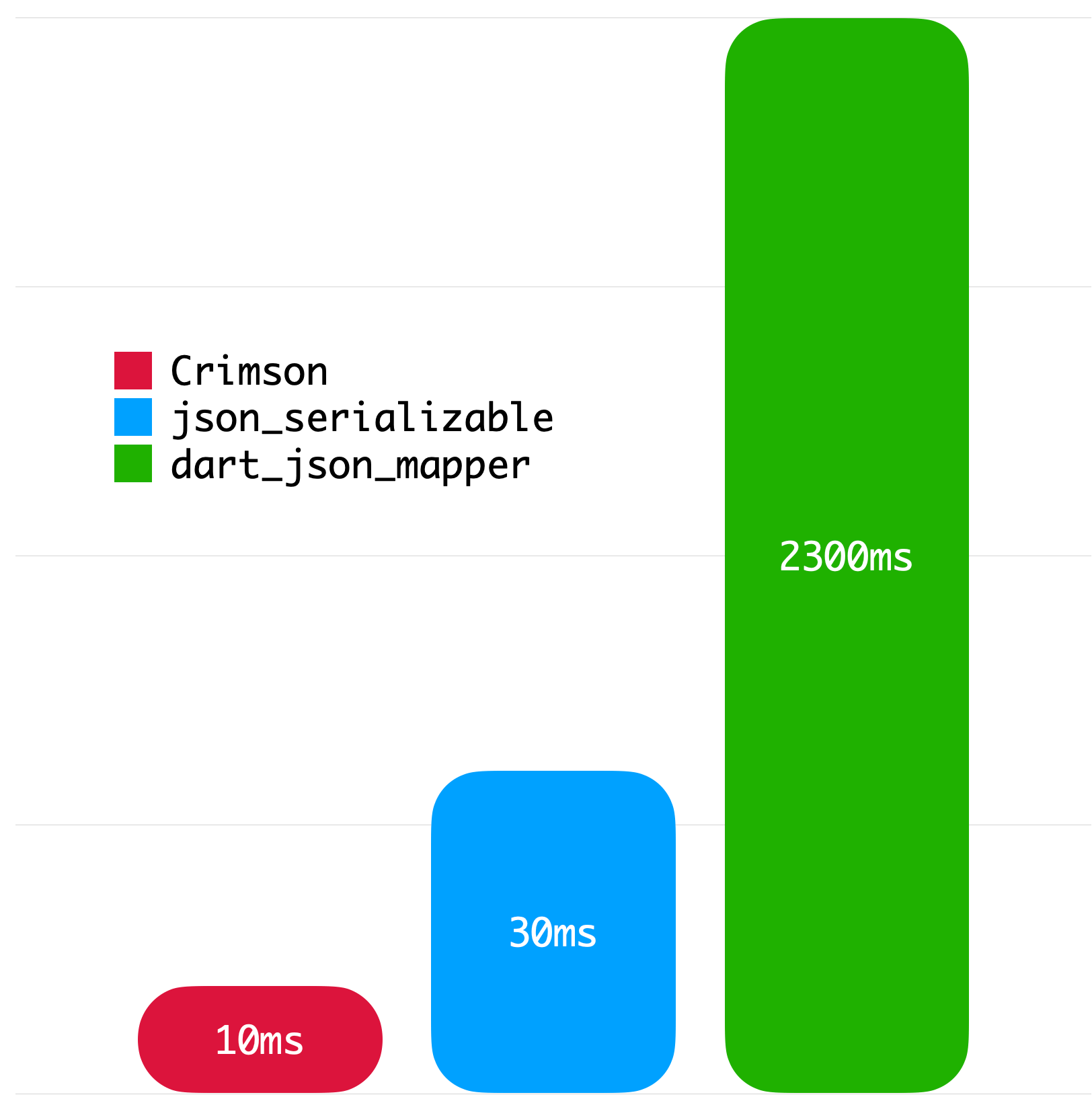
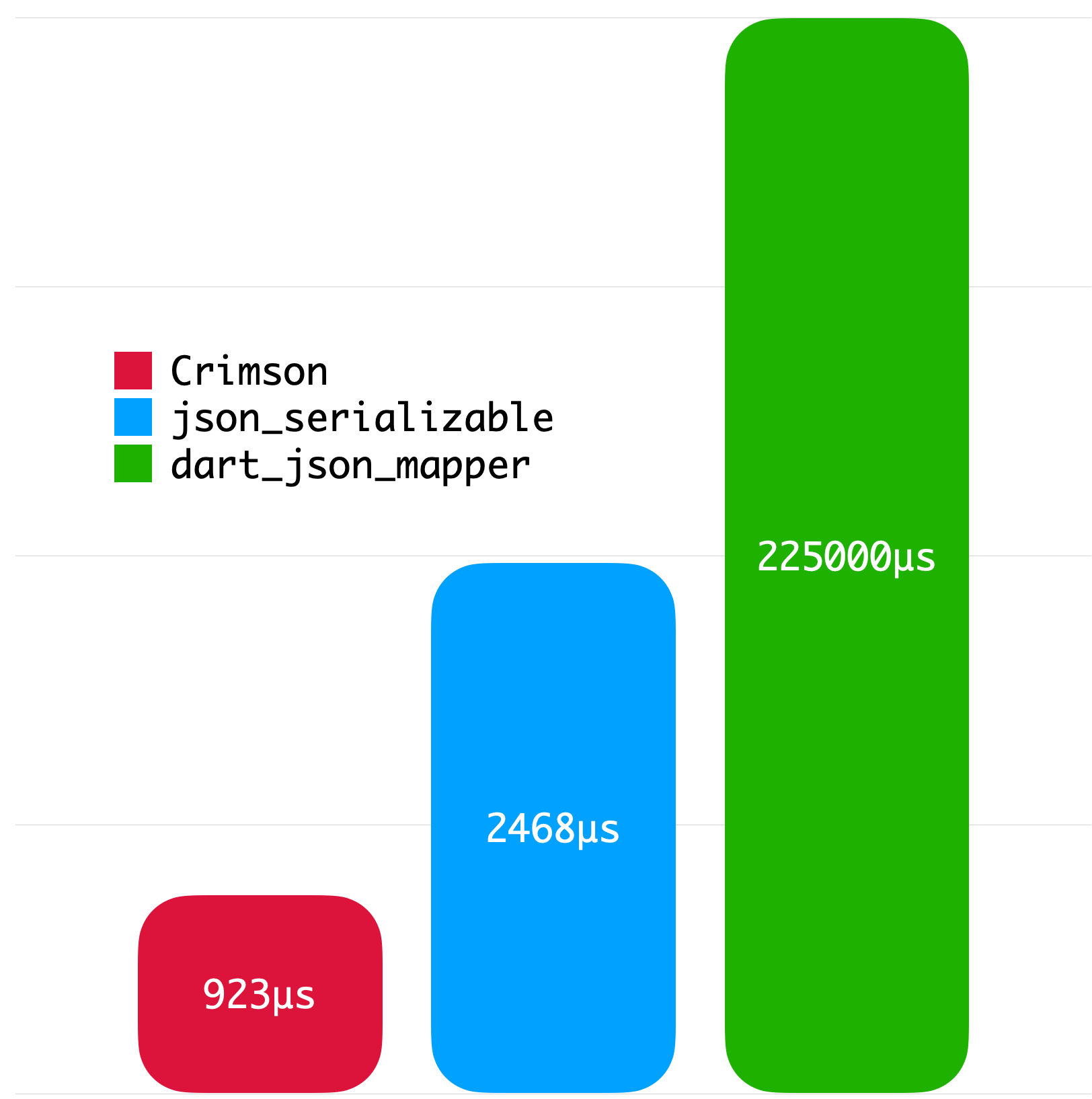
The following benchmarks give you an idea about the JSON parsing performance of Crimson. The benchmarks were run on a MacBook with M1 Pro and 32 GB of RAM using Twitter API data.

Big JSON without whitespace Big JSON with whitespace
Medium JSON without whitespace Small JSON without whitespace
License
Copyright 2023 Simon Choi

Licensed under the Apache License, Version 2.0 (the "License");
you may not use this file except in compliance with the License.
You may obtain a copy of the License at

   http://www.apache.org/licenses/LICENSE-2.0

Unless required by applicable law or agreed to in writing, software
distributed under the License is distributed on an "AS IS" BASIS,
WITHOUT WARRANTIES OR CONDITIONS OF ANY KIND, either express or implied.
See the License for the specific language governing permissions and
limitations under the License.

所属分类

依赖

依赖清单 3 项

源码仓库

使用此插件的项目

暂无相关数据。