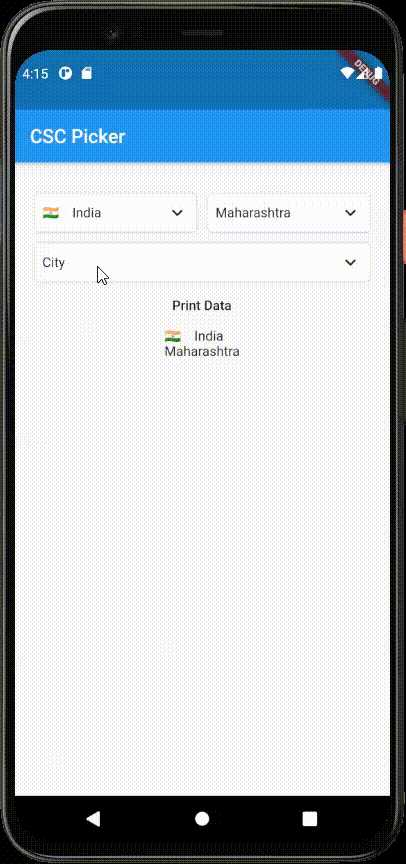
csc_picker
A flutter package to display a country, states, and cities. In addition it gives the possibility to select a list of countries, States and Cities depends on Selected, also you can search country, state, and city all around the world.
How to Use
To use this Package, add csc_picker as a dependency in your pubspec.yaml .
CSCPicker (
onCountryChanged: (value) {
setState (() {
countryValue = value;
});
},
onStateChanged:(value) {
setState (() {
stateValue = value;
});
},
onCityChanged:(value) {
setState (() {
cityValue = value;
});
},
),
you will get feedback in onChanged functions
Parameters
Parameters Type Description flagState CountryFlag Enable (get flag with country name) / Disable (Disable flag) / ShowInDropdownOnly (display flag in dropdown only) layout Layout Toggle dropdown layout (Horizontal / Vertical) showStates Boolean Enable disable States dropdown (true / false) showCities Boolean Enable disable Cities dropdown (true / false) dropdownDecoration BoxDecoration Dropdown box decoration to style your dropdown selector [OPTIONAL PARAMETER] (USE with disabledDropdownDecoration) disabledDropdownDecoration BoxDecoration Disabled Dropdown box decoration to style your dropdown selector [OPTIONAL PARAMETER] (USE with disabled dropdownDecoration) selectedItemStyle TextStyle To change selected item style dropdownHeadingStyle TextStyle To change DropdownDialog Heading style dropdownItemStyle TextStyle To change DropdownDialog Item style dropdownDialogRadius double To change DropdownDialogBox radius searchBarRadius double To change search bar radius defaultCountry CscCountry To select default country disableCountry Boolean Disable country dropdown (Note: use it with default country) countryFilter List of CscCountry Show only countries in dropdown that you want countrySearchPlaceholder String Placeholder for country search field stateSearchPlaceholder String Placeholder for state search field citySearchPlaceholder String Placeholder for city search field countryDropdownLabel String Label/Title for country dropdown countryDropdownLabel String Label/Title for state dropdown countryDropdownLabel String Label/Title for city dropdown
Example
import 'package:csc_picker/csc_picker.dart' ;
import 'package:flutter/material.dart' ;
void main () {
runApp (MyApp ());
}
class MyApp extends StatelessWidget @override
Widget build (BuildContext context) {
return MaterialApp (
title: 'CSC Picker' ,
theme: ThemeData (
primarySwatch: Colors .blue,
visualDensity: VisualDensity .adaptivePlatformDensity,
),
home: MyHomePage (title: 'CSC Picker' ),
);
}
}
class MyHomePage extends StatefulWidget MyHomePage ({Key key, this .title}) : super (key: key);
final String title;
@override
_MyHomePageState createState () => _MyHomePageState ();
}
class _MyHomePageState extends State <MyHomePage > String countryValue = "" ;
String stateValue = "" ;
String cityValue = "" ;
String address = "" ;
@override
Widget build (BuildContext context) {
GlobalKey <CSCPickerState > _cscPickerKey = GlobalKey ();
return Scaffold (
appBar: AppBar (
title: Text (widget.title),
),
body: Center (
child: Container (
padding: EdgeInsets .symmetric (horizontal: 20 ),
height: 600 ,
child: Column (
children: [
CSCPicker (
showStates: true ,
showCities: true ,
flagState: CountryFlag .DISABLE,
dropdownDecoration: BoxDecoration (
borderRadius: BorderRadius .all (Radius .circular (10 )),
color: Colors .white,
border:
Border .all (color: Colors .grey.shade300, width: 1 )),
disabledDropdownDecoration: BoxDecoration (
borderRadius: BorderRadius .all (Radius .circular (10 )),
color: Colors .grey.shade300,
border:
Border .all (color: Colors .grey.shade300, width: 1 )),
countrySearchPlaceholder: "Country" ,
stateSearchPlaceholder: "State" ,
citySearchPlaceholder: "City" ,
countryDropdownLabel: "*Country" ,
stateDropdownLabel: "*State" ,
cityDropdownLabel: "*City" ,
countryFilter: [CscCountry .India ,CscCountry .United_States,CscCountry .Canada ],
selectedItemStyle: TextStyle (
color: Colors .black,
fontSize: 14 ,
),
dropdownHeadingStyle: TextStyle (
color: Colors .black,
fontSize: 17 ,
fontWeight: FontWeight .bold),
dropdownItemStyle: TextStyle (
color: Colors .black,
fontSize: 14 ,
),
dropdownDialogRadius: 10.0 ,
searchBarRadius: 10.0 ,
onCountryChanged: (value) {
setState (() {
countryValue = value;
});
},
onStateChanged: (value) {
setState (() {
stateValue = value;
});
},
onCityChanged: (value) {
setState (() {
cityValue = value;
});
},
),
TextButton (
onPressed: () {
setState (() {
address = "$cityValue , $stateValue , $countryValue " ;
});
},
child: Text ("Print Data" )),
Text (address)
],
)),
),
);
}
}
Special Thanks to