搜索插件、代码仓与 APP 分类

custom_map_markers 封面
插件详情v0.0.2+1

custom_map_markers

一个将运行时小部件转换为地图标记图标或字节数组图像的包。

AndroidiOSWeb
近 30 天下载
15
喜欢数
86
Pub 分数
140

安装插件

flutter pub add custom_map_markers

插件介绍

基于插件公开信息、社区数据与项目使用情况整理的选型参考。

一个 Flutter 包,使开发者能够在运行时使用小部件作为自定义地图标记图标,或将它们转换为字节数组图像以在地图上使用。它通过允许直接将 Flutter 小部件集成到跨 Android、iOS 和 Web 平台的地图视图中,简化了创建动态、交互式标记的过程。适用于需要基于实时数据的个性化或动画标记的应用程序。

适合场景

  • 基于用户数据的动态标记图标
  • 动画或状态地图标记
  • 地图上的自定义 UI 元素
  • 实时位置可视化
  • 交互式地图叠加

主要特点

  • 将小部件转换为地图标记
  • 支持字节数组输出
  • 跨平台兼容性
  • 与地图插件轻松集成
  • 运行时标记自定义

适合对象

  • 开发交互式地图的开发者
  • 具有实时位置跟踪的应用程序
  • UI密集型的地理位置功能
  • 可定制的地图界面
  • 网页和移动地图应用

使用建议

  • 复杂控件带来的性能影响
  • 需要兼容的地图插件
  • 仅限支持的平台
  • 频繁更新时的内存使用
  • 网页上的潜在渲染不一致

原始 README

以下为关联源码仓库的 README 原文快照,最新内容请访问源码仓库。

Custom Map Markers

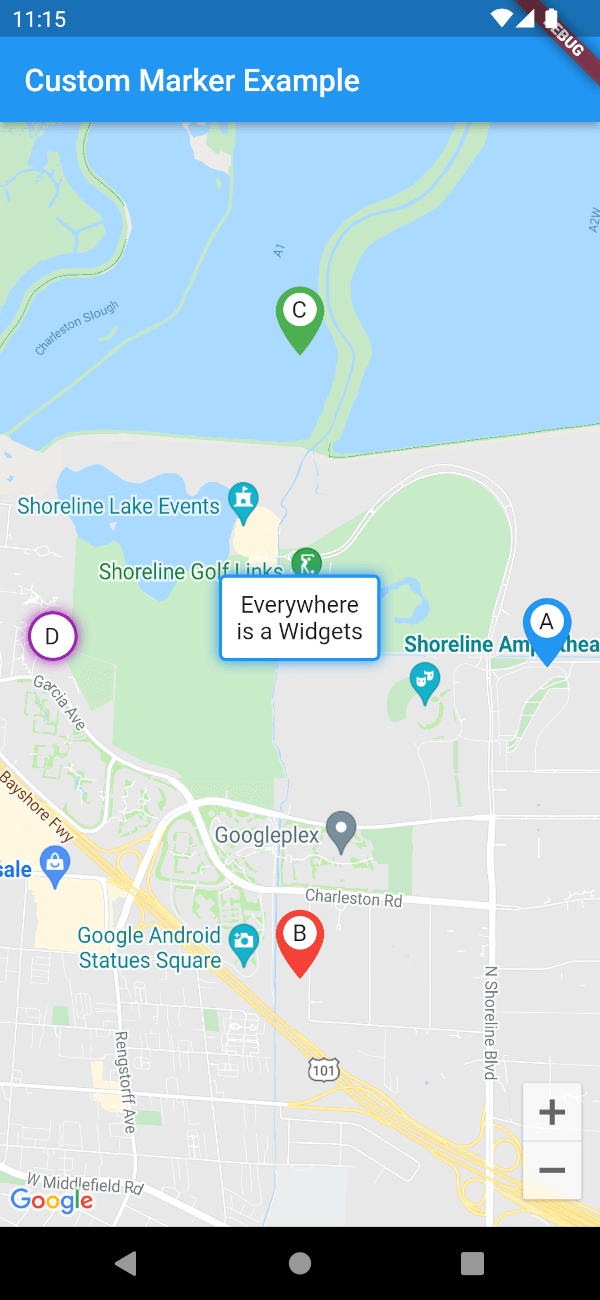
Not only "Everything is a widget" also "Everywhere is a widget".
custom_map_marker is a package that turns runtime widgets into map marker icons.

Features

this package providers the following features:

  • Ability to create runtime map markers using flutter widgets.
  • Capture Images of any list of widgets.

Getting started

First, add custom_map_markers as a dependency in your pubspec.yaml file.

dependencies:
  custom_map_markers: ^0.0.1

Usage

  1. Wrap your GoogleMaps widget with CustomGoogleMapMarkerBuilder.
  2. Define each marker and its custom widget in customMarkers
  3. Once custom markers are ready they will be passed as Set<Marer> in builder function.
final locations = const [  
  LatLng(37.42796133580664, -122.085749655962),  
  LatLng(37.41796133580664, -122.085749655962),  
];  

CustomGoogleMapMarkerBuilder(  
  customMarkers: [  
  MarkerData(  
        marker: Marker(  markerId: const MarkerId('id-1'), position: locations[0]),  
		child: _customMarker('A', Colors.black)),  
  MarkerData(  
        marker: Marker(  markerId: const MarkerId('id-2'), position: locations[1]),  
		child: _customMarker('B', Colors.red)),    
  ],  
  builder: (BuildContext context, Set<Marker>? markers) {  
    if (markers == null) {  
      return const Center(child: CircularProgressIndicator());  
  }  
    return GoogleMap(  
      initialCameraPosition: const CameraPosition(  
        target: LatLng(37.42796133580664, -122.085749655962),  
  zoom: 14.4746,  
  ),  
  markers: markers,  
  onMapCreated: (GoogleMapController controller) { },  
  );  
  },  
)

Not a google map user?

if you are not willing to use google maps you can use CustomMapMarkerBuilder that takes List<widgets> instead of List<MarkerData> and returns List<Uint8List> instead of Set<Marker> so you are free to use captured png images as you need.

Notes:
  1. Make sure your marker widget has boundaries.
  2. This package capture a png image of widget markers once they render, if your widget would take more time to render like Image.network you can use screenshotDelay parameter to daley the capture process making sure that your widget is rendered properly before capturing it.
  3. to run project example you have to add a valid google maps key to android/ios directories.

Features and bugs

Please feel free to:

所属分类

依赖

依赖清单 3 项

源码仓库

使用此插件的项目

暂无相关数据。