搜索插件、代码仓与 APP 分类

dashed_line 封面
插件详情v0.1.0+3

dashed_line

用您想要的任何形状和样式绘制虚线。就这么简单。

AndroidiOSWebmacOSWindowsLinux
近 30 天下载
4
喜欢数
77
Pub 分数
160

安装插件

flutter pub add dashed_line

插件介绍

基于插件公开信息、社区数据与项目使用情况整理的选型参考。

一个用于绘制可自定义虚线的 Flutter 包,支持任意形状或样式。它允许开发者轻松创建视觉上吸引人的虚线路径,支持多种配置,如虚线长度、间隙大小和笔画宽度。非常适合在跨平台应用中用作分隔线、边框或装饰性线条的 UI 元素。该包轻量且可无缝集成到现有的 Flutter 项目中。

适合场景

  • 在UI布局中创建自定义分隔符
  • 设计装饰性线条图案
  • 在小部件周围绘制虚线边框
  • 增强图表或图形可视化
  • 构建交互式绘图工具

主要特点

  • 支持任何路径形状
  • 可自定义的虚线和间隙长度
  • 可调节的描边宽度
  • 跨平台兼容性
  • 简单的 API 集成

适合对象

  • 寻求视觉多样性的UI设计师
  • 开发数据可视化组件的开发者
  • 需要样式化装饰元素的应用程序
  • 跨平台 Flutter 应用程序

使用建议

  • 可能需要对复杂路径进行性能优化
  • 限制为在 Flutter 的画布内进行 2D 渲染
  • 不适用于无额外逻辑的动画仪表效果

原始 README

以下为关联源码仓库的 README 原文快照,最新内容请访问源码仓库。

dashed_line

pub.dev build status

Draw dashed lines with any shape and style you want. Just like that.

Usage

Add the dependency to your pubspec.yaml (you can see the newest version in the pub badge):

dependencies:
  dashed_line: ^0.1.0

Use the widget:

import 'package:dashed_line/dashed_line.dart';

// ...

DashedLine(
  path: Path()..cubicTo(-40, 53, 14, 86, 61, 102),
  color: Colors.red,
)

...you can also use the SVG path commands instead of a Path:

DashedLine.svgPath(
  'C -40 53 14 86 61 102',
  color: Colors.red,
)

Where to obtain path methods/commands?

There are many ways.

You can construct the path yourself using the Path methods like lineTo or cubicTo.

You can also use the path commands used in the d attribute of SVG files. You can do this manually or via export from one of the vector graphics software, like Inkscape or Figma. We found SvgPathEditor quite useful too.

Example: Exporting path commands from Figma
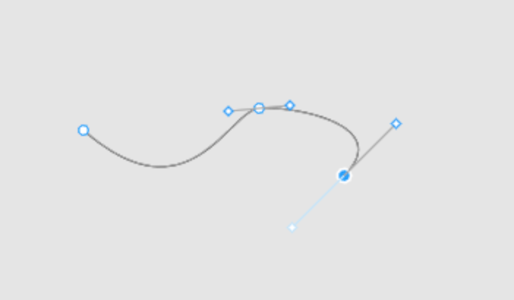
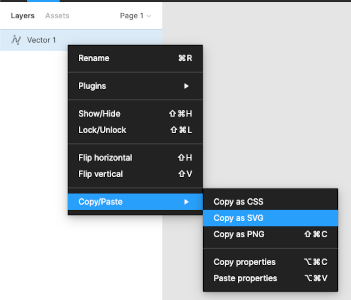
First step Second step
Create path using pen Export path as SVG

And now we have an SVG in the clipboard:

<svg width="190" height="48" viewBox="0 0 190 48" fill="none" xmlns="http://www.w3.org/2000/svg">
  <path d="M1 16C73 79 100 3 121 0.999997C142 -1 214.5 11.5 179 47" stroke="black"/>
</svg>

From here we can just copy the value of the path's d attribute and use for the DashedLine.svgPath constructor's first argument.

🚨 Note about paths

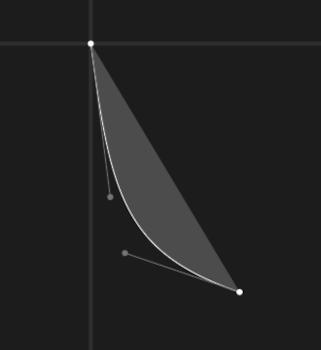
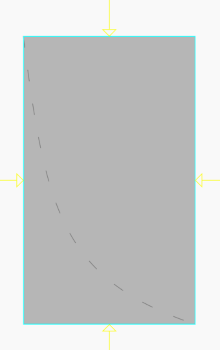
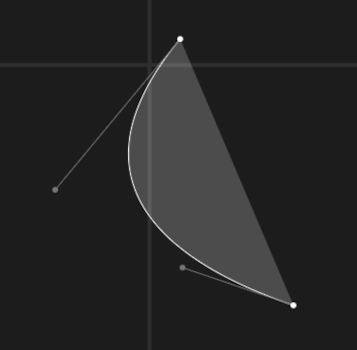
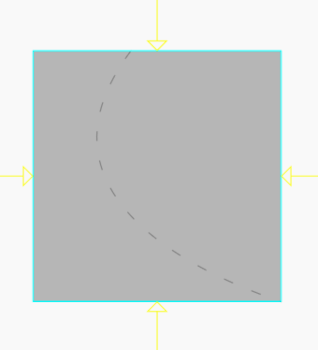
Due to how Paths work in Flutter and Skia, the DashedLine widget takes NOT as much space as the dashed line needs, but as much it needs to contain all the control points. Table below should help understand the problem.


Path commands Path Result line
C 8 63 14 86 61 102
C -40 53 14 86 61 102

License

See LICENSE.

所属分类

依赖

依赖清单 1 项

源码仓库

使用此插件的项目

暂无相关数据。