搜索插件、代码仓与 APP 分类

error_stack 封面
插件详情v2.1.7

error_stack

ErrorStack 可帮助您快速处理 Flutter 应用中的错误!自定义错误处理界面和日志记录,助您保持高效。

AndroidiOSmacOSWindowsLinux
近 30 天下载
1230
喜欢数
63
Pub 分数
160

安装插件

flutter pub add error_stack

插件介绍

基于插件公开信息、社区数据与项目使用情况整理的选型参考。

ErrorStack 是一个 Flutter 包,旨在通过提供可自定义的 UI 来显示错误以及强大的日志记录功能,简化应用程序中的错误处理。它帮助开发者在开发和生产环境中快速识别和解决各种问题,提高调试效率。该包支持多个平台,可无缝集成到现有工作流程中。当发生异常时,该包通过提供清晰且可操作的反馈来提升生产力。

适合场景

  • 调试运行时错误
  • 显示用户友好的错误消息
  • 记录异常以供分析
  • 提高应用稳定性
  • 监控生产环境中的崩溃
  • 提升开发者工作流程

主要特点

  • 可定制的错误 UI
  • 内置错误日志
  • 跨平台支持
  • 轻松集成到Flutter应用
  • 实时错误报告
  • 可配置的错误处理行为

适合对象

  • Flutter 开发者
  • 使用 CI/CD 流水线的团队
  • 需要强大错误监控的应用程序
  • 开发人员在故障期间专注于用户体验
  • 具有严格错误追踪需求的项目
  • 前端团队优先考虑调试速度

使用建议

  • 需要配置才能实现完整功能
  • 可能会略微增加应用大小
  • 依赖于正确的日志记录设置
  • 仅适用于未经定制的非生产环境使用
  • 限于错误显示和日志记录范围
  • 最好与其他监控工具配合使用

原始 README

以下为关联源码仓库的 README 原文快照,最新内容请访问源码仓库。

Error Stack for Flutter

pub package License: MIT

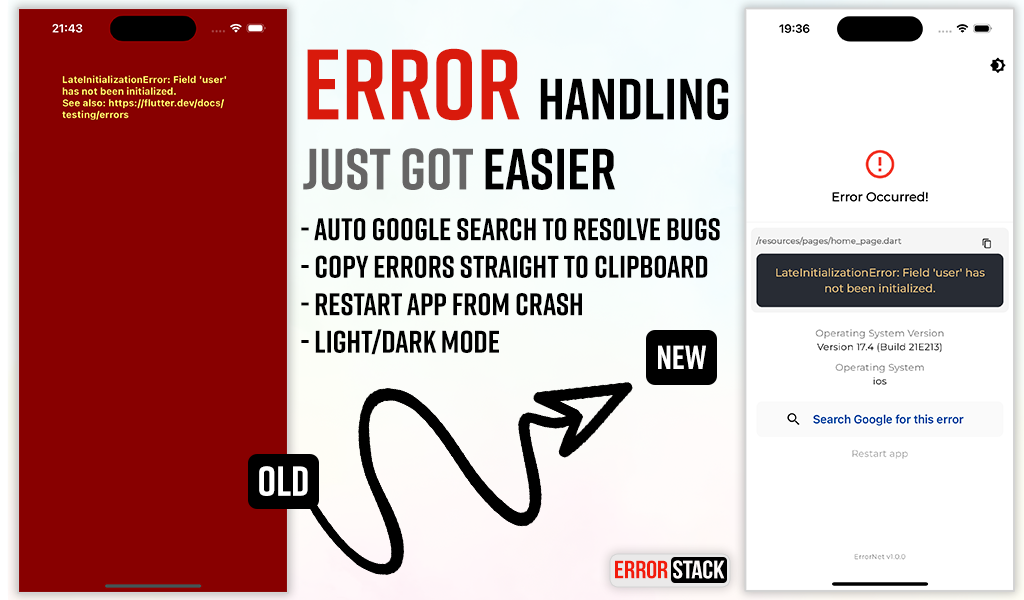
Error Stack is a comprehensive error handling and debugging toolkit for Flutter. It provides beautiful error screens in debug mode with actionable information, customizable error pages for production, and a powerful dev panel for runtime debugging.

Features

  • Beautiful debug error screens with Google search links and stack traces
  • Customizable production error pages
  • Light and dark mode support
  • Dev Panel - Runtime debugging tool with:
    • API request/response logging
    • Console logging with severity levels
    • Navigation route tracking
    • Local storage viewer (Secure Storage & Shared Preferences)
    • UI debugging overlays (grid, layout bounds, etc.)
  • Dio interceptor for automatic HTTP logging
  • SOLID architecture with dependency injection support

Installation

Add the following to your pubspec.yaml:

dependencies:
  error_stack: ^2.1.7

Or install via command line:

dart pub add error_stack

Quick Start

Basic Setup
import 'package:flutter/material.dart';
import 'package:error_stack/error_stack.dart';

void main() async {
  WidgetsFlutterBinding.ensureInitialized();
  await ErrorStack.init();
  runApp(MyApp());
}

class MyApp extends StatelessWidget {
  @override
  Widget build(BuildContext context) {
    return MaterialApp(
      builder: ErrorStack.builder, // Adds dev panel and UI debug overlays
      home: HomePage(),
    );
  }
}
Nylo Integration
import 'package:error_stack/error_stack.dart';

class AppProvider {
  @override
  boot(Nylo nylo) async {
    nylo.useErrorStack();
  }
}

Configuration

Full Initialization Options
await ErrorStack.init(
  level: ErrorStackLogLevel.verbose,  // verbose | minimal
  initialRoute: '/',                   // Route for "Restart app" button
  forceDebugWidget: false,             // Show debug widget in release mode
  enableDevPanel: true,                // Enable/disable dev panel (default: debug mode only)
  devPanelConfig: DevPanelConfig(
    enableApiLogging: true,
    enableConsoleLogging: true,
    enableRouteTracking: true,
    apiLogLimit: 100,
    consoleLogLimit: 100,
    routeHistoryLimit: 50,
  ),
  errorWidget: (errorDetails) {        // Custom release mode error widget
    return Scaffold(
      body: Center(
        child: Text('Something went wrong'),
      ),
    );
  },
);
Log Levels
  • ErrorStackLogLevel.verbose (default) - Full stack trace and details
  • ErrorStackLogLevel.minimal - Basic error information only

Dev Panel

The Dev Panel is a runtime debugging tool accessible in debug mode. It provides 4 main tabs plus UI debugging tools.

Setup
import 'package:error_stack/error_stack.dart';

void main() async {
  WidgetsFlutterBinding.ensureInitialized();
  await ErrorStack.init();
  runApp(MyApp());
}

class MyApp extends StatelessWidget {
  @override
  Widget build(BuildContext context) {
    return MaterialApp(
      navigatorObservers: [ErrorStackNavigatorObserver()], // Route tracking
      builder: ErrorStack.builder, // Dev panel bar and UI overlays
      home: HomePage(),
    );
  }
}
Opening the Dev Panel

Option 1: Long-press the "Dev Mode" bar at the bottom of the screen

Option 2: Call programmatically:

ErrorStack.showDevPanel(context);

API Tab

View HTTP requests and responses with timing, headers, and body data.

Dio Integration
import 'package:error_stack/error_stack_dio.dart';

final dio = Dio();
dio.interceptors.add(ErrorStackDioInterceptor());

// All requests are automatically logged
final response = await dio.get('https://api.example.com/users');
Manual API Logging
// Log a complete request
DevPanelStore.instance.logApi(
  method: 'GET',
  url: 'https://api.example.com/users',
  statusCode: 200,
  durationMs: 150,
  requestHeaders: {'Authorization': 'Bearer token'},
  responseBody: {'users': []},
);

// Or track pending requests
final requestId = DevPanelStore.instance.startApiRequest(
  method: 'POST',
  url: 'https://api.example.com/data',
  requestBody: {'key': 'value'},
);

// Later, complete the request
DevPanelStore.instance.completeApiRequest(
  requestId: requestId,
  statusCode: 201,
  durationMs: 250,
  responseBody: {'success': true},
);

Logs Tab

Console logs with filtering by severity level. Tap the copy icon on any log entry to copy the full entry (level, timestamp, tag, message, and stack trace) to the clipboard.

import 'package:error_stack/error_stack.dart';

// Log at different levels
DevPanelStore.instance.debug('Debug message');
DevPanelStore.instance.info('User logged in', tag: 'auth');
DevPanelStore.instance.warning('Cache miss for key');
DevPanelStore.instance.error('Failed to load data', stackTrace: trace.toString());

// With metadata
DevPanelStore.instance.info(
  'Payment processed',
  tag: 'payments',
  metadata: {'amount': 99.99, 'currency': 'USD'},
);

Routes Tab

Navigation history with route names, arguments, and actions. Tap a route to open its details sheet, where you can copy the route name to the clipboard.

Route tracking is automatic when using ErrorStackNavigatorObserver:

MaterialApp(
  navigatorObservers: [ErrorStackNavigatorObserver()],
  // ...
)

Manual tracking is also available:

DevPanelStore.instance.trackRoutePush('/profile', arguments: {'userId': 123});
DevPanelStore.instance.trackRoutePop('/profile');
DevPanelStore.instance.trackRouteReplace('/home');

Storage Tab

View all local storage data from both Secure Storage and Shared Preferences. Tap an entry to open the edit modal, where you can copy the key or value to the clipboard or update the stored value.


UI Debug Tools

The dev panel includes visual debugging overlays:

Tool Description
Grid Paper Overlay grid for alignment checking
Layout Bounds Show widget boundaries
Text Scale Override text scale (0.5-3.0x)
Color Blindness Simulate protanopia, deuteranopia, tritanopia
Slow Animations 5x animation slowdown
Performance Overlay Flutter performance metrics
Safe Areas Visualize safe area boundaries

Control programmatically:

final store = DevPanelStore.instance;

store.toggleGridPaper(true);
store.setGridSpacing(24.0);
store.toggleLayoutBounds(true);
store.setTextScaleFactor(1.5);
store.setColorBlindnessMode(ColorBlindnessMode.protanopia);
store.toggleSlowAnimations(true);
store.togglePerformanceOverlay(true);
store.toggleSafeAreas(true);

// Reset all to defaults
store.resetUIDebugSettings();

Architecture

Error Stack follows SOLID principles with a modular design:

lib/
├── error_stack.dart              # Main entry point & exports
├── error_stack_dio.dart          # Dio interceptor export
├── src/
│   ├── config/                   # Configuration classes
│   ├── storage/                  # Storage abstraction
│   ├── handler/                  # Error handling logic
│   └── dev_panel/                # Dev panel components
│       ├── data/                 # Store, models, collections
│       ├── widgets/              # Panel UI widgets
│       ├── interceptors/         # Dio interceptor
│       └── observers/            # Navigator observer
└── widgets/                      # Error display widgets

Example

Check out the example app for comprehensive demos including:

  • Basic setup
  • Custom error widgets
  • Dev panel features
  • Dio integration

Changelog

See CHANGELOG for release history.

Social

License

The MIT License (MIT). See LICENSE for details.

所属分类

依赖

依赖清单 4 项

源码仓库

使用此插件的项目