搜索插件、代码仓与 APP 分类

flicked_cards 封面
插件详情v0.0.3

flicked_cards

一个由手势驱动的可自定义且可扩展的卡片小部件

AndroidiOSWebmacOSWindowsLinux
近 30 天下载
33
喜欢数
82
Pub 分数
145

安装插件

flutter pub add flicked_cards

插件介绍

基于插件公开信息、社区数据与项目使用情况整理的选型参考。

Flicked Cards 是一个手势驱动、可自定义且可扩展的 Flutter 卡片小部件,支持交互式卡片翻转和滑动动画。它采用流畅的过渡效果和响应式手势,使开发者能够创建引人入胜的用户界面,让用户通过直观的触摸操作翻转或关闭卡片。该包支持 Android、iOS、Web、macOS、Windows 和 Linux 多个平台,非常适合需要动态卡片导航或内容展示的跨平台应用。

适合场景

  • 交互式卡片滑块
  • 滑动关闭界面
  • 基于手势的内容探索
  • 仪表板中的卡片翻转动画
  • 带有滑动卡片的用户入门流程

主要特点

  • 由手势驱动的卡片交互
  • 可自定义的翻转和滑动动画
  • 可扩展的设计,用于自定义行为
  • 跨平台兼容性
  • 支持多种交互状态
  • 可配置的过渡持续时间

适合对象

  • 开发交互式卡片 UI 的开发者
  • 需要滑动或翻页手势的应用
  • 寻求动画卡片体验的设计师
  • 跨平台移动和网页应用
  • 原型设计交互式布局

使用建议

  • 可能需要对大型卡片列表进行性能调优
  • 自定义可能需要更深入的 Dart 知识
  • 与其他包相比,内置主题有限
  • 由于动画开销,最适合中等数量的卡片

原始 README

以下为关联源码仓库的 README 原文快照,最新内容请访问源码仓库。

flicked_cards

Build Status Codecov Pub Package MIT License

A gesture driven card swipping widget supporting custom animations.

Features

  • Awesome default animations provided out of the box
  • Progress through cards swipping both direction or in a single direction
  • Extensible through custom provided animations
  • Support piling or popping (depending on animation spec)

Examples

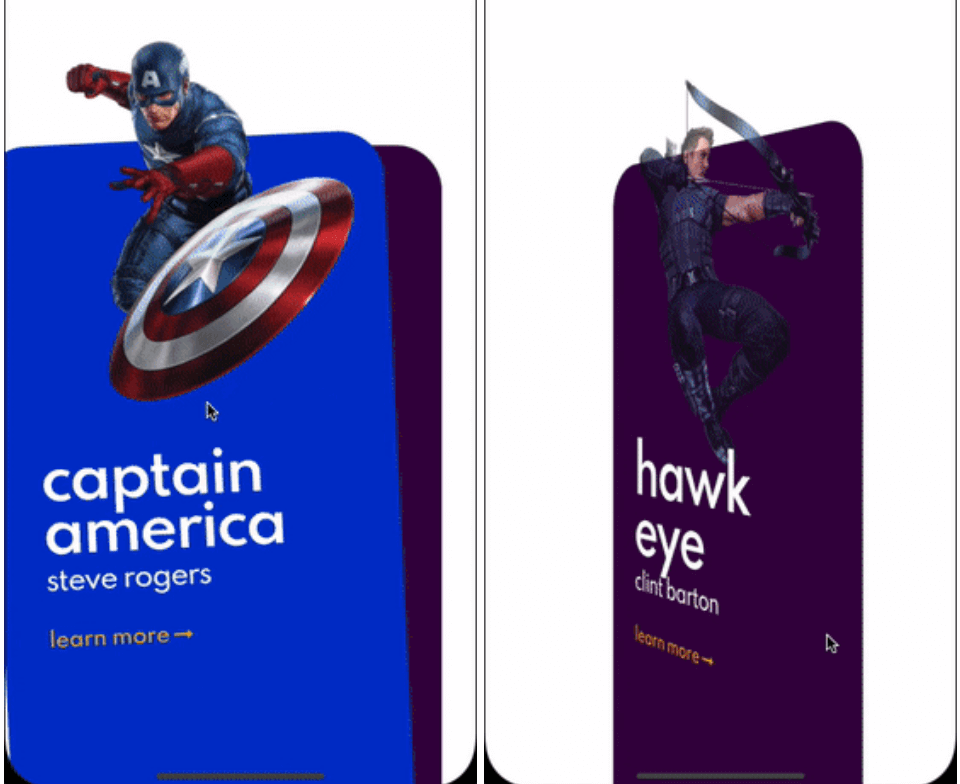
Here are some of the animation provided out of the box, take a look at the example to see all.

Cards used in these examples where taken from Brocodev

Example usage

FlickedCards(
  count: Superhero.marvelHeroes.length,
  animationStyle: FlipAnimation(),
  onSwiped: (idx, dir) => print('>>> $dir $idx'),
  builder: (index, progress, context) {
    final superHeroe = Superhero.marvelHeroes[index];
    return Container(
      child: Center(
        child: SuperheroCard(
            superhero: superHeroe,
            factorChange: 1 - progress),
      ),
    );
  },
)

Custom animations

flicked_cards provides an easy way to create custom animations but it is required to have a basic understanding of how cards can be layed out and how to position them depending on the drag progress and some of the properties in AnimationConfig.

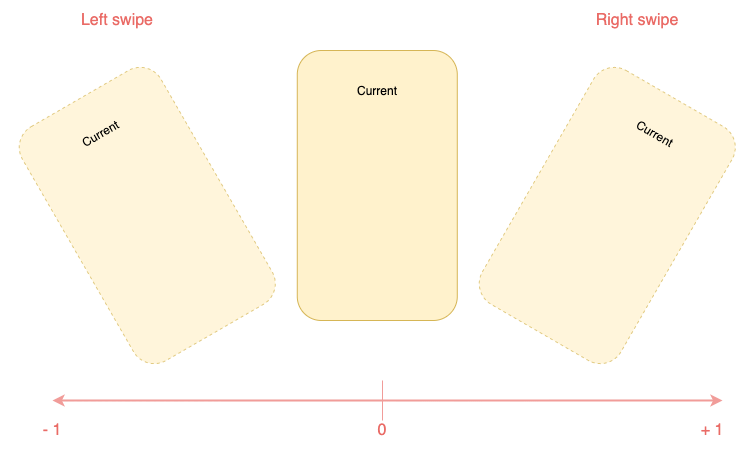
Animations will be provided a progress value in the range (-1, 1) you should try to make you animation symmetric around 0 when posible. Like this:

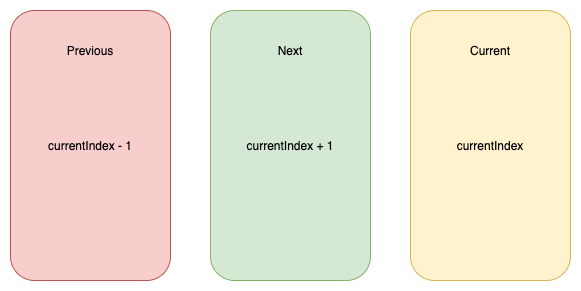
You will have to reason about relative card indices:

Interface for animations

All animations will need to implement CardAnimation which basically defines:

  • animation of a particular card depending on swipe progress required
  • opacity of a particular card depending on swipe progress optional
  • where to apply transformations on cards (Fractional Offset)
typedef SwipeAnimation = Matrix4 Function(double progress);
typedef OpacityAnimation = double Function(double progress);

abstract class CardAnimation {
  AnimationConfig get config;
  LayoutConfig get layoutConfig;

  SwipeAnimation animationForCard({required int relativeIndex});

  OpacityAnimation opacityForCard({required int relativeIndex}) {
    return (_) => 1;
  }

  FractionalOffset fractionalOffsetForCard({required int relativeIndex});
}

Additionally to make this process a bit easier, 2 extra abstract classes that implement CardAnimation which are:

  • SymmetricCardAnimation
  • AsymmetricCardAnimation

Carousel animation is an example of a SymmetricCardAnimation take a look here

If struggling to make the animationlook at how the animations provided out of the box where implemented: here

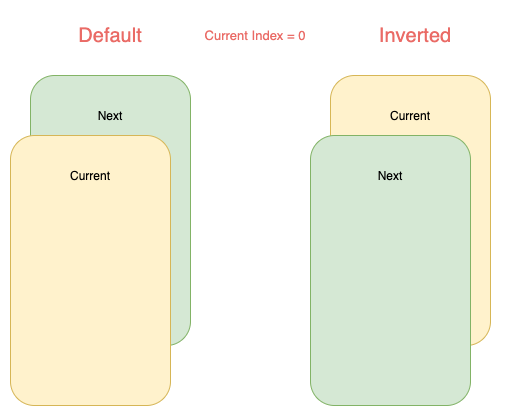
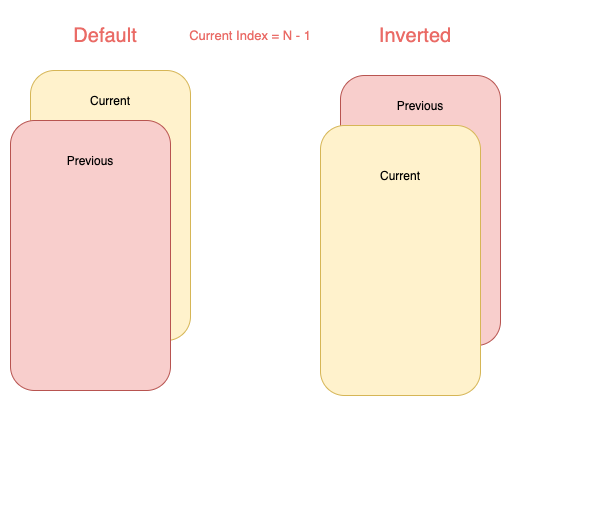
Card layouts

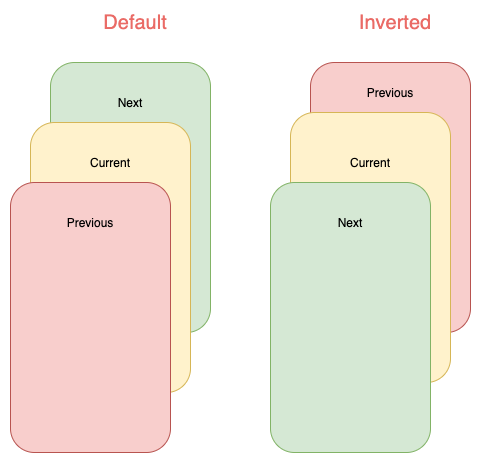
Internally cards are placed in Stack widget so an animation can choose to work with a single or both of the following layouts:

Note that depending on the index some of cards will not be displayed:

所属分类

源码仓库

使用此插件的项目

暂无相关数据。