搜索插件、代码仓与 APP 分类

flutter_animation_progress_bar 封面
插件详情v2.3.1

flutter_animation_progress_bar

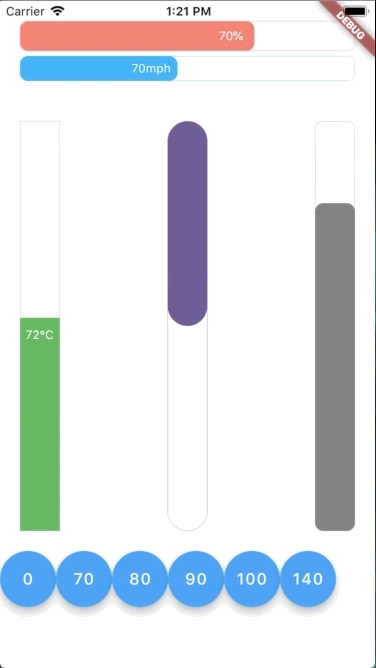
这个色彩丰富的Flutter组件包旨在以响应式风格展示动画进度条。它还支持垂直和水平方向的进度条。

AndroidiOSWebmacOSWindowsLinux
近 30 天下载
2.8万
喜欢数
237
Pub 分数
125

安装插件

flutter pub add flutter_animation_progress_bar

插件介绍

基于插件公开信息、社区数据与项目使用情况整理的选型参考。

一个充满活力的Flutter包,提供水平和垂直方向的动画进度条。采用响应式设计风格,可平滑更新进度值,并在所有主要平台上支持实时视觉反馈。非常适合用作加载指示器、任务完成跟踪或任何需要动态进度可视化的UI元素。该包轻量级、可自定义,并能无缝集成到Flutter应用中。

适合场景

  • 加载屏幕
  • 任务完成指示器
  • 表单进度跟踪
  • 交互式教程
  • 游戏进度条

主要特点

  • 水平和垂直方向支持
  • 响应式动画更新
  • 色彩丰富且可自定义的设计
  • 跨平台兼容性
  • 平滑过渡动画
  • 通过 pub 的简单集成

适合对象

  • 开发交互式 UI 的开发者
  • 需要视觉进度反馈的应用程序
  • 寻求动画指示器的设计人员
  • 跨平台 Flutter 项目
  • 希望设置简单但视觉效果丰富的用户

使用建议

  • 可能需要额外的样式以支持深色模式
  • 对高频更新的性能影响
  • 除了基本属性外,自定义功能有限
  • 未针对极高的进度值进行优化
  • 依赖于 Flutter 动画引擎的稳定性

原始 README

以下为关联源码仓库的 README 原文快照,最新内容请访问源码仓库。

Flutter Animation Progress Bar

This colorful Flutter widget package aims to show an animation progress bar in reactive style. It also supports both vertical and horizontal bar.

Flutter Create Contest

This package is also a submission to Flutter Create contest. The basic rule of this contest is to measure the total Dart file size less or equal 5KB.

After unzipping the compressed file, run following command to update dependencies:

flutter packages get

To evaluate the total size of all Dart files:

find . -name "*.dart" ! -name "*test*"  | xargs cat | wc -c

To evaluate only the package Dart code:

find . -name "*.dart" ! -name "*test*" ! -path "*example*"  | xargs cat | wc -c

To run simple example app with a total size of dart code less or equal 5KB:

cd example
flutter clean
flutter run

Hot restart app with "R" to replay the animation

To run the full example app:

cd example
mv lib/main.dart tmp && mv lib/main.dart.bk lib/main.dart && mv tmp lib/main.dart.bk
flutter clean
flutter run

Using built-in float action buttons to change value and see the effect

Getting Started

In order to use this package, do import

import 'package:flutter_animation_progress_bar/flutter_animation_progress_bar.dart';

Basic implementation can be done like below code:

import 'package:flutter/widgets.dart';
import 'package:flutter_animation_progress_bar/flutter_animation_progress_bar.dart';

void main() {
  runApp(
    Center(
        child: FAProgressBar(
      currentValue: 80,
      displayText: '%',
    )),
  );
}
Example App

You can find more examples from Example App

API

In this table, you can find all attributes provided by this package:

Attribute Default value Description
currentValue 0 Set the current value for progress bar. This value should be in stateful so that whenever setState() has been called, the progress bar will trigger an animation from latest currentValue to new currentValue
maxValue 100 Max value to be displayed as progress bar.
Current value can be greater than max value
size 30 The bar height if direction in Axis.horizontal.
The bar width if direction in Axis.vertical
animatedDuration const Duration(milliseconds: 300) Set the duration for an animation cycle
direction Axis.horizontal The bar can be in Axis.horizontal or Axis.vertical direction
verticalDirection VerticalDirection.down With vertical direction, the bar can be VerticalDirection.up or VerticalDirection.down direction
borderRadius 8 Set the bar border radius
border null Set the bar border style by BoxBorder
backgroundColor const Color(0x00FFFFFF) Set the bar background color
progressColor const Color(0xFFFA7268) Set the bar progressing color
progressGradient null Set the bar progressing gradient. Overrides progressColor
changeColorValue null Set a value that progress color should be changed to
[0---blue----[70]-red-100]
changeProgressColor const Color(0xFF5F4B8B) Color that progressing color will be changed to, whenever currentValue greater than changeColorValue
displayText null Text to display belonging with currentValue.
Examples:
% -> 20%
°F -> 80°F
displayTextStyle ... TextStyle of displayText
Objects
class FAProgressBar {

  final double currentValue;
  final double maxValue;
  final double size;
  final Duration animatedDuration;
  final Axis direction;
  final VerticalDirection verticalDirection;
  final double borderRadius;
  final BoxBorder border;
  final Color backgroundColor;
  final Color progressColor;
  final Gradient progressGradient;
  final int changeColorValue;
  final Color changeProgressColor;
  final String displayText;
  final TextStyle displayTextStyle;
}
Feedback

Feel free to leave any feedback for helping support this package 🍻 

Buy Me A Coffee

所属分类

源码仓库

使用此插件的项目