搜索插件、代码仓与 APP 分类

flutter_chat_bubble 封面
插件详情v2.0.2

flutter_chat_bubble

为Flutter应用开发获取一个顶级的聊天UI组件。创建类似WhatsApp和Telegram的多样化设计。自定义属性以实现惊艳的用户界面。提升技能,优化实时通信应用的用户体验。

AndroidiOSWebmacOSWindowsLinux
近 30 天下载
1.1万
喜欢数
329
Pub 分数
150

安装插件

flutter pub add flutter_chat_bubble

插件介绍

基于插件公开信息、社区数据与项目使用情况整理的选型参考。

一个 Flutter 包,提供可自定义的聊天气泡 UI,用于构建实时消息界面。受 WhatsApp 和 Telegram 等流行应用的启发,它使开发者能够在多个平台上创建视觉上吸引人且交互性强的聊天体验。通过广泛的颜色、形状和动画自定义选项,它能够满足多样化的设计需求,同时保持高性能。非常适合提升通信类应用的用户参与度。

适合场景

  • 实时消息应用
  • 客户支持聊天界面
  • 社交媒体消息功能
  • 群聊实现
  • 应用内通知,聊天风格
  • 教育类应用程序讨论区

主要特点

  • 可自定义气泡样式
  • 支持消息对齐(左/右)
  • 内置动画效果
  • 跨平台兼容性
  • 与现有聊天逻辑的轻松集成
  • 适用于所有屏幕尺寸的响应式设计

适合对象

  • 开发聊天应用的开发者
  • UI设计师寻找可重用组件
  • 创建多平台消息解决方案的团队
  • 初创公司正在原型设计通信功能
  • 专注于用户体验提升的前端工程师

使用建议

  • 需要额外的状态管理才能实现完整的聊天功能
  • 可能需要自定义样式来处理复杂布局
  • 大型消息列表的性能影响
  • 有限的内置键入指示器或已读回执
  • 并非开箱即用的完整聊天解决方案

原始 README

以下为关联源码仓库的 README 原文快照,最新内容请访问源码仓库。

Flutter Chat Bubble/UI

Discover the ultimate Flutter widget for creating diverse chat UI designs like WhatsApp, Telegram, and more. With its customizable properties, create stunning chat UI and elevate the user experience in your messaging app. Enhance your Flutter development skills with this top-notch chat UI widget and make a mark in the world of real-time communication.

Usage

Add this to your package's pubspec.yaml file:

dependencies:
  flutter_chat_bubble: <latest-version>

Examples

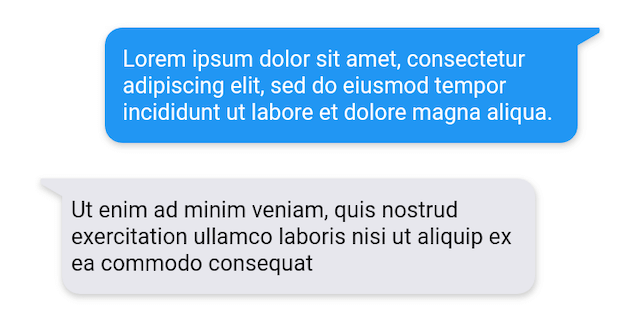
Easily create dynamic chat bubbles with the ChatBubble widget in Flutter with the extensive range of properties.

Example 1

example 1

  ChatBubble(
        clipper: ChatBubbleClipper1(type: BubbleType.sendBubble),
        alignment: Alignment.topRight,
        margin: EdgeInsets.only(top: 20),
        backGroundColor: Colors.blue,
        child: Container(
          constraints: BoxConstraints(
            maxWidth: MediaQuery.of(context).size.width * 0.7,
          ),
          child: Text(
            "Lorem ipsum dolor sit amet, consectetur adipiscing elit, sed do eiusmod tempor incididunt ut labore et dolore magna aliqua.",
            style: TextStyle(color: Colors.white),
          ),
        ),
      )
  
  ChatBubble(
    clipper: ChatBubbleClipper1(type: BubbleType.receiverBubble),
    backGroundColor: Color(0xffE7E7ED),
    margin: EdgeInsets.only(top: 20),
    child: Container(
      constraints: BoxConstraints(
        maxWidth: MediaQuery.of(context).size.width * 0.7,
      ),
      child: Text(
        "Ut enim ad minim veniam, quis nostrud exercitation ullamco laboris nisi ut aliquip ex ea commodo consequat",
        style: TextStyle(color: Colors.black),
      ),
    ),
  )
Example 2

example 2

ChatBubble(
    clipper: ChatBubbleClipper2(type: BubbleType.sendBubble),
  )
  
ChatBubble(
    clipper: ChatBubbleClipper2(type: BubbleType.receiverBubble),
  )
Example 3

example 3

ChatBubble(
    clipper: ChatBubbleClipper3(type: BubbleType.sendBubble),
  )
  
ChatBubble(
    clipper: ChatBubbleClipper3(type: BubbleType.receiverBubble),
  )
Example 4

example 4

ChatBubble(
    clipper: ChatBubbleClipper4(type: BubbleType.sendBubble),
  )
  
ChatBubble(
    clipper: ChatBubbleClipper4(type: BubbleType.receiverBubble),
  )
Example 5

example 5

ChatBubble(
    clipper: ChatBubbleClipper5(type: BubbleType.sendBubble),
  )
  
ChatBubble(
    clipper: ChatBubbleClipper5(type: BubbleType.receiverBubble),
  )
Example 6

example 6

ChatBubble(
    clipper: ChatBubbleClipper6(type: BubbleType.sendBubble),
  )
  
ChatBubble(
    clipper: ChatBubbleClipper6(type: BubbleType.receiverBubble),
  )
Example 7

example 7

ChatBubble(
    clipper: ChatBubbleClipper7(type: BubbleType.sendBubble),
  )
  
ChatBubble(
    clipper: ChatBubbleClipper7(type: BubbleType.receiverBubble),
  )
Example 8

example 8

ChatBubble(
    clipper: ChatBubbleClipper8(type: BubbleType.sendBubble),
  )
  
ChatBubble(
    clipper: ChatBubbleClipper8(type: BubbleType.receiverBubble),
  )
Example 9

example 9

ChatBubble(
    clipper: ChatBubbleClipper9(type: BubbleType.sendBubble),
  )
  
ChatBubble(
    clipper: ChatBubbleClipper9(type: BubbleType.receiverBubble),
  )
Example 10

example 10

ChatBubble(
    clipper: ChatBubbleClipper10(type: BubbleType.sendBubble),
  )
  
ChatBubble(
    clipper: ChatBubbleClipper10(type: BubbleType.receiverBubble),
  )

Features and bugs

Submit feature requests and report bugs through the issue tracker.

所属分类

源码仓库

使用此插件的项目