搜索插件、代码仓与 APP 分类

flutter_context_menu 封面
插件详情v0.4.2

flutter_context_menu

在您的应用中创建并显示可自定义的上下文菜单。

AndroidiOSWebmacOSWindowsLinux
近 30 天下载
3.3万
喜欢数
125
Pub 分数
160

安装插件

flutter pub add flutter_context_menu

插件介绍

基于插件公开信息、社区数据与项目使用情况整理的选型参考。

一个 Flutter 包,使开发者能够在多个平台上创建和显示可自定义的上下文菜单。它提供了一种一致的方式来呈现用户长按或右键单击小部件时的操作选项,从而增强应用程序中的用户交互体验。该包支持所有主要平台,包括 Android、iOS、Web、macOS、Windows 和 Linux,确保广泛的兼容性。通过灵活的自定义选项,开发者可以调整菜单的外观和行为以匹配应用设计。非常适合添加直观且符合平台特性的上下文操作。

适合场景

  • 在桌面应用程序中添加右键菜单
  • 在移动设备上实现长按操作
  • 使用上下文选择创建交互式 UI
  • 通过快速操作提升生产力工具
  • 支持多平台应用程序

主要特点

  • 跨平台支持
  • 可自定义菜单项
  • 与现有小部件的轻松集成
  • 对长按和右键点击有响应
  • 可配置的样式和布局

适合对象

  • 使用丰富交互功能开发桌面或移动应用的开发者
  • 针对多个平台的团队
  • 需要上下文用户操作的应用程序

使用建议

  • 需要仔细处理手势冲突
  • 可能需要额外的样式以保持一致性
  • 不适合用于简单的单次操作

原始 README

以下为关联源码仓库的 README 原文快照,最新内容请访问源码仓库。

Logo

Flutter Context Menu

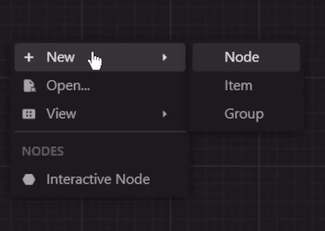
A Flutter library that provides a flexible and customizable solution for creating and displaying context menus in Flutter applications. It allows you to easily add context menus to your UI, providing users with a convenient way to access additional options and actions specific to the selected item or area.

View Example · Report Bug · Request Feature

GitHub Actions Workflow Status
Pub Version License GitHub Stars
Pub Likes Pub Points Pub Downloads
Stand With Palestine

Preview

zread

Features

  • ContextMenu: The package includes a highly customizable context menu system that can be easily integrated into your Flutter application. It provides a seamless and intuitive user experience, enhancing the usability of your app.

  • Hierarchical Structure: The context menu supports a hierarchical structure with submenu functionality. This enables you to create nested menus, providing a clear and organized representation of options and suboptions.

  • Selection Handling: The package includes built-in selection handling for context menu items. It allows you to define callback functions for individual menu items, enabling you to execute specific actions or logic when an item is selected.

  • Customization Options: Customize the appearance and behavior of the context menu to match your app's design and requirements. Modify the style, positioning, animation, and interaction of the menu to create a cohesive user interface.

  • Built-in Components: The package includes built-in components, such as MenuItem, MenuDivider, and MenuHeader, that can be used in your context menu.

  • Cross Platform Support: The package is compatible with multiple platforms, including Android, iOS, Web, and Desktop.

Getting Started

Installation
  • Method 1 (Recommended):

    run this command in your terminal:

    flutter pub add flutter_context_menu
    
  • Method 2:

    add this line to your pubspec.yaml dependencies:

    dependencies:
        flutter_context_menu:
    

    then, run this command in your terminal:

    flutter pub get
    

Usage

  1. First, import the package:

    import 'package:flutter_context_menu/flutter_context_menu.dart';
    
  2. Then, initialize a ContextMenu instance:

    // define your context menu entries
    final entries = <ContextMenuEntry>[
      const MenuHeader(text: "Context Menu"),
      MenuItem(
        label: const Text('Copy'),
        icon: const Icon(Icons.copy),
        onSelected: (value) {
          // implement copy
        },
      ),
      MenuItem(
        enabled: false, // disable this item
        label: const Text('Cut'),
        icon: const Icon(Icons.cut),
        onSelected: (value) {
          // implement cut
        },
      ),
      MenuItem(
        label: const Text('Paste'),
        icon: const Icon(Icons.paste),
        onSelected: (value) {
          // implement paste
        },
      ),
      const MenuDivider(),
      MenuItem.submenu(
        label: const Text('Edit'),
        icon: const Icon(Icons.edit),
        items: [
          MenuItem(
            label: const Text('Undo'),
            value: "Undo",
            icon: const Icon(Icons.undo),
            onSelected: (value) {
              // implement undo
            },
          ),
          MenuItem(
            label: const Text('Redo'),
            value: 'Redo',
            icon: const Icon(Icons.redo),
            onSelected: (value) {
              // implement redo
            },
          ),
        ],
      ),
    ];
    
    // initialize a context menu
    final menu = ContextMenu(
      entries: entries,
      position: const Offset(300, 300),
      padding: const EdgeInsets.all(8.0),
    );
    
  3. Finally, to show the context menu, there are two ways:

    • Method 1: Directly calling one of the show methods.

      This will show the context menu at the manually specified position.

      void showMenu() async {
        showContextMenu(context, contextMenu: menu);
        // or 
        final selectedValue = await menu.show(context);
        print(selectedValue);
      }
      
    • Method 2: Using the ContextMenuRegion widget to show the context menu when the user right-clicks or long-presses the region area.

      This will show the context menu where the user clicks when the position property is not specified in the ContextMenu constructor.

      @override
      Widget build(BuildContext context) {
        return Column(
          children: [
            ContextMenuRegion(
              contextMenu: contextMenu,
              onItemSelected: (value) {
                print(value);
              },
              child: Container(
                color: Colors.indigo,
                height: 300,
                width: 300,
                child: const Center(
                  child: Text(
                    'Right click or long press!',
                  ),
                ),
              ),
            )
          ],
        );
      }
      

Customization

Theme: By default, the context menu and its items uses the MaterialApp's theme data for styling. However, you can customize the appearance and behavior of the context menu by modifying the theme data. Or individually by specifying a BoxDecoration in the boxDecoration property of the ContextMenu.

Custom Entries: You can create your own context menu entries by subclassing the ContextMenuEntry class. This allows you to customize the appearance, behavior, and functionality of the context menu items.

Learn More

  • More info: Full documentation will be provided, inshallah 🙏
  • See: Full Example

Feedback and Contributions

If you have any suggestions or feedback, please open an issue or create a pull request.

If you like this package, please star it and follow me on X and GitHub.

License

This project is licensed under the BSD 3-Clause License.


Made with ❤️ in Egypt 🇪🇬

🇵🇸 Stand With Palestine 🇵🇸

所属分类

源码仓库

使用此插件的项目