搜索插件、代码仓与 APP 分类

flutter_dynamic_icon 封面
插件详情v2.1.0

flutter_dynamic_icon

一个用于动态更改应用图标和应用图标批次号的 Flutter 插件

AndroidiOS
近 30 天下载
2230
喜欢数
423
Pub 分数
150

安装插件

flutter pub add flutter_dynamic_icon

插件介绍

基于插件公开信息、社区数据与项目使用情况整理的选型参考。

一个 Flutter 插件,可在 Android 和 iOS 上实现动态应用图标更改和批量编号更新。它允许开发者在运行时通过编程方式切换应用图标,适用于自定义品牌、季节性主题或用户偏好。该插件支持平台特定的图标管理和批量编号,用于版本控制或促销目的。专为与 Flutter 应用无缝集成而设计,无需修改原生代码即可简化图标操作。非常适合需要视觉灵活性或交互式图标体验的应用。

适合场景

  • 根据用户偏好更改应用图标
  • 季节性或事件相关的图标更新
  • 应用品牌定制
  • 测试不同的图标变体
  • 促销活动图标切换

主要特点

  • 运行时动态图标切换
  • 对 Android 和 iOS 的支持
  • 批次号管理
  • 简单 API 集成
  • 无需原生代码

适合对象

  • 可自定义用户界面的应用程序
  • 以品牌为中心的应用程序
  • 事件驱动或季节性应用
  • 图标测试的开发工具
  • 营销或推广活动

使用建议

  • 更改图标后需要重启应用
  • 部分较旧设备支持有限
  • iOS 需要额外配置
  • 图标资源必须预先定义
  • 不适合频繁更换图标

原始 README

以下为关联源码仓库的 README 原文快照,最新内容请访问源码仓库。

flutter_dynamic_icon

A flutter plugin for dynamically changing app icon and app icon batch number in the mobile platform. Supports only iOS (with version > 10.3).

Usage

To use this plugin, add flutter_dynamic_icon as a dependency in your pubspec.yaml file.

Getting Started

Check out the example directory for a sample app using flutter_dynamic_icon.

iOS Integration
Index
  • 2x - 120px x 120px
  • 3x - 180px x 180px

To integrate your plugin into the iOS part of your app, follow these steps

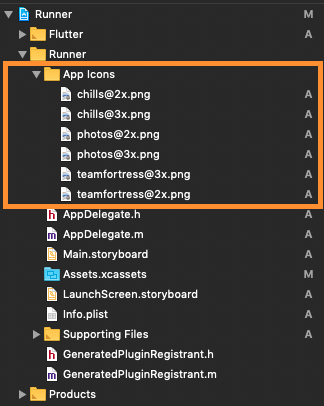
  1. First let us put a few images for app icons, they are
    • teamfortress@2x.png, teamfortress@3x.png
    • photos@2x.png, photos@3x.png,
    • chills@2x.png, chills@3x.png,
  2. These icons shouldn't be kept in Assets.xcassets folder, but outside. When copying to Xcode, you can select 'create folder references' or 'create groups', if not you will get and error when uploading the build to the AppStore saying: (Thanks to @nohli for this observation) TMS-90032: Invalid Image Path - - No image found at the path referenced under key 'CFBundleAlternateIcons':...

Here is my directory structure:

directory_structure

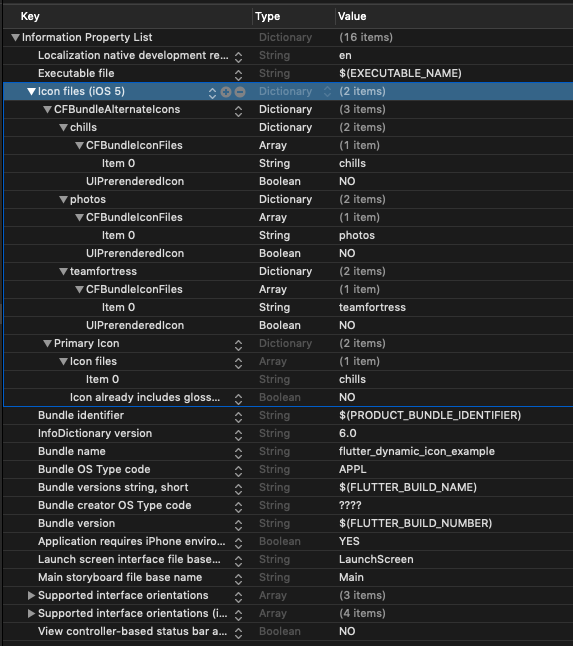
  1. Next, we need to setup the Info.plist
    1. Add Icon files (iOS 5) to the Information Property List
    2. Add CFBundleAlternateIcons as a dictionary, it is used for alternative icons
    3. Set 3 dictionaries under CFBundleAlternateIcons, they are correspond to teamfortress, photos, and chills
    4. For each dictionary, two properties — UIPrerenderedIcon and CFBundleIconFiles need to be configured
    5. If the sub-property UINewsstandIcon is showing under Icon files (iOS 5) and you don't plan on using it (it is intended for use with Newstand features), erase it or the app will get rejected upon submission on the App Store

Note that if you need it work for iPads, You need to add these icon declarations in CFBundleIcons~ipad as well. See here for more details.

Here is my Info.plist after adding Alternate Icons

Screenshot

info.plist

Raw
<?xml version="1.0" encoding="UTF-8"?>
<!DOCTYPE plist PUBLIC "-//Apple//DTD PLIST 1.0//EN" "http://www.apple.com/DTDs/PropertyList-1.0.dtd">
<plist version="1.0">
<dict>
	<key>CFBundleDevelopmentRegion</key>
	<string>en</string>
	<key>CFBundleExecutable</key>
	<string>$(EXECUTABLE_NAME)</string>
	<key>CFBundleIcons</key>
	<dict>
		<key>CFBundleAlternateIcons</key>
		<dict>
			<key>chills</key>
			<dict>
				<key>CFBundleIconFiles</key>
				<array>
					<string>chills</string>
				</array>
				<key>UIPrerenderedIcon</key>
				<false/>
			</dict>
			<key>photos</key>
			<dict>
				<key>CFBundleIconFiles</key>
				<array>
					<string>photos</string>
				</array>
				<key>UIPrerenderedIcon</key>
				<false/>
			</dict>
			<key>teamfortress</key>
			<dict>
				<key>CFBundleIconFiles</key>
				<array>
					<string>teamfortress</string>
				</array>
				<key>UIPrerenderedIcon</key>
				<false/>
			</dict>
		</dict>
		<key>CFBundlePrimaryIcon</key>
		<dict>
			<key>CFBundleIconFiles</key>
			<array>
				<string>chills</string>
			</array>
			<key>UIPrerenderedIcon</key>
			<false/>
		</dict>
	</dict>
	<key>CFBundleIdentifier</key>
	<string>$(PRODUCT_BUNDLE_IDENTIFIER)</string>
	<key>CFBundleInfoDictionaryVersion</key>
	<string>6.0</string>
	<key>CFBundleName</key>
	<string>flutter_dynamic_icon_example</string>
	<key>CFBundlePackageType</key>
	<string>APPL</string>
	<key>CFBundleShortVersionString</key>
	<string>$(FLUTTER_BUILD_NAME)</string>
	<key>CFBundleSignature</key>
	<string>????</string>
	<key>CFBundleVersion</key>
	<string>$(FLUTTER_BUILD_NUMBER)</string>
	<key>LSRequiresIPhoneOS</key>
	<true/>
	<key>UILaunchStoryboardName</key>
	<string>LaunchScreen</string>
	<key>UIMainStoryboardFile</key>
	<string>Main</string>
	<key>UISupportedInterfaceOrientations</key>
	<array>
		<string>UIInterfaceOrientationPortrait</string>
		<string>UIInterfaceOrientationLandscapeLeft</string>
		<string>UIInterfaceOrientationLandscapeRight</string>
	</array>
	<key>UISupportedInterfaceOrientations~ipad</key>
	<array>
		<string>UIInterfaceOrientationPortrait</string>
		<string>UIInterfaceOrientationPortraitUpsideDown</string>
		<string>UIInterfaceOrientationLandscapeLeft</string>
		<string>UIInterfaceOrientationLandscapeRight</string>
	</array>
	<key>UIViewControllerBasedStatusBarAppearance</key>
	<false/>
</dict>
</plist>

Now, you can call FlutterDynamicIcon.setAlternateIconName with the CFBundleAlternateIcons key as the argument to set that icon.

Dart/Flutter Integration

From your Dart code, you need to import the plugin and use it's static methods:

import 'package:flutter_dynamic_icon/flutter_dynamic_icon.dart';

try {
  if (await FlutterDynamicIcon.supportsAlternateIcons) {
    await FlutterDynamicIcon.setAlternateIconName("photos");
    print("App icon change successful");
    return;
  }
} on PlatformException {} catch (e) {}
print("Failed to change app icon");

...

// set batch number
try {
	await FlutterDynamicIcon.setApplicationIconBadgeNumber(9399);
} on PlatformException {} catch (e) {}

// gets currently set batch number
int batchNumber = FlutterDynamicIcon.getApplicationIconBadgeNumber();

Check out the example app for more details

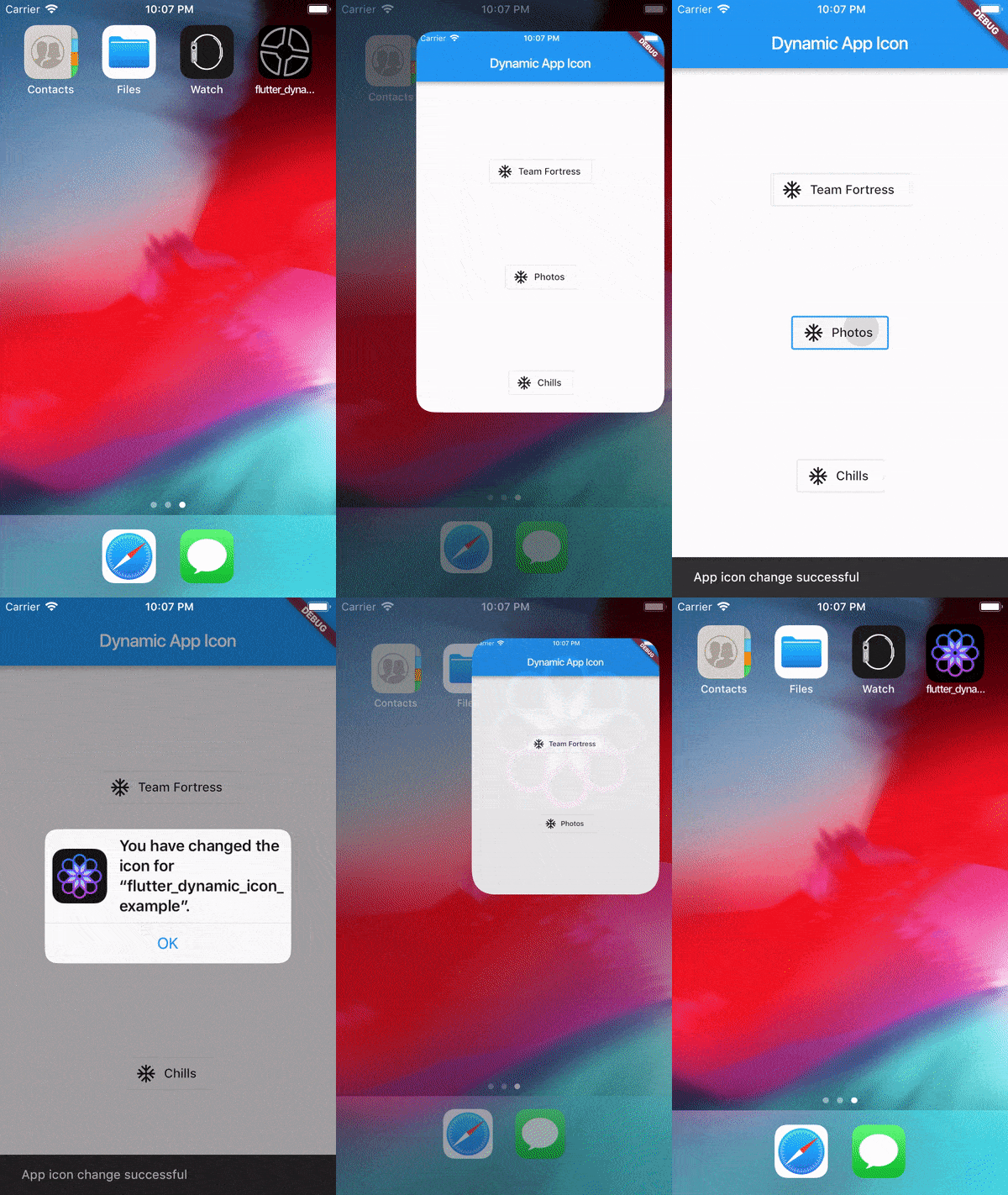
Screenrecord

Showing App Icon change

Screenrecording of the example

Showing Batch number on app icon change in SpringBoard

Screenrecording of the example

Reference

This was made possible because this blog. I borrowed a lot of words from this blog. https://medium.com/ios-os-x-development/dynamically-change-the-app-icon-7d4bece820d2

所属分类

源码仓库

使用此插件的项目

暂无相关数据。