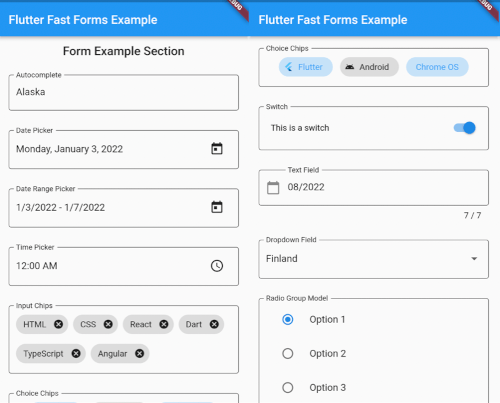
Flutter Fast Forms 是一个 Dart 包,旨在简化 Flutter 表单的创建,使开发者能够快速构建强大且可重用的表单组件。它提供了一种简单、声明式的 API 来定义表单字段、验证规则和提交逻辑,同时最大限度地减少样板代码。该包支持所有主要平台,包括 Android、iOS、Web、macOS、Windows 和 Linux,非常适合跨平台应用。内置对常见输入类型的支持以及可自定义的验证器,可在不牺牲灵活性或性能的前提下加速开发。
适合场景
快速成型原型
跨平台表单开发
复杂验证工作流
可重用的表单组件
简化用户注册流程
主要特点
声明式表单语法
内置验证辅助函数
跨平台兼容性
可扩展的字段类型
最少的样板代码
适合对象
初学者 Flutter 开发人员
注重速度的团队
需要动态表单的应用程序
项目有紧迫的截止日期
开发者避免表单复杂性
使用建议
超出默认小部件之外的自定义功能有限
可能需要学习新的类似 DSL 的语法
不太适合高度独特的表单布局
依赖于包维护
最适合标准表单模式
原始 README
以下为关联源码仓库的 README 原文快照,最新内容请访问源码仓库。
Flutter Fast Forms
Flutter Fast Forms is the only Dart package you need to build Flutter forms fast.
It adds these missing features to the Flutter SDK:
Not all controls in a form are autonomous and act independent of each other.
Occasionally, the state of a form field might be directly related to the state of some other form field as well.
Flutter Fast Forms allows you to define such conditions declaratively.
📓 Example: A FastTextField that is disabled when a FastSwitch is selected.
1. Add the conditions property to the conditional form field and assign an empty Map:
constFastSwitch(
name: 'switch',
titleText: 'Disable text field',
),
FastTextField(
name: 'text_field',
labelText: 'Just some sample text field',
conditions: {},
),
2. Choose a suitable FastConditionHandler as Map key and assign a FastConditionList:
constFastSwitch(
name: 'switch',
titleText: 'Disable text field when selected',
),
FastTextField(
name: 'text_field',
labelText: 'Just some sample text field',
conditions: {
FastCondition.disabled: FastConditionList([]),
},
)
[!NOTE]
A FastConditionHandler is a function that runs whenever a FastConditionList is checked and determines what happens when the condition is either met or not.
3. Add a FastCondition relating the field to another field:
constFastSwitch(
name: 'switch',
titleText: 'Disable text field when selected',
),
FastTextField(
name: 'text_field',
labelText: 'Just some sample text field',
conditions: {
FastCondition.disabled: FastConditionList([
FastCondition(
target: 'switch',
test: (value, field) => value isbool && value,
),
]),
},
),
[!NOTE]
target is the name of the FastFormField that the form field depends on.
📓 Example: A FastTextField that is enabled when a FastSwitchor a FastCheckbox is selected.
constFastCheckbox(
name: 'checkbox',
titleText: 'Enable text field when selected',
),
constFastSwitch(
name: 'switch',
titleText: 'Enable text field when selected',
),
FastTextField(
name: 'text_field',
enabled: false,
labelText: 'Just some sample text field',
conditions: {
FastCondition.enabled: FastConditionList([
FastCondition(
target: 'switch',
test: (value, field) => value isbool && value,
),
FastCondition(
target: 'checkbox',
test: (value, field) => value isbool && value,
),
]),
},
),
📓 Example: A FastTextField that is disabled when both a FastSwitchand a FastCheckbox are selected.
constFastCheckbox(
name: 'checkbox',
titleText: 'Disable text field when selected',
),
constFastSwitch(
name: 'switch',
titleText: 'Disable text field when selected',
),
FastTextField(
name: 'text_field',
labelText: 'Just some sample text field',
conditions: {
FastCondition.enabled: FastConditionList(
[
FastCondition(
target: 'switch',
test: (value, field) => value isbool && value,
),
FastCondition(
target: 'checkbox',
test: (value, field) => value isbool && value,
),
],
match: FastConditionMatch.every,
),
},
),
[!NOTE]
match specifies how all individual test results in the list are evaluated to determine whether the condition is met.
Custom Form Fields
There are use cases where the widget catalog does not fully satisfy your individual requirements.
As a consequence you have to add non-standard controls to your form.
With Flutter Fast Forms you're free to wrap any custom widget into a form field.
📓 Example: A simple widget that provides a random integer whenever a button is pressed.
1. Create a stateful widget class extending FastFormField<T> with a corresponding FastFormFieldState<T>:
[!NOTE]
Always make sure that you apply certain super-initializer parameters like decoration or enabled in your builder functions.
Otherwise assigning those arguments when invoking the constructor won't have any effect.