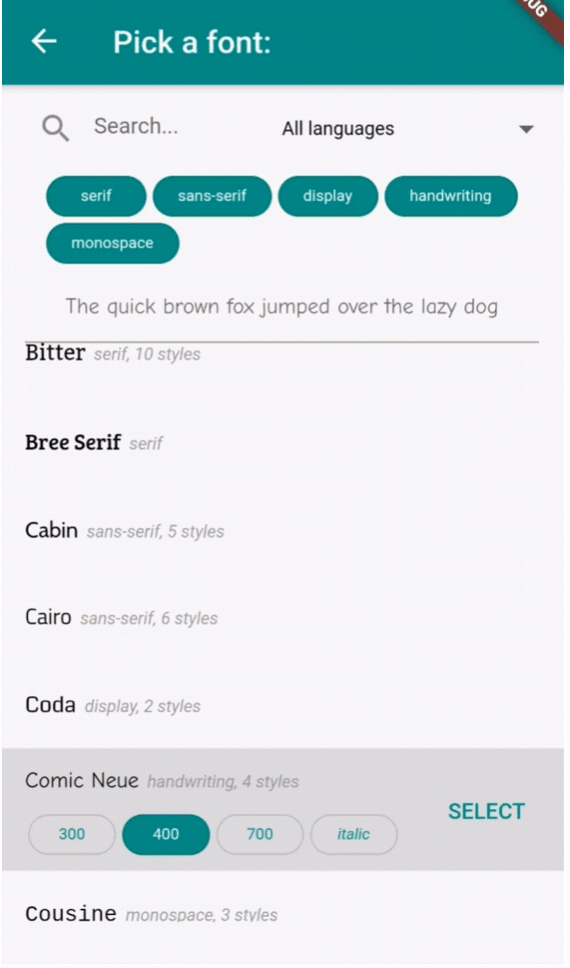
一个 Flutter 包,提供可自定义的控件,用于从下拉菜单或专用屏幕中选择 Google 字体。它可无缝集成到跨多个平台的 Flutter 应用中,使用户能够直接在应用界面中浏览和应用字体。该包通过利用 Google 字体的丰富库,简化了字体集成,提供简洁直观的选择体验。非常适合需要动态排版定制的应用,如设计工具、文本编辑器或创意应用。
适合场景
具有动态文本样式的应用
设计和排版工具
带字体选择的文本编辑器
可自定义的 UI 主题
带有视觉内容的教育类应用
创意内容创作应用
主要特点
Google 字体集成
可自定义的下拉菜单或全屏选择器
跨平台支持
轻松应用字体
轻量且快速
支持字体预览
适合对象
开发文本密集型应用的开发者
注重设计的 Flutter 应用程序
需要用户字体自定义的应用程序
教育和创意软件
使用 Flutter 的 UI/UX 设计师
使用建议
字体加载需要互联网访问
可能会略微增加应用大小
仅限 Google 字体
字体渲染性能在旧设备上的表现各不相同
不支持离线字体
大型字体列表的初始加载时间
原始 README
以下为关联源码仓库的 README 原文快照,最新内容请访问源码仓库。
flutter_font_picker
A Flutter widget that lets the user select and apply a Google Font from a custom dropdown.
Provides a FontPicker widget that can be used in a route or dialog as a UI for choosing a font from Google Fonts.
Depends on the google_fonts package for loading and displaying the fonts.
Localizations available for 🇪🇸🇩🇪🇮🇹🇵🇹🇫🇷🇵🇱🇳🇱🇯🇵.
Simple Example
Inside your build method, use a button that when pressed, will navigate to the font picker screen:
PickerFont? _selectedFont;

ElevatedButton(
  child: Text('Pick a font'),
  onPressed: () {
    Navigator.push(
      context,
      MaterialPageRoute(
          builder: (context) => FontPicker(
              onFontChanged: (PickerFont font) {
                _selectedFont = font;
                print("${font.fontFamily} with font weight ${font.fontWeight} and font style ${font.fontStyle}.}");
              },
          ),
      ),
    );
  }),
The onFontChanged function retrieves the font that the user selects with an object containing details like the font's name, weight, style, etc.
You can then use its toTextStyle() method to style any text with the selected font:
Text('This will be styled with the font: $_selectedFont.fontFamily',
      style: selectedFont.toTextStyle()),
Check the example project for more usages.
FontPicker settings
onFontChanged: (required) the callback that returns a PickerFont object with all the details and methods for the user's selected font.
googleFonts: A list of Google fonts to use in the font picker. By default it contains all 975 fonts included in constants.dart. You should only use a limited number of them for performance and data saving, as each font is downloaded and stored to the app's storage when it comes into view. Using up to 100-200 fonts should work fine.
initialFontFamily: The font family to use initially in the font picker. Defaults to 'Roboto'.
showFontInfo: Whether to show font details (category, number of variants) next to each font tile in the list.
showFontVariants: Whether to show font variants (weights and styles) in the font picker. If set to false, user will only be able to select the default variant of each font.
showInDialog: Set this to true if you want to use the font picker inside an AlertDialog (check examples).
recentsCount: Fonts that the user selected before are saved to be shown at the start of the list. Sets how many you want saved as recents.
lang: The language in which to show the UI. Defaults to English ('en'). Other options are 🇪🇸🇩🇪🇮🇹🇵🇹🇫🇷🇵🇱🇳🇱🇯🇵 ('es', 'de', 'it', 'pt', 'fr', 'pl', 'nl', 'ja'). If you need a translation in another language: take a look at the dictionary variable in translations.dart, and send me (or fix) the translations for your language .
FontPicker features
The user can:
Browse a list of any Google fonts you want.
Select a variant (font weight and/or style) for each font.
Filter the fonts by category (serif, sans-serif, handwriting, etc.) or available font glyphs (Latin, Greek, Cyrillic, etc.).
Search the fonts by name.
See the most recently used fonts at the top of the list.