搜索插件、代码仓与 APP 分类

flutter_onboarding_screen 封面
插件详情v2.0.2

flutter_onboarding_screen

一个 Flutter 包,帮助开发者创建应用程序的引导屏幕。

AndroidiOSWebmacOSWindowsLinux
近 30 天下载
53
喜欢数
26
Pub 分数
135

安装插件

flutter pub add flutter_onboarding_screen

插件介绍

基于插件公开信息、社区数据与项目使用情况整理的选型参考。

一个专为简化移动和Web应用程序引导屏幕创建而设计的Flutter包。它提供了一个可自定义的轮播界面,使开发者能够以流畅、互动的方式展示介绍性内容。该包内置对Android、iOS、Web、macOS、Windows和Linux等多个平台的支持,确保在不同设备上实现一致的引导体验。该包易于集成,能有效提升应用首次启动时的用户参与度。

适合场景

  • 应用入门流程
  • 用户教程屏幕
  • 首次用户体验
  • 产品功能介绍
  • 多页欢迎屏幕

主要特点

  • 预构建的入门轮播
  • 可定制的 UI 组件
  • 跨平台兼容性
  • 与 Flutter 的轻松集成
  • 支持动画和过渡效果

适合对象

  • 新应用开发者
  • 以用户体验为中心的项目
  • 移动和网页应用
  • 注重引导的应用程序
  • 最低设置要求

使用建议

  • 超出基本样式的定制功能有限
  • 依赖外部依赖项
  • 可能需要额外的状态管理
  • 不太适合复杂的导航模式
  • 无内置分析跟踪

原始 README

以下为关联源码仓库的 README 原文快照,最新内容请访问源码仓库。

flutter onboarding screen

A new Flutter package for both android and iOS which help developer in creating a onboarding screen of their app.

Bitbucket open issues

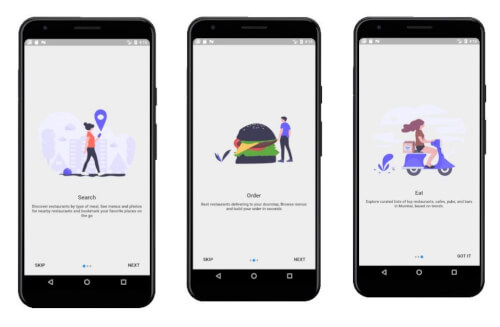
Screenshots

Usage

Example

To use this package :

  dependencies:
    flutter:
      sdk: flutter
    flutter_onboarding_screen:
How to use
class TestScreen extends StatelessWidget {
    /*here we have a list of OnbordingScreen which we want to have, each OnbordingScreen have a imagePath,title and an desc.
      */
  final List<OnbordingData> list = [
    OnbordingData(
      imagePath: "images/pic11.png",
      title: "Search",
      desc:"Discover restaurants by type of meal, See menus and photos for nearby restaurants and bookmark your favorite places on the go",
    ),
    OnbordingData(
      imagePath: "images/pic12.png",
      title: "Order",
      desc:"Best restaurants delivering to your doorstep, Browse menus and build your order in seconds",
    ),
    OnbordingData(
      imagePath: "images/pic13.png",
      title: "Eat",
      desc:"Explore curated lists of top restaurants, cafes, pubs, and bars in Mumbai, based on trends.",
    ),
  ];

  @override
  Widget build(BuildContext context) {
    /* remove the back button in the AppBar is to set automaticallyImplyLeading to false
  here we need to pass the list and the route for the next page to be opened after this. */
    return new IntroScreen(list,MaterialPageRoute(builder: (context) => NextScreen()),
    );
  }
}
Created & Maintained By

Tushar Nikam

  Stackoverflow Buy Me A Coffee

所属分类

源码仓库

使用此插件的项目

暂无相关数据。